
Products compared
Corsair
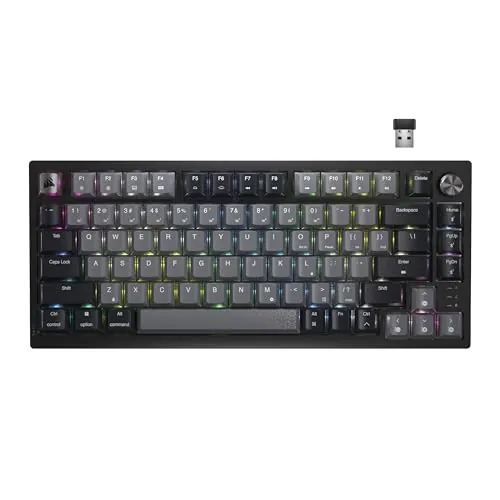
CORSAIR K65 Plus Wireless 75% RGB Mechanical Gaming Keyboard, Black/Gray, U.S. layout
Exact assigned U.S. retailer offer and North American CORSAIR SKU. Confirm the CH-91D401L-NA model and U.S. layout on the seller listing and delivered keyboard; similarly named K65 or regional variants are not assumed interchangeable.
Model K65 Plus Wireless / CH-91D401L-NA
Amazon ASIN B0CQ31VFT4
Logitech G
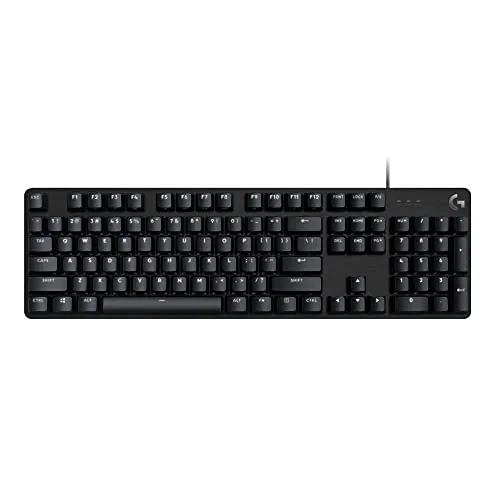
Logitech G413 SE Full-Size Mechanical Gaming Keyboard, Black
Exact assigned U.S. retailer offer; listed model is 920-010433 and Logitech's U.S. product page identifies the G413 SE. Confirm that the listing is the full-size SE model, not G413 TKL SE or another G413 variant.
Model G413 SE / 920-010433
Amazon ASIN B08Z6X4NK3
Differences that matter
What matters most to you?
Choose a priority to see what it changes.
Sources for Connection and day-to-day controls
Start with the keys you need on the right side
The G413 SE is the manufacturer-described full-size option. The K65 Plus is CORSAIR's 75% layout: CORSAIR says it retains arrow and utility keys, while its layout guide describes the 75% design as removing the number pad from a full-size arrangement. If dedicated numpad entry is part of your day—spreadsheets, numeric forms or repeated data entry—check the G413 SE layout shown in the exact listing. If you want less board footprint and can give up the numpad, the K65 keeps those other keys CORSAIR calls out.
CORSAIR lists the K65 Plus at 320 × 136 × 35 mm. I did not find an exact G413 SE footprint in the Logitech U.S. materials checked, so don't estimate its desk fit from another G413 model. Measure your available width and depth against the exact full-size unit and allow room for the cable and mouse movement.
Choose a connection plan, then check the software you actually need
The K65 Plus has three listed connection modes: 2.4GHz wireless, Bluetooth and USB wired. CORSAIR lists a USB wireless receiver and USB charging/data cable in its package, and its page describes iCUE controls for macros, RGB and the multi-function dial. That is useful if you want to move between compatible setups or change the dial's role; it is not a claim that every operating system or app works identically.
Logitech describes the G413 SE as wired. Its product page also lists FN media controls and white LED lighting, but the materials reviewed here don't establish G413 SE software-based key customization comparable to iCUE. Treat the controls the page documents as onboard features, and verify the current G413 SE support information for your OS before counting on app macros or lighting profiles.
Only the Corsair swap procedure is documented in the sources checked
CORSAIR identifies K65 Plus switches as hot-swappable and includes a 2-in-1 keycap/switch puller in the package list. Its product guide explains that the board's switches and keycaps can be removed with that tool. If you specifically want a keyboard with manufacturer-documented switch swapping, this gives the K65 a clear evidence-backed advantage for that requirement.
Logitech lists tactile mechanical switches and PBT keycaps for the G413 SE but the product page checked doesn't say whether switches are socketed, which replacement parts are supported, or whether a puller is included. That is unknown from these sources, not proof that service is impossible. Ask Logitech for the exact 920-010433 procedure and compatible parts if it affects your purchase.
Before you order: exact layout, package and host check
1. Check the exact offer: K65 Plus Wireless, U.S. SKU CH-91D401L-NA / ASIN B0CQ31VFT4, or G413 SE, ASIN B08Z6X4NK3 / listed model 920-010433. Avoid confusing the full-size G413 SE with the G413 TKL SE. 2. Decide whether a number pad is required. 3. Decide whether wired-only is fine or whether you need 2.4GHz/Bluetooth. 4. If switch replacement or keycap puller matters, verify the required tool and supported replacement parts; only CORSAIR's relevant hot-swap and puller information was confirmed here. 5. Check the exact seller box contents and the board dimensions against your desk before checkout.
No price or value-premium claim is made. This guide does not compare how the boards feel, sound or perform in games; choose by the verified layout and setup requirements you can name in advance.
Product details
CORSAIR K65 Plus Wireless 75% RGB Mechanical Gaming Keyboard, Black/Gray, U.S. layout
- Layout
- 75%; CORSAIR says it retains arrow and utility keys; the 75% form factor omits the number pad Source
- Connection choices
- 2.4GHz wireless, Bluetooth and USB wired Source
- Switch serviceability and box contents
- Hot-swappable switches; CORSAIR lists a USB receiver, USB charging/data cable and 2-in-1 keycap/switch puller in the package Source
- Dimensions
- 320 × 136 × 35 mm (manufacturer-listed); measure the planned desk area Source
Logitech G413 SE Full-Size Mechanical Gaming Keyboard, Black
- Layout and connection
- Logitech describes the G413 SE as full-size and wired Source
- Key construction
- Tactile mechanical switches and PBT keycaps are listed; switch hot-swap support is not established by the product page checked Source
- Onboard controls
- Logitech lists FN media controls and white LED lighting; check the exact model's documented configuration before assuming desktop software customization Source
Before you buy
Community discussions
Trying the dial on the intended connection
CORSAIR K65 Plus Wireless 75% RGB Mechanical Gaming Keyboard, Black/Gray, U.S. layout
One K65 Plus Wireless owner said the volume dial did not work through the wireless receiver even though they had selected volume control in their setup.
What to check
Check the keyboard layout and input first, then try the dial when you connect to the host as planned.
Common questions
Does the K65 Plus keep arrow keys, and does it have a number pad?
CORSAIR describes the K65 Plus Wireless as a 75% keyboard that retains arrow and utility keys. Its own layout guide describes the 75% form as the full-size arrangement with the number pad removed. If you use dedicated numeric keys daily, the Logitech page describes the G413 SE as full-size; check the exact layout shown by the seller before ordering.K65 PLUS WIRELESS 75% RGB Mechanical Gaming Keyboard — U.S. CORSAIR product pageCORSAIR K65 PLUS WIRELESS: Everything you need to know — CORSAIR U.S.G413 SE Mechanical Gaming Keyboard — Logitech G U.S. product page
Can I use the K65 Plus without wireless?
Yes. CORSAIR lists USB wired alongside 2.4GHz wireless and Bluetooth, and its package list includes a USB charging/data cable. Confirm that the exact retail package is the CH-91D401L-NA U.S. variant.K65 PLUS WIRELESS 75% RGB Mechanical Gaming Keyboard — U.S. CORSAIR product page
Which one lets me replace the mechanical switches?
CORSAIR explicitly describes the K65 Plus as hot-swappable and lists a keycap/switch puller in its package contents. Logitech's G413 SE page lists tactile mechanical switches and PBT keycaps but does not confirm hot-swap support. If replacement is a deciding requirement, get Logitech's exact G413 SE procedure and compatible part confirmation before choosing; the page omission alone does not establish impossibility.K65 PLUS WIRELESS 75% RGB Mechanical Gaming Keyboard — U.S. CORSAIR product pageCORSAIR K65 PLUS WIRELESS: Everything you need to know — CORSAIR U.S.G413 SE Mechanical Gaming Keyboard — Logitech G U.S. product page
Will both keyboards work with my computer and let me customize keys?
The CORSAIR page documents iCUE support for macros, dial functions and RGB, plus wired and wireless modes. Logitech describes G413 SE as wired and lists FN media controls and white lighting. The sources checked do not settle every operating system, app or customized-key scenario for the exact Logitech offer. Check the current model-specific compatibility and software documentation for your OS and intended changes before buying.K65 PLUS WIRELESS 75% RGB Mechanical Gaming Keyboard — U.S. CORSAIR product pageG413 SE Mechanical Gaming Keyboard — Logitech G U.S. product page
Sources and scope
Confirm the G413 SE’s footprint, box contents and switch-service instructions for the exact SKU. Check current software support if you plan to customize keys on your computer.
Related comparisons
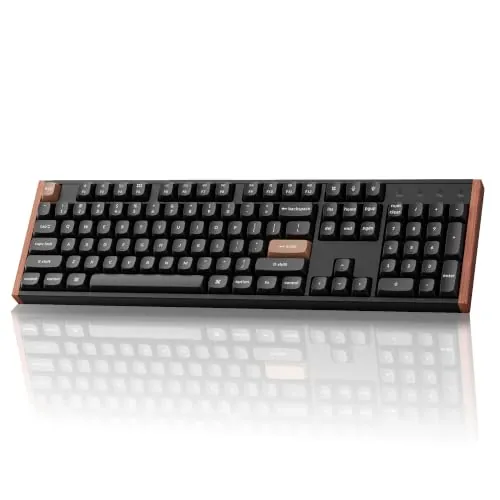
Keychron K10 HE vs CORSAIR K65 Plus Wireless: Full-Size or 75%?
The Keychron K10 HE is a full-size magnetic keyboard with tri-mode connection and browser-based Launcher; the CORSAIR K65 Plus is a 75% mechanical keyboard with MLX Red switches and tri-mode connection. Keychron's actuation range depends on switch version, and its selector does not identify the version included with K10H-F1. Check that exact configuration before choosing by travel range.
Read comparison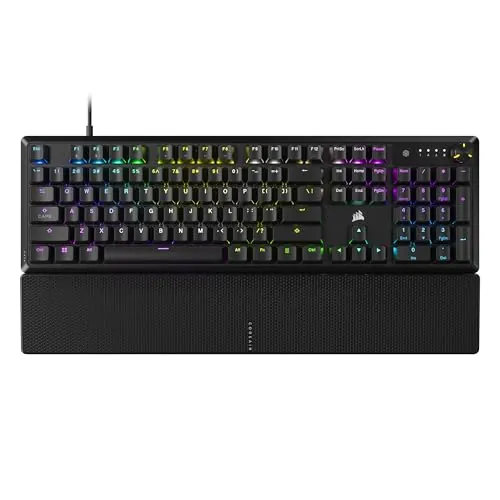
Corsair K65 Plus Wireless vs K70 CORE: Layout, Switches and Connection Modes
The black/gray Corsair K65 Plus Wireless (CH-91D401L-NA) keeps arrow and utility keys in a 75% layout and switches among 2.4GHz, Bluetooth and wired USB modes. The black Corsair K70 CORE with palm rest (CH-910981E-NA) is full-size with a 104-key matrix and wired USB Type-A. Both use Corsair MLX Red linear switches, but the K65 page explicitly describes its switches as hot-swappable and calls them MLX Red, while K70's page calls its switches MLX Red v2. Both support iCUE; choose by layout and host workflow rather than an untested typing-feel claim.
Read comparison