
Products compared

Logitech G
Logitech G502 HERO Wired Gaming Mouse - Black
Black wired USB model. Logitech's setup guide documents up to five 3.6 g weights in different positions; it does not establish that every used or third-party seller includes a complete weight set.
Model G502 HERO / 910-005469
Amazon ASIN B07GBZ4Q68
Logitech G
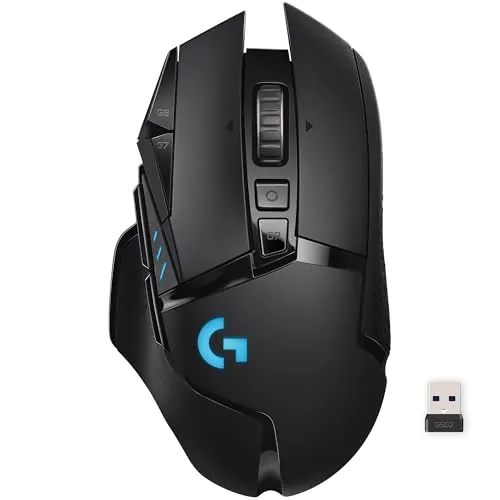
Logitech G502 LIGHTSPEED Wireless Gaming Mouse - Black
Black wireless model using its USB receiver; Logitech's guide also supports direct cable data mode and charging. Its weight guide documents 2 g pieces in the mouse and 4 g pieces in the receiver-storage cover.
Model G502 LIGHTSPEED / 910-005565
Amazon ASIN B07L4BM851
Differences that matter
Sources for Connection at the desk
Sources for Receiver position and charging access
Sources for Documented weight-piece arrangement
Sources for Button and profile customization
Decide whether you want a cable on the desk or a receiver to place
G502 HERO is the wired option: its Logitech guide shows USB connection to a PC. G502 LIGHTSPEED uses a wireless receiver. The LIGHTSPEED setup guide also says it can transfer data over the cable when plugged directly into a PC, so cable use remains an option even though receiver wireless is its distinctive setup.
For LIGHTSPEED, plan where the receiver and its USB adapter can sit. Logitech recommends using the cable and adapter for wireless mode, keeping the receiver within 20 cm of the mouse, and putting it more than 2 m from wireless routers or other 2.4 GHz devices. These are manufacturer setup recommendations; no measured connection comparison is claimed.
Plan the LIGHTSPEED charging routine before choosing wireless
The LIGHTSPEED guide says to unplug the cable from the wireless adapter and connect it to the front of the mouse when charging; when the mouse is directly connected to a PC, it operates in data-over-cable mode. The guide estimates a full charge from empty at around two hours plugged into a PC USB port. A PC USB port is the source's specified charging setup.
The guide describes checking charge status on the mouse or in G HUB. Its runtime figures depend on lighting and report-rate conditions and vary with age and use, so this comparison does not turn them into a general battery-life promise or compare them with the wired HERO.
Compare the weight pieces and software you will actually configure
The HERO guide describes up to five 3.6 g weights placed in different orientations. The LIGHTSPEED guide describes four 2 g weights in its upper compartment and two 4 g weights inside its receiver-storage cover; Logitech's current LIGHTSPEED US product page says six adjustable weights are included. The HERO guide describes the weight and balance effect as personal preference, so these layouts are not a comfort or tracking verdict. Confirm exact accessories for open-box and used offers.
The setup guides also name different customization software: Logitech Gaming Software for HERO's three preconfigured profiles, and Logitech G HUB for LIGHTSPEED onboard settings. If button or profile customization is part of your buying decision, check current OS support before relying on a particular app version.
Product details
Logitech G502 HERO Wired Gaming Mouse - Black
Logitech G502 LIGHTSPEED Wireless Gaming Mouse - Black
- Connection
- Wireless USB receiver; direct connection to a PC by cable gives data-over-cable mode Source
- Charging
- Rechargeable LiPo battery; guide says a full charge from empty takes around 2 hours when plugged into a PC USB port Source
- Weight adjustment
- Four 2 g weights in upper door; two 4 g weights can be added inside the receiver-storage cover Source
Before you buy
Community discussions
Trying the wheel in the software you use
Logitech G502 HERO Wired Gaming Mouse - Black
A G502 HERO owner said the wheel behaved normally on most pages but repeatedly registered downward scrolling in two situations, including a 3D printing slicer. They had not identified the cause.
What to check
Check the wheel on a task where one unintended action would be disruptive, such as zooming in a design app.
Finding a task for the freely spinning wheel
Logitech G502 LIGHTSPEED Wireless Gaming Mouse - Black
A new G502 LIGHTSPEED owner was trying a free-spinning scroll wheel for the first time. They said it rapidly moved through items in a game and asked what other tasks it was useful for.
What to check
Try a task that benefits from moving quickly, then try one that needs a single indexed step. Decide whether the wheel and receiver setup suit the way you work.
Common questions
Is the G502 LIGHTSPEED strictly wireless?
No. Logitech's setup guide describes receiver-based wireless use and says the mouse operates in data-over-cable mode when plugged directly into a PC; the cable is also used for charging.G502 LIGHTSPEED Setup Guide
What receiver placement does Logitech recommend for the LIGHTSPEED?
The guide recommends keeping the receiver within 20 cm of the mouse and more than 2 m from wireless routers or other 2.4 GHz devices. This is Logitech's setup guidance, not a promise of a particular wireless result in every environment.G502 LIGHTSPEED Setup Guide
How do the weight kits differ?
The HERO setup guide describes up to five 3.6 g weights placed in different orientations. The LIGHTSPEED guide describes four 2 g weights in its upper compartment and two 4 g weights inside the receiver-storage cover. The sources do not establish which setup feels better; check that the exact item listing includes the pieces you expect.G502 HERO Setup GuideG502 LIGHTSPEED Setup GuideG502 LIGHTSPEED Wireless Gaming Mouse - Logitech G US
Does the LIGHTSPEED recharge faster or last longer than the HERO?
No comparative battery claim is made. The LIGHTSPEED setup guide describes charging and its own full-charge estimate; the HERO is wired. Those facts do not establish gaming endurance, charge-cycle life or a performance advantage.G502 LIGHTSPEED Setup GuideG502 HERO Setup Guide
Sources and scope
This is a source-based setup comparison, not a hands-on test. Logitech's listed sensor, wireless, battery and button specifications do not establish comparative latency, tracking, click feel, comfort, noise or gaming results. The exact Amazon ASIN-to-part-number pairing comes from the current listing data; Logitech US pages opened for this guide confirm each named black model but do not show those part numbers in their extracted page text. Confirm the model number on the retailer's exact listing before purchase.
Related comparisons

Logitech MX Master 4 vs G502 HERO: Multi-Computer Scrolling or Wired Controls?
The Graphite Logitech MX Master 4 (910-007558) connects by Bluetooth or its included wireless USB receiver, switches among up to three paired computers and charges over USB-C. It adds a dedicated thumb wheel and adaptive MagSpeed scrolling; Actions Ring and advanced customization require Logi Options+. The Black wired Logitech G502 HERO (910-005469) stays connected by USB and maps 11 programmable inputs, including wheel tilt, DPI controls and profile selection. Choose MX Master 4 for multi-computer and horizontal-scroll routines; choose G502 HERO for a fixed wired desk where its physical command map fits. This is a feature-fit guide, not a productivity, gaming or comfort test.
Read comparison

Logitech Lift vs MX Vertical: Hand Fit, Receiver and Charging
These are both right-handed Logitech vertical mice, but Logitech positions them for different hand-size ranges. Lift uses one AA battery and a Logi Bolt receiver; MX Vertical recharges over USB-C, can stay connected by cable while charging, and uses a Unifying receiver. Bluetooth is available on both.
Read comparison