
Products compared

Logitech
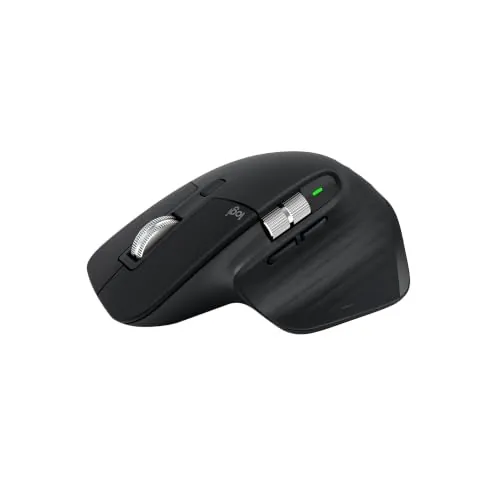
Logitech MX Master 4 Wireless Mouse, Graphite
U.S. standard Graphite MX Master 4. This is not an MX Master 3/3S, Business or Mac-specific edition.
Model 910-007558
Amazon ASIN B0FC5SJNQX

Logitech G
Logitech G502 HERO Wired Gaming Mouse, Black
U.S. Black wired G502 HERO. This is not a G502 LIGHTSPEED or G502 X.
Model 910-005469
Amazon ASIN B07GBZ4Q68
Differences that matter
What matters most to you?
Choose a priority to see what it changes.
Sources for Wireless switching versus fixed USB
Sources for Long-page and horizontal scrolling
Sources for Shortcut controls and software dependence
Sources for Power and charging routine
Start with the desk and host setup
MX Master 4 can connect through Bluetooth or its included wireless USB receiver. Logitech documents Easy-Switch pairing for up to three computers. G502 HERO is a wired USB mouse. If your desk rotates among personal and work computers, count the channels you need and confirm how each host can connect; if you prefer a mouse that needs no charging routine, G502 HERO's direct cable is the simpler documented power arrangement.
MX Master 4 has a USB-C charging port. Charging access and the exact charging-cable contents are package questions worth checking for the seller and model code you choose.
Choose the scrolling action you actually use
For long documents, MX Master 4's MagSpeed wheel can move between ratchet and free-spin modes automatically or through a manual mode button. For wide sheets or timelines, the dedicated thumb wheel offers a separate side-to-side control. Logi Options+ adds app-specific thumb-wheel assignments.
G502 HERO uses a dual-mode hyper-fast top wheel with a separate mode switch. Its manual also maps left and right wheel tilt as programmable inputs. Decide whether a thumb-operated horizontal wheel or wheel tilt fits the motions you already use; neither control layout proves faster work.
Check software before relying on shortcuts
The MX Master 4 Haptic Sense Panel opens Actions Ring, and Logitech says Logi Options+ is required for Actions Ring. The guide also calls for Options+ to enable gestures and expand thumb-wheel settings. If your computer is managed by an employer or school, check that this software is allowed before paying for those shortcuts.
G502 HERO's input map offers more programmable physical positions, and Logitech G identifies G HUB for programming its buttons. The useful pre-buy check is to assign each required action to an actual control on the diagrams, not to assume advertised counts are all extra side buttons.
Product details
Logitech MX Master 4 Wireless Mouse, Graphite
- Connection and host switching
- Bluetooth or included wireless USB receiver; Logitech documents pairing with up to three computers and switching channels with Easy-Switch. Source
- Scroll controls
- MagSpeed switches between line-by-line ratchet and hyper-fast free-spin, automatically or with the mode button; a separate thumb wheel scrolls horizontally. Source
- Charging and software features
- Rechargeable mouse with a USB-C charging port. Actions Ring, haptic customization, gestures and extended thumb-wheel settings depend on Logi Options+. Source
Logitech G502 HERO Wired Gaming Mouse, Black
- Connection
- Wired USB connection to the computer; no wireless receiver or mouse-battery routine is part of its documented setup. Source
- Programmable inputs
- 11 programmable inputs include ordinary clicks, wheel click, back/forward, DPI controls, both wheel-tilt directions and profile selection. A separate wheel-mode shift is not programmable. Source
Before you buy
Community discussions
Checking what a sideways wheel press does
Logitech G502 HERO Wired Gaming Mouse, Black
A G502 HERO owner accustomed to holding a previous mouse’s wheel sideways said their HERO scrolled horizontally one step per press in their setup.
What to check
Try the horizontal wheel action in a spreadsheet or timeline. Check whether it moves a single step or continues when held.
Common questions
Can MX Master 4 pair with more than one computer?
Logitech Support says it can pair with up to three computers and switch channels with Easy-Switch. It connects through Bluetooth or the included wireless USB receiver; check host compatibility on each computer.Getting Started — Logitech MX Master 4
What does MX Master 4's MagSpeed wheel do?
Its guide describes line-by-line ratchet and hyper-fast free-spin modes, with speed-adaptive automatic switching or a manual mode-shift button. The separate thumb wheel scrolls horizontally. These details describe controls, not a tested speed advantage over G502 HERO.Getting Started — Logitech MX Master 4
Does MX Master 4 need Logitech software for every feature?
Basic pointer connection is documented through Bluetooth or the wireless USB receiver. Logitech says Logi Options+ is necessary for Actions Ring; its support guide also lists software for gestures and extended thumb-wheel behavior. Check the exact feature and host before buying for software customization.Logitech MX Master 4 Wireless Mouse, Graphite, U.S. product pageGetting Started — Logitech MX Master 4
Are G502 HERO's eleven programmable buttons eleven extra side buttons?
No. The maker's map includes left/right and wheel clicks, back/forward, DPI controls, wheel tilt and profile selection. The separate top wheel-mode switch is not programmable.G502 HERO Setup Guide
Sources and scope
This guide uses exact-model Logitech product and support documentation. It does not establish faster work, better gaming, lower latency, improved tracking, longer battery life, reliability, hand fit or comfort. MX Master 4 requires periodic charging; Logitech's support page identifies a USB-C charging port but the cited sources do not settle every Amazon seller's cable/package variation, so verify the exact box contents. Check the model codes: Graphite MX Master 4 910-007558 and Black wired G502 HERO 910-005469. MX Master 3/3S, MX Master 4 for Business and Mac editions, G502 LIGHTSPEED and G502 X are different configurations.
Related comparisons
Logitech MX Master 4 vs MX Master 3S Bluetooth Edition: Receiver and Haptics
The U.S. Graphite MX Master 4 (910-007558) includes a USB-C receiver and adds configurable haptic feedback for supported actions. The Black MX Master 3S Bluetooth Edition (910-007500) is Bluetooth-first; Logitech says a Logi Bolt receiver is optional and not included. Both can use Logi Options+ for customization and Actions Ring workflows.
Read comparison
Logitech MX Master 4 vs M720 Triathlon: Receiver, Scroll and Setup
The Logitech MX Master 4 Graphite (910-007558) pairs a separate thumbwheel with the Actions Ring, which requires Logi Options+, and a rechargeable USB-C setup. The M720 Triathlon Black (910-006036) moves horizontally by tilting its main wheel and uses a replaceable AA battery with a Unifying receiver in the box. Both also offer Bluetooth and can pair with up to three computers. Decide by your preferred controls, software setup, host connection and power routine; this is not a comfort or performance ranking.
Read comparison