
Products compared
Logitech G
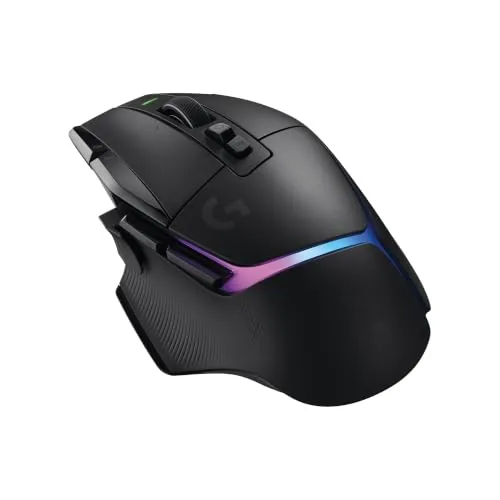
Logitech G502 X PLUS Wireless Gaming Mouse (Black)
LIGHTSPEED wireless model with an included USB-A receiver and extension adapter; the thumb/DPI-shift button can be repositioned or removed.
Model 910-006160
Amazon ASIN B092CB69Q4
Razer
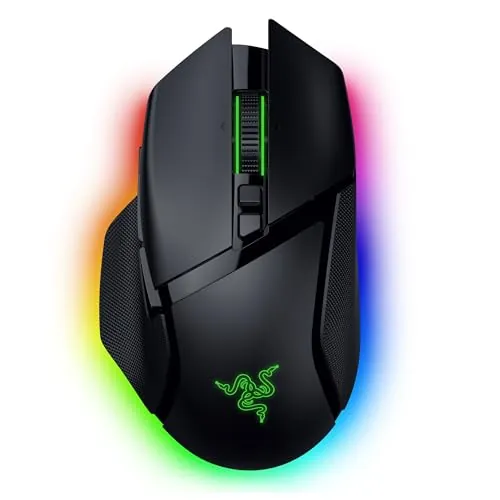
Razer Basilisk V3 Pro 35K Wireless Gaming Mouse (Black)
35K model with Bluetooth and HyperSpeed documented on Razer's 35K page, configurable HyperScroll modes, and a separate wireless-charging accessory path.
Model RZ01-05240100-R3U1
Amazon ASIN B0DG837JYP
Differences that matter
What matters most to you?
Choose a priority to see what it changes.
Sources for Host connection and receiver plan
Sources for Thumb controls and programmable layout
Sources for Scroll-wheel behavior
Sources for Configuration software and computer platform
Start with the host connection you actually need
The G502 X PLUS box list includes a LIGHTSPEED USB-A receiver and USB extension adapter, along with a USB-C charging cable. Logitech lists LIGHTSPEED wireless and does not list Bluetooth, so check the connection your computer supports rather than assuming another mode.
Razer's US Basilisk V3 Pro 35K page lists both HyperSpeed wireless and Bluetooth in its model-specific comparison. If Bluetooth is the deciding requirement, verify that the exact black 35K listing matches SKU RZ01-05240100-R3U1; do not confuse it with the separate non-35K Basilisk V3 Pro.
Pick the thumb control and scroll behavior you want to use
Both brands list 13 programmable or customizable controls, so the count alone does not decide this pair. The G502 thumb/DPI-shift button can be repositioned or removed and replaced by its included cover; Razer documents its 35K model's left-side multi-function trigger as non-removable.
Both wheels tilt left and right. Logitech calls the G502 wheel hyper-fast; Razer describes three 35K scroll modes—tactile, free-spin, and Smart-Reel auto-switching—and says Smart-Reel and scroll acceleration are configurable in Synapse 4. Prefer a physical layout and scroll behavior you will actually map, rather than treating a control count as a gaming result.
Include the charging system in your package check
Logitech lists a USB-C charging cable in the G502 box and marks the mouse POWERPLAY compatible. That is useful if you already have that charging system; the listing does not mean a POWERPLAY mat is included.
Razer's 35K page lists its charging puck and Mouse Dock Pro as separately sold accessories, and the Dock Pro includes the puck. The Dock Pro compatibility page names Basilisk V3 Pro 35K. Razer's exact product page distinguishes a mouse-only option from a dock bundle, so check the actual selected configuration before comparing packages.
Verify software support on the computer you will configure
Logitech's G502 page names G HUB but labels its operating-system minimums as support at release. Logitech's current G HUB FAQ lists Windows 10 build 1809 or later, Windows 11, and macOS 14 or later for both Intel and Apple-silicon Macs.
Razer says Synapse 4 is used to configure the exact 35K mouse's button mappings and scroll modes. Its current Synapse page lists Windows 10/11 and a Mac Preview for Apple-silicon Macs on macOS 15 or later; it directs readers to a separate compatible-device list. Confirm that list for this exact 35K model if Mac remapping is essential.
Product details
Logitech G502 X PLUS Wireless Gaming Mouse (Black)
- Wireless connection listed
- LIGHTSPEED wireless; Logitech lists a LIGHTSPEED USB-A receiver in the box. Source
- Programmable controls
- 13 programmable controls; the thumb/DPI-shift button can be rotated 180 degrees or removed and replaced with its cover. Source
- Charging setup
- USB-C charging cable is listed in the box; the mouse is POWERPLAY compatible. Source
Razer Basilisk V3 Pro 35K Wireless Gaming Mouse (Black)
- Wireless modes documented
- The US 35K product page lists battery-life entries for both HyperSpeed wireless and Bluetooth. Source
- Scroll controls
- Four-way tilt wheel with tactile, free-spin, and configurable Smart-Reel modes. Source
- Wireless charging
- The exact model supports the separately purchased Razer Wireless Charging Puck or Mouse Dock Pro; the dock includes the puck. Source
Before you buy
Community discussions
Compare controls against a fresh mouse
Logitech G502 X PLUS Wireless Gaming Mouse (Black)
An owner upgraded from a G502 HERO to a G502 X PLUS and noticed the buttons felt different.
What to check
If you are replacing a familiar mouse, try the clicks, wheel and button reach before picking a new shape.
Count the side controls you reach for
Razer Basilisk V3 Pro 35K Wireless Gaming Mouse (Black)
A Basilisk V3 Pro 35K owner looking at alternatives says they want more than two side buttons and additional controls near the wheel.
What to check
List the functions you map to the side buttons and near the wheel. See which buttons you can reach without changing your grip.
Common questions
Does the Basilisk V3 Pro 35K have Bluetooth?
Razer's U.S. 35K page lists Bluetooth battery life as well as HyperSpeed wireless, documenting Bluetooth for this model. Logitech's G502 specification lists LIGHTSPEED and its USB-A receiver but does not list Bluetooth; confirm the connection your host requires.Wireless Ergonomic RGB Gaming Mouse - Razer Basilisk V3 Pro 35KSpecification - G502 X PLUS Wireless RGB Gaming Mouse
Can I change the thumb control on either mouse?
The G502 X PLUS thumb/DPI-shift button can be rotated 180 degrees or removed and replaced with the included cover. Razer says the Basilisk V3 Pro 35K multi-function trigger is not removable, so compare the fixed button placement with your intended use.Specification - G502 X PLUS Wireless RGB Gaming MouseWireless Ergonomic RGB Gaming Mouse - Razer Basilisk V3 Pro 35K
Is wireless charging included with the Basilisk V3 Pro 35K?
Razer lists its wireless charging puck and Mouse Dock Pro as separate purchases; the Dock Pro page lists the Basilisk V3 Pro 35K as compatible. Razer's exact product page currently offers a mouse-only option and a Dock Pro bundle, so verify the exact listing configuration.Wireless Ergonomic RGB Gaming Mouse - Razer Basilisk V3 Pro 35KBuy Razer Basilisk V3 Pro 35K - Black (RZ01-05240100-R3U1)Wireless Mouse Charging Dock - Razer Mouse Dock Pro
What software should I check before relying on custom mappings?
Logitech names G HUB for the G502 and its current FAQ lists Windows 10/11 and macOS 14 or later for Intel and Apple silicon. Razer names Synapse 4 for the Basilisk 35K; its Mac software is currently a Preview for Apple-silicon Macs on macOS 15 or later, and exact device compatibility is listed separately.Specification - G502 X PLUS Wireless RGB Gaming MouseLogitech G HUB - FAQsWireless Ergonomic RGB Gaming Mouse - Razer Basilisk V3 Pro 35KRazer Synapse 4: Advanced Device Control and Lighting Software
Sources and scope
This is a feature and setup comparison, not a hands-on or controlled gaming test. Logitech's product specification lists LIGHTSPEED wireless and an included USB-A receiver but does not list Bluetooth; that omission is not proof that no other connection workflow exists. Razer's U.S. product page lists Bluetooth and HyperSpeed wireless for the exact Basilisk V3 Pro 35K. Confirm the exact listing, software support and accessory bundle before purchase.
- Specification - G502 X PLUS Wireless RGB Gaming Mouse
- Logitech G HUB - FAQs
- Buy Razer Basilisk V3 Pro 35K - Black (RZ01-05240100-R3U1)
- Wireless Ergonomic RGB Gaming Mouse - Razer Basilisk V3 Pro 35K
- Razer Synapse 4: Advanced Device Control and Lighting Software
- Wireless Mouse Charging Dock - Razer Mouse Dock Pro
Related comparisons

Logitech G502 HERO vs G502 X PLUS: Wired or Rechargeable Wireless?
These black U.S. models suit different desk routines. The G502 HERO 910-005469 stays connected by its 2.1 m cable and has Logitech-documented weight adjustment. The G502 X PLUS 910-006160 uses a LIGHTSPEED USB-A receiver, recharges over USB-C, and can switch to data-over-cable use when connected directly to a PC. Its DPI-Shift button can be repositioned or replaced by a cover. Decide whether cable-free movement and the X PLUS control adjustment are worth adding a receiver and charging routine.
Read comparison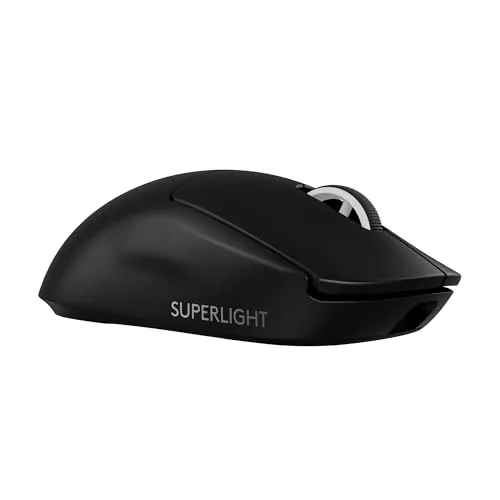
Logitech G PRO X SUPERLIGHT 2 vs Razer Basilisk V3 Pro 35K: Fit and Control Setup
The Black Logitech G PRO X SUPERLIGHT 2 (910-006628) is listed at 60 g with five buttons and a LIGHTSPEED USB receiver. The Black Razer Basilisk V3 Pro 35K (RZ01-05240100-R3U1) is a larger right-handed model with a tilt wheel, Bluetooth/2.4 GHz/wired modes, and a USB receiver. Choose by your own size and control preferences; polling and control-count wording differs across the manufacturers’ pages, so this guide makes no performance ranking.
Read comparison