
Products compared
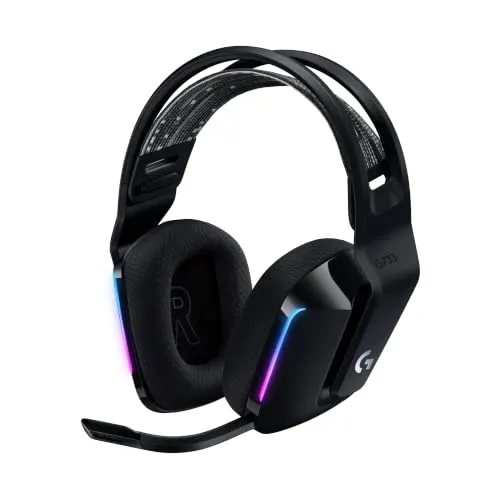
Logitech G
Logitech G733 LIGHTSPEED Wireless Gaming Headset
Black G733. Logitech specifies LIGHTSPEED wireless via USB and identifies its built-in USB-C port for charging; the cited specification describes it as wireless.
Model G733 (part number 981-000863)
Amazon ASIN B081415GCS
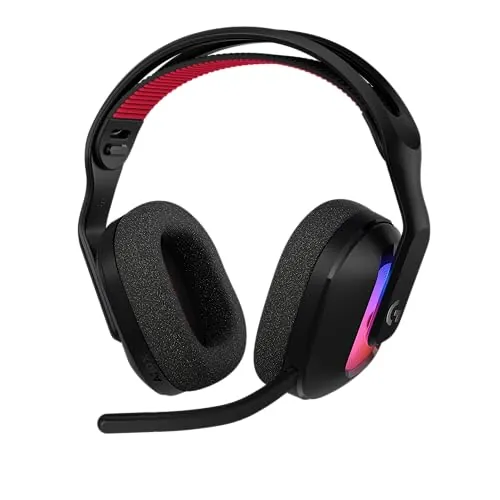
Logitech G
Logitech G Astro A20 X LIGHTSPEED Wireless Gaming Headset
Black Astro A20 X. Logitech documents PLAYSYNC AUDIO switching between two selected systems, lists LIGHTSPEED wireless, Bluetooth and USB-C wired connection types, and requires its PLAYSYNC base for PC/console use.
Model Astro A20 X (part number 939-002242)
Amazon ASIN B0FFXZ9XQ4
Differences that matter
What matters most to you?
Choose a priority to see what it changes.
Sources for Switching between two game systems
Sources for Connection choices and required desk hardware
Sources for Included receiver and cables
Sources for Mic format and call controls
Start with the systems you actually switch between
The A20 X US page describes a PLAYSYNC button that switches between two selected systems, naming PS5, Xbox, PC and Nintendo Switch combinations. That feature matters if you regularly move between two of those systems and want a headset handoff at the button. It is a switch between systems, not evidence of simultaneous playback.
There is a Nintendo Switch scope mismatch to resolve: the product page lists Switch for PLAYSYNC, but the support specification's at-release platform list names PC, Mac, PlayStation and Xbox. If Switch is one of your two devices, confirm the exact generation and procedure with Logitech. The G733 pages reviewed here establish USB LIGHTSPEED wireless but do not document the same two-system switching workflow.
Count ports, cables and the A20 X base in your setup
The G733 support specification names LIGHTSPEED wireless via USB and says USB-C is for charging. It describes the headset as wireless, so do not buy it expecting the USB-C charging socket to act as wired audio. Verify that your intended host supports the USB receiver workflow.
The A20 X support specification lists LIGHTSPEED, Bluetooth 5.3 LE and USB-C wired connection types and marks the PLAYSYNC base required for PC/console use. Its exact US product page lists the base and two 1.8 m USB-C-to-USB-A cables in the box. Check the selected ASIN offer and measure the cable route to the host before ordering; a listed mode does not guarantee the exact device behavior you need.
Choose by mic placement and call controls, not marketing claims
Logitech lists a detachable cardioid boom microphone and earcup audio controls for G733. The A20 X support specification lists a 6 mm omnidirectional microphone and earcup controls; its product page describes a mute indicator on the mic. Those documented designs can guide a desk and voice-chat setup check.
Pickup-pattern labels alone do not tell you which mic will sound clearer in your room. If voice capture is a deciding factor, look for a test of your own host, app and room; this comparison did not measure microphone performance.
Pre-buy checklist for your exact PC or console pair
Write down the two devices you want to use, the ports available on each, and whether you need wireless USB, Bluetooth, wired USB-C or a one-button switch. Match those needs to the manufacturer pages rather than assuming the word multi-platform covers every model or operating mode.
For A20 X, include the PLAYSYNC base and cable placement in a PC/console setup. For Nintendo Switch, resolve the product/support page discrepancy before treating it as supported. For G733, confirm the USB LIGHTSPEED receiver route and treat USB-C as charging based on the reviewed specification.
Product details
Logitech G733 LIGHTSPEED Wireless Gaming Headset
Logitech G Astro A20 X LIGHTSPEED Wireless Gaming Headset
- Exact US variant
- Black; part number 939-002242 Source
- Documented connection types
- LIGHTSPEED, Bluetooth 5.3 LE and USB Type-C wired; PLAYSYNC base with LIGHTSPEED is the receiver and is required for PC/console use Source
- Listed box setup
- Headset, PLAYSYNC base, mic boom, two 1.8 m USB-C-to-USB-A cables and user documents on the exact US product page; confirm the seller's selected ASIN package Source
- Microphone and controls
- Support specification lists a 6 mm omnidirectional microphone and earcup controls; product page describes a mic mute indicator Source
Before you buy
Community discussions
Checking which receiver comes with a used headset
Logitech G733 LIGHTSPEED Wireless Gaming Headset
Someone given a G733 reported that it would not pair. They suspected the USB receiver may have been mixed up with another headset’s.
What to check
If you are buying a used headset or moving it between systems, confirm the included receiver matches the exact headset and test it on the intended host.
Common questions
Can the Astro A20 X switch between a console and PC?
Its US product page says PLAYSYNC switches between two selected combinations of PS5, Xbox, PC and Nintendo Switch. The support specification says the PLAYSYNC base is required for PC/console. Verify your exact devices and port setup; the pages do not establish every host workflow.Astro A20 X Wireless Gaming Headset | Logitech GSpecification - Logitech G A20 X
Does the G733's USB-C port provide wired headset audio?
The G733 specification labels the built-in Type-C port for charging and describes the headset as wireless. It documents LIGHTSPEED wireless via USB, not wired USB-C audio.Specification - G733
Does the Astro A20 X support Nintendo Switch?
The current US product page lists Nintendo Switch as one of the systems for PLAYSYNC. The support specification's at-release platform list names PC, Mac, PlayStation and Xbox but does not list Switch. Confirm the exact Switch generation and connection steps with Logitech before buying for that use.Astro A20 X Wireless Gaming Headset | Logitech GSpecification - Logitech G A20 X
Does the Astro A20 X's USB-C wired mode mean the base is optional on PC?
No such conclusion is supported: Logitech's support specification marks the PLAYSYNC base as required for PC/console use while also listing USB-C wired as a connection type. Confirm the intended host and mode with Logitech before buying.Specification - Logitech G A20 X
Sources and scope
This guide compares manufacturer-documented features and setup conditions, not measured sound, microphone quality, comfort, latency, battery life or reliability. The A20 X product page currently lists Nintendo Switch for PLAYSYNC switching, but its support specification's at-release host list names PC, Mac, PlayStation and Xbox; confirm the exact Switch generation and workflow with Logitech before relying on it. For both models, check the exact host, available USB port and intended connection mode before purchase.
Related comparisons

Logitech G733 vs G522: Wireless Modes, USB Setup and Mic Controls
For the exact US black G733 (981-000863) versus G522 (981-001491), the practical difference is how you connect and manage the headset. Logitech lists the G733 with LIGHTSPEED wireless through its USB receiver; the G522 adds LIGHTSPEED, Bluetooth and USB wired audio. G522 switches between Bluetooth and LIGHTSPEED rather than mixing their audio, and USB wired mode disables LIGHTSPEED. Its headset mic EQ and signal-cleanup options work across its listed modes, while voice modulation still depends on G HUB. Pick G733 if your setup is a receiver-based PC/console workflow and you do not need Bluetooth; choose G522 if you want to switch among receiver, phone Bluetooth and USB audio. Check your platform, available USB port and the exact listing's box contents before ordering.
Read comparison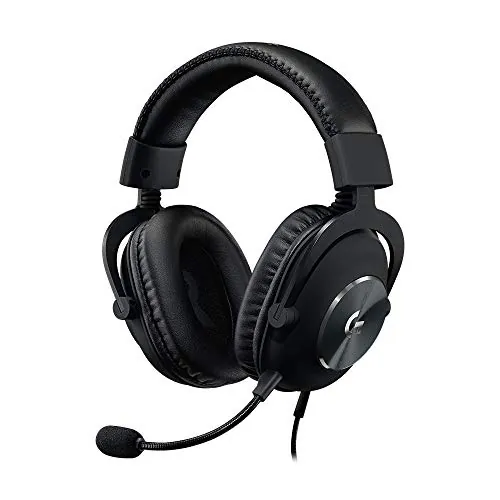
Logitech PRO X Wired vs G733: Connection, PC Features, and Fit Adjustments
The black Logitech PRO X (981-000817) connects by cable and can use its USB DAC for PC features; the black G733 (981-000863) uses a LIGHTSPEED USB receiver and has a rechargeable, non-user-replaceable battery. Compare the connection your device can use, the features that require G HUB, and the fit adjustments you prefer.
Read comparison