
Products compared
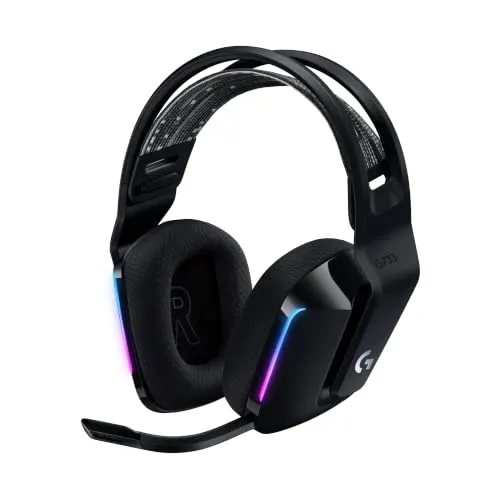
Logitech G
Logitech G733 LIGHTSPEED Wireless Gaming Headset, Black
Black US listing; exact Logitech part 981-000863.
Model 981-000863
Amazon ASIN B081415GCS
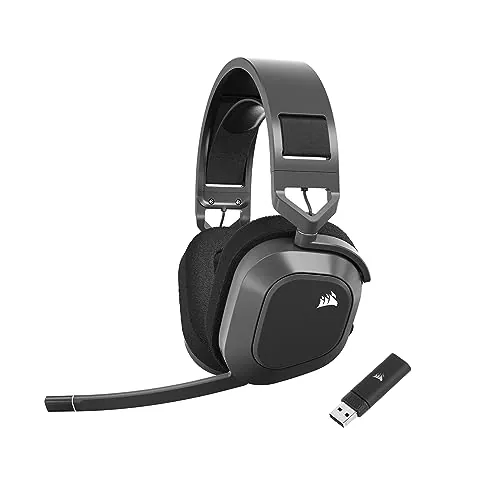
CORSAIR
CORSAIR HS80 MAX WIRELESS Gaming Headset, Steel Gray
Steel Gray US listing; part CA-9011295-WW. The cited CORSAIR guide describes standard HS80 MAX behavior but does not state this WW part number.
Model CA-9011295-WW
Amazon ASIN B0D5Z1C5TB
Differences that matter
What matters most to you?
Choose a priority to see what it changes.
Sources for Wireless connection path
Sources for RF plus Bluetooth audio behavior
Sources for Microphone handling
Sources for On-headset controls
Start with your actual device list
The G733 evidence supports LIGHTSPEED wireless via USB, and Logitech explicitly labels its G733 connectivity as LIGHTSPEED only. The standard CORSAIR HS80 MAX guide describes a USB receiver RF mode and a separate Bluetooth mode. That gives the HS80 MAX more documented connection modes, but only matters if your devices support the route you intend to use.
Write down each gaming host and phone before choosing. Check for an available USB path for the receiver and Bluetooth audio support on the phone. CORSAIR’s PC instructions specify a USB Type-A port for its transmitter; the source set does not verify every USB adapter, console revision or handheld.
Treat Bluetooth on standard HS80 MAX as a switched mode
CORSAIR’s standard HS80 MAX instructions say to toggle between RF wireless and Bluetooth. If a phone is paired while the headset is in RF mode, the instructions describe phone calls only; for Bluetooth media such as music, switch to Bluetooth mode. That is a practical two-device workflow, not evidence of simultaneous game audio and Bluetooth music.
The same page has a separate section for HS80 MAX for Xbox that says simultaneous RF and Bluetooth is possible. That is a different named variant; do not use its feature to decide on the assigned CA-9011295-WW standard listing.
Choose the mic and control routine you prefer
Logitech lists the G733 microphone as a detachable boom and confirms earcup audio controls. CORSAIR documents a different routine for standard HS80 MAX: flip the mic up to mute and down to unmute; use the volume/EQ wheel for volume and to cycle four presets. These are control differences, not evidence that one mic sounds better.
If you remove a boom mic between calls, the G733’s documented removable part is the clearer fit. If you want a visible lift-to-mute gesture and a stated wheel action, the HS80 MAX guide spells those out.
Run this pre-buy connection check
For each device, mark USB receiver, Bluetooth or neither. The G733 sources reviewed establish USB LIGHTSPEED and no Bluetooth; the HS80 MAX guide documents RF receiver setup on PC and PS4/PS5, plus Bluetooth mode. If a host needs a specific port, verify its physical connector and operating-system support before relying on an adapter.
For HS80 MAX, decide whether switching from RF to Bluetooth is acceptable. If the requirement is game sound and Bluetooth music at the same time, do not choose the standard model on that assumption. Recheck the listing part number: the standard WW listing is the subject here; CORSAIR treats its Xbox version separately.
Product details
Logitech G733 LIGHTSPEED Wireless Gaming Headset, Black
CORSAIR HS80 MAX WIRELESS Gaming Headset, Steel Gray
- Connection modes
- The standard HS80 MAX guide describes a USB wireless receiver RF mode and a separate Bluetooth mode; it documents switching between them. Source
- Microphone and headset controls
- Flip the microphone up to mute and down to unmute; the volume/EQ wheel changes volume and cycles four EQ presets. Source
Before you buy
Community discussions
Listening for the mute alert
Logitech G733 LIGHTSPEED Wireless Gaming Headset, Black
An owner moving from a Corsair headset to a G733 said they had trouble distinguishing the new mute and unmute sounds.
What to check
Test the mute action and what you can hear or see during a call. Decide which feedback works when you cannot look at the software.
Common questions
Can the standard HS80 MAX play game audio over RF and Bluetooth music at the same time?
Do not count on it from the documentation reviewed. CORSAIR says that in RF mode, a Bluetooth-paired phone is limited to calls; Bluetooth media playback uses Bluetooth mode. The same guide separately names an HS80 MAX for Xbox with simultaneous RF and Bluetooth, which is not the standard model covered here.HS80 MAX WIRELESS Quick Start Guide (standard HS80 MAX sections)
Does the G733 have Bluetooth?
The G733 specification lists LIGHTSPEED wireless via USB, and Logitech’s own G733 connectivity row labels it LIGHTSPEED only. The reviewed sources do not document Bluetooth for G733.Specification - G733G522 LIGHTSPEED vs G733: Logitech connectivity comparison
Which headset lets you remove the boom mic?
Logitech lists the G733 boom mic as detachable. CORSAIR documents a flip-up/flip-down mute control for standard HS80 MAX rather than a detachable-microphone claim.Specification - G733HS80 MAX WIRELESS Quick Start Guide (standard HS80 MAX sections)
What should I check for console and phone use?
Check the exact console’s available USB receiver path and the phone’s Bluetooth audio support. CORSAIR documents USB Type-A receiver setup for PC and a receiver connection for PS4/PS5; Logitech’s G733 spec confirms USB but this comparison does not test every host or adapter combination.Specification - G733HS80 MAX WIRELESS Quick Start Guide (standard HS80 MAX sections)
Sources and scope
The assigned Steel Gray listing identifies CA-9011295-WW. CORSAIR’s U.S. Steel Gray page uses the -NA suffix and links to the standard CA-9011295 setup guide. Compare the standard guide’s receiver, Bluetooth and controls by model, and verify regional package or warranty details with the seller. The separate Xbox variant documents different simultaneous audio behavior. Sound, comfort and range have no independent results here.
Related comparisons

Logitech G733 vs G522: Wireless Modes, USB Setup and Mic Controls
For the exact US black G733 (981-000863) versus G522 (981-001491), the practical difference is how you connect and manage the headset. Logitech lists the G733 with LIGHTSPEED wireless through its USB receiver; the G522 adds LIGHTSPEED, Bluetooth and USB wired audio. G522 switches between Bluetooth and LIGHTSPEED rather than mixing their audio, and USB wired mode disables LIGHTSPEED. Its headset mic EQ and signal-cleanup options work across its listed modes, while voice modulation still depends on G HUB. Pick G733 if your setup is a receiver-based PC/console workflow and you do not need Bluetooth; choose G522 if you want to switch among receiver, phone Bluetooth and USB audio. Check your platform, available USB port and the exact listing's box contents before ordering.
Read comparison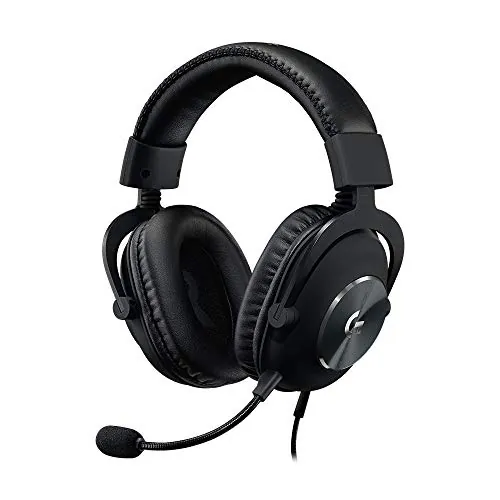
Logitech PRO X Wired vs G733: Connection, PC Features, and Fit Adjustments
The black Logitech PRO X (981-000817) connects by cable and can use its USB DAC for PC features; the black G733 (981-000863) uses a LIGHTSPEED USB receiver and has a rechargeable, non-user-replaceable battery. Compare the connection your device can use, the features that require G HUB, and the fit adjustments you prefer.
Read comparison