
Products compared
Logitech G
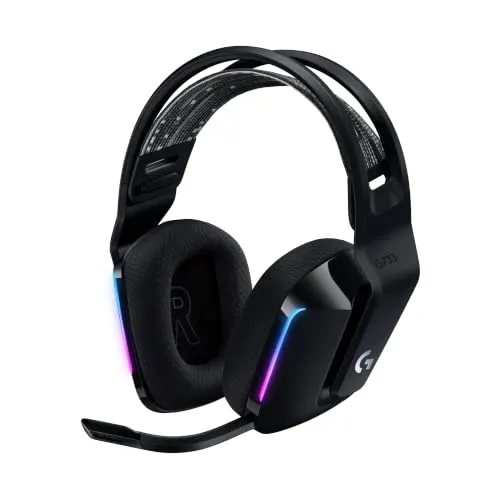
Logitech G733 LIGHTSPEED Wireless Gaming Headset
Black US model. Logitech documents LIGHTSPEED wireless via USB, USB-C charging, a detachable boom and a separate mute control.
Model 981-000863
Amazon ASIN B081415GCS
Corsair
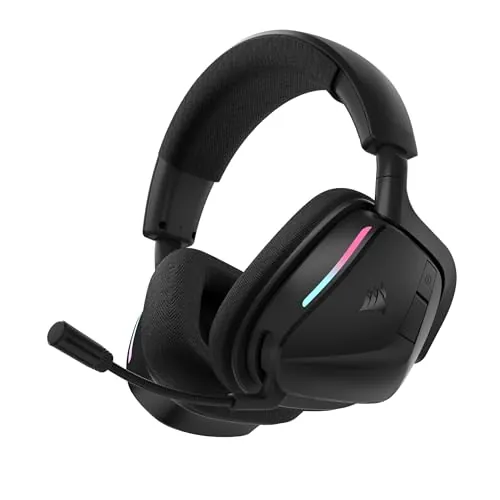
CORSAIR VOID WIRELESS v2 Gaming Headset - Carbon
Exact US Carbon SKU. Corsair documents a USB-A RF receiver and Bluetooth modes; the listing data color field says Black, while Corsair's SKU page says Carbon.
Model CA-9011379-WW
Amazon ASIN B0DYVD72P2
Differences that matter
What matters most to you?
Choose a priority to see what it changes.
Sources for Wireless route and phone connection
Sources for Phone calls versus phone music
Sources for Microphone mute action
Sources for First setup and included connection pieces
Start with the devices you need to connect
The exact Black G733 is documented as LIGHTSPEED wireless via USB, and Logitech's comparison table lists its connectivity as LIGHTSPEED only. Its USB-C connector is identified in the support specification for charging. That gives this model a receiver-based wireless workflow; do not treat the charging port as a documented wired-audio input.
The VOID WIRELESS v2 adds a Bluetooth mode beside its USB-A RF transmitter. Corsair's guide describes switching between them with a quick power-button press. If your phone is part of the setup, that Bluetooth route is the meaningful difference; check the exact computer or console and port before relying on a particular configuration.
Separate phone calls from phone music on the Corsair
Corsair's VOID v2 guide describes phone calls from a paired phone while the headset is in RF mode. It directs the user to Bluetooth mode for Bluetooth music. Those instructions describe switching modes; they do not show that phone music is mixed with receiver audio at the same time.
So decide how you use your phone during play. If calls are the only phone audio you need and your receiver setup is otherwise enough, check that routine against the guide. If you want phone music, plan to switch to Bluetooth mode. The G733 sources cited here document no Bluetooth phone mode.
Choose the mute movement you prefer
Logitech documents a separate G733 mute/unmute button and a detachable boom. Its exact-model setup guide also describes visual and audible feedback for mute status. Corsair's VOID v2 guide uses the boom itself as the control: raise it to mute and lower it to unmute, with an audible indication.
If you want to keep the boom in speaking position and press a separate control, the G733 matches that documented action. If you prefer to lift the boom when you stop speaking, the Corsair matches that action. These instructions do not establish microphone quality or guarantee privacy; they let you choose a physical routine.
Do a host, software and bundle check
Before ordering, check that your device can use the receiver route you plan to use, and verify the specific host rather than assuming every console or phone behaves alike. Logitech's page identifies advanced G HUB features; Corsair's guide describes its iCUE setup on a compatible computer. App customization should not be assumed to carry over to every platform.
Corsair's exact U.S. product page lists the USB wireless transmitter and 0.5 m USB charging cable in the box. Logitech's G733 guide shows receiver setup and USB-C charging, but the retailer's exact bundle should still be checked. The Corsair page calls CA-9011379-WW Carbon while the listing details says Black; use the model code and verify the selected finish.
Product details
Logitech G733 LIGHTSPEED Wireless Gaming Headset
CORSAIR VOID WIRELESS v2 Gaming Headset - Carbon
Before you buy
Community discussions
Checking how the headset signals a muted microphone
Logitech G733 LIGHTSPEED Wireless Gaming Headset
A G733 owner said it was hard for them to tell whether the mic was muted and asked about a persistent visual indication.
What to check
Try muting during a call and check which feedback you notice while wearing the headset. Compare it with the other model’s mute action.
Common questions
Can I listen to phone music on the VOID v2 while it is connected to its RF receiver?
Corsair's guide says a paired phone can provide calls while the headset is in RF mode, but Bluetooth music requires Bluetooth mode. It does not promise simultaneous game audio and phone music mixing.CORSAIR VOID WIRELESS v2 quick start guide
Does the G733 mute only when I remove its microphone?
No. Logitech documents a separate mute/unmute button; detaching the boom is a separate option. The guide also describes light and audible mute feedback.Logitech G733 specificationLogitech G733 setup guide
Are these two exact listings the same color?
The assigned Corsair product ID and ASIN map to model CA-9011379-WW. Corsair's U.S. product page names that exact SKU Carbon, while the listing data color field says Black. Confirm the finish displayed on the selected offer. The G733 assignment is the Black 981-000863 model.CORSAIR VOID WIRELESS v2 Gaming Headset - Carbon (CA-9011379-WW)Logitech G733 LIGHTSPEED Wireless Gaming Headset - Black (981-000863)
Sources and scope
Check the receiver port on your console or computer. The Corsair VOID v2 adds Bluetooth for a phone. The CA-9011379-WW listing may call the finish Carbon or Black. Match the full model code before ordering.
Related comparisons

SteelSeries Arctis Nova 5 vs CORSAIR VOID Wireless v2
For Nintendo Switch, the Nova 5 has clearer USB-dongle guidance: SteelSeries lists the Nova 5 family for Switch and Switch 2, with a firmware/USB-audio caveat on Switch 2. CORSAIR's product page shows Switch compatibility, but its support chart does not list the VOID Wireless v2 for Switch. For PC or PlayStation, compare Bluetooth switching and mic controls: the Nova 5 changes between 2.4GHz and Bluetooth; the VOID v2 can take phone calls in RF mode but requires Bluetooth mode for Bluetooth media.
Read comparison
Logitech G733 vs G522: Wireless Modes, USB Setup and Mic Controls
For the exact US black G733 (981-000863) versus G522 (981-001491), the practical difference is how you connect and manage the headset. Logitech lists the G733 with LIGHTSPEED wireless through its USB receiver; the G522 adds LIGHTSPEED, Bluetooth and USB wired audio. G522 switches between Bluetooth and LIGHTSPEED rather than mixing their audio, and USB wired mode disables LIGHTSPEED. Its headset mic EQ and signal-cleanup options work across its listed modes, while voice modulation still depends on G HUB. Pick G733 if your setup is a receiver-based PC/console workflow and you do not need Bluetooth; choose G522 if you want to switch among receiver, phone Bluetooth and USB audio. Check your platform, available USB port and the exact listing's box contents before ordering.
Read comparison