
Products compared
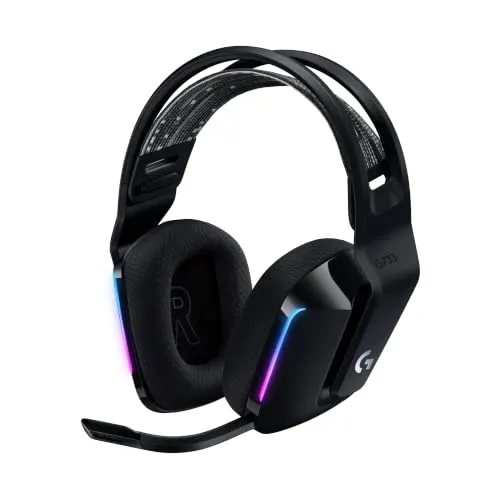
Logitech G
Logitech G733 LIGHTSPEED Wireless Gaming Headset — Black
Black U.S. variant; LIGHTSPEED wireless headset
Model G733 / 981-000863
Amazon ASIN B081415GCS

HyperX
HyperX Cloud Alpha Gaming Headset — Black-Red
Original wired U.S. Cloud Alpha; Black-Red variant
Model HX-HSCA-RD/AM (current part 4P5L1AA#ABL)
Amazon ASIN B074NBSF9N
Differences that matter
Sources for Host connection path
Sources for Where controls and mic adjustments happen
Check the port before choosing wireless or wired
The G733’s specification separates its LIGHTSPEED wireless connection via USB from its built-in USB-C charging port. The Cloud Alpha instead uses a detachable 3.5 mm four-pole headset cable. That makes the host connection the first purchase check: verify that your specific console, controller, PC or handheld supports the route you intend to use.
If you use the Alpha on a desktop with separate audio and microphone jacks, HyperX documents a 2 m PC extension cable with separate stereo and mic plugs. For G733, confirm the USB wireless receiver and other needed items in the exact selected package; the official black product page’s “In the Box” contents are not readable in the available page text.
Compare controls without treating them as a performance test
Logitech lists earcup audio controls on G733 and identifies it as a BLUE VO!CE product. Logitech describes BLUE VO!CE as G HUB software filters, so that option depends on wanting the software workflow on a supported computer. HyperX documents volume adjustment and mic muting on Cloud Alpha’s detachable cable.
Both models have a detachable boom microphone in their documentation. These control and software differences do not show that one microphone sounds clearer, nor do the sources provide a matched sound, latency, range, comfort or battery test.
Match the exact variant and what arrives in the box
The selected listing identifies G733 Black as part 981-000863. The assigned Cloud Alpha is the original Black-Red model HX-HSCA-RD/AM; HyperX’s current U.S. selected Black-Red variant is SKU 4P5L1AA#ABL, and HP’s parts list bridges that part number to the listed model designation. Check both color and part/SKU on the offer so a Cloud Alpha S, Wireless or another color bundle is not substituted.
HyperX lists its included headset cable, detachable microphone, PC extension and quick-start guide. Logitech’s exact black page exposes a box-content heading but not its item list in the available text, so confirm the chosen seller’s package directly if the receiver or charging lead matters.
Product details
Logitech G733 LIGHTSPEED Wireless Gaming Headset — Black
HyperX Cloud Alpha Gaming Headset — Black-Red
Before you buy
Community discussions
Checking which microphone a replacement cable uses
HyperX Cloud Alpha Gaming Headset — Black-Red
A Cloud Alpha owner tried a cable with its own microphone and said the input switched away from the headset’s boom mic.
What to check
If you normally use the boom mic, verify both playback and microphone input with any replacement cable or adapter you plan to use.
Common questions
Does the G733 connect through its USB-C charging port?
Logitech specifies LIGHTSPEED wireless via USB and separately identifies the built-in USB-C port as charging. Treat these as different roles and confirm the exact wireless receiver and host path for the selected package.Specification — G733G733 LIGHTSPEED Wireless Gaming Headset — Black, part 981-000863
Can I connect the Cloud Alpha to a desktop with separate headphone and mic jacks?
HyperX lists an included PC extension cable with separate 3.5 mm stereo and microphone plugs. Confirm the selected box contains that cable and that your PC’s jacks match the arrangement.Cloud Alpha SpecificationsCloud Alpha Overview and cable-control layoutCloud Alpha Gaming Headset — Black-Red SKU 4P5L1AA#ABL
Which headset has better sound or microphone quality?
These sources document features and connections, not a controlled, matched test of sound or microphone quality. Choose by the connection and control workflow first, and consult a directly comparable test if measured performance is decisive.Specification — G733Cloud Alpha Gaming Headset — Black-Red SKU 4P5L1AA#ABL
Sources and scope
This is a feature and setup comparison based on current manufacturer and support documentation, not a hands-on headset test. It does not compare sound, microphone quality, latency, wireless range, comfort, battery life or reliability. Logitech’s exact black 981-000863 page exposes an “In the Box” section heading but not a readable item list, so its included receiver and charging cable are not asserted here; verify the selected listing or box, especially for open-box stock.
Related comparisons

HyperX Cloud III Wired vs Cloud Alpha Wired: Ports, Adapters and Controls
The black HyperX Cloud III Wired (727A8AA) has documented USB-C, USB-A via its included adapter, and 3.5mm connection options, with USB NGENUITY features on supported Windows PCs. The Black-Red Cloud Alpha Wired (4P5L1AA#ABL) is documented around a 3.5mm connection and includes a detachable headset cable, inline controls, and a PC extension cable. Check the port and cable you will actually use before choosing; this guide compares setup features, not sound or comfort results.
Read comparison
Logitech G733 vs G522: Wireless Modes, USB Setup and Mic Controls
For the exact US black G733 (981-000863) versus G522 (981-001491), the practical difference is how you connect and manage the headset. Logitech lists the G733 with LIGHTSPEED wireless through its USB receiver; the G522 adds LIGHTSPEED, Bluetooth and USB wired audio. G522 switches between Bluetooth and LIGHTSPEED rather than mixing their audio, and USB wired mode disables LIGHTSPEED. Its headset mic EQ and signal-cleanup options work across its listed modes, while voice modulation still depends on G HUB. Pick G733 if your setup is a receiver-based PC/console workflow and you do not need Bluetooth; choose G522 if you want to switch among receiver, phone Bluetooth and USB audio. Check your platform, available USB port and the exact listing's box contents before ordering.
Read comparison