
Products compared
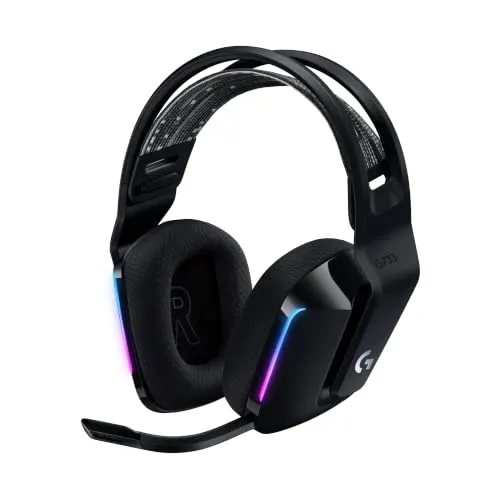
Logitech G
Logitech G733 LIGHTSPEED Wireless Gaming Headset - Black
Black U.S. G733 LIGHTSPEED wireless headset; exact model 981-000863.
Model 981-000863
Amazon ASIN B081415GCS

HyperX
HyperX Cloud III Wired Gaming Headset - Black
Black U.S. Cloud III Wired headset, SKU 727A8AA; not a Cloud III Wireless model.
Model 727A8AA
Amazon ASIN B0C3BSZ56D
Differences that matter
What matters most to you?
Choose a priority to see what it changes.
Sources for Game-audio connection
Sources for Console and host routing
Sources for Cables and adapters to plan for
Sources for Voice software and operating system
Sources for Microphone and on-headset controls
Match the connection to your gaming device
G733 is not a wired USB-C headset: Logitech's support specification calls its audio LIGHTSPEED wireless via USB and describes the built-in Type-C connector as charging. Before buying, confirm that your gaming host can use the G733's USB wireless path and that the exact platform has the features you need.
Cloud III Wired gives you more wired choices. HyperX lists USB-C, USB-A and 3.5 mm, and names the Xbox controller's 3.5 mm jack as the Xbox route. For a PC, console, or mobile setup, choose the cable/adapter that matches the host; HyperX cautions that features vary by platform and connection.
Separate the software workflow from the connection
If you are choosing G733 for a voice effect, Logitech explicitly lists G733 LIGHTSPEED as a BLUE VO!CE product and says the filters run through G HUB. That makes it a clear named software route; it does not establish that every filter works on every console or application.
HyperX currently lists Cloud III Wired in NGENUITY Legacy, while its software page says both NGENUITY versions are Windows-only and Legacy support is limited after August 2025. If a specific effect is required, verify that exact feature and current support before purchase instead of inferring it from a general software page.
Compare the microphone controls, not microphone quality
Both models document detachable boom microphones. HyperX gives more detail about its Cloud III controls: its earcup has volume and mic-mute controls, with an LED to show mute state. Logitech's G733 support specification confirms earcup audio controls but does not list each button's action in the reviewed source.
If the mute light or a direct on-headset mute control matters, HyperX documents those details for Cloud III. Neither the control list nor the manufacturer descriptions provide a comparative mic-clarity result, so choose by connection, supported software and control routine rather than a quality ranking.
Product details
Logitech G733 LIGHTSPEED Wireless Gaming Headset - Black
G733 removes the headset audio cable during use, but its game-audio route is the LIGHTSPEED USB connection; the headset's USB-C port is listed for charging. Logitech's Blue VO!CE filters are a named software workflow through G HUB, not a claim that every feature works on every host.
- Audio and charge connection
- LIGHTSPEED wireless audio via USB; built-in USB Type-C port is for charging. Source
- Voice software path
- Logitech lists G733 LIGHTSPEED in its BLUE VO!CE product list; BLUE VO!CE filters run through Logitech G HUB. Source
- Microphone and headset controls
- Detachable boom microphone and earcup audio controls. Source
HyperX Cloud III Wired Gaming Headset - Black
Cloud III Wired trades wireless audio for connection flexibility: HyperX lists USB-C, USB-A and 3.5 mm and explicitly routes Xbox controller use through 3.5 mm. It includes a USB-C-to-USB-A adapter and lists on-headset volume and mute controls.
- Wired connections
- 3.5 mm, USB-C, and USB-A; HyperX says use 3.5 mm at an Xbox or PlayStation controller headset jack. Source
- Included connection accessories
- USB dongle and USB-C-to-USB-A adapter are listed in the box; headset cable 3.93 ft and USB dongle cable 4.26 ft are listed in specifications. Source
- Microphone and controls
- Detachable microphone; earcup volume and mic-mute controls with mute indicator LED. Source
Before you buy
Community discussions
Trying a PC call with the Cloud III’s default audio
HyperX Cloud III Wired Gaming Headset - Black
A Cloud III Wired reviewer used USB and described clear team communication with their setup. They skipped NGENUITY and turned off spatial audio for Discord.
What to check
If you are deciding between the G733’s software options and the Cloud III’s wired paths, start by taking a call on the PC and USB connection you actually plan to use.
What Discord hears when you press mute
HyperX Cloud III Wired Gaming Headset - Black
A Cloud III Wired user on USB reported that friends in Discord could hear computer playback even after the user pressed the headset’s mic mute. The post does not establish the cause.
What to check
Check your conferencing or game-chat input device and confirm what the other person hears with physical mute engaged. This report was about Discord on USB.
PlayStation G733 owner asks about third-party boom-mic compatibility
Logitech G733 LIGHTSPEED Wireless Gaming Headset - Black
A G733 owner using PlayStation asks whether a third-party 3.5 mm microphone can replace the detachable boom. They say the Logitech mic settings they use are not available on that console; the post does not answer whether another microphone is compatible.
What to check
If replacing the G733 boom mic is important, confirm the specific microphone’s connector and compatibility with Logitech and your console before buying. This post raises the question but does not establish a compatible replacement.
Common questions
Does USB-C carry audio on the G733?
Logitech's G733 support specification says LIGHTSPEED wireless via USB is the connection type and identifies the built-in USB Type-C port for charging. This guide does not describe the headset's USB-C port as its game-audio connection.Specification - G733
How does Cloud III Wired connect to an Xbox controller?
HyperX says to use the controller's 3.5 mm headset jack. Its platform page also lists USB-C and a USB-C-to-USB-A adapter for other supported devices; features vary by host and connection.HyperX Cloud III Wired Gaming Headset - Black U.S. product page
Which headset has a detachable microphone?
Both. Logitech's G733 specification identifies a detachable boom microphone. HyperX's Cloud III Wired page lists the detachable microphone in the box and separate earcup volume/mute controls with a mute indicator.Specification - G733HyperX Cloud III Wired Gaming Headset - Black U.S. product page
Can I use HyperX NGENUITY on macOS?
HyperX's software page currently says NGENUITY and NGENUITY Legacy are available only on Windows. It lists Cloud III Wired under Legacy and says Legacy maintenance is limited after August 2025; check the current software support before relying on it.HyperX NGENUITY Software Compatibility and Support
Sources and scope
This guide covers Logitech G733 Black model 981-000863 and HyperX Cloud III Wired Black SKU 727A8AA. It does not test sound, mic quality, latency, range, comfort, battery life or reliability. Logitech's reviewed current U.S. page/support specification confirms USB LIGHTSPEED audio and USB-C charging but does not provide a complete in-text platform list or current in-box inventory; no unverified G733 host list or package contents are inferred. HyperX names its platforms and connection routes; software/spatial-audio features vary by platform and connection. HyperX's software compatibility page currently lists Cloud III Wired in NGENUITY Legacy and says support is limited after August 2025; recheck current availability if software controls are essential.
Related comparisons

HyperX Cloud III Wired vs Cloud Alpha Wired: Ports, Adapters and Controls
The black HyperX Cloud III Wired (727A8AA) has documented USB-C, USB-A via its included adapter, and 3.5mm connection options, with USB NGENUITY features on supported Windows PCs. The Black-Red Cloud Alpha Wired (4P5L1AA#ABL) is documented around a 3.5mm connection and includes a detachable headset cable, inline controls, and a PC extension cable. Check the port and cable you will actually use before choosing; this guide compares setup features, not sound or comfort results.
Read comparison
Logitech G733 vs G522: Wireless Modes, USB Setup and Mic Controls
For the exact US black G733 (981-000863) versus G522 (981-001491), the practical difference is how you connect and manage the headset. Logitech lists the G733 with LIGHTSPEED wireless through its USB receiver; the G522 adds LIGHTSPEED, Bluetooth and USB wired audio. G522 switches between Bluetooth and LIGHTSPEED rather than mixing their audio, and USB wired mode disables LIGHTSPEED. Its headset mic EQ and signal-cleanup options work across its listed modes, while voice modulation still depends on G HUB. Pick G733 if your setup is a receiver-based PC/console workflow and you do not need Bluetooth; choose G522 if you want to switch among receiver, phone Bluetooth and USB audio. Check your platform, available USB port and the exact listing's box contents before ordering.
Read comparison