
Products compared
Logitech
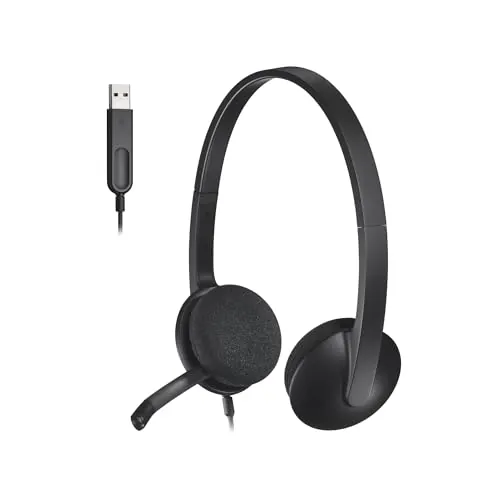
Logitech H340 USB Computer Headset - Black
Black wired USB-A headset. Its product page lists swivel-mounted foam ear cushions and a 180 cm cable. The guide directs volume, microphone settings and mute to system audio settings.
Model H340 / 981-000507
Amazon ASIN B008X3JGSI
Logitech
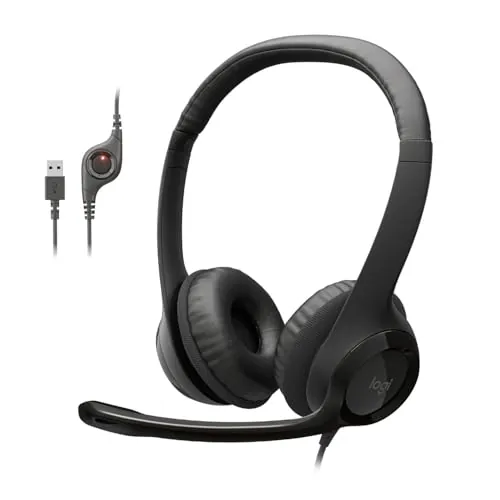
Logitech H390 USB Computer Headset - Black USB-A
Black USB-A H390 variant. Logitech lists mute and volume controls on the cable, swivel-mounted leatherette ear cushions and a 1.9 m cable. Do not substitute the separate H390 USB-C selection.
Model H390 / 981-000014
Amazon ASIN B000UXZQ42
Differences that matter
Sources for Computer port and cable route
Sources for Where mute and volume are controlled
Sources for Ear-cushion material
Check the USB-A host port and reach before choosing
The H340 and H390 compared here both use USB-A. Logitech lists a 180 cm cable for H340 and 1.9 m for H390. Measure the route from your computer’s USB-A port to your chair, including any path around a monitor or desk edge.
The current H390 page displays USB-A and USB-C selections. This article covers the black H390 981-000014 USB-A selection only. Verify the model and connector on the final listing, and do not treat an adapter as guaranteed to work with your particular host.
Choose how you want to reach mute and volume during a call
For H340, Logitech's setup guide says to use system audio settings to adjust headset volume, microphone settings or mute. Its Windows and Mac menu instructions are for older OS versions, so use your current system's settings rather than expecting the old menu labels to match.
For H390, Logitech lists mute and listening-volume controls on the cable. That places the controls on the headset lead instead of in a settings panel. The sources do not confirm how each control synchronizes with every conferencing app, so check the exact computer and app you use.
If both foam cushions and a physical control pod are non-negotiable, this exact pair splits those requirements; keep comparing rather than assuming the H390 pads or H340 software behavior can be changed with an unverified accessory or utility.
Make the cushion choice without assuming comfort results
Logitech lists swivel-mounted foam ear cushions for H340 and swivel-mounted leatherette ear cushions for H390. If you have a material preference, it can decide the pair independently of control placement.
The words foam and leatherette identify materials, not how either headset will feel during a long call, retain heat, or hold up over time. This comparison includes no wear test or sound-quality result.
Product details
Logitech H340 USB Computer Headset - Black
Before you buy
Community discussions
Checking the headset plug against a USB-C laptop
Logitech H390 USB Computer Headset - Black USB-A
A buyer used a USB-C adapter to connect their USB-A Logitech H390 to a MacBook Air.
What to check
Check your laptop or dock for the USB port your headset needs, and account for an adapter if the ports differ.
Common questions
Which one has mute and volume controls on the cable?
The H390 USB-A page lists inline cable controls for listening volume and mute. The H340 guide directs volume, microphone settings and mute to system audio settings.Logitech USB Headset H340 Setup GuideH390 USB Computer Headset, Black USB-A / 981-000014 - Logitech US
Do both headsets use USB-A?
The H340 in this comparison is USB-A, and H390 part 981-000014 is the USB-A model. Logitech also sells a USB-C H390 variant, so check the retailer listing for USB-A and model 981-000014 before ordering.H340 USB Computer Headset - Logitech USH390 USB Computer Headset, Black USB-A / 981-000014 - Logitech USLogitech Business Product listing data, Fall/Winter 2014
Which headset has foam cushions?
The H340 page lists swivel-mounted foam ear cushions. The H390 page lists swivel-mounted leatherette cushions. These material descriptions do not establish which headset will feel more comfortable to you.H340 USB Computer Headset - Logitech USH390 USB Computer Headset, Black USB-A / 981-000014 - Logitech US
Will H340's mute control work in my meeting app?
The H340 guide explains using system audio settings to adjust volume, microphone settings and mute. It does not document synchronization behavior for every current conferencing app. Check the app and OS you use; the guide's specific menu steps are for older OS releases.Logitech USB Headset H340 Setup Guide
Sources and scope
This is a documentation-based feature comparison, not a listening or comfort test. It does not rank sound, microphone clarity, noise cancellation, call quality, comfort, heat or durability. The H340 guide uses older operating-system menu examples; treat it as evidence that system audio settings are the documented control route, not as current instructions for every OS or app. Verify exact USB-A model numbers and package details on the retailer listing.
Related comparisons

Logitech H390 vs HyperX Cloud Alpha: USB-A or 3.5mm?
The exact Logitech H390 offer is the wired USB-A model 981-000014; the red HyperX Cloud Alpha is a wired 3.5mm CTIA headset with a detachable microphone. Both document inline volume and mic-mute controls. Match the headset plug to a host that supports both audio and microphone, then decide whether you want to tuck the H390 boom aside or unplug the Cloud Alpha mic.
Read comparison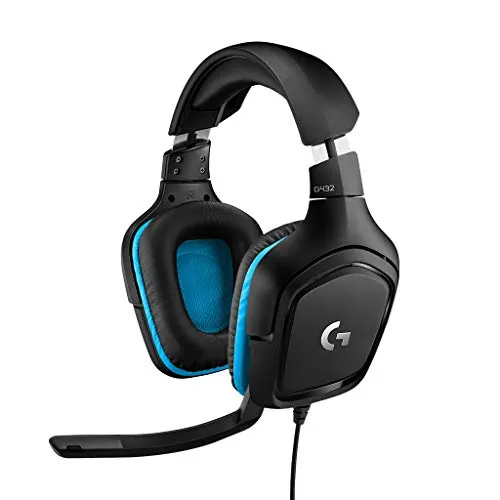
Logitech H390 vs Logitech G432: USB and 3.5 mm Connections, Mic Mute and Software
These exact wired models suit different desk and device layouts. The Black H390 981-000014 connects directly by USB-A and puts volume and mute buttons on its cable. The Black/Blue G432 981-000769 includes a USB audio adapter and splitter cable, also documents a 3.5 mm route for compatible analog hosts, and mutes when you flip its boom up. Logitech G HUB is needed for G432's DTS Headphone:X 2.0 and EQ presets on Windows; it is a separate software feature requirement, not the basic wired connection or physical mute action.
Read comparison