
Products compared
Logitech
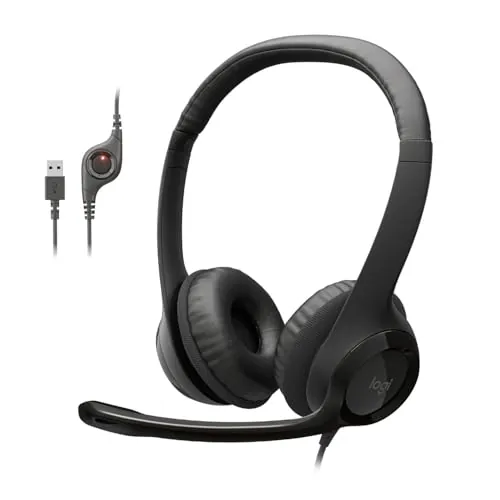
Logitech H390 USB Computer Headset, Black (USB-A)
The selected H390 is the USB-A model. Its inline controller has separate volume up/down and a center mute button with a mute light; Logitech's setup guide shows direct connection to a computer USB port.
Model 981-000014
Amazon ASIN B000UXZQ42
Logitech G
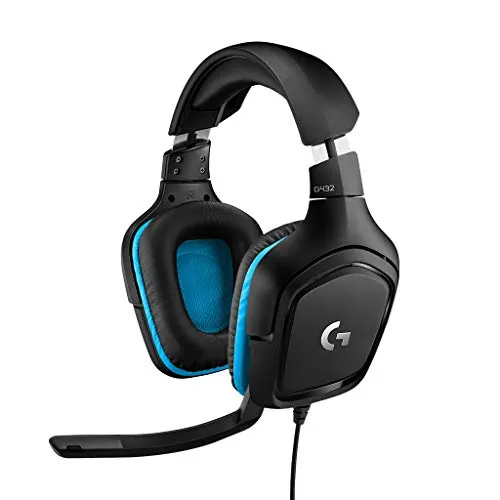
Logitech G432 Wired Gaming Headset, Black/Blue
The G432 includes a USB audio adapter and splitter cable, and Logitech also lists a 3.5 mm connection path for compatible consoles and mobile devices. Its microphone mutes when the boom is flipped up; the earcup has a volume wheel.
Model 981-000769
Amazon ASIN B07MRMHML9
Differences that matter
What matters most to you?
Choose a priority to see what it changes.
Sources for Computer connection
Sources for Analog device path and package
Sources for Microphone mute action
Sources for Volume location and G HUB
Start with the ports on the device you actually use
For a computer with USB-A, H390 connects directly to the computer port in Logitech's guide. This comparison uses model 981-000014. Logitech also lists USB-C H390 models, so check the connector on the specific listing before ordering.
G432 gives you two documented routes. Its package lists a USB audio adapter and splitter cable; Logitech documents the USB-DAC route for PC, PS4 and docked Nintendo Switch, and a 3.5 mm route for compatible consoles and mobile devices. For a computer with separate headset jacks, check the included splitter diagram and your port layout before buying; the route depends on the host, not just the headset name.
Choose the mute and volume gestures you will use all day
H390 keeps its actions together on the cable: tap the center button to mute or unmute, and press +/− to adjust volume. The setup guide shows a red mute indicator. G432 puts a volume wheel on an earcup and uses a different mute gesture: raise the microphone boom to mute. Neither choice is a measured microphone-quality result; it is about where your hand goes and whether you prefer pressing a button or moving the boom.
Do not assume the physical state is reflected the same way in every video-call app. Logitech's product materials describe the controls, but do not promise app-by-app mute synchronization.
Separate G432 software features from the wired connection
G432's basic question is first whether your device matches the USB-adapter or analog route. Logitech's separate software note applies to DTS Headphone:X 2.0 surround and EQ presets: the company says both are Windows-only and require Logitech G HUB. If you only want wired audio, the physical mute boom and volume wheel, do not mistake that feature note for proof that G HUB is required for every connection.
H390's selected USB-A setup is described by Logitech as plug-and-play. The guide focuses on the physical inline controller and USB port; it does not offer the same G HUB feature requirement as the G432 page.
Product details
Logitech H390 USB Computer Headset, Black (USB-A)
Logitech G432 Wired Gaming Headset, Black/Blue
- Connection options and included pieces
- The package lists a USB audio adapter and splitter cable. Logitech documents use through the included USB DAC on PC, PS4 and docked Nintendo Switch, and 3.5 mm use on compatible consoles or mobile devices. Source
- Mute and volume controls
- Flip the microphone boom up to mute; use the volume wheel on an earcup. Source
- Optional software features
- DTS Headphone:X 2.0 surround and EQ presets are available only on Windows and require Logitech G HUB. The listed physical mute and volume controls are on the headset. Source
Before you buy
Community discussions
A G432 owner looks for the mute control
Logitech G432 Wired Gaming Headset, Black/Blue
A new G432 owner who used a mute button on their previous headset asks where to mute the microphone on the G432.
What to check
Check which control you can reach easily without looking, and how that works when you switch between the devices you use.
A G432 user considers a PC’s audio jack and USB adapter
Logitech G432 Wired Gaming Headset, Black/Blue
A G432 user wants to choose between their PC’s 3.5 mm headset port and the headset’s USB adapter.
What to check
Look at the ports on every device you want to connect. Decide whether a direct USB headset or a model with a separate analog connection suits your setup.
Common questions
Is the H390 in this comparison USB-A or USB-C?
The assigned H390 is product 542 / ASIN B000UXZQ42, model 981-000014, Black USB-A. Logitech's current H390 family page also presents a separate USB-C option, so verify the part number and connector on the offer.H390 Setup GuideH390 USB Computer Headset, 981-000014
Does G432 need Logitech G HUB for basic wired audio and mute?
Logitech ties G HUB on Windows to DTS Headphone:X 2.0 and EQ presets. The G432 manual shows a physical boom-flip mute and volume control; the connection can use the included USB audio adapter or a compatible analog path. Confirm the host supports the route you plan to use.G432 User ManualG432 Wired Gaming Headset, 981-000769
Where are volume and microphone mute controls?
H390 has +/− volume and a center mute button on its inline controller. G432 has an earcup volume wheel and a microphone boom that flips up to mute.H390 Setup GuideG432 User Manual
Sources and scope
This comparison covers the assigned Black USB-A H390 981-000014 and wired G432 981-000769. Host compatibility depends on the exact USB or analog port and operating system. The G HUB statement is limited to G432 DTS Headphone:X 2.0 and EQ presets. No sound, microphone quality, comfort, latency, privacy or durability testing is claimed.
Related comparisons
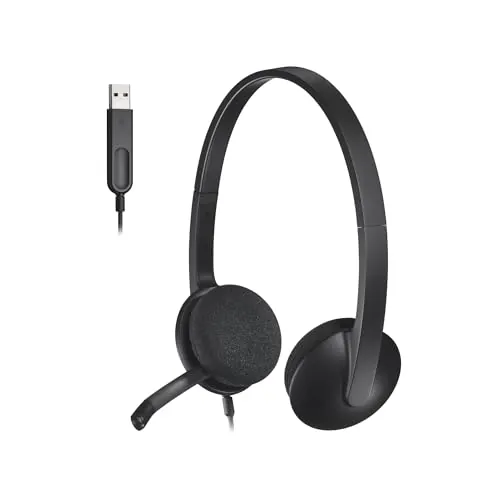
Logitech H340 vs H390 USB-A Headsets: Inline Controls or Foam Cushions?
These black USB-A wired headsets differ in two practical ways: where you change volume and mute, and the material that rests against your ears. Logitech's H340 guide directs audio and mute adjustments to system settings; the H390 puts volume and mute controls on its cable. H340 has swivel-mounted foam cushions, while H390 has swivel-mounted leatherette cushions. Measure the USB cable route and decide whether you prefer a physical control pod or software controls before ordering.
Read comparison
Logitech H390 vs HyperX Cloud Alpha: USB-A or 3.5mm?
The exact Logitech H390 offer is the wired USB-A model 981-000014; the red HyperX Cloud Alpha is a wired 3.5mm CTIA headset with a detachable microphone. Both document inline volume and mic-mute controls. Match the headset plug to a host that supports both audio and microphone, then decide whether you want to tuck the H390 boom aside or unplug the Cloud Alpha mic.
Read comparison