
Products compared
Logitech
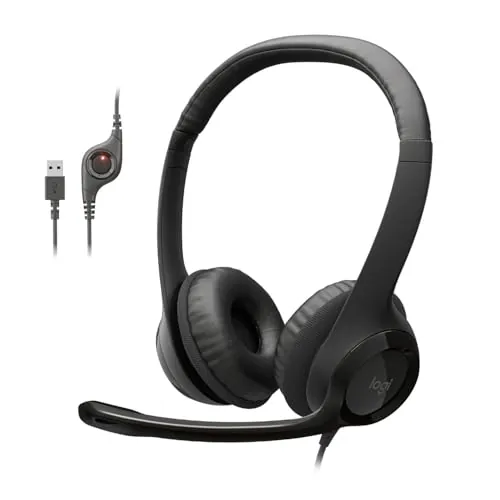
Logitech H390 Wired USB-A Headset
Black U.S. USB-A edition; cable-mounted mute and volume controls.
Model 981-000014
Amazon ASIN B000UXZQ42

HyperX
HyperX Cloud III Wired Gaming Headset
Black wired edition; USB and 3.5 mm connection options, detachable microphone and earcup controls.
Model 727A8AA
Amazon ASIN B0C3BSZ56D
Differences that matter
What matters most to you?
Choose a priority to see what it changes.
Sources for Connection in the assigned package
Sources for Where mute and volume live
Sources for Console-specific USB limit
Start with the exact port, not the headset family name
This pair differs most at the connection step. Logitech's U.S. part table identifies black H390 981-000014 as the USB-A version, and its setup guide shows that plug going into a computer USB port. Logitech lists a separate number, 981-001575, for the U.S. USB-C H390. If your listing says only “H390,” verify the SKU before assuming the connector.
The assigned black Cloud III Wired, 727A8AA, is documented with a 3.5 mm path, USB dongle and USB-C-to-USB-A adapter. That gives more ways to try a compatible host, but the host must support the chosen input. HyperX's Xbox instructions specifically direct users to the controller's compatible 3.5 mm headset jack.
Pick the control location you will actually reach
H390 puts volume up/down and mute on the cable. Its setup guide describes the center button and a mute light. Cloud III puts a volume wheel and mic-mute button on the earcup, with an LED that indicates mute. This is a practical workflow distinction: inline controls stay on the lead, while the Cloud III controls stay by the ear. Neither placement proves better sound, mic capture or in-game results.
Check the Xbox route before paying for Cloud III features
For Xbox, HyperX says to use the controller's compatible 3.5 mm headset jack. HyperX also states that the supplied USB adapter does not function on Xbox and that the bundled DTS license is for PC. Treat those as connection and feature boundaries, not a claim that every console setup exposes the same functions. Logitech's H390 setup guide documents a computer USB-A connection, so this comparison does not establish H390 console compatibility.
A quick pre-buy check
1. Confirm the exact model code: 981-000014 for the black H390 USB-A version, or 727A8AA for the black Cloud III Wired. 2. Identify the host port you plan to use and check its device instructions. 3. If using Xbox with Cloud III, confirm a compatible 3.5 mm jack on the controller; do not count on the USB adapter or DTS license. 4. Decide whether you want cable-mounted or earcup controls.
Product details
Logitech H390 Wired USB-A Headset
Before you buy
Community discussions
Reaching the earcup controls
HyperX Cloud III Wired Gaming Headset
After a week using the Cloud III Wired over USB, an owner preferred its earcup volume wheel and mute button. They had accidentally changed settings on the inline controls of their previous headset.
What to check
During a call, try reaching for mute without looking away. Compare reaching to the Cloud III earcup with keeping the H390’s controls on its USB cable.
Common questions
Does the H390 in this comparison have USB-C?
The exact assigned black H390 model is 981-000014. Logitech's U.S. part-number table places that code in the USB-A version column; it lists USB-C as a separate H390 code, 981-001575. Check the code rather than relying on the family name alone.Logitech Headset Portfolio: U.S. H390 part numbers
Can I use Cloud III Wired on Xbox?
HyperX documents the Xbox path as the controller's compatible 3.5 mm headset jack. The included USB adapter does not function on Xbox, and HyperX says the bundled DTS license is for PC only. Check your controller's available jack and the feature support you need.HyperX Cloud III Wired: connection and platform guidanceHyperX Support: Cloud III DTS is not available on Xbox
Are mute and volume controls in the same place?
No. The H390 has inline cable buttons for mute and volume. Cloud III Wired puts a volume wheel and mic-mute button on the earcup.Logitech H390 Setup GuideHyperX Support: Cloud III mic mute button and volume wheel
Sources and scope
This is a feature-and-setup comparison, not a listening, microphone, comfort, durability, latency or game-performance test. Connector presence alone does not guarantee compatibility with every host: check the exact device port, controller jack and software support. The H390 evidence here applies to the assigned USB-A SKU, not Logitech's separate USB-C H390 edition.
- Logitech H390 USB Headset, U.S. black SKU 981-000014
- Logitech Headset Portfolio: U.S. H390 part numbers
- Logitech H390 Setup Guide
- HP: HyperX Cloud III Wired Gaming Headset, Black, product 727A8AA
- HyperX Support: Cloud III mic mute button and volume wheel
- HyperX Support: Cloud III DTS is not available on Xbox
- HyperX Cloud III Wired: connection and platform guidance
Related comparisons

HyperX Cloud III Wired vs Cloud Alpha Wired: Ports, Adapters and Controls
The black HyperX Cloud III Wired (727A8AA) has documented USB-C, USB-A via its included adapter, and 3.5mm connection options, with USB NGENUITY features on supported Windows PCs. The Black-Red Cloud Alpha Wired (4P5L1AA#ABL) is documented around a 3.5mm connection and includes a detachable headset cable, inline controls, and a PC extension cable. Check the port and cable you will actually use before choosing; this guide compares setup features, not sound or comfort results.
Read comparison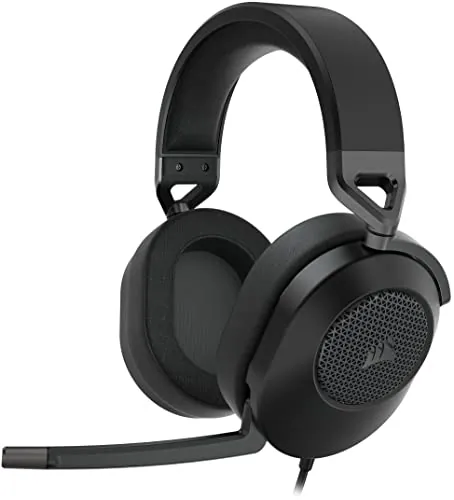
Corsair HS65 Surround vs HyperX Cloud III: Ports, PC Features and Mic Controls
Both wired headsets can connect over 3.5 mm, but their USB paths differ: the exact Corsair HS65 adds an included adapter for iCUE SoundID/Dolby features, while the exact black Cloud III includes a USB dongle and USB-A adapter and lists NGENUITY access on supported Windows PCs. The HS65 boom stays attached and flips to mute; Cloud III's mic detaches and its mute LED shows state.
Read comparison