
Products compared
Logitech
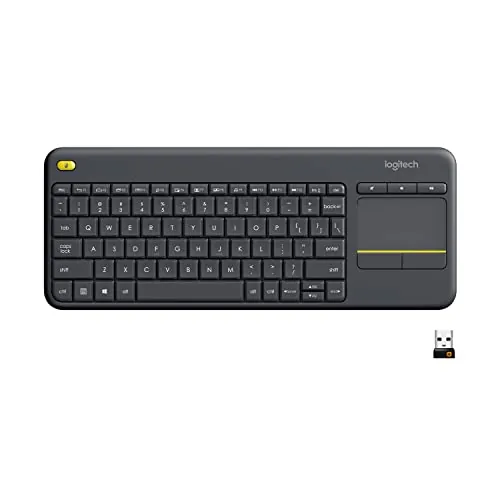
Logitech K400 Plus Wireless Touch Keyboard (Black)
K400 Plus, black; exact Logitech part number 920-007119. The maker positions it for a PC connected to a TV and documents a built-in touchpad plus a Unifying USB receiver.
Model 920-007119
Amazon ASIN B014EUQOGK
Logitech
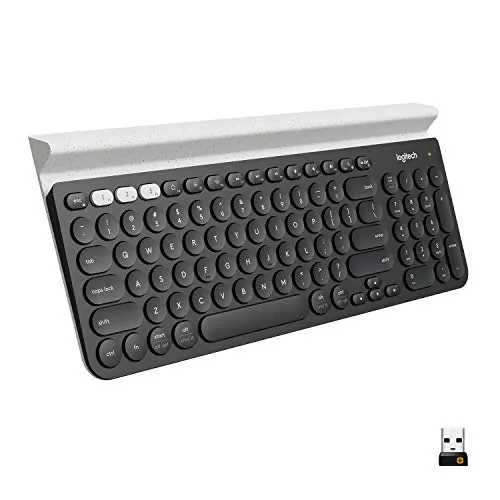
Logitech K780 Multi-Device Wireless Keyboard (Dark Grey/Speckled White)
K780, exact selected Dark Grey/Speckled White part 920-008025. It adds three keyboard-selected device channels and an integrated phone/tablet cradle.
Model 920-008025
Amazon ASIN B01LZTBKBG
Differences that matter
What matters most to you?
Choose a priority to see what it changes.
Sources for Where pointer control comes from
Sources for Number of typing destinations and connection route
Sources for Phone and tablet placement
Sources for Replaceable battery format
Sources for Exact key legends and selected finish
Start with the job, not the keyboard family name
K400 Plus is the more direct fit when you want to type and move a pointer from the same keyboard while seated away from one compatible PC. Logitech describes the K400 Plus as a keyboard with a built-in touchpad for a PC-connected TV and lists a plug-and-play Unifying receiver. That describes the PC-to-TV setup; it does not promise direct support on every smart TV.
K780 addresses a different routine: type on up to three connected computers or mobile devices and select the intended keyboard channel at the keyboard. It uses Bluetooth or its supplied Unifying receiver and includes a device cradle. If you need a pointer on each host, plan that separately.
A practical host and pointer check before buying
Make a short host list before choosing. For each computer, phone, tablet or TV-connected PC, record the operating system and whether it can use the needed USB receiver or Bluetooth keyboard route. Logitech's current K400 page lists Windows 7/8/10 or later, Android 7 or later and ChromeOS; its separate legacy technical-spec page gives an older at-release Android minimum, so verify current support for the exact device. The current K780 page names Windows, ChromeOS, macOS, Android, iOS and iPadOS. These broad lists do not guarantee support for every device or application.
For a K780 setup, assign the three keyboard channels to the hosts you actually switch between, then identify how you will move the pointer on each. For K400 Plus, confirm the receiver has a supported USB host and that a single target is enough. Do not treat a TV's port or Bluetooth logo as proof of keyboard and touchpad support.
Check the exact part, legends and everyday setup
These exact models are K400 Plus 920-007119 in black and K780 920-008025 in Dark Grey/Speckled White. Logitech's current K400 page shows an English International label and UK gallery for model 920-007119; the offered key legends remain unresolved. If a U.S. layout is essential, inspect the exact offer's top-view photograph rather than relying on the K400 family name. For K780, the maker's setup guide shows a full QWERTY arrangement, dual system legends, three Easy-Switch keys and the rear cradle; confirm the seller is offering the specified speckled part.
Also account for batteries and mobile-device placement. K400 Plus takes two AA batteries; K780 takes two AAA batteries. Logitech's up-to figures are usage-dependent and do not show how long either will last in your routine. K780's integrated cradle is specified for devices up to a 12-inch iPad; check your device and case physically against it.
Product details
Logitech K400 Plus Wireless Touch Keyboard (Black)
- Pointing
- Integrated multi-finger touchpad. Source
- Connection
- Logitech Unifying 2.4 GHz; a USB Unifying receiver is required. Confirm a supported USB host before choosing it. Source
- Power
- Two replaceable AA batteries; Logitech lists up to 18 months, with life varying by use and computing conditions. Source
- Host families
- The current US product page names Windows 7/8/10 or later, Android 7 or later and ChromeOS; verify the exact host, since TV support is not universal. Source
Logitech K780 Multi-Device Wireless Keyboard (Dark Grey/Speckled White)
- Device switching
- Three Easy-Switch keys select among up to three connected typing devices. Source
- Connection
- Bluetooth or a Unifying USB receiver; the setup guide says a pre-paired receiver is supplied. Check the exact box contents and available host ports. Source
- Cradle
- Integrated rubber cradle; Logitech says it accommodates devices up to a 12-inch iPad. Check your device's dimensions and case against the actual cradle. Source
- Power
- Two replaceable AAA batteries; Logitech lists up to 24 months, with actual life depending on use. Source
Before you buy
Community discussions
Switching between a work laptop and iPad
Logitech K780 Multi-Device Wireless Keyboard (Dark Grey/Speckled White)
The K780 owner paired it to a work laptop through Unifying and an iPad through Bluetooth, then reported difficulty switching back while the work device restricted Bluetooth and pairing software. The thread does not report a confirmed resolution.
What to check
For a work computer plus a personal tablet, confirm that each host supports the connection route you plan to use and that workplace restrictions allow the required setup. The post does not establish a general connection fault or fix.
Using a Galaxy Tab Ultra in the built-in cradle
Logitech K780 Multi-Device Wireless Keyboard (Dark Grey/Speckled White)
A Galaxy Tab Ultra owner says they use the K780's built-in stand but are concerned about the hard plastic edge contacting the glass. They ask about a separate riser; they do not report screen damage.
What to check
Check your tablet and case against the K780 cradle and look at where the device rests. If that contact or viewing angle does not suit your setup, allow space for a separate stand; this post offers no protection guarantee.
Common questions
Does the K780 Easy-Switch key also move my mouse to that device?
The sources describe Easy-Switch as selecting which connected device receives K780 keystrokes. They do not establish automatic switching for a separate mouse. Plan a separate mouse connection and switching method if you need pointer control on each host.Logitech K780 US product page, part 920-008025Logitech K780 Multi-Device Keyboard setup guide
Can I connect either keyboard directly to any smart TV?
No universal smart-TV compatibility is established. Logitech positions K400 Plus for a PC connected to a TV; in that setup, check the PC's USB and OS support. If you plan to plug a keyboard into the TV itself, verify that TV's maker-documented keyboard, touchpad and app support for the exact model.Logitech K400 Plus US product page, part 920-007119Logitech K400 Plus technical specificationsLogitech K780 US product page, part 920-008025
What batteries do these exact models use?
Logitech lists two replaceable AA batteries for K400 Plus 920-007119 and two replaceable AAA batteries for K780. The listed maximum lifetimes vary by usage conditions and should not be read as a comparative runtime test.Logitech K400 Plus technical specificationsLogitech K780 technical specifications
Is the K400 Plus 920-007119 definitely a US-layout keyboard?
That remains unresolved from Logitech's current page: it displays an English International label and links a UK gallery. Inspect the exact seller's photos and part number before buying if US key legends matter.Logitech K400 Plus US product page, part 920-007119
Sources and scope
This is a feature-fit guide based on Logitech materials for K400 Plus model 920-007119 and K780 model 920-008025, not hands-on testing. It does not rank typing feel, pointer quality, wireless reliability, comfort or real-world battery runtime. K400's current product page names Windows 7/8/10 or later, Android 7 or later and ChromeOS, while Logitech's older technical-specification page lists Android 5.0 at release; check current support for the exact host. The K400 product page currently displays an English International label and a UK gallery for model 920-007119, so U.S. key legends are not confirmed: inspect the offered keyboard itself. The K780 product page identifies the Dark Grey/Speckled White model; confirm the seller's exact 920-008025 variant and layout. A keyboard's listed computer/mobile OS support does not establish direct compatibility with every smart TV.
- Logitech K400 Plus US product page, part 920-007119
- Logitech K400 Plus technical specifications
- Logitech education listing data, K400 Plus SKU 920-007119
- Logitech K780 US product page, part 920-008025
- Logitech K780 technical specifications
- Logitech K780 Multi-Device Keyboard setup guide
- Logitech K780 battery replacement support
- K780 Dark Grey/Speckled White top-view image linked by part 920-008025
Related comparisons

Logitech MX Keys S vs K780: Desk Footprint, Receiver and Phone Cradle
This U.S. comparison covers the Graphite Logitech MX Keys S (920-011558) and Speckled White Logitech K780 (920-008025). MX Keys S is 430.20 mm wide and 131.63 mm deep, uses Bluetooth or a Logi Bolt USB receiver, and its rechargeable battery can charge over USB-C while you continue typing. K780 is 380 mm wide and 153 mm deep, uses Bluetooth or Logitech's Unifying receiver, and its built-in cradle holds phones through a 12-inch iPad class; Logitech lists a maximum device thickness of 11.3 mm. K780 uses two replaceable AAA cells and has no backlight. The practical choice is whether your desk and phone/tablet routine benefit more from an integrated cradle or from illumination and rechargeable upkeep—not a typing-quality verdict.
Read comparisonLogitech MX Keys S vs K400 Plus: Desk Typing or TV Control?
These are different kinds of wireless keyboard. The Graphite MX Keys S has backlighting, USB-C charging, Bluetooth or a Logi Bolt receiver, and Easy-Switch for up to three paired computers. The K400 Plus adds a built-in touchpad and media keys for controlling a PC-connected TV, but connects through its included Unifying USB receiver and runs on two replaceable AA batteries. Check the host's USB and operating-system requirements before buying; Bolt and Unifying receivers are not interchangeable.
Read comparison