
Products compared

Logitech
Logitech MX Keys S Advanced Wireless Illuminated Keyboard, Graphite
U.S. Graphite MX Keys S. Logitech documents Bluetooth Low Energy or the included Logi Bolt USB receiver, USB-C charging, backlighting, and pairing with up to three computers. The full-size product layout is suited to desk use; it does not have an integrated touchpad.
Model 920-011558
Amazon ASIN B0BKW3LB2B
Logitech
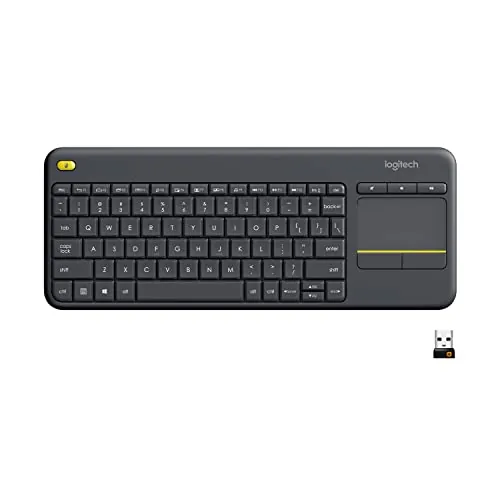
Logitech K400 Plus Wireless Touch Keyboard, Black
U.S. Black K400 Plus with an integrated touchpad and media controls, positioned by Logitech for controlling a PC connected to a TV. It requires a USB Unifying receiver and two replaceable AA batteries; Bluetooth is not listed for this model.
Model 920-007119
Amazon ASIN B014EUQOGK
Differences that matter
What matters most to you?
Choose a priority to see what it changes.
Sources for Built-in pointing for couch or TV-PC use
Sources for Receiver, Bluetooth and switching between computers
Sources for Key layout, backlighting and pointing-device trade-off
Sources for Charging, batteries and placement
Start with where you will use it
The MX Keys S and K400 Plus are not interchangeable versions of the same keyboard. MX Keys S is a desk-oriented, illuminated keyboard with a separate pointing device. Logitech positions the K400 Plus for controlling a PC connected to a TV and builds a touchpad and media controls into the keyboard itself.
If you sit at a desk and want one keyboard paired to several computers, MX Keys S's Easy-Switch and Bluetooth/Bolt options answer that use case. If you are on a couch with a PC feeding the TV, K400 Plus lets you type and point from one board. Confirm the PC and software accept that input; the product description does not promise direct pairing to every smart TV.
Check receiver and host before you order
MX Keys S can pair over Bluetooth Low Energy or the Logi Bolt USB receiver. Its Easy-Switch button supports up to three paired computers. K400 Plus uses the Unifying receiver and Logitech's 2.4 GHz protocol; the model specification lists the receiver as a required accessory and gives Windows, ChromeOS and Android support at release.
The receiver families matter if you already own Logitech gear: Logitech says Bolt products do not work with Unifying receivers and vice versa. The K400 Plus specification does not list Bluetooth, so confirm the host has a usable USB port and do not count on a laptop or TV pairing to replace its receiver.
Match layout and power to your setup
MX Keys S has a rechargeable 1500 mAh battery and USB-C charging cable; Logitech documents backlighting and controls for brightness and duration in Options+. It is about 430 mm wide. K400 Plus is shorter across the desk at about 354 mm, though it is deeper front to back at about 140 mm, because its touchpad sits on the keyboard. Logitech specifies two replaceable AA batteries and no backlighting for K400 Plus.
Measure the actual surface before choosing: K400 Plus is narrower, but not shallower. Pick MX Keys S if a lit desk board and rechargeable charging fit your routine; pick K400 Plus if integrated pointing and replaceable batteries are more useful. Logitech's up-to-18-month K400 battery statement is a conditional maker rating, not a promise for your use.
Product details
Logitech MX Keys S Advanced Wireless Illuminated Keyboard, Graphite
- Wireless connection
- Logi Bolt USB receiver or Bluetooth Low Energy Source
- Multi-device pairing
- Up to three computers; switch channels with Easy-Switch Source
- Power and lighting
- Rechargeable 1500 mAh battery, USB-C charging and backlighting Source
- Keyboard dimensions
- 430.20 mm wide × 131.63 mm deep; 810 g Source
Logitech K400 Plus Wireless Touch Keyboard, Black
- Wireless connection
- Logitech Unifying protocol over 2.4 GHz; USB Unifying receiver required Source
- Pointing and media controls
- Built-in multi-finger touchpad; dedicated mute and volume keys Source
- Power and lighting
- Two replaceable AA batteries; no backlighting Source
- Keyboard dimensions
- 354.3 mm wide × 139.9 mm deep; 380 g Source
Before you buy
Community discussions
Checking receiver plans with existing Logitech devices
Logitech MX Keys S Advanced Wireless Illuminated Keyboard, Graphite
A buyer pairing MX Keys S with an older MX Master 3 describes concern about reusing receiver equipment and the connection options available on their workstation. This is one user's setup and does not establish compatibility for other device combinations.
What to check
Before choosing, list the Logitech devices and host connections you already use, then verify receiver support for those exact models. Treat this post as a reminder to check your own setup, not as compatibility guidance for all Bolt or Unifying products.
Common questions
Can the MX Keys S and K400 Plus use the same USB receiver?
No. MX Keys S uses Logi Bolt, while K400 Plus requires Logitech Unifying. Logitech states that Bolt and Unifying devices are not compatible with each other's receivers. MX Keys S can instead connect directly over Bluetooth Low Energy when the host supports it.Specification — MX Keys SWireless Touch Keyboard K400 Plus Technical SpecificationsAre Logi Bolt devices compatible with Unifying USB receivers?
Which is better for a PC connected to a TV?
K400 Plus is the more direct fit if you want an integrated touchpad and media keys on one board; Logitech specifically describes it for a PC-connected TV. Confirm the PC's OS and whether the application you use accepts keyboard and touchpad input. This is not a claim that K400 Plus works directly with every smart TV.K400 Plus Black 920-007119 — Logitech U.S. product pageWireless Touch Keyboard K400 Plus Technical Specifications
Can MX Keys S switch between computers?
Yes. Logitech says MX Keys S can be paired with up to three computers and switched with the Easy-Switch button. Each host must be paired over Bluetooth or the Logi Bolt receiver.Getting Started — MX Keys S
Do both keyboards have backlit keys?
No. Logitech lists backlighting for MX Keys S and documents smart illumination controls. The K400 Plus technical specification lists backlighting as not available.MX Keys S Graphite 920-011558 — Logitech U.S. product pageSpecification — MX Keys SWireless Touch Keyboard K400 Plus Technical Specifications
How do they get power?
MX Keys S has a rechargeable 1500 mAh battery and USB-C charging; Logitech lists a USB-C charging cable in its box contents. K400 Plus takes two replaceable AA batteries. The K400's up-to-18-month figure is Logitech's conditional rating and is not a test result in this guide.Specification — MX Keys SWireless Touch Keyboard K400 Plus Technical Specifications
Sources and scope
This guide compares manufacturer-documented features and setup for the exact U.S. Graphite MX Keys S 920-011558 and Black K400 Plus 920-007119. It is not a typing, comfort, noise, latency, range, durability, battery-runtime, or TV-compatibility test. K400 Plus is described for a PC-connected TV; this does not establish compatibility with every smart TV or device. Verify the exact keyboard color/model and receiver in the seller's offer.
Related comparisons

Logitech MX Keys S vs Wave Keys: Choose by Lighting, Layout and Power
These two Logitech keyboards share Bluetooth, an included Logi Bolt receiver and Easy-Switch workflows, so connection alone does not settle the choice. MX Keys S (920-011558) has a low-profile layout, adaptive backlighting and a USB-C charging port you can use while typing. Wave Keys (920-011898) has a wave-shaped layout with an attached cushioned palm rest, uses two included AAA batteries, and its Logitech consumer FAQ says its keys are not backlit. Check your lighting, desk layout, host operating systems and power preference before choosing; neither model is a universal comfort winner.
Read comparison
Logitech MX Keys S vs MX Mechanical: Scissor or Tactile Quiet?
The Graphite MX Keys S uses scissor keys; the assigned full-size MX Mechanical is the Tactile Quiet low-profile mechanical version. Logitech lists 1.8 mm total travel for MX Keys S and 3.2 mm for MX Mechanical. Both support lighting, Bluetooth LE or a Logi Bolt receiver, and switching among up to three devices. Choose by a typing style you already know you want; these specifications do not establish typing speed, comfort or sound superiority.
Read comparison