
Products compared
Logitech
Logitech K585 Slim Multi-Device Wireless Keyboard
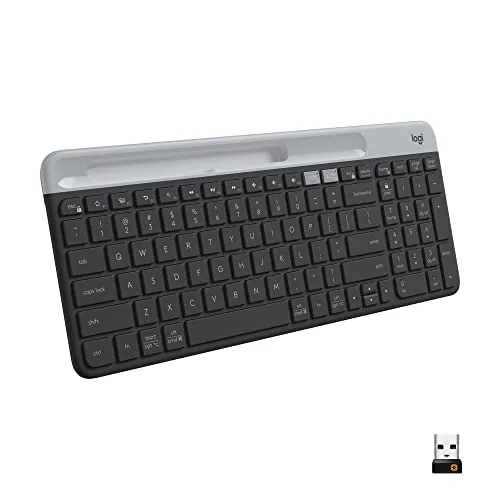
Graphite U.S. K585 with conventional low-profile keys, a number pad, an integrated phone cradle and Easy-Switch between two devices. Logitech documents Bluetooth and the included Unifying receiver, plus basic mobile functions on listed iOS/iPadOS and Android versions. The brochure lists two pre-installed AAA batteries and a maker-estimated 24-month life that varies with use.
Model 920-011479
Amazon ASIN B0BL2ND2GC
Logitech
Logitech ERGO K860 Wireless Split Keyboard
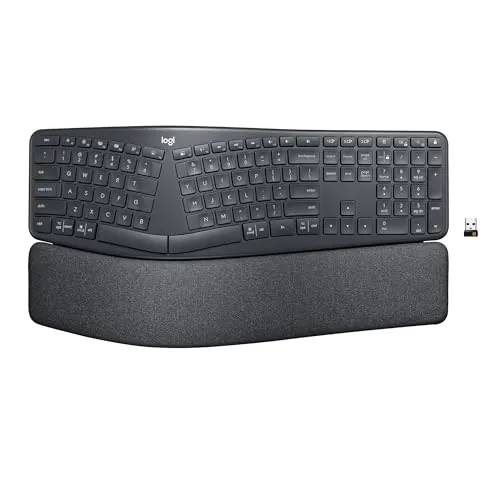
Consumer Graphite ERGO K860 with a curved split keyframe, integrated padded palm rest and 0°, −4° or −7° palm-lift positions. Logitech's setup instructions document Bluetooth or a Unifying USB receiver and Easy-Switch for up to three paired computers. Its listed body is 456 mm wide by 233 mm deep. The support page lists two AAA batteries and a 24-month estimate; usage can change that estimate.
Model 920-009166
Amazon ASIN B07ZWK2TQT
Differences that matter
What matters most to you?
Choose a priority to see what it changes.
Sources for Device switching and mobile placement
Sources for Desk footprint and secondary-device space
Sources for Wireless connection and host checks
Sources for Battery replacement
Choose the key arrangement you actually want to use
K585 keeps a conventional low-profile keyboard shape, including a number pad, while placing a phone cradle above the keys. ERGO K860 changes the typing surface: its curved keyframe is split, a padded wrist rest is attached, and the palm lift can be set at three positions. Logitech's setup article says to allow time to get familiar with the K860 shape. That does not make it better for every person; consider how you already place your hands and whether you want to switch to a split layout.
Logitech describes the K585 as compact, but the K585 brochure's dimensions are packaging measurements, not the keyboard body. If tray clearance is a close call, confirm the K585 body measurement from the exact retailer listing before checkout. The official K860 support specification does give a 456 × 233 mm body footprint, so mark that area and leave room for a mouse.
Map the Easy-Switch channels to your real devices
K585 is described for switching between a computer and a phone or tablet placed in its built-in cradle. The U.S. brochure lists Android 8.0 or later and iOS/iPadOS 14 or later over Bluetooth; non-Windows/macOS systems have basic functions without software. Check your phone and case in the holder before relying on the fit.
K860's setup instructions cover pairing up to three computers, using either Bluetooth or the Unifying receiver and a short press to switch a prepared channel. If you regularly switch among three computers, that documented channel count can settle the choice. The setup page's computer focus does not prove that the K860 cannot work with phones; verify current support for your specific mobile host if it matters.
Check the receiver and operating-system details
Both model documents list Bluetooth and a Logitech Unifying receiver. A receiver can be convenient on a desktop without Bluetooth, but confirm there is an available USB port and do not assume its pairing is shared across keyboards. K585's brochure explicitly identifies its Graphite part number 920-011479 and the included Unifying receiver. The K860 setup page identifies its consumer receiver path as Unifying, separate from the business model's Logi Bolt materials.
The K585 brochure gives specific mobile Bluetooth basics and desktop receiver requirements for its U.S. part. The K860 technical table labels the operating-system list as support at release, so it should not be treated as a current guarantee for an older OS. Check Logitech's current support entry for the exact computer before relying on customization software or a receiver pairing flow.
Treat the battery figures as estimates, not a reason to choose
The K585 brochure lists two AAA batteries already installed and an estimated 24-month life; the K860 setup guide also specifies two AAA cells and estimates 24 months. Logitech qualifies the K585 figure by user and computing conditions and the K860 figure by use and operating conditions. There is no matched endurance measurement here, so battery type and published estimates are a practical tie rather than a battery-life winner.
Product details
Logitech K585 Slim Multi-Device Wireless Keyboard
- Exact U.S. edition
- K585 Slim Multi-Device Wireless Keyboard, Graphite, part 920-011479 Source
- Layout and holder
- Conventional low-profile layout with number pad and integrated phone cradle; Easy-Switch selects between two devices Source
- Connection and mobile scope
- Bluetooth Low Energy or included Unifying USB receiver; manufacturer brochure lists iOS/iPadOS 14+ and Android 8.0+ with basic functions on non-Windows/macOS systems Source
- Power
- Two pre-installed AAA batteries; manufacturer estimate is 24 months and varies with user/computing conditions Source
Logitech ERGO K860 Wireless Split Keyboard
- Exact consumer U.S. edition
- ERGO K860 Graphite, part 920-009166; distinct from K860 for Business Source
- Keyframe and palm rest
- Curved split keyframe with an integrated padded wrist rest; adjustable palm-lift legs at 0°, −4° and −7° Source
- Pairing and desk footprint
- Bluetooth Low Energy or Unifying receiver; pairs with up to three computers. Listed body dimensions: 456 × 233 × 48 mm Source
- Power
- Two AAA batteries; Logitech lists a 24-month estimate, which varies with use and operating conditions Source
Before you buy
Community discussions
A shopper wants a one-piece split keyboard with a number pad
Logitech ERGO K860 Wireless Split Keyboard
A shopper trying to replace an older Microsoft keyboard points to the K860 as a reference for its shape. They want a fixed split, a number pad and a wrist rest.
What to check
Compare the actual footprint and key layout. Decide how often you use the number pad and whether the split or the phone cradle matters more.
Common questions
Which model has a phone cradle?
K585 has an integrated phone cradle and Logitech describes switching between a computer and a phone or tablet. Check your phone and case in the holder before relying on the fit. K860’s listed setup is for computer channels, so plan separate mobile-device placement.K585 Slim Multi-Device Wireless Keyboard — Graphite, U.S. part 920-011479Getting Started — ERGO K860
How many devices can I switch between?
Logitech describes two-device Easy-Switch for K585. The K860 setup guide documents pairing up to three computers and using a short press to select a paired channel. The guide does not claim that either keyboard types to multiple devices simultaneously.K585 Slim Multi-Device Wireless Keyboard — Graphite, U.S. part 920-011479Getting Started — ERGO K860
Does ERGO K860 reduce pain or improve typing comfort for everyone?
No individual health or comfort outcome is established here. Logitech documents a split keyframe, padded palm rest and adjustable lift, and advises allowing time to get familiar with the design. Personal response varies; this guide does not make a medical or test-based claim.ERGO K860 Wireless Split Keyboard — Graphite, consumer part 920-009166Getting Started — ERGO K860
Will the K860 fit my keyboard tray?
Its listed body is 456 mm wide by 233 mm deep by 48 mm high. Measure the usable tray area and leave additional space for the mouse. Logitech's checked K585 page and brochure do not provide the keyboard body's dimensions; the brochure's package measurements are not the keyboard footprint.ERGO K860 Technical Specifications — Logitech SupportK585 Slim Multi-Device Wireless Keyboard — Logitech U.S. manufacturer brochure
Do their battery requirements differ?
Both cited manufacturer sources specify two AAA batteries and estimate about 24 months, with usage caveats. That is a documented similarity, not a comparative endurance test.K585 Slim Multi-Device Wireless Keyboard — Logitech U.S. manufacturer brochureGetting Started — ERGO K860
Sources and scope
This guide compares the U.S. Graphite K585 part 920-011479 with the consumer ERGO K860 part 920-009166, not K860 for Business or other language/color versions. Logitech describes the K585 cradle and two-device switching; brochure package dimensions are not keyboard dimensions, so confirm the body size on the selected offer if desk fit matters. The K860 operating-system matrix is labeled “support at release”; check current compatibility for your computer before relying on software features. Both use two AAA batteries and have a maker estimate of 24 months with usage caveats; these figures are not a matched battery test. No comfort, pain-relief, posture, speed, noise, reliability or productivity result is claimed.
- K585 Slim Multi-Device Wireless Keyboard — Graphite, U.S. part 920-011479
- K585 Slim Multi-Device Wireless Keyboard — Logitech U.S. manufacturer brochure
- ERGO K860 Wireless Split Keyboard — Graphite, consumer part 920-009166
- Getting Started — ERGO K860
- ERGO K860 Technical Specifications — Logitech Support
Related comparisons

Logitech ERGO K860 vs Wave Keys: Layout, Receiver, and Desk Fit
The Graphite Logitech ERGO K860 (920-009166) and Wave Keys (920-011898) both include an integrated palm-rest area, Bluetooth, three-device switching, and two AAA batteries. The K860 has a curved split keyframe, adjustable palm lift, and a Unifying receiver path; Wave Keys has a compact wave-shaped layout and an included Logi Bolt receiver. The receiver families do not pair with one another, so match the keyboard to the receiver already used by your computer or use Bluetooth where supported. This is a layout and setup comparison, not a medical or measured comfort result.
Read comparison
Logitech K585 vs MX Keys S: Phone Cradle, Device Switching, and Charging
Both are Graphite wireless keyboards with Bluetooth and a Logitech USB receiver, but the documented workflows differ: K585 combines a compact number-pad layout, phone cradle, two device channels, and replaceable AAA batteries; MX Keys S supports up to three paired computers, adaptive backlighting, and USB-C charging. Confirm the exact part number and the receiver your computer can use.
Read comparison