
Products compared
Logitech
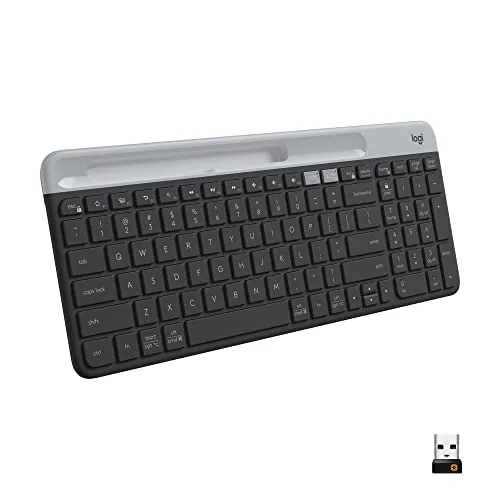
Logitech K585 Slim Multi-Device Wireless Keyboard
Graphite US product identity; compact layout with number pad, integrated phone cradle, two device channels, Bluetooth or the included Unifying receiver, and two pre-installed AAA batteries per Logitech’s part-matched brochure.
Model 920-011479
Amazon ASIN B0BL2ND2GC

Logitech
Logitech MX Keys S Wireless Illuminated Keyboard
Graphite US product identity; Logitech lists up to three paired computers, smart illumination, programmable Smart Actions, Bluetooth or Logi Bolt receiver, and internal rechargeable power over USB-C.
Model 920-011558
Amazon ASIN B0BKW3LB2B
Differences that matter
What matters most to you?
Choose a priority to see what it changes.
Sources for Desk layout and phone placement
Sources for Paired-device channels
Sources for Receiver and Bluetooth route
Start with the desk layout and where your phone sits
K585’s official US product page describes a compact layout with a number pad and a built-in phone cradle. That gives it a specific role if you type on a computer and periodically answer messages on a phone set beside the keyboard. Logitech’s product materials do not give a verified physical keyboard length for this K585 part, so “compact” is a maker description, not a numeric desk-fit promise.
MX Keys S has a listed length of 430.20 mm. Use that number to compare against your available space, and measure your own K585 desk setup rather than substituting its brochure’s package dimensions. The sources checked do not establish that MX Keys S lacks a phone holder; choose the K585 when the built-in cradle is a feature you want, not because the other keyboard is assumed not to support phone placement.
Match device switching and receiver setup to your hosts
K585 documents Easy-Switch for two devices and Bluetooth or a 2.4 GHz USB Unifying receiver stored in the battery door. The manufacturer’s part-matched brochure lists a Unifying receiver in the box. MX Keys S setup documentation describes pairing up to three computers and switching channels with Easy-Switch; it connects by Bluetooth or the included Logi Bolt receiver.
Before buying, count the computers, phone or tablet you want to switch between and decide whether you will use Bluetooth or a receiver. The receiver types differ, so verify the correct one for the exact model and your host. Logitech’s K585 brochure lists receiver system requirements separately from Bluetooth requirements; if you plan to connect a tablet or phone, check that the selected connection route and host support it.
Choose the power and lighting routine you prefer
The K585 brochure for Graphite part 920-011479 lists two pre-installed AAA batteries and an estimated 24-month life with a conditions caveat. MX Keys S uses a rechargeable internal battery and USB-C; Logitech says you can continue typing while it charges. Its published battery figures vary with backlight conditions, so they cannot be compared directly with the K585 estimate as though they came from the same test.
MX Keys S explicitly documents smart illumination that responds when hands approach and adjusts to the room, with settings in Logi Options+. If that lighting workflow matters to you, it is supported for MX Keys S. The K585 materials reviewed here do not establish whether all illumination functions are absent, so the comparison makes no absence claim. The MX Keys S support specification says some packages include a palm rest; check the seller’s exact contents before counting on one.
Product details
Logitech K585 Slim Multi-Device Wireless Keyboard
- Part and finish
- Graphite, Logitech part 920-011479 Source
- Layout and phone placement
- Compact layout with number pad and built-in phone cradle Source
- Device switching and wireless
- Up to two devices; Bluetooth or 2.4 GHz USB Unifying receiver stored in battery door Source
- Included power
- Two pre-installed AAA batteries; manufacturer estimate of 24 months varies by user and computing conditions Source
Logitech MX Keys S Wireless Illuminated Keyboard
- Part and finish
- Graphite, Logitech part 920-011558 Source
- Listed keyboard length
- 430.20 mm (manufacturer specification) Source
- Pairing and wireless
- Up to three paired computers; Bluetooth or Logi Bolt USB receiver Source
- Power and lighting
- 1500 mAh rechargeable battery; USB-C charging while typing; smart illumination responds to nearby hands and ambient light Source
Before you buy
Community discussions
Checking whether the mouse follows a keyboard switch
Logitech MX Keys S Wireless Illuminated Keyboard
An MX Keys S owner used it with an MX Master 3S and a Bolt receiver on each of two computers. They reported that the mouse followed the keyboard switch in only one direction.
What to check
If you want one switch to move both devices, check the supported keyboard, mouse and software combination, then try it in both directions.
Common questions
Does the K585 have a number pad and phone cradle?
Yes. Logitech describes the Graphite K585 as a compact layout with a number pad and a built-in phone cradle. Its official description does not provide a measured keyboard length, so check the physical unit if your desk fit is tight.K585 Slim Multi-Device Wireless Keyboard — Logitech US Graphite product page
Can either keyboard switch between a computer and another device?
Yes. Logitech lists K585 for up to two devices, including computers, phones or tablets; MX Keys S can pair with up to three computers. Both offer Bluetooth and a USB receiver route, but the named receiver technologies differ.K585 Slim Multi-Device Wireless Keyboard — Logitech US Graphite product pageGetting Started — MX Keys S, Logitech SupportSpecification — MX Keys S, Logitech Support
Are the K585 and MX Keys S USB receivers the same?
Logitech identifies the K585 included receiver as Unifying and the MX Keys S receiver as Logi Bolt. Treat them as different receiver technologies and verify the exact supported connection path for your computer; Bluetooth is also documented for both models.K585 Slim Multi-Device Wireless Keyboard — Logitech manufacturer brochure and part/package specificationsGetting Started — MX Keys S, Logitech SupportSpecification — MX Keys S, Logitech Support
Which one has longer battery life?
The manufacturer figures are not a matched test. K585’s brochure estimates 24 months and says use conditions affect battery life. MX Keys S battery duration varies with backlight settings; its specification lists five months with backlight off and shorter stated durations under specific lighting conditions. Choose between AAA replacement and USB-C recharging rather than treating these figures as a ranking.K585 Slim Multi-Device Wireless Keyboard — Logitech manufacturer brochure and part/package specificationsSpecification — MX Keys S, Logitech Support
Sources and scope
This is a manufacturer-specification comparison, not a typing, comfort, noise, durability, or battery-runtime test. Logitech describes the K585 as compact but the official K585 page and brochure do not provide a verified physical keyboard length; the MX Keys S specification lists 430.20 mm. Do not use the K585 brochure’s package dimensions as keyboard dimensions. Both pages support configurable software features, and this comparison does not claim that an unmentioned feature is absent. Verify the selected seller’s exact Graphite part number and included package before purchase.
- K585 Slim Multi-Device Wireless Keyboard — Logitech US Graphite product page
- K585 Slim Multi-Device Wireless Keyboard — Logitech manufacturer brochure and part/package specifications
- MX Keys S — Logitech US product page
- Getting Started — MX Keys S, Logitech Support
- Specification — MX Keys S, Logitech Support
Related comparisons

Logitech MX Keys S vs Wave Keys: Choose by Lighting, Layout and Power
These two Logitech keyboards share Bluetooth, an included Logi Bolt receiver and Easy-Switch workflows, so connection alone does not settle the choice. MX Keys S (920-011558) has a low-profile layout, adaptive backlighting and a USB-C charging port you can use while typing. Wave Keys (920-011898) has a wave-shaped layout with an attached cushioned palm rest, uses two included AAA batteries, and its Logitech consumer FAQ says its keys are not backlit. Check your lighting, desk layout, host operating systems and power preference before choosing; neither model is a universal comfort winner.
Read comparison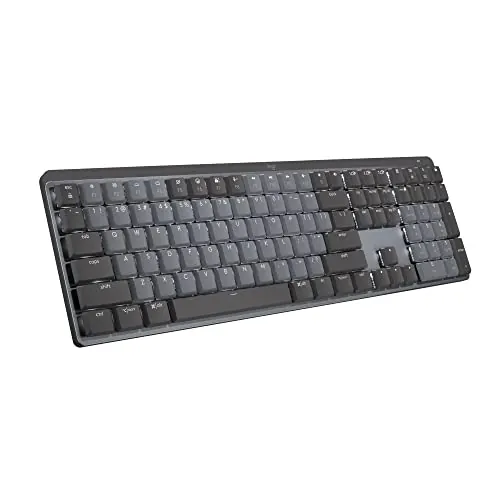
Logitech MX Keys S vs MX Mechanical: Scissor or Tactile Quiet?
The Graphite MX Keys S uses scissor keys; the assigned full-size MX Mechanical is the Tactile Quiet low-profile mechanical version. Logitech lists 1.8 mm total travel for MX Keys S and 3.2 mm for MX Mechanical. Both support lighting, Bluetooth LE or a Logi Bolt receiver, and switching among up to three devices. Choose by a typing style you already know you want; these specifications do not establish typing speed, comfort or sound superiority.
Read comparison