
Products compared
Logitech
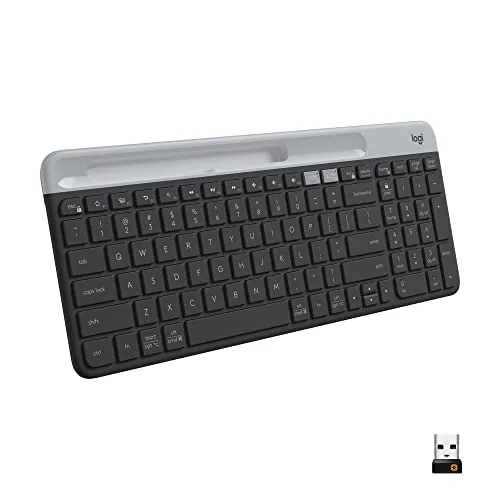
Logitech K585 Slim Multi-Device Wireless Keyboard
Graphite U.S. variant; built-in phone cradle, separate number pad, and two-device Easy-Switch.
Model K585 (920-011479)
Amazon ASIN B0BL2ND2GC
Logitech
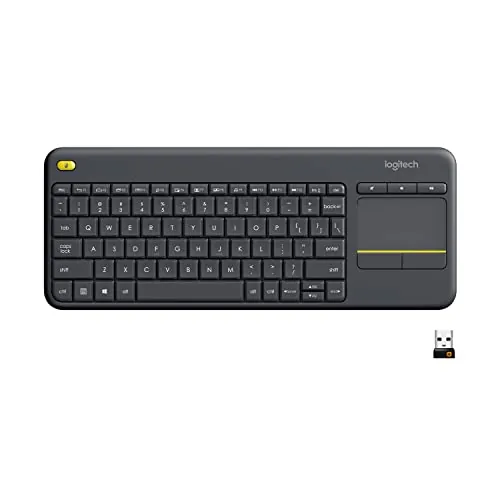
Logitech K400 Plus Wireless Touch Keyboard
Black U.S. product variant; integrated touchpad and USB Unifying receiver connection for a compatible host.
Model K400 Plus (920-007119)
Amazon ASIN B014EUQOGK
Differences that matter
What matters most to you?
Choose a priority to see what it changes.
Sources for Pointer control built into the keyboard
Sources for How many devices and how they connect
Sources for Host and operating-system check
Sources for Battery type and maker estimate
Decide whether pointer control needs to travel with the keyboard
K400 Plus puts a touchpad beside its keys. If your computer is connected to a TV and you want to type and move the pointer from one keyboard, this layout addresses both inputs without a separate mouse. K585 has no touchpad in its exact Graphite layout, so a computer setup still needs another way to move the pointer.
That distinction is about included controls, not measured precision or comfort. If your host is a smart TV rather than a computer connected to the television, verify the TV and app behavior directly: Logitech documents the K400 Plus's Unifying USB connection and PC-connected-TV use, not universal direct-TV Bluetooth support.
Use K585's cradle and switch for a phone-and-computer desk
K585 combines a phone cradle, number pad and Easy-Switch that selects typing between two paired devices. Logitech lists both Bluetooth and an included Unifying USB receiver, so a typical desk setup can pair the computer and phone using the connection methods their operating systems support. The switch selects where keystrokes go; it does not transfer a separate mouse or type into two hosts at once.
Before buying, check that the phone and any protective case rest securely in the cradle. The reviewed manufacturer material does not specify a maximum size or supported case thickness. If a pointer is required on the computer, plan a mouse or another host input separately.
Match the receiver, operating system and battery drawer
K585 can use Bluetooth LE or its Unifying USB receiver; the exact Graphite brochure lists Bluetooth support for phones and tablets as well as computers, with basic functions only on systems outside Windows and macOS unless software is supported. K400 Plus uses Logitech's Unifying 2.4 GHz receiver and needs a compatible USB host. Both product families therefore need a host check, but the Bluetooth path belongs to K585, not K400 Plus.
The battery drawers also differ: the K585 Graphite brochure lists two preinstalled AAA batteries and an up-to-24-month estimate; the K400 Plus specification lists two replaceable AA batteries and an up-to-18-month estimate. Conditions are not standardized here, so those numbers are not a runtime ranking.
Product details
Logitech K585 Slim Multi-Device Wireless Keyboard
- Built-in layout
- Phone cradle and number pad are the documented built-in layout features; Logitech’s reviewed feature list does not identify an integrated touchpad. Source
- Connections and switching
- Bluetooth or included Unifying USB receiver; Easy-Switch selects between two paired devices for typing. Source
- Power
- Two preinstalled AAA batteries; maker brochure lists up to 24 months, with life dependent on use and computing conditions. Source
Logitech K400 Plus Wireless Touch Keyboard
- Built-in layout
- Integrated 3.5-inch multi-finger touchpad for pointer control; Logitech positions the keyboard for a PC connected to a TV. Source
- Connection and host
- Logitech Unifying 2.4 GHz protocol and a required USB Unifying receiver; Logitech positions it for a PC-connected TV and lists Windows, Android and Chrome OS. Source
- Power
- Two replaceable AA batteries; maker lists up to 18 months, with battery life varying by use and computing conditions. Source
Before you buy
Community discussions
Setting up a keyboard for the couch
Logitech K400 Plus Wireless Touch Keyboard
A new console user asked whether to buy a keyboard for couch use and was considering the Logitech K400 Plus.
What to check
Decide whether you need a pointer as well as a keyboard, and how much space you have on your lap or side table.
Leaving room for a number pad on a small desk
Logitech K585 Slim Multi-Device Wireless Keyboard
A shopper wanted a multi-device keyboard with a number pad. A K585 owner suggested considering the board when desk space matters.
What to check
Measure the space you can spare and compare the layouts for a number pad, pointer control and nearby devices.
Common questions
Can the K585 replace a mouse?
Logitech’s reviewed K585 feature list identifies the phone cradle and number pad but does not identify a touchpad or mouse in the maker’s box list. If the computer needs pointer control, plan a separate mouse or use another host input method.K585 Slim Multi-Device Wireless Keyboard, Graphite 920-011479Logitech K585 manufacturer brochure, Graphite 920-011479
Can I connect the K400 Plus to any TV with Bluetooth?
Do not assume so. Logitech documents the K400 Plus using a USB Unifying receiver and markets it for a PC-connected TV. Check whether your exact TV or connected computer accepts the receiver and whether your apps support keyboard and touchpad input.K400 Plus Wireless Touch Keyboard, Black 920-007119Wireless Touch Keyboard K400 Plus Technical Specifications
Does K585 type on two devices at the same time?
No simultaneous input is documented. Logitech describes Easy-Switch as changing typing between two paired devices, so one device is selected as the typing destination at a time.K585 Slim Multi-Device Wireless Keyboard, Graphite 920-011479Logitech K585 manufacturer brochure, Graphite 920-011479
Do the listed battery-life figures show which keyboard lasts longer?
They are separate manufacturer estimates, not a controlled comparison. K585's brochure lists two AAA batteries and up to 24 months; K400 Plus specifications list two replaceable AA batteries and up to 18 months. Logitech notes conditions affect life, so do not treat the difference as measured comparative runtime.Logitech K585 manufacturer brochure, Graphite 920-011479Wireless Touch Keyboard K400 Plus Technical Specifications
Sources and scope
This guide compares documented layouts, connections, host requirements and listed battery specifications. It does not report typing, pointer, wireless-reliability, comfort or battery-life testing. Smart-TV support varies by TV and app; Logitech's PC-connected-TV positioning for the K400 Plus does not establish universal direct smart-TV compatibility. Check the current exact listing and the OS requirements for the connection you will use.
Related comparisons

Logitech K585 vs MX Keys S: Phone Cradle, Device Switching, and Charging
Both are Graphite wireless keyboards with Bluetooth and a Logitech USB receiver, but the documented workflows differ: K585 combines a compact number-pad layout, phone cradle, two device channels, and replaceable AAA batteries; MX Keys S supports up to three paired computers, adaptive backlighting, and USB-C charging. Confirm the exact part number and the receiver your computer can use.
Read comparisonLogitech MX Keys S vs K400 Plus: Desk Typing or TV Control?
These are different kinds of wireless keyboard. The Graphite MX Keys S has backlighting, USB-C charging, Bluetooth or a Logi Bolt receiver, and Easy-Switch for up to three paired computers. The K400 Plus adds a built-in touchpad and media keys for controlling a PC-connected TV, but connects through its included Unifying USB receiver and runs on two replaceable AA batteries. Check the host's USB and operating-system requirements before buying; Bolt and Unifying receivers are not interchangeable.
Read comparison