
Products compared
Logitech
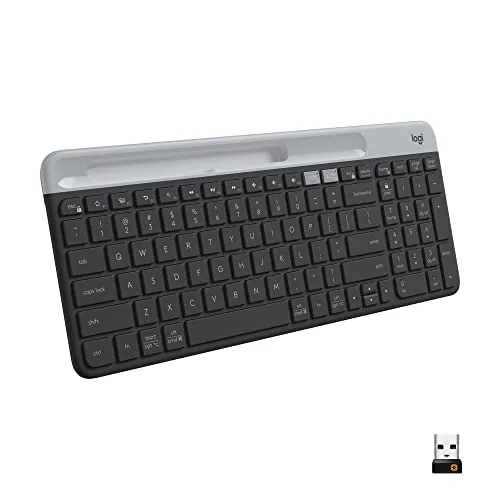
Logitech K585 Slim Multi-Device Wireless Keyboard
Graphite US standalone keyboard with slim low-profile layout, numeric keypad, built-in phone cradle, Bluetooth and a USB receiver kept in the battery door. Logitech's K585 setup guide routes the receiver connection through Unifying pairing.
Model K585 / 920-011479
Amazon ASIN B0BL2ND2GC

Logitech
Logitech Wave Keys Ergonomic Wireless Keyboard
Graphite US standard Wave Keys keyboard with a wave-shaped layout and cushioned palm rest. It connects by Bluetooth or the included Logi Bolt receiver and can switch among a laptop, tablet and phone; Logitech's Wave Keys product page does not list an integrated phone cradle.
Model Wave Keys / 920-011898
Amazon ASIN B0BTNY72VD
Differences that matter
What matters most to you?
Choose a priority to see what it changes.
Sources for Phone placement and desk layout
Start with the desk arrangement you want
The US Graphite K585 (920-011479) is the slim, low-profile choice with a number pad and built-in phone cradle. Logitech's page describes the phone holder as part of the product, so it can make a two-device desk more direct when you type on a computer and then a phone. It does not give a fit guarantee for your phone plus case; check your own device against the cradle before buying if that is the main reason you want K585.
Wave Keys (920-011898) trades that phone holder for a wave-shaped key field and a cushioned palm rest. Logitech lists a number pad on this model too. This is a physical-layout choice, not evidence that one keyboard is more comfortable, healthier or faster for every user. If you need a phone visible while typing, allow space for a separate stand with Wave Keys.
Count the computers and mobile devices you actually switch between
The K585 setup page documents up to two paired devices. Wave Keys is documented for up to three; Logitech describes using it among a laptop, tablet and phone. If you only alternate between a computer and phone, both can cover the channel count. If you routinely move the keyboard across three hosts, Wave Keys has the additional documented channel.
Each host still needs a connection it supports. Both keyboards offer Bluetooth; their USB receiver paths differ. If switching to a specific tablet or work computer matters, check its current operating-system support and whether Bluetooth or an available USB connection is actually allowed.
Check the receiver before replacing a keyboard beside a mouse
The K585 product page places its USB receiver in the battery door, and its setup instructions use Logitech's Unifying receiver pairing flow. Wave Keys comes with the Logi Bolt receiver CU0021 and can also connect over Bluetooth. Logitech explicitly says Bolt and Unifying devices cannot pair with each other's receiver.
That does not mean you must replace a Unifying mouse to use Wave Keys. If the computer supports Bluetooth, the keyboard can use Bluetooth while the mouse stays on its current Unifying receiver. If you want the Wave's Bolt connection instead, plan an available USB port or hub. Conversely, a K585 may fit a one-Unifying-receiver arrangement only when the exact mouse is Unifying-compatible and both devices are supported on the host. Confirm before disturbing a working setup.
Treat software features as a separate compatibility check
Logitech describes Logi Options+ customization for both models: the K585 product page calls out customizable function keys, and the Wave Keys page describes custom shortcuts. Logitech's current support guidance says to check supported devices and operating systems before relying on app features, and says the older Options application is no longer maintained.
For Wave Keys, the model specification lists its receiver and Bluetooth OS requirements and says basic device functions are supported without software on systems other than Windows and macOS. That distinction matters if you use ChromeOS, Linux, iPadOS or another host: ordinary keyboard input and app-specific customization are not the same requirement. Check the current support list for the exact setup you plan to use.
Before you buy
1. Decide whether a phone cradle or a cushioned palm rest is more useful in your setup. 2. Count whether you need two or three Easy-Switch targets. 3. Identify the receiver type used by the mouse you plan to keep. 4. Confirm that the chosen keyboard's Bluetooth or receiver connection is available on each host. 5. If you want custom keys, verify current Logi Options+ support for the exact keyboard and OS.
For K585, check your phone and case in the cradle and verify your mouse's Unifying compatibility if you want one shared receiver. For Wave Keys, verify that a USB port is available for Bolt or that the host can pair the keyboard by Bluetooth alongside the existing mouse. Do not infer successful pairing just from brand or receiver appearance.
Product details
Logitech K585 Slim Multi-Device Wireless Keyboard
The K585 is the direct fit when you want the keyboard itself to hold a phone, or when your planned setup needs Unifying rather than Logi Bolt. Its receiver family only helps with a mouse if that exact mouse is also Unifying-compatible and supported by your host/software; the family label alone does not verify a new pairing.
- Phone placement and layout
- Built-in phone cradle, slim profile and number pad; the Logitech product page recommends checking the actual phone setup for your use. Source
- Easy-Switch capacity
- Pairs with up to two devices; Bluetooth or USB receiver connection. Source
- Receiver family and storage
- USB receiver is stored in the battery door; K585 receiver setup uses the Unifying device workflow. Source
Logitech Wave Keys Ergonomic Wireless Keyboard
Choose Wave Keys for its physical wave layout and cushioned palm rest, or if three paired keyboard targets matter. Its included Bolt receiver cannot pair an Unifying mouse; a Bluetooth connection for Wave Keys can leave that mouse on its existing receiver if the host supports the chosen connections.
- Layout and palm rest
- Wave-shaped keys with a cushioned palm rest; the product page describes three layers of memory foam. Personal comfort is not assessed here. Source
- Easy-Switch workflow
- Product guidance describes switching among laptop, tablet or phone; Logitech's Wave Keys announcement documents up to three connected devices. Source
- Included receiver and connection paths
- Logi Bolt receiver CU0021 is listed in the box; Bluetooth Low Energy is the other listed connection path. Source
Before you buy
Community discussions
Buyer asks how the K585 and Wave Keys switch between devices
Logitech K585 Slim Multi-Device Wireless Keyboard
A shopper compared the K585 and Wave Keys and asked which way of switching between devices would suit their desk.
What to check
Count the devices you use and compare which keys switch between them on each keyboard.
Common questions
Which keyboard has a built-in phone cradle?
The K585 product page shows and describes a built-in phone cradle. Logitech's Wave Keys page does not list an integrated cradle; if you choose it, plan separate phone support. Check your actual case and phone fit in the K585 cradle.K585 Slim Multi-Device Wireless Keyboard (Graphite US product page)Wave Keys Ergonomic Wireless Keyboard (Graphite US product page)
Can Wave Keys pair to the Unifying receiver used by a K585 or mouse?
No. Wave Keys uses Logi Bolt or Bluetooth; Logitech states that Bolt and Unifying receivers are not cross-compatible. You can connect Wave Keys over Bluetooth and leave a compatible Unifying mouse on its existing receiver if the host supports both connections.Specification - Wave KeysAre Logi Bolt devices compatible with Unifying USB receivers?
How many devices can I switch between?
Logitech says K585 switches between up to two paired devices. Wave Keys supports up to three; its product guidance describes switching among a laptop, tablet and phone. Each host still needs a supported pairing path.Pair your K580/K585 to a second device with Easy-SwitchWave Keys Ergonomic Wireless Keyboard (Graphite US product page)Logitech Introduces Ergonomic Wave Keys to Boost Worker Comfort and Wellbeing
Do I need Logitech software for basic typing?
The keyboards offer Bluetooth connection, while Logitech presents Options+ for supported personalization and receiver setup. Wave Keys' model specification says basic functions are supported without software on systems other than Windows and macOS. Check current OS support if custom keys or device management matter.Pair your K580/K585 to a second device with Easy-SwitchSpecification - Wave KeysLogi Options+: Getting Started & Support Hub
Sources and scope
This is a source-based setup and layout comparison, not a typing or comfort test. Manufacturer sources describe the product shapes and connection paths, but they do not establish that either layout will feel better for a particular person or that a specific phone and case will fit the K585 cradle. Pairing with a retained mouse also depends on that exact mouse, host and current Logitech software support.
- K585 Slim Multi-Device Wireless Keyboard (Graphite US product page)
- Pair your K580/K585 to a second device with Easy-Switch
- Wave Keys Ergonomic Wireless Keyboard (Graphite US product page)
- Specification - Wave Keys
- Getting Started - Wave Keys
- Are Logi Bolt devices compatible with Unifying USB receivers?
- How to set up the Logitech Unifying Receiver
- Logi Options+: Getting Started & Support Hub
- Logitech Introduces Ergonomic Wave Keys to Boost Worker Comfort and Wellbeing
Related comparisons

Logitech MX Keys S vs Wave Keys: Choose by Lighting, Layout and Power
These two Logitech keyboards share Bluetooth, an included Logi Bolt receiver and Easy-Switch workflows, so connection alone does not settle the choice. MX Keys S (920-011558) has a low-profile layout, adaptive backlighting and a USB-C charging port you can use while typing. Wave Keys (920-011898) has a wave-shaped layout with an attached cushioned palm rest, uses two included AAA batteries, and its Logitech consumer FAQ says its keys are not backlit. Check your lighting, desk layout, host operating systems and power preference before choosing; neither model is a universal comfort winner.
Read comparison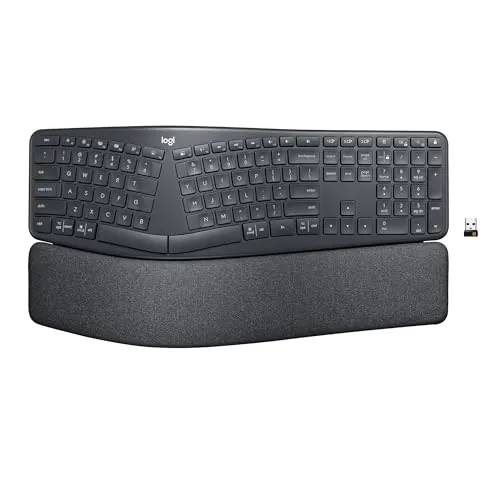
Logitech ERGO K860 vs Wave Keys: Layout, Receiver, and Desk Fit
The Graphite Logitech ERGO K860 (920-009166) and Wave Keys (920-011898) both include an integrated palm-rest area, Bluetooth, three-device switching, and two AAA batteries. The K860 has a curved split keyframe, adjustable palm lift, and a Unifying receiver path; Wave Keys has a compact wave-shaped layout and an included Logi Bolt receiver. The receiver families do not pair with one another, so match the keyboard to the receiver already used by your computer or use Bluetooth where supported. This is a layout and setup comparison, not a medical or measured comfort result.
Read comparison