
Products compared
Logitech
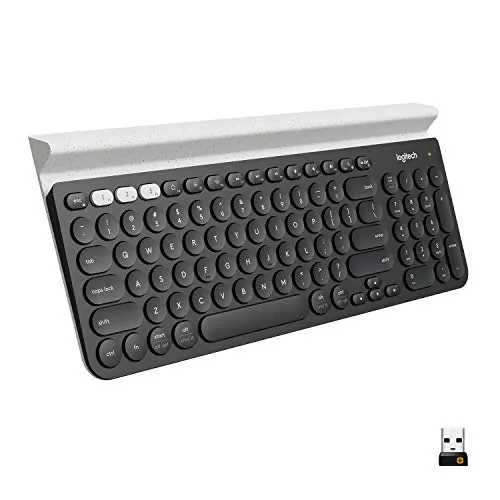
Logitech K780 Multi-Device Wireless Keyboard
Logitech's U.S. product listing for K780 model 920-008025. Choose it when a Unifying receiver path or its integrated phone/tablet cradle matches your workspace; it has no key backlighting.
Model 920-008025
Amazon ASIN B01LZTBKBG
Logitech
Logitech Alto Keys K98M Wireless Mechanical Keyboard, Graphite
Graphite U.S. K98M 920-013575. Logitech describes a 98-key mechanical layout, white backlighting and linear Marble switches.
Model 920-013575
Amazon ASIN B0FMD1DGS8
Differences that matter
What matters most to you?
Choose a priority to see what it changes.
Sources for Receiver family and host connection
Sources for Phone or tablet placement at the keyboard
Sources for OS layout and shortcut setup
Start with the receiver already on your desk
Look for the Unifying or Bolt mark on your current USB receiver before treating it as reusable. Logitech documents K780 with Unifying 2.4 GHz or Bluetooth Smart; K98M uses Logi Bolt or Bluetooth Low Energy. Logitech's compatibility FAQ explicitly rules out cross-pairing between Bolt devices and Unifying receivers. If you cannot identify the receiver, use the compatible Bluetooth route only after checking that the host supports it, or plan a separate correct receiver. The brand name alone is not enough to decide.
If you need a receiver, inspect the exact Amazon offer for K780 model 920-008025 and confirm whether the Unifying receiver is included. This comparison does not verify the package contents for the seller's offer.
Decide whether key lighting is a requirement
For the exact Graphite K98M, Logitech's U.S. page lists white backlighting. The K780 technical specification says backlighting is not available. That makes lighting a concrete model difference, but not proof that one keyboard is easier or faster to type on. If lighting is non-negotiable, K98M is the fit in this pair provided its receiver or Bluetooth route also works with your host. If receiver continuity matters more and an unlit keyboard is acceptable, K780 fits the Unifying path.
Check where a phone or tablet will sit
K780's U.S. page documents an integrated rubber cradle for a phone or tablet, with support described up to a 12-inch iPad, and a built-in number pad. The K98M U.S. page describes its Graphite model as a 98-key mechanical keyboard with white lighting. If you need a raised second screen with K98M, plan desk space for a separate stand because this comparison does not confirm a built-in cradle. Measure your actual device and desk placement rather than assuming a fit.
Match the operating-system layout before setting shortcuts
Logitech's K780 U.S. page lists Windows, ChromeOS, macOS, Android, iOS and iPadOS, and says the keyboard maps keys and shortcuts to the preferred operating system. The K98M setup guide describes Windows and macOS layouts, including a layout-selection step after Bolt connection, and notes corresponding compatibility for iOS/iPadOS and Linux/Android layout legends. Check the instructions for the exact connection path and host you intend to use; these statements do not guarantee every custom action or shortcut on every platform.
Product details
Logitech K780 Multi-Device Wireless Keyboard
Logitech Alto Keys K98M Wireless Mechanical Keyboard, Graphite
- Wireless routes
- Logi Bolt USB receiver or Bluetooth Low Energy; Logitech states these receiver families cannot pair with Unifying receivers Source
- Lighting and layout
- White backlighting and a 98-key layout; official U.S. product page specifies a hot-swappable linear Marble switch Source
Before you buy
Community discussions
Choosing a receiver for a replacement keyboard
Logitech K780 Multi-Device Wireless Keyboard
A K780 owner looking for a replacement says they would prefer a keyboard using the Bolt receiver already used by their mouse, while remaining open to other wireless receiver options. The post does not test the K780 with Bolt.
What to check
If you already use a Bolt receiver, check whether the exact keyboard you choose supports that receiver or Bluetooth on your host. This thread records one person's preference and does not establish cross-pairing compatibility.
Using a Galaxy Tab Ultra in the built-in cradle
Logitech K780 Multi-Device Wireless Keyboard
A Galaxy Tab Ultra owner says they use the K780's built-in stand but are concerned about the hard plastic edge contacting the glass. They ask about a separate riser; they do not report screen damage.
What to check
If the K780 cradle is a deciding feature, check the fit and contact points of your own tablet and case. For a keyboard without a confirmed attached stand, leave desk space for a separate riser if needed.
Common questions
Can I use my Logitech Unifying receiver with the K98M?
No. Logitech states that Bolt devices are not compatible with Unifying receivers and Unifying devices are not compatible with Bolt receivers. For K98M, use compatible Bluetooth Low Energy or a separate compatible Bolt connection; verify host support and the selected package before buying.Logitech Support: Are Logi Bolt devices compatible with Unifying USB receivers?Logitech Support: Getting Started with Alto Keys K98M
Which one has illuminated keys?
The exact Graphite K98M U.S. page lists white backlighting. K780's official technical specification lists backlighting as not available.Logitech Alto Keys K98M, U.S. product page, Graphite 920-013575Logitech K780 technical specifications
Does the K780 hold a tablet, and will the K98M do the same?
Logitech describes an integrated rubber K780 cradle for phones and tablets, including up to a 12-inch iPad. The reviewed K98M product page documents a 98-key layout but does not establish an attached cradle, so plan a separate stand if you choose K98M and need that placement.Logitech K780 Multi-Device Wireless Keyboard, U.S. product pageLogitech Alto Keys K98M, U.S. product page, Graphite 920-013575
Are the K780 and K98M typing feel or noise compared here?
No. The guide compares documented layout, connection and lighting choices; it does not report a hands-on typing, sound, comfort, latency or battery test. The K98M's official page names its linear Marble switch, but that specification is not a comparative result. Logitech Alto Keys K98M, U.S. product page, Graphite 920-013575Logitech K780 Multi-Device Wireless Keyboard, U.S. product page
Sources and scope
This is a manufacturer-document comparison, not a hands-on typing, sound, comfort, latency or battery test. Logitech documents K780 with Unifying or Bluetooth Smart and K98M with Logi Bolt or Bluetooth Low Energy; its support FAQ says Bolt and Unifying receivers are incompatible in both directions. Compatibility of an exact computer, tablet, receiver package, or other Logitech peripheral is not inferred. The exact receiver included in the selected U.S. Amazon offer is not established here; check that offer before buying if a dongle is required. K98M listing data marketing fields are quarantined, so only the exact official product and support documentation is used.
- Logitech K780 Multi-Device Wireless Keyboard, U.S. product page
- Logitech K780 technical specifications
- Logitech Alto Keys K98M, U.S. product page, Graphite 920-013575
- Logitech Support: Getting Started with Alto Keys K98M
- Logitech Support: Are Logi Bolt devices compatible with Unifying USB receivers?
Related comparisons

Logitech MX Keys S vs K780: Desk Footprint, Receiver and Phone Cradle
This U.S. comparison covers the Graphite Logitech MX Keys S (920-011558) and Speckled White Logitech K780 (920-008025). MX Keys S is 430.20 mm wide and 131.63 mm deep, uses Bluetooth or a Logi Bolt USB receiver, and its rechargeable battery can charge over USB-C while you continue typing. K780 is 380 mm wide and 153 mm deep, uses Bluetooth or Logitech's Unifying receiver, and its built-in cradle holds phones through a 12-inch iPad class; Logitech lists a maximum device thickness of 11.3 mm. K780 uses two replaceable AAA cells and has no backlight. The practical choice is whether your desk and phone/tablet routine benefit more from an integrated cradle or from illumination and rechargeable upkeep—not a typing-quality verdict.
Read comparison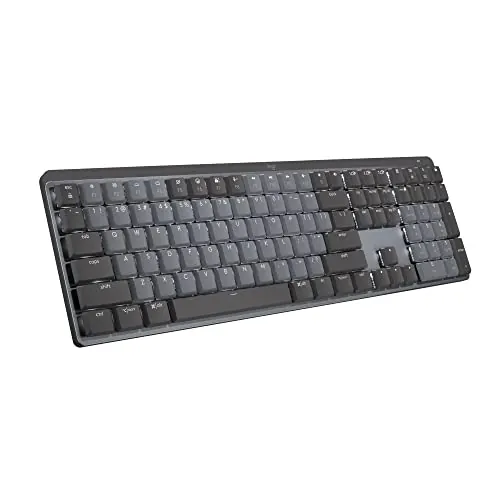
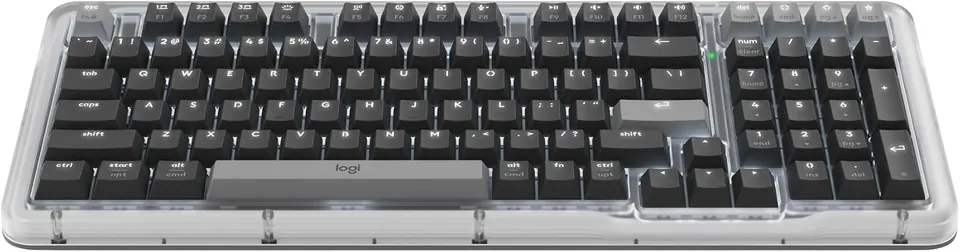
Logitech MX Mechanical vs Alto Keys K98M: Full-Size or 98-Key, Fixed or Swappable?
The MX Mechanical is Logitech’s full-size, low-profile board with an integrated numpad; model 920-010547 uses Tactile Quiet switches. The Alto Keys K98M has a 98-key layout and a hot-swappable linear Marble switch. Pick the MX if you want its full-size layout and to choose among Logitech’s switch styles when ordering; pick the K98M if a 98-key arrangement or the documented switch-replacement path matters more. Neither source set establishes a typing or sound winner.
Read comparison