
Products compared
Logitech
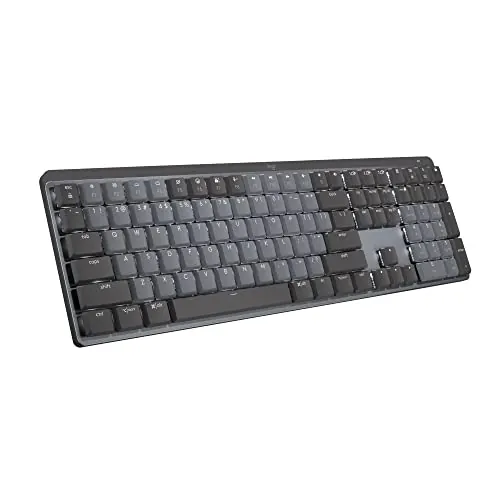
Logitech MX Mechanical Wireless Illuminated Keyboard, Graphite, Tactile Quiet
Graphite full-size low-profile mechanical keyboard with integrated numpad; this comparison follows the cataloged Tactile Quiet variant.
Model MX Mechanical / 920-010547
Amazon ASIN B09LK1P1RD
Logitech
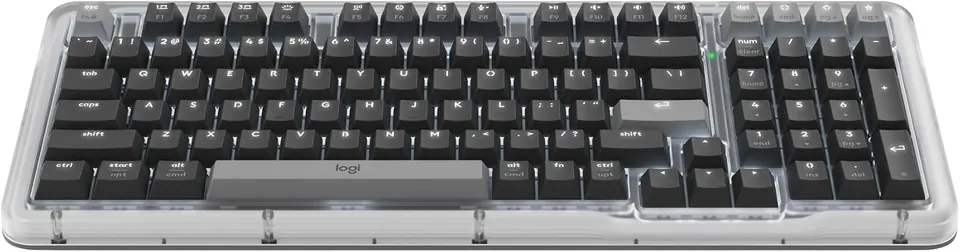
Logitech Alto Keys K98M Wireless Mechanical Keyboard, Graphite
Graphite wireless keyboard with a 98-key layout, white backlighting, customizable Action Keys, and a hot-swappable linear Marble switch.
Model Alto Keys K98M / 920-013575
Amazon ASIN B0FMD1DGS8
Differences that matter
What matters most to you?
Choose a priority to see what it changes.
Sources for Switch choice at checkout versus after purchase
Sources for Wireless setup and included receiver
Sources for Shortcut customization
Start with the layout you will use all day
The MX Mechanical is the full-size option with an integrated numpad. K98M uses a 98-key layout, and the exact-pair RTINGS table classifies it as compact (96%) while it classifies MX Mechanical as full-size (100%). That gives you a useful key-arrangement comparison, but not a desk-fit calculation: the categories do not state the actual width gap. If your work surface is tight, check the dimensions for both exact variants and measure the available space before deciding.
For regular number entry, the MX’s full-size integrated-numpad layout is the more direct feature fit. If you want the K98M’s 98-key arrangement, choose it for that layout itself rather than assuming it is a specific number of inches narrower.
Decide whether the switch is a purchase-time choice or a later project
The MX Mechanical model in this comparison is the Graphite Tactile Quiet version; Logitech lists Clicky and Linear styles as other MX Mechanical configurations. RTINGS marks MX Mechanical as not hot-swappable. If switch feel matters, check that the retailer still has Tactile Quiet selected rather than relying on a product-family title or photo.
Logitech describes the K98M’s installed switch as a hot-swappable linear Marble Switch. That answers whether the board is designed for switch replacement, but not which third-party replacements fit. If post-purchase switch changes are the deciding feature, confirm a replacement part against model-specific compatibility information before spending on extra switches. No typing feel, loudness, or switch-life ranking is inferred here.
Match the connection and shortcut setup to your computer
MX Mechanical’s support specification explicitly lists Logi Bolt and Bluetooth Low Energy, plus a Logi Bolt receiver and USB-C-to-A charging cable in the box. Logitech describes Easy-Switch across up to three paired devices. Its setup guide says to pair over Bluetooth or use the receiver, then press the channel key to switch devices. If your desktop has no Bluetooth or you routinely move between computers, this documentation makes the MX setup concrete.
The exact US K98M product page describes a wireless keyboard and says its Action Keys can be customized with Logi Options+, but the text reviewed here does not list the exact bundle contents or connection route. Check the seller’s 920-013575 listing if a Bolt receiver, Bluetooth pairing, cable, or a multi-device switching detail is essential. Do not substitute package information for K98M Plus or Basekit editions.
Check the shortcut layer before treating the app as a requirement
For K98M, Logitech describes dedicated Action Keys that can be customized in Logi Options+. For MX Mechanical, Logitech lists Fn-key changes, app-specific profiles, Smart Actions shortcuts and backlighting effects in the same software. Think through the shortcut you would actually assign—such as a one-press work action—then check that the correct operating system and app setup support the workflow you want.
The product pages describe customization features, not measured typing or productivity gains. If you do not plan to configure shortcuts, compare the physical key layout and switch plan first; if you do, choose the model whose documented controls match the action you want to assign.
Product details
Logitech MX Mechanical Wireless Illuminated Keyboard, Graphite, Tactile Quiet
- Layout and switch options
- Full-size layout with integrated numpad. Logitech lists Tactile Quiet, Clicky and Linear switch styles; model 920-010547 is Graphite Tactile Quiet. Source
- Wireless setup
- Logi Bolt receiver and Bluetooth Low Energy; Logitech’s specification lists a Logi Bolt receiver and 1 m USB-C-to-A charging cable in the box. Source
Logitech Alto Keys K98M Wireless Mechanical Keyboard, Graphite
- Layout and installed switch
- 98-key layout with a hot-swappable linear Marble Switch. Logitech does not enumerate compatible replacement switch models on the product page. Source
- Custom keys and lighting
- White backlighting; Action Keys can be customized with the Logi Options+ app. Source
Before you buy
Community discussions
Trying the sound and feel of Tactile Quiet keys
Logitech MX Mechanical Wireless Illuminated Keyboard, Graphite, Tactile Quiet
A commenter who uses a Tactile Quiet MX Mechanical with a number pad found it more audible than their previous MX Keys and preferred its tactile feel.
What to check
Try each switch at the desk and note how the key feels and sounds. Check which switch option you can buy or replace on each model.
Trying a smaller layout before giving up dedicated keys
Logitech MX Mechanical Wireless Illuminated Keyboard, Graphite, Tactile Quiet
A newcomer comparing keyboards for a laptop asked about compact models. A commenter who owned the full-size and Mini MX Mechanical described preferring Logitech’s Tactile Quiet switch feel for their typing.
What to check
Check which dedicated keys differ between the full-size and 98-key boards. Try the key positions you use most before deciding whether the saved desk space matters.
Common questions
Can I replace switches on either keyboard?
Logitech calls the K98M’s installed linear Marble Switch hot-swappable, and RTINGS lists K98M as hot-swappable and MX Mechanical as not. The Logitech K98M product page does not identify every compatible replacement switch, so verify fit before buying spares.Alto Keys K98M Wireless Keyboard with Gasket Structure (920-013575 Graphite)Logitech MX Mechanical vs Alto Keys K98M: Which Keyboard Is Better?
Does the K98M take up less desk width?
It has a 98-key layout and RTINGS classifies it as compact (96%) versus full-size (100%) for MX Mechanical. Those labels do not establish a measured width difference. Check current dimensions for the exact variants and measure your available space.MX Mechanical Wireless Keyboard (920-010547 Graphite)Alto Keys K98M Wireless Keyboard with Gasket Structure (920-013575 Graphite)Logitech MX Mechanical vs Alto Keys K98M: Which Keyboard Is Better?
What connection accessories are included?
Logitech’s MX Mechanical specification lists a Logi Bolt receiver and a 1 m USB-C-to-A charging cable in the box. The exact K98M product-page text reviewed here confirms wireless use but does not list package contents, so verify the seller’s exact 920-013575 bundle before ordering if a receiver or cable matters.Specification - MX MechanicalAlto Keys K98M Wireless Keyboard with Gasket Structure (920-013575 Graphite)
Sources and scope
The layout labels are not matched footprint measurements. Logitech identifies the K98M’s installed linear Marble switch as hot-swappable but does not list every replacement switch that will fit. No controlled typing, sound, comfort, or durability winner is claimed. Confirm exact color, switch configuration, receiver and included accessories on the listing before checkout.
Related comparisons

Logitech MX Keys S vs MX Mechanical: Scissor or Tactile Quiet?
The Graphite MX Keys S uses scissor keys; the assigned full-size MX Mechanical is the Tactile Quiet low-profile mechanical version. Logitech lists 1.8 mm total travel for MX Keys S and 3.2 mm for MX Mechanical. Both support lighting, Bluetooth LE or a Logi Bolt receiver, and switching among up to three devices. Choose by a typing style you already know you want; these specifications do not establish typing speed, comfort or sound superiority.
Read comparison
Logitech Wave Keys vs MX Mechanical: Layout, Receiver, and Charging
The Graphite Logitech Wave Keys (920-011898) uses a compact wave-shaped plunger layout with a cushioned palm rest and two replaceable AAA batteries. The Graphite MX Mechanical Tactile Quiet (920-010547) is a wider, full-size low-profile mechanical keyboard with a numpad, a rechargeable battery, white smart backlighting, and a USB-C charging cable. Logitech lists a Logi Bolt USB receiver and Bluetooth for both. Pick by the layout and maintenance routine you actually want; the manufacturer battery estimates use different test conditions and do not prove one lasts longer in comparable use.
Read comparison