
Products compared
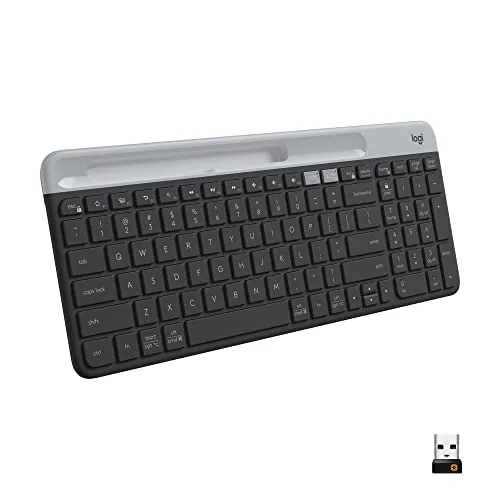
Logitech
Logitech K585 Slim Multi-Device Wireless Keyboard (Graphite)
U.S. Graphite K585 configuration; two-device Easy-Switch keyboard with Bluetooth and a supplied 2.4 GHz USB receiver.
Model 920-011479
Amazon ASIN B0BL2ND2GC
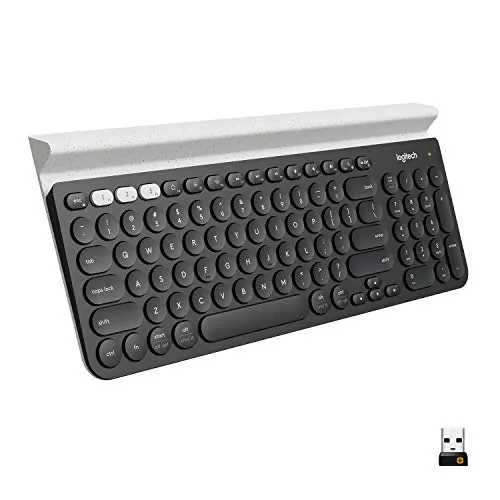
Logitech
Logitech K780 Multi-Device Wireless Keyboard
U.S. K780 configuration in Dark Grey/Speckled White; three-device Easy-Switch keyboard with a number pad and integrated device cradle.
Model 920-008025
Amazon ASIN B01LZTBKBG
Differences that matter
Sources for How many devices stay paired
Sources for Phone or tablet cradle
Sources for Number pad and host support
Start by counting the devices you switch between
The clearest difference is the number of saved device channels: Logitech documents two for the K585 and up to three for the K780. Count the desktop or laptop, phone and tablet you actually intend to switch among. A computer connected through a USB receiver still uses one of the K585's two channels; the receiver does not add another slot.
Both product pages list a number pad, so you do not need to choose the K780 just to get one. If your normal setup uses two hosts, compare the cradle and exact connection route next. If you routinely switch among three, the K780 has the documented third channel.
Map the receiver and Bluetooth route before ordering
For K585, Logitech's setup article says the included receiver is pre-paired to channel 1. Pair the other device through the remaining channel using the documented Easy-Switch steps. Check that the receiver's USB connection suits your computer, or plan on Bluetooth if the host supports it.
The K780 guide describes Bluetooth and an included pre-paired Unifying receiver, while its product page documents up to three devices. Write down which host will use which route and follow Logitech's current instructions for that combination. The cited pages do not justify assuming every possible receiver-and-Bluetooth arrangement will work on every host or OS.
Check the cradle against your actual device and case
Logitech describes the K585's built-in cradle as a phone holder. The K780 page describes its integrated cradle for a phone or tablet up to 12 inches. If you want to park a tablet, that written scope makes the K780 the clearer candidate, but it does not guarantee that a particular model or thick case will fit.
Measure the device with the case attached and check the exact current product details. If the cradle is optional to your workflow, channel count and host connection may be the more useful deciding points.
Match the exact U.S. model and operating system
This comparison follows K585 Graphite 920-011479 first and K780 920-008025 second. Confirm these model numbers and finishes in the retailer listing because nearby bundles or regional versions may differ.
Logitech's K780 product page lists Windows, ChromeOS, macOS, Android and iOS/iPadOS. For the K585, verify the current compatibility information for your exact OS and whether you intend to use Bluetooth or the receiver. Software and platform requirements can change, so use Logitech's current support pages before treating a feature as essential.
Product details
Logitech K585 Slim Multi-Device Wireless Keyboard (Graphite)
- Paired-device channels
- Up to two devices total; the included USB receiver is pre-paired to channel 1. Source
- Connection choices
- Bluetooth or the included 2.4 GHz USB receiver; the receiver is stored in the battery compartment. Source
- Cradle and number pad
- Logitech describes a compact keyboard with a number pad and a built-in phone cradle. Source
Logitech K780 Multi-Device Wireless Keyboard
- Paired-device channels
- Logitech documents Easy-Switch for up to three connected devices. Source
- Connection choices
- Bluetooth or the included pre-paired Unifying USB receiver; verify the host and current setup instructions for the connection you plan to use. Source
- Cradle and supported systems
- The product page describes an integrated cradle for a phone or tablet up to 12 inches and lists Windows, ChromeOS, macOS, Android, and iOS/iPadOS. Source
Before you buy
Community discussions
A K780 owner considers the K585 as a replacement
Logitech K780 Multi-Device Wireless Keyboard
A K780 owner shopping for a replacement asks about the K585, noting that both are non-mechanical multi-device keyboards with a number pad. The post is a purchase question, not a comparative test.
What to check
Since both models have number pads, compare how many hosts you need to keep paired and whether the two cradle layouts fit your phone or tablet. The thread does not report an outcome between these models.
Using a Galaxy Tab Ultra in the built-in cradle
Logitech K780 Multi-Device Wireless Keyboard
A Galaxy Tab Ultra owner says they use the K780's built-in stand but are concerned about the hard plastic edge contacting the glass. They ask about a separate riser; they do not report screen damage.
What to check
Check your tablet and case against the cradle of the keyboard you choose, including the resting point and viewing angle. The concern in this post is a personal fit check, not a claim that either model damages a screen.
Common questions
Does the K585 USB receiver create a third device slot?
No. Logitech's K585 instructions state that the included receiver is pre-paired to channel 1 and the K580/K585 supports up to two devices total. The receiver is one connection route, not an additional channel.Pair your K580/K585 to a second device with Easy-Switch
Which keyboard can keep three devices paired?
Logitech documents up to three connected devices for the K780; its K780 guide describes Bluetooth and the included pre-paired Unifying receiver. Logitech documents two total channels for the K585.K780 Multi-Device Wireless Keyboard, U.S. product pageLogitech K780 Wireless Multi-Device Keyboard setup guidePair your K580/K585 to a second device with Easy-Switch
Will a tablet fit in either cradle with its case on?
The cited pages describe the K585 cradle for a phone and the K780 cradle for a phone or tablet up to 12 inches. They do not specify a fit guarantee for every device thickness or case, so check the exact dimensions of your device and case against the current product information.K585 Slim Multi-Device Wireless Keyboard, U.S. Graphite product pageK780 Multi-Device Wireless Keyboard, U.S. product page
Sources and scope
This guide compares the U.S. Logitech K585 Graphite, model 920-011479 (ASIN B0BL2ND2GC), with the K780, model 920-008025 (ASIN B01LZTBKBG). It uses Logitech product, support and setup documentation, not hands-on testing. Logitech specifies two device channels for the K585 and up to three for the K780. Cradle descriptions do not establish fit for every device or protective case; measure your device and case against the exact keyboard before buying. Check current host requirements and the exact package if you plan to use a USB receiver.
Related comparisons

Logitech MX Keys S vs K780: Desk Footprint, Receiver and Phone Cradle
This U.S. comparison covers the Graphite Logitech MX Keys S (920-011558) and Speckled White Logitech K780 (920-008025). MX Keys S is 430.20 mm wide and 131.63 mm deep, uses Bluetooth or a Logi Bolt USB receiver, and its rechargeable battery can charge over USB-C while you continue typing. K780 is 380 mm wide and 153 mm deep, uses Bluetooth or Logitech's Unifying receiver, and its built-in cradle holds phones through a 12-inch iPad class; Logitech lists a maximum device thickness of 11.3 mm. K780 uses two replaceable AAA cells and has no backlight. The practical choice is whether your desk and phone/tablet routine benefit more from an integrated cradle or from illumination and rechargeable upkeep—not a typing-quality verdict.
Read comparisonLogitech K585 vs MX Keys S: Phone Cradle, Device Switching, and Charging
Both are Graphite wireless keyboards with Bluetooth and a Logitech USB receiver, but the documented workflows differ: K585 combines a compact number-pad layout, phone cradle, two device channels, and replaceable AAA batteries; MX Keys S supports up to three paired computers, adaptive backlighting, and USB-C charging. Confirm the exact part number and the receiver your computer can use.
Read comparison