
Products compared
Logitech
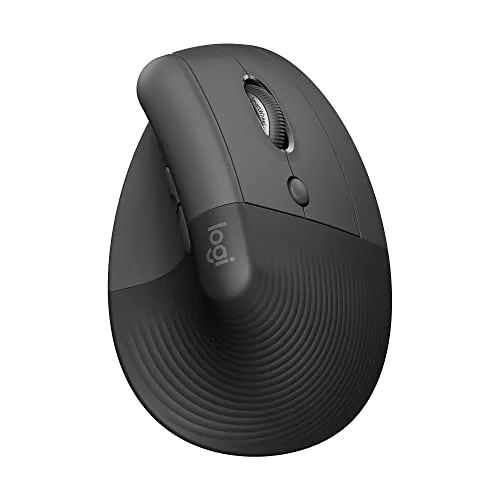
Logitech Lift Vertical Ergonomic Mouse
US Graphite right-handed Lift; 57-degree vertical mouse shape.
Model Lift Graphite, right-handed (910-006466)
Amazon ASIN B09J1TB35S
Logitech
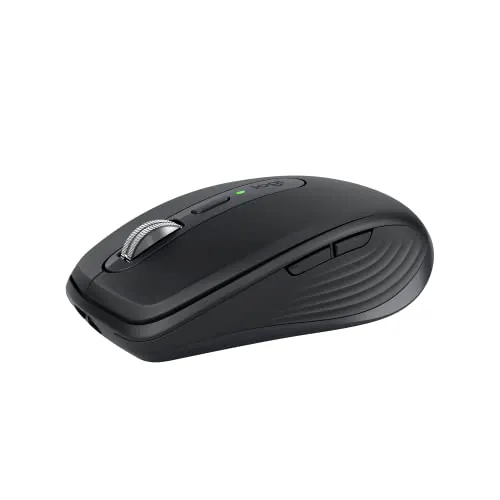
Logitech MX Anywhere 3S Compact Wireless Mouse
Standard US Graphite MX Anywhere 3S, not the separate MX Anywhere 3S for Mac edition.
Model MX Anywhere 3S Graphite (910-006925)
Amazon ASIN B0BPY4ZQXG
Differences that matter
What matters most to you?
Choose a priority to see what it changes.
Sources for Manufacturer-listed body size and weight
Sources for Pointing shape and hand movement
Sources for Host channels and channel-button location
Sources for Receiver contents and USB setup
Sources for Power and cable routine
Treat the two bodies differently when planning desk and bag space
Lift is the tall option: Logitech specifies a 57-degree upright form and lists its body at 108 × 70 × 71 mm. MX Anywhere 3S is listed at 34.4 × 65 × 100.5 mm and 95 g with its battery. If this mouse has to fit a particular sleeve, drawer, or narrow laptop tray, compare those measurements with the opening and space you actually have.
The size difference describes storage and setup geometry. It does not say which shape will feel better in your hand, nor does it guarantee that a mouse will fit a given case.
The receiver bundle is a real setup difference
Both models support Bluetooth Low Energy and can use Logi Bolt, and both can save up to three device channels. The Lift's Easy-Switch button is under the mouse and its Logitech setup page shows the Bolt receiver stored under the battery door. Logitech's standard consumer MX Anywhere 3S page says its Bolt receiver is not included; its Easy-Switch button is also underneath.
If you rely on a receiver for a work computer, decide whether Bluetooth is available and whether you want to buy a receiver separately. Check your USB ports too: the Bolt receiver is USB-A, while the MX Anywhere 3S's included charging cable is USB-A-to-USB-C.
Pick the battery routine, not a claimed runtime winner
Lift takes one replaceable AA, and its setup guide shows the Logi Bolt receiver stored behind the battery door. MX Anywhere 3S recharges over USB-C; the standard model includes a USB-A-to-USB-C cable and Logitech says it can charge while you work. Choose based on whether you prefer carrying a spare battery or keeping a rechargeable device on your charging routine.
Manufacturer maximum battery-life figures are not comparable real-world results. This guide does not rank battery endurance or lifetime cost.
Check the on-mouse controls you will use most
Lift gives you a SmartWheel in the tall vertical body and an underside device selector. MX Anywhere 3S uses a MagSpeed wheel with a mode-shift button, side Back/Forward buttons, and an underside Easy-Switch control. Logitech describes customization through Logi Options+; the underlying scroll and button controls are the practical difference here, not a comparative speed or accuracy result.
For either mouse, count your paired computers before first setup. A channel switch is an underside action on both, so neither has a top-mounted quick selector in this pair.
Product details
Logitech Lift Vertical Ergonomic Mouse
Logitech MX Anywhere 3S Compact Wireless Mouse
- Body dimensions and listed weight
- 34.4 × 65 × 100.5 mm; 95 g with battery Source
- Saved devices and connections
- Up to 3 channels; Bluetooth Low Energy or compatible Logi Bolt receiver, sold separately; underside channel button Source
- Power and included cable
- Rechargeable USB-C battery; included cable is USB-A to USB-C and can charge while you work Source
Before you buy
Community discussions
One owner adjusts to the 3S’s compact size while moving between classes
Logitech MX Anywhere 3S Compact Wireless Mouse
An owner with comparatively small hands describes the MX Anywhere 3S as smaller than expected at first, then says they adjusted to it over several days. They use it while moving between classes. This is one person’s experience, not a personal-fit guarantee or a direct Lift test.
What to check
Compare the listed body size with a mouse you already use and consider where you will carry it. If grip fit matters, try both shapes in person when possible.
Common questions
Does MX Anywhere 3S come with a Logi Bolt receiver?
No. Logitech's standard Graphite MX Anywhere 3S product page says the receiver is not included, though the mouse is compatible with Logi Bolt. Lift's setup guide shows its receiver stored under the battery door.MX Anywhere 3S, Graphite, part 910-006925Getting Started - LIFT Vertical Ergonomic MouseSpecification - LIFT Vertical Ergonomic Mouse
Can both mice switch between three devices?
Yes. Logitech documents up to three channels for Lift and MX Anywhere 3S. Both use an underside Easy-Switch button; either can pair through Bluetooth, and Bolt connection requires the receiver path.Getting Started - LIFT Vertical Ergonomic MouseGetting Started - MX Anywhere 3S
Which listed body is lower for a laptop sleeve?
Logitech lists MX Anywhere 3S at 34.4 mm high and Lift at 108 mm high. Compare those body measurements with your actual sleeve opening; they do not account for a case's padding or fit tolerance.Specification - MX Anywhere 3SSpecification - LIFT Vertical Ergonomic Mouse
What charging cable is included with MX Anywhere 3S?
The standard MX Anywhere 3S specification lists a USB-A-to-USB-C charging cable. Logitech separately specifies USB-C-to-USB-C for the Mac edition. The cable supports charging; this guide does not treat it as wired mouse-data operation.Specification - MX Anywhere 3S
Sources and scope
This guide covers the US Graphite right-handed Lift 910-006466 and standard Graphite MX Anywhere 3S 910-006925. It does not cover Lift Left, Lift for Business, or MX Anywhere 3S for Mac. Dimensions are manufacturer-listed body measurements for carrying and desk planning; they do not guarantee fit in a particular pouch or workspace. No comfort, symptom, tracking-performance, battery-runtime, durability, or travel-test ranking is claimed.
Related comparisons

Logitech Lift vs MX Vertical: Hand Fit, Receiver and Charging
These are both right-handed Logitech vertical mice, but Logitech positions them for different hand-size ranges. Lift uses one AA battery and a Logi Bolt receiver; MX Vertical recharges over USB-C, can stay connected by cable while charging, and uses a Unifying receiver. Bluetooth is available on both.
Read comparison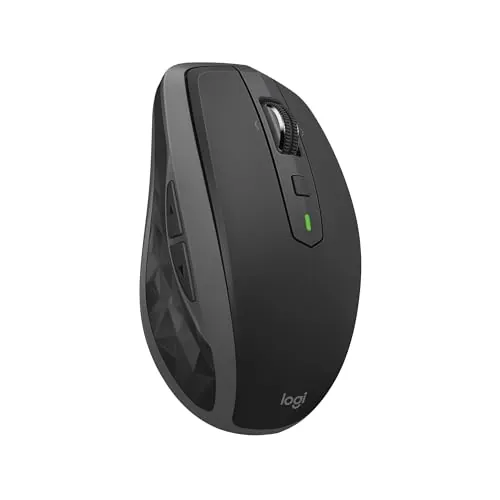
Logitech MX Anywhere 3S vs MX Anywhere 2S Bluetooth Edition: Receivers, USB-C and OS Fit
This comparison is for the assigned graphite SKUs: MX Anywhere 3S 910-006925 / ASIN B0BPY4ZQXG and MX Anywhere 2S Bluetooth Edition 910-007232 / ASIN B0CJXQVMHL. Both pair with up to three computers and support Bluetooth. The 3S can also use a Logi Bolt receiver, which Logitech says is not included; it cannot use a Unifying receiver. The 2S model family lists both Bluetooth and Unifying, but the assigned Bluetooth Edition listing says no USB receiver is included. Charging also differs: USB-C on the 3S, Micro-USB on the 2S. Decide by the receiver you own, the port and cable you want, and whether your computer can use Logitech's customization app.
Read comparison