
Products compared
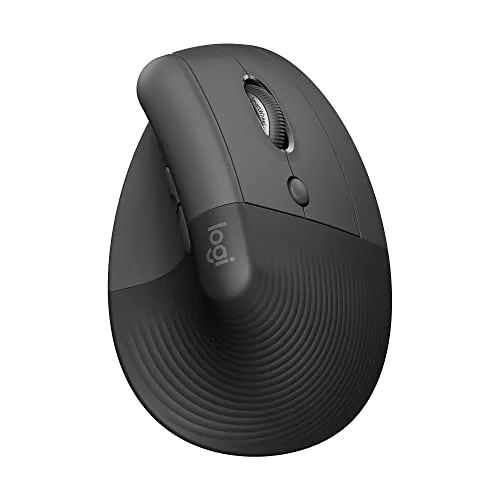
Logitech
Logitech Lift Vertical Ergonomic Mouse
Graphite U.S. offer; Logitech's product page identifies the graphite Lift variant and product specification lists mouse M/N MR0094.
Model 910-006466
Amazon ASIN B09J1TB35S
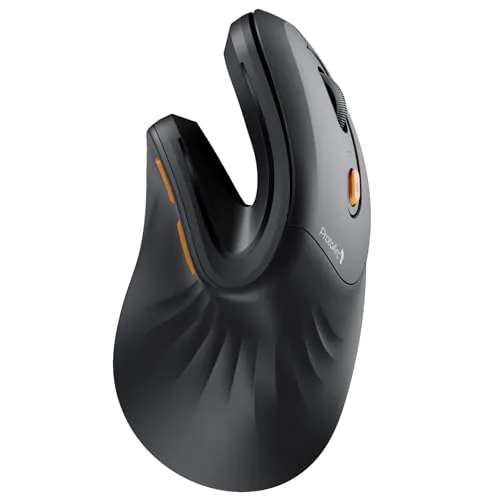
ProtoArc
ProtoArc EM11 NL Wireless Vertical Mouse
Black U.S. model; the manufacturer page selects Black and identifies the EM11 NL, not the RGB EM11 variant.
Model EM11 NL
Amazon ASIN B0CX18LHWS
Differences that matter
What matters most to you?
Choose a priority to see what it changes.
Sources for Hand-size guidance and shape check
Sources for Connection paths and device switching
Sources for Side-button behavior and software dependency
Sources for Battery replacement versus charging
Start with the device and port setup
The Lift gives you two routes: Bluetooth Low Energy or the included Logi Bolt USB receiver. Logitech documents up to three device channels, with a button on the bottom for Easy-Switch. The exact support specification lists the included receiver, so a buyer who wants a dongle connection should still confirm a free USB-A port on each intended host or use Bluetooth where available.
The black EM11 NL also advertises three-device switching, through two Bluetooth pairings and a 2.4 GHz USB receiver. Its product page lists a receiver in the box and specifies Bluetooth Low Energy and an available USB port as the respective host requirements. Do not assume that a receiver supplied with one mouse will connect the other; use the connection path documented for the exact product.
Check side-button behavior before choosing for a Mac
Both products have side navigation buttons, but their software behavior is not the same. Logitech's Lift guide says its Back/Forward buttons can be assigned other actions through Logitech software. That makes Lift the better-supported direction when a buyer explicitly wants to remap those buttons, subject to the current software requirements and the computer's installation policy.
ProtoArc says the EM11 NL's buttons are not programmable and its Back/Forward functions are not compatible with Mac OS. Do not extend that statement to the entire mouse: ProtoArc separately lists macOS among its Bluetooth/receiver system requirements. If you use a Mac, decide whether you need the side-button navigation itself or only pointer and scroll input, then confirm the behavior you rely on.
Choose the power routine and treat sizing as a cue
Lift uses one replaceable AA; the exact-model support specification lists an AA and Logi Bolt receiver in its box contents. EM11 NL has a built-in 500 mAh rechargeable battery, and ProtoArc lists a USB-C cable with the U.S. black model. Its FAQ specifies an A-to-C cable and 5 V input and recommends a computer USB port. This is a practical distinction in upkeep, not evidence of one mouse lasting longer between charges.
For size, Logitech describes Lift for small-to-medium hands, while ProtoArc says EM11 NL is for hands under 7.5 inches. The reviewed pages do not supply a shared measurement procedure, and Logitech gives no numeric cutoff on its U.S. page. Use these as manufacturers' selection cues only. The spec pages also label their dimensions differently; they can help check physical clearance, but do not turn them into an ergonomic or personal-fit verdict.
Product details
Logitech Lift Vertical Ergonomic Mouse
The graphite 910-006466 offer is the right-handed Lift model represented by this comparison. Its exact-model support page identifies M/N MR0094; use the included receiver or Bluetooth, and treat Logitech's hand-size description as guidance rather than a fit promise.
- Wireless options and channels
- Bluetooth Low Energy or Logi Bolt USB receiver; manufacturer says it can connect to up to three devices and switch with the Easy-Switch button. Source
- Power and in-box receiver
- One user-replaceable AA battery; the reviewed specification lists a Logi Bolt USB receiver and one AA battery in the box. Source
- Maker's hand-size guidance
- Logitech describes Lift as a fit for small-to-medium hands on its U.S. product page; no numeric hand-length boundary is stated there. Source
ProtoArc EM11 NL Wireless Vertical Mouse
The assigned black EM11 NL is distinct from the RGB EM11. The manufacturer lists three connection channels and a built-in rechargeable battery. Its FAQ says the side Back/Forward buttons are not programmable and are not compatible with Mac OS; that caveat applies to those buttons, not to the mouse's Bluetooth pairing generally.
- Wireless options and device count
- Two Bluetooth channels plus a 2.4 GHz USB receiver are advertised for three-device switching; the maker lists USB receiver and Bluetooth Low Energy connection types. Source
- Power and U.S. black box contents
- Built-in 500 mAh rechargeable battery. The U.S. black model package list includes a USB-C charging cable and USB receiver; ProtoArc FAQ specifies an A-to-C charging cable and 5 V input. Source
- Maker's hand-size guidance
- ProtoArc describes the EM11 NL for hands under 7.5 inches, but the reviewed product page does not define the hand measurement method. This is not an individual fit guarantee. Source
Before you buy
Community discussions
An EM11 NL owner wants side buttons suited to their workflow
ProtoArc EM11 NL Wireless Vertical Mouse
A new EM11 NL owner likes how it feels in their smaller hand and asks about assigning actions to the side buttons.
What to check
List the shortcuts you want under your thumb. Check which assignments are documented for the mouse and operating system you would use.
Common questions
Do both mice switch among three devices?
Both makers describe three-device workflows, but the connection paths differ. Logitech Lift uses Bluetooth Low Energy or Logi Bolt and has an Easy-Switch button. ProtoArc EM11 NL lists two Bluetooth connections plus a USB receiver. Check that your hosts support the selected connection and that any receiver has a compatible USB port.Logitech Support: Getting Started - LIFT Vertical Ergonomic MouseProtoArc EM11 NL Vertical Mouse, Black U.S. product page
Will the EM11 NL Back and Forward buttons work on a Mac?
ProtoArc's FAQ says its EM11 NL Back/Forward buttons are not compatible with Mac OS and are not programmable. That limitation is specific to those side buttons; the FAQ does not say the mouse itself lacks Mac Bluetooth support.ProtoArc FAQ - EM11 NL / EM11
Can I remap buttons on both mice?
Logitech says Lift's Back/Forward buttons can be assigned other functions with Logitech software. ProtoArc says the EM11 NL buttons are not programmable. Check your organization's software-install policy and the current Logi Options+ operating-system requirements if remapping is important.Logitech Support: Getting Started - LIFT Vertical Ergonomic MouseProtoArc FAQ - EM11 NL / EM11Logi Options+ official product and download page
Which one is a better fit for my hand?
The reviewed product pages do not give a common hand-measurement method. Logitech calls Lift suitable for small-to-medium hands; ProtoArc says EM11 NL is for hands under 7.5 inches but does not define that measurement in the reviewed page. Those maker statements are not a guaranteed personal fit. Check both exact shapes or ask the manufacturers how to measure before choosing by hand size alone.Logitech Lift Vertical Ergonomic Mouse, Graphite U.S. product page (910-006466)ProtoArc EM11 NL Vertical Mouse, Black U.S. product page
Is the EM11 NL rechargeable by any USB-C cable?
ProtoArc lists a USB-C charging cable in the U.S. black-model package, but its FAQ says the mouse should be charged with a USB-A-to-USB-C cable at 5 V and recommends a computer USB port. Follow that instruction rather than assuming USB-C-to-USB-C support.ProtoArc EM11 NL Vertical Mouse, Black U.S. product pageProtoArc FAQ - EM11 NL / EM11
Sources and scope
The makers give different guidance for hand size. Logitech describes small-to-medium hands, and ProtoArc states under 7.5 inches without defining how to measure. Check the shape in person if fit matters.
- Logitech Lift Vertical Ergonomic Mouse, Graphite U.S. product page (910-006466)
- Logitech Support: Specification - LIFT Vertical Ergonomic Mouse
- Logitech Support: Getting Started - LIFT Vertical Ergonomic Mouse
- Logi Options+ official product and download page
- ProtoArc EM11 NL Vertical Mouse, Black U.S. product page
- ProtoArc FAQ - EM11 NL / EM11
Related comparisons

Logitech Lift vs MX Vertical: Hand Fit, Receiver and Charging
These are both right-handed Logitech vertical mice, but Logitech positions them for different hand-size ranges. Lift uses one AA battery and a Logi Bolt receiver; MX Vertical recharges over USB-C, can stay connected by cable while charging, and uses a Unifying receiver. Bluetooth is available on both.
Read comparison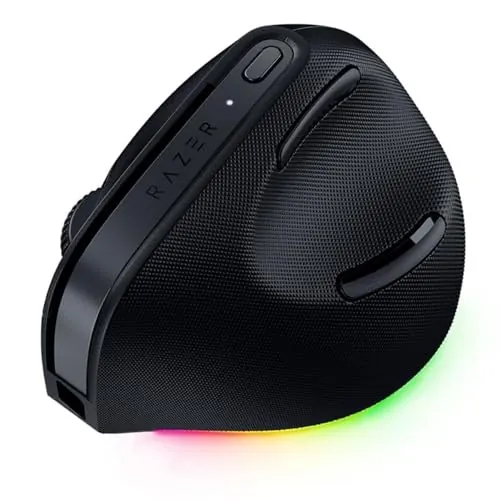
Razer Pro Click V2 Vertical Edition vs Logitech Lift: Fit, Connections and Power
The Razer Pro Click V2 Vertical Edition is a right-handed vertical mouse with USB-C wired, 2.4 GHz and Bluetooth modes; Logitech Lift Graphite is also a right-handed vertical mouse, with Logitech guidance for small-to-medium hands and Bolt or Bluetooth LE. Compare the shapes with a mouse you already handle comfortably, then check device switching, receiver needs and software support. Neither maker's specifications establish a comfort or health outcome.
Read comparison