
Products compared
Logitech
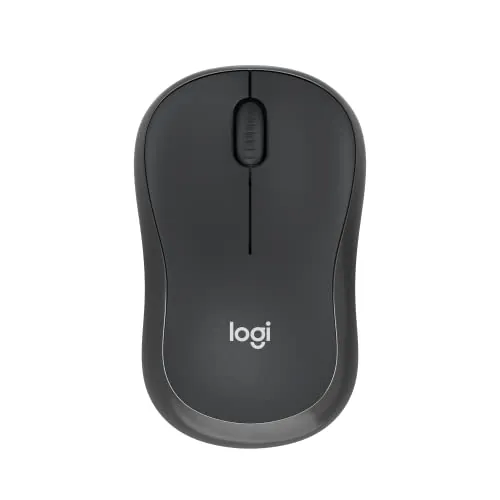
Logitech M240 Silent Bluetooth Mouse — Graphite
Compact, ambidextrous optical mouse. Move the whole mouse across a surface to move the pointer. Logitech lists Bluetooth Low Energy and Logi Bolt compatibility; the Bolt receiver is not included with the mouse.
Model 910-007113
Amazon ASIN B0BXNR9DB6
Logitech
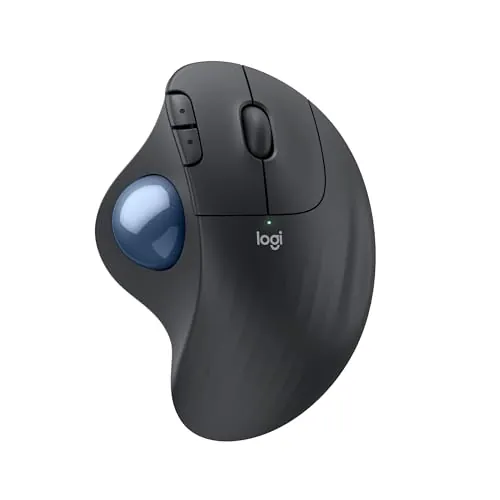
Logitech ERGO M575S Wireless Trackball — Graphite + Blue Ball
Thumb-operated trackball: the body stays on the desk while the thumb rotates the ball to move the pointer. This exact Graphite + Blue Ball listing includes a Logi Bolt receiver as well as Bluetooth support.
Model 910-007027
Amazon ASIN B0BBQ3ZYNY
Differences that matter
What matters most to you?
Choose a priority to see what it changes.
Sources for Body size and placement check
Sources for Navigation controls
Sources for Wireless connection and included receiver
What changes when you switch pointing styles
The central choice is how your hand moves the pointer. The graphite M240 is a conventional optical mouse: the body travels across a surface, and Logitech describes the shape as compact and suitable for either hand. The ERGO M575S keeps its body on the desk; the thumb rotates the trackball. Its no-sweep operation can be useful where the mouse body cannot travel freely, but the device still occupies a fixed place and the user still needs hand access.
Published measurements are starting points for comparing the bodies, not a promise of desk clearance or personal fit. Lay out the device at the intended workstation and include room for the hand and the M240's travel, if choosing that model.
Buttons, receiver and software checks
The M575S adds physical Back and Forward side buttons alongside left/right clicks and the scroll-wheel middle click; Logitech lists Back/Forward and middle click as customizable. The M240 has left/right and middle click, and its setup guide explicitly walks through changing the middle-button action in Options+. That support guide conflicts with a cached product-listing title that calls M240's three buttons non-customizable, so this guide follows the more specific manufacturer setup instructions and flags the listing data conflict for correction.
Both mice can use Bluetooth Low Energy. The M240 support specifications also list Logi Bolt compatibility but say a receiver is not included. Logitech lists a Bolt receiver in the M575S box and says USB-A is required for that connection. A USB-C-only host can instead use Bluetooth if it supports it. Options+ adds separate software requirements: check the current download and device-compatibility pages instead of assuming every mouse feature works on every platform.
A practical pre-buy check
First match the exact item: M240 Silent Graphite 910-007113 or ERGO M575S Graphite + Blue Ball 910-007027. Then check the host connection and the included items on the exact listing. Finally, clear a place at your desk and try the intended motion: slide the M240 through the range you use, or rest the M575S and confirm the thumb-operated ball and side controls are reachable. The maker sources establish the controls and kit, but cannot decide which shape will suit your hand.
Product details
Logitech M240 Silent Bluetooth Mouse — Graphite
- Manufacturer-listed dimensions
- 99 × 60 × 39 mm (H × W × D); 73.8 g with battery Source
- Controls
- Three listed mouse buttons: left click, right click and middle click. Logitech’s setup guide documents customizing the middle button in Options+. Source
- Wireless and box contents
- Bluetooth Low Energy; Logi Bolt compatibility (receiver not included); one AA battery is listed in the box. Source
Logitech ERGO M575S Wireless Trackball — Graphite + Blue Ball
- Manufacturer-listed dimensions
- 134 × 100 × 48 mm (H × W × D); 145 g Source
- Controls
- Five listed controls: left/right click, Back/Forward and scroll-wheel middle click; Back/Forward and middle click are listed as customizable. Source
- Wireless and box contents
- Bluetooth Low Energy or Logi Bolt receiver; one AA battery and a Logi Bolt receiver are listed in the box. Bolt use requires a USB-A port. Source
Before you buy
Community discussions
A user prefers standard buttons and the M240 shape
Logitech M240 Silent Bluetooth Mouse — Graphite
A user who tried the M240 and M330 says they prefer a fingertip grip, standard buttons, a small mouse and AA power, and personally favored the M330 shape.
What to check
If you want to avoid extra navigation buttons, compare the M575S Back/Forward controls with the simpler M240 layout. The post describes one person’s preferences; they did not report trying the M575S.
Common questions
Does the M240 include a USB receiver?
No receiver is listed in the M240 box contents. Logitech’s specifications list Bluetooth Low Energy and Logi Bolt compatibility, with the Logi Bolt receiver marked not included. The exact M240 can therefore be used over Bluetooth without occupying a USB port.Specification — M240
What changes when moving from an M240 to an ERGO M575S?
The M240 is a conventional optical mouse that you move across a surface. The M575S is a thumb-operated trackball whose body stays in place, and it adds dedicated Back/Forward side buttons. Logitech’s documentation does not establish that one pointing style is more comfortable or accurate for every user.M240 Silent Bluetooth Mouse — Graphite / US product pageERGO M575S Wireless Trackball — Graphite + Blue Ball / US product pageGetting Started — ERGO M575S
Can I use the M575S if my computer has no USB-A port?
The M575S supports Bluetooth Low Energy as well as its included Logi Bolt receiver. The receiver route requires USB-A according to Logitech, so a Bluetooth connection is the documented no-receiver route. Check the host’s Bluetooth support and current software compatibility separately.Specification — ERGO M575SGetting Started — ERGO M575S
Can I customize the M240 middle button?
Logitech’s M240 setup guide describes assigning a different function to the middle button through Options+. A Amazon listing title calls the three buttons non-customizable, so that listing wording is in conflict with the manufacturer guide and should not be used as the deciding source. Check current Options+ support for your operating system.Getting Started — M240Logi Options+ — current download and operating-system requirements
Sources and scope
This is a feature-fit comparison from Logitech documentation, not a hands-on test. It does not rank comfort, pointing accuracy, tracking quality, noise or battery life. Logitech’s M240 support guide says its middle button can be customized, while the listing title labels the three buttons non-customizable; the guide-supported capability is used here and the listing wording is flagged for review.
Related comparisons
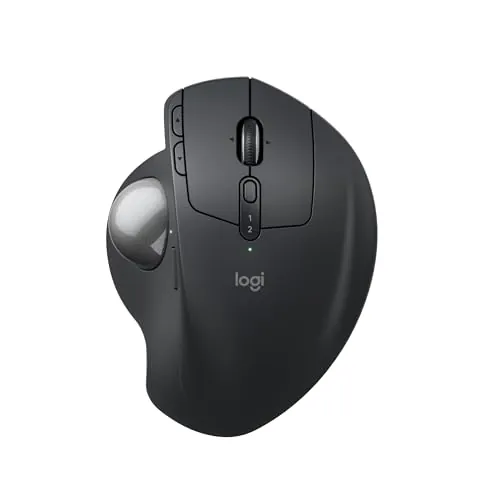
Logitech MX Ergo S vs ERGO M575S: Tilt, Thumb Controls and Power
Both are thumb-operated Logitech trackballs with Bluetooth and a Logi Bolt receiver in the manufacturer-listed box. The MX Ergo S adds a stated 20-degree tilt, a physical button for switching between speed and high-precision tracking, six customizable buttons and two-channel Easy-Switch; it recharges over USB-C, but the cable is not included. The ERGO M575S uses Logi Options+ for cursor-speed changes, offers three customizable buttons, and runs on one replaceable AA battery rated by Logitech for up to 18 months. Logitech's M575S support pages checked here do not state its saved-host count, so verify that requirement before relying on it for multi-computer switching.
Read comparison
Logitech M240 Silent vs M720 Triathlon: Bluetooth, Switching and Hand Fit
These Logitech mice suit different desk routines. M240 Silent is a compact, either-hand Bluetooth mouse powered by one AA; M720 Triathlon is a full-size right-hand mouse with Bluetooth or an included Unifying receiver, three selectable device channels, and extra side and thumb controls. Check the exact M240 listing if you plan to use a Bolt receiver: its U.S. product page describes Bluetooth without a dongle, while Logitech's broader MR0105 specification lists Bolt as optional and not included.
Read comparison