
Products compared
Logitech
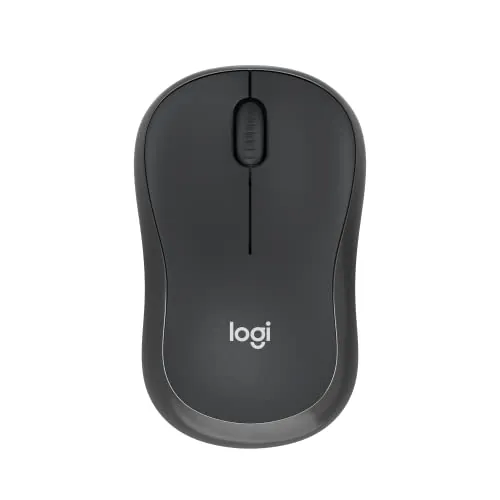
Logitech M240 Silent Bluetooth Mouse
Graphite US listing. The Logitech product page is for part 910-007113 and describes a direct Bluetooth pairing path.
Model 910-007113
Amazon ASIN B0BXNR9DB6
Logitech
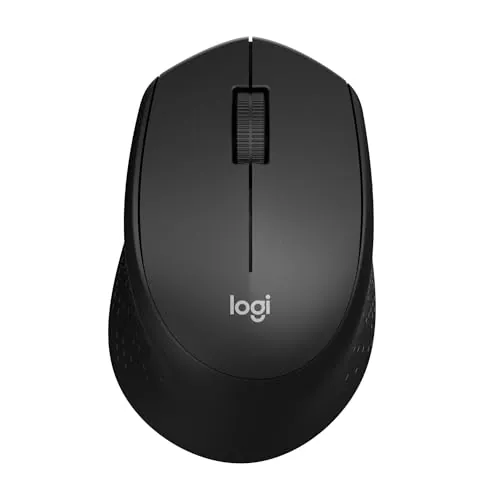
Logitech M330 Silent Plus Wireless Mouse
Black US listing. Logitech's product page identifies part 910-004905 and describes setup by plugging its USB receiver into the computer or laptop.
Model 910-004905
Amazon ASIN B01JPOLKDW
Differences that matter
What matters most to you?
Choose a priority to see what it changes.
Sources for Connection and receiver workflow
Sources for Hand orientation and carry use
Sources for Advertised battery life
Start with the computer connection
If your computer already has Bluetooth and you would rather not use a receiver port, the M240's direct Bluetooth pairing is the clear route on Logitech's product page. If you prefer to plug in a receiver, the M330 page describes that workflow. Before you choose the M330, check the receiver and port shown for the exact offer; for a USB-C-only computer, confirm an adapter or hub will work with your setup.
There is a small M240 documentation wrinkle: its product page markets Bluetooth pairing without a dongle, while Logitech's support specification also lists Logi Bolt and says the receiver is not included. The available pages do not establish that a Logi Bolt receiver is in the assigned consumer retail box, so buy it as a Bluetooth mouse unless the exact offer and receiver support are confirmed.
Match the shape to who will use it
Logitech describes the M240 as compact and designed for either hand, which is useful when the same mouse moves between left- and right-handed users or travels in a laptop bag. Logitech describes the M330 as asymmetric and guiding the right hand. If you already know one orientation is required, that is a concrete model distinction; if comfort is personal, try the exact body shape rather than treating the product description as a comfort test.
Check the host before ordering
Logitech lists several computer and mobile operating systems for the M240. The M330 product page describes support for Windows, macOS and Linux, and Logitech's original announcement also names Chrome OS. For Android or iPadOS, check current support for the exact mouse and host rather than assuming compatibility from another platform or from a similar Logitech model.
Do not choose on the battery estimate alone
Logitech lists up to 18 months for both models under its product-page conditions. The matching estimates do not establish equal real-world life, and they do not show that one lasts longer in a household or workplace. Pick by connection and shape first, then check the exact offer's battery-in-box details.
Product details
Logitech M240 Silent Bluetooth Mouse
Pick this when your host supports Bluetooth and you want the compact, either-hand shape Logitech describes. If you require a receiver instead, verify the exact 910-007113 offer and receiver compatibility: Logitech's separate M240 support entry lists Logi Bolt but says it is not included.
- Connection
- Direct Bluetooth pairing; Logitech says no dongle or port is required for this setup. Source
- Shape
- Compact and described by Logitech as designed for left- or right-handed use. Source
- Published battery estimate
- Up to 18 months with auto-sleep; Logitech says one AA battery is pre-installed. Source
Logitech M330 Silent Plus Wireless Mouse
Choose this when you prefer a receiver-based setup and use the mouse right-handed. Before checkout, confirm the exact Black 910-004905 offer includes the receiver and that your computer has a usable matching port or adapter.
- Connection
- Receiver-based setup: Logitech instructs users to plug the USB receiver into a computer or laptop; the exact port available on your host still matters. Source
- Shape
- Asymmetric shape described by Logitech as guiding the right hand. Source
- Published battery estimate
- Up to 18 months with an on/off switch and auto-sleep power saving; this is a manufacturer estimate, not a measured comparison. Source
Before you buy
Community discussions
A user compares the M240 and M330 after months of use
Logitech M240 Silent Bluetooth Mouse
A user who tried both mice for months describes a fingertip grip, preference for standard buttons and AA power, and their personal preference for the M330’s shape and click feel.
What to check
Treat this as one person’s report about shape, buttons and click sound. Try both if those details matter to you; it is not a universal comfort or noise ranking.
Compact Bluetooth use in a snug laptop bag
Logitech M240 Silent Bluetooth Mouse
One M240 owner chose it for a compact, basic Bluetooth setup and said it fit a smaller hand and a snug laptop bag. They had previously used a nano USB receiver.
What to check
The M240 pairs over Bluetooth while the M330 comparison listing uses a USB receiver. Check your laptop’s ports, bag space and preferred mouse shape before choosing; the fit comment is personal.
Common questions
Does the M240 require a USB receiver?
No receiver is needed for the direct Bluetooth setup on Logitech's M240 product page. Logitech's separate M240 support specification also lists Logi Bolt but says the receiver is not included; verify that exact receiver route and retail package if Bluetooth is unavailable on your host.M240 Silent Bluetooth Mouse — US product page, part 910-007113Specification — M240, Logitech US Support
Which mouse is described for left-handed use?
Logitech describes the M240 as designed for both left- and right-handed users. The M330 page describes an asymmetric form guiding the right hand. Neither page proves which will be comfortable for you.M240 Silent Bluetooth Mouse — US product page, part 910-007113M330 Silent Plus Wireless Mouse — US product page, Black part 910-004905
Is the M330 a Bluetooth mouse?
Logitech's exact Black M330 Silent Plus page describes starting by plugging the USB receiver into a computer or laptop. If you specifically need Bluetooth pairing without a receiver, the M240 page explicitly describes that route.M330 Silent Plus Wireless Mouse — US product page, Black part 910-004905M240 Silent Bluetooth Mouse — US product page, part 910-007113
Does one have a longer advertised battery life?
Both Logitech product pages list up to 18 months. These are separate manufacturer estimates, not a head-to-head battery test.M240 Silent Bluetooth Mouse — US product page, part 910-007113M330 Silent Plus Wireless Mouse — US product page, Black part 910-004905
Sources and scope
This is a source-based fit guide for the assigned US Graphite M240 910-007113 and Black M330 Silent Plus 910-004905 listings. Logitech's current M240 product page describes its direct Bluetooth workflow; a separate M240 support specification also names Logi Bolt but says the receiver is not included and does not explicitly bridge that option to part 910-007113. Do not assume a receiver is in the M240 retail box. Logitech lists up to 18 months for both; those manufacturer estimates are not comparative battery testing. No hands-on fit, comfort, click-noise, cursor-performance, reliability or battery testing was conducted.
Related comparisons

Logitech M240 Silent vs M720 Triathlon: Bluetooth, Switching and Hand Fit
These Logitech mice suit different desk routines. M240 Silent is a compact, either-hand Bluetooth mouse powered by one AA; M720 Triathlon is a full-size right-hand mouse with Bluetooth or an included Unifying receiver, three selectable device channels, and extra side and thumb controls. Check the exact M240 listing if you plan to use a Bolt receiver: its U.S. product page describes Bluetooth without a dongle, while Logitech's broader MR0105 specification lists Bolt as optional and not included.
Read comparison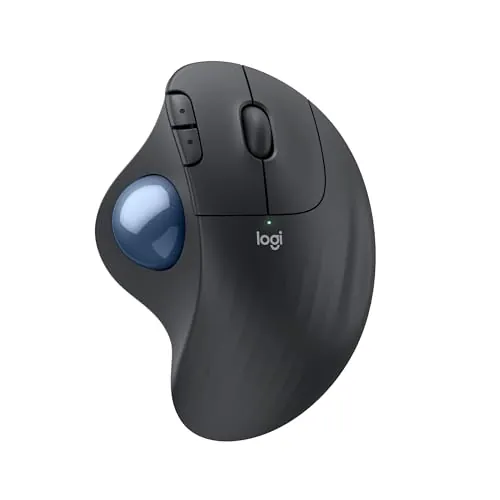
Logitech M240 Silent vs ERGO M575S: Movement, Navigation and Receiver Choice
This comparison is about how you steer the pointer and what comes in the box. The graphite M240 Silent (910-007113) is a compact, ambidextrous Bluetooth mouse with a conventional moving body. The Graphite + Blue Ball ERGO M575S (910-007027) is a stationary thumb trackball with Back/Forward keys and an included Logi Bolt receiver. Check your desk space, hand use and host ports before choosing.
Read comparison