
Products compared
Logitech
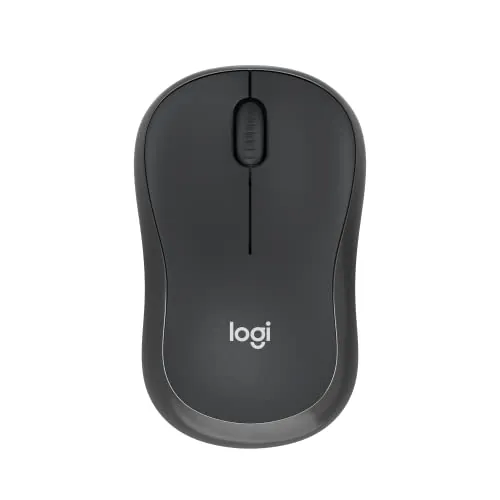
Logitech M240 Silent Bluetooth Mouse — Graphite
One Graphite M240 mouse. Logitech identifies this exact model page as Bluetooth-only connection with no dongle or port required, and says the design is for left- and right-handed users.
Model 910-007113
Amazon ASIN B0BXNR9DB6

Logitech
Logitech MX Vertical Wireless Mouse — Graphite
One Graphite MX Vertical mouse. Logitech's datasheet maps part 910-005447 to Graphite in the Americas and documents a right-handed shape, Bluetooth, Unifying receiver and USB-C cable connection, plus rechargeable power.
Model 910-005447
Amazon ASIN B07FNJB8TT
Differences that matter
What matters most to you?
Choose a priority to see what it changes.
Sources for Hand orientation
Sources for Using more than one computer
Set the hand requirement before comparing features
The M240's maker describes its shape as suitable for either hand. MX Vertical's datasheet specifies right-handed use and a 57-degree vertical layout. That makes handedness the first filter for a shared desk: do not select the MX Vertical for a left-handed user based on its charging or switching features.
A design specification is not an individual fit result. If a vertical or compact shape is important, try the exact shape if you can; this comparison does not measure comfort or predict how a hand will respond.
Match the connection to the computer
M240 is the simpler documented route if Bluetooth is available: Logitech says it pairs over Bluetooth without a dongle or port. MX Vertical adds two alternatives: a Unifying receiver and USB-C cable. Its support page specifically explains wired operation: switch the mouse on, then connect the USB cable.
For a computer without Bluetooth, check that the MX Vertical listing includes the receiver or that you can use the cable. The datasheet establishes receiver support, not package contents for every seller or listing.
Choose between AA replacement and USB-C charging
The M240 page says one AA is pre-installed and describes replacing batteries. The MX Vertical datasheet specifies a rechargeable USB-C battery; Logitech's support instructions say the mouse remains connected through the cable while charging and can be used corded when switched on.
This is a choice about how you want to restore power, not a battery-life ranking. The published estimates use different conditions and neither source establishes your day-to-day runtime.
Check whether you need multi-computer switching
Logitech documents MX Vertical pairing with up to three computers and selecting a channel with its Easy-Switch button on the underside. Its datasheet also describes four customizable buttons; customization requires Logitech Options on Windows or macOS. If you plan to rely on custom shortcuts, confirm the software works on your host.
The cited M240 page establishes Bluetooth pairing but does not document a comparable multi-computer switch or shortcut workflow. Treat that as a documentation limit, not proof that an undocumented behavior is impossible. If switching is required, MX Vertical has the sourced procedure in this pair.
Product details
Logitech M240 Silent Bluetooth Mouse — Graphite
Logitech MX Vertical Wireless Mouse — Graphite
- Host connection
- Bluetooth, Logitech Unifying USB receiver, or USB-C cable. Logitech documents corded use with the mouse switched on and the cable connected. Source
- Device switching
- Can pair with up to three computers and switch with Easy-Switch; the button is on the underside. Source
- Hand orientation and power
- Right-handed design; USB-C rechargeable battery. Source
Before you buy
Community discussions
Switching an M240 between a Mac and Android TV
Logitech M240 Silent Bluetooth Mouse — Graphite
An M240 owner using a Mac and Android TV says switching between the two meant removing the mouse from Bluetooth settings and pairing it again.
What to check
If multi-host use matters, compare this owner’s re-pairing routine with the MX Vertical’s documented switching options and decide which controls fit your setup.
One owner’s experience with the M240’s compact shape
Logitech M240 Silent Bluetooth Mouse — Graphite
An owner chose the M240 as a compact Bluetooth mouse and said its shape worked for their smaller hand and snug laptop bag.
What to check
This comparison also changes handedness and shape. Try the M240 and right-handed MX Vertical form in the way you normally hold a mouse; the cited fit report reflects one person.
Common questions
Which of these mice is specified for left-handed use?
Logitech says M240 is designed for both left- and right-handed users. MX Vertical is specified as right-handed, so choose by the intended user's handedness before weighing charging or connection options.M240 Silent Bluetooth Mouse — Graphite, model 910-007113MX Vertical Advanced Ergonomic Mouse datasheet
Can MX Vertical work through its USB cable, or does the cable only charge it?
Logitech's getting-started instructions explicitly say to turn MX Vertical on and plug in the USB cable to use it corded. The datasheet identifies a USB-C charging cable; check the selected package for the cable you need.Getting Started — MX VerticalMX Vertical Advanced Ergonomic Mouse datasheet
Does MX Vertical include a Unifying receiver?
The Logitech datasheet documents receiver connectivity, not the contents of every retail package. Check the exact listing and package description before buying if you need the receiver; Bluetooth and USB-C cable are separately documented connection options.MX Vertical Advanced Ergonomic Mouse datasheetGetting Started — MX Vertical
How do I choose if I want both left-hand use and multi-computer switching?
The M240 is Logitech's either-hand option here, while MX Vertical is the model with a documented Easy-Switch button for up to three computers and is right-handed. If you require both characteristics, compare another model that explicitly supports both.M240 Silent Bluetooth Mouse — Graphite, model 910-007113Getting Started — MX VerticalMX Vertical Advanced Ergonomic Mouse datasheet
Sources and scope
This guide compares manufacturer-documented design and setup features for M240 Graphite model 910-007113 and MX Vertical Graphite part 910-005447. It does not establish comfort, pain relief, tracking accuracy, click noise, battery endurance or reliability. MX Vertical supports a Unifying receiver, but these sources do not confirm whether a receiver is included with every listing; verify the selected package. No current or historical price is represented.
Related comparisons
Logitech MX Vertical vs ERGO M575S: Mouse Movement, Desk Space and Power
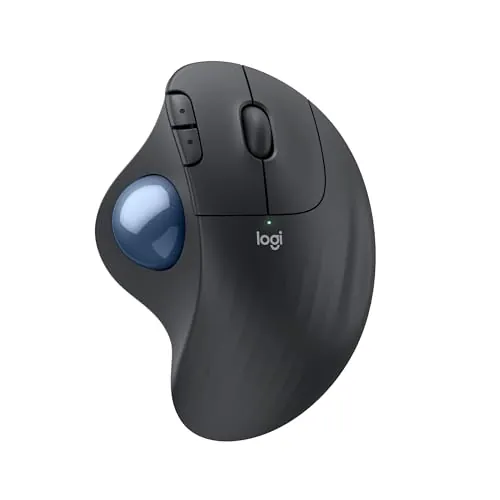
These Logitech mice differ in how the cursor moves and what the desk must provide. MX Vertical uses a 57° upright grip, but the mouse still travels over a surface; ERGO M575S moves the cursor with its thumb-operated ball while its body stays in place. Check the exact 910-005447 and 910-007027 versions, then match Unifying versus Logi Bolt or Bluetooth to your computer and decide whether USB-C recharging or a replaceable AA battery fits your routine.
Read comparison
Logitech G502 HERO vs MX Vertical: Grip, Controls and Connection
These exact Logitech models answer different desk questions. The wired G502 HERO puts 11 programmable controls and an adjustable weight system in a conventional mouse layout. The right-hand MX Vertical uses a documented 57° upright angle, four customizable buttons, Bluetooth or a Unifying receiver, and USB-C cable operation. Neither shape is a fit guarantee; choose by the grip and control arrangement you want, then check the host connection and the exact model number.
Read comparison