
Products compared

Logitech
Logitech MX Vertical Advanced Ergonomic Mouse (Graphite)
MX Vertical, Graphite, U.S./AMR part 910-005447. Its 57° orientation changes the grip, while cursor control still comes from moving the mouse body over a surface.
Model 910-005447
Amazon ASIN B07FNJB8TT
Logitech
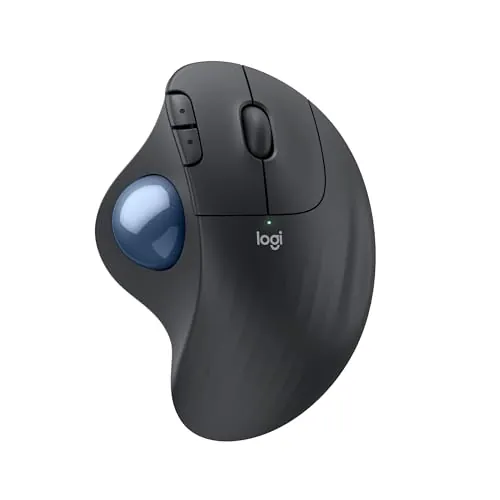
Logitech ERGO M575S Wireless Trackball (Graphite + Blue Ball)
ERGO M575S, Graphite + Blue Ball, part 910-007027. It uses a thumb-operated trackball rather than moving its body to move the cursor. The exact-model specification lists a Logi Bolt receiver and one AA battery in the box.
Model 910-007027
Amazon ASIN B0BBQ3ZYNY
Differences that matter
Sources for How cursor movement works
Sources for Desk-space planning
Sources for Receiver and wireless route
Choose the movement you want at your desk
MX Vertical and ERGO M575S are not simply two shapes for the same motion. MX Vertical has an upright 57° design, but it remains a moving mouse: the body travels over the work surface to move the pointer. ERGO M575S is a thumb-operated trackball; roll its ball to move the pointer while the body remains at a fixed spot. That is the main decision if your desk is crowded or you dislike moving a mouse body.
The M575S still needs a place for its body and room for your hand and thumb to reach the ball. MX Vertical needs the body plus the sweep area you use for ordinary pointer movement. Logitech's M575S description says it can operate on any surface, but that does not remove the need for a stable placement or establish that its shape will suit every hand.
Use a simple desk-space check before ordering
Clear a small rectangle where you plan to work. For a moving mouse, place a paper outline roughly matching its body and then mark the extra travel area you use to reach the edges of your screen. For a trackball, mark the fixed body location and check the hand/thumb approach from your usual seated position. This is a planning exercise, not a guarantee that either shape will feel right.
The MX Vertical data sheet lists a body size of 78.5 mm high × 79 mm wide × 120 mm long. The M575S specification lists 134 mm high × 100 mm wide × 48 mm deep. The official sources label the axes differently, so use them as product measurements and confirm the physical diagram or exact listing before comparing the dimensions as a footprint. Neither number includes your personal clearance needs.
Match the receiver and power to your computer
The exact MX Vertical supports Bluetooth Low Energy and Logitech's Unifying USB receiver. Its setup instructions also explain USB-C cable use while the mouse is switched on. The exact M575S supports Bluetooth Low Energy or a Logi Bolt receiver; Logitech lists that receiver in the box and says a USB-A port is needed to use it. Unifying and Logi Bolt are distinct receiver families, so an existing receiver should not drive your choice until you check its label and compatibility.
Power is another concrete difference. MX Vertical has a built-in rechargeable Li-Po battery and USB-C charging. ERGO M575S uses a user-replaceable AA, with one AA listed in the exact-model box contents. Logitech publishes battery-life estimates, but these do not establish how long either will last under your usage or provide a controlled head-to-head result.
Verify the exact model and keep the choice personal
Check the product number before ordering. The graphite MX Vertical is 910-005447 and the graphite ERGO M575S with the blue ball is 910-007027. Logitech lists the M575SP separately. Check the M575S specifications for the battery and included accessories.
The sources establish different control methods, receiver families, battery arrangements and listed body dimensions. They do not tell you which mouse will feel more comfortable or fit your hand. If possible, handle the exact type of movement before deciding; otherwise treat your desk measurement and preferred control action as the deciding questions.
Product details
Logitech MX Vertical Advanced Ergonomic Mouse (Graphite)
- Movement
- Upright 57° mouse; move its body over a surface to steer the cursor. Source
- Connections
- Bluetooth Low Energy, Logitech Unifying USB receiver, or USB-C cable while the mouse is switched on. Source
- Power and listed size
- Built-in rechargeable Li-Po battery; Logitech lists 78.5 mm high × 79 mm wide × 120 mm long. The dimensions are product measurements, not a desk-clearance guarantee. Source
Logitech ERGO M575S Wireless Trackball (Graphite + Blue Ball)
- Movement
- Thumb-operated trackball; move the ball to steer the cursor while the mouse body stays in place. Source
- Connections and box
- Bluetooth Low Energy or Logi Bolt USB receiver; Logitech lists one Logi Bolt receiver and one AA battery in the exact M575S box contents. Logi Bolt is distinct from the MX Vertical's Unifying receiver. Source
- Power and listed size
- One user-replaceable AA battery; Logitech lists 134 mm high × 100 mm wide × 48 mm deep. This measurement is not a desk-clearance guarantee. Source
Before you buy
Community discussions
Getting used to trackball movement and clicks
Logitech ERGO M575S Wireless Trackball (Graphite + Blue Ball)
A laptop setup post lists the ERGO M575S and says its author preferred an older M570’s click pressure and smoother ball.
What to check
Try the trackball and its buttons in the position where your hand usually rests. Check whether you prefer moving your thumb or moving the whole mouse.
Checking button reach on the MX Vertical
Logitech MX Vertical Advanced Ergonomic Mouse (Graphite)
An owner trying the MX Vertical for a first full day could reach the buttons but was still deciding whether the body felt too large for their hand.
What to check
Check whether you can reach all the buttons with your hand in its usual position. If you can try both designs, compare the space each needs beside your keyboard.
Common questions
Does the MX Vertical stay still like the M575S?
No. Logitech describes MX Vertical as a mouse that connects by Bluetooth or Unifying receiver and can be used with a cable; cursor movement still comes from guiding the mouse body. ERGO M575S is a thumb-operated trackball, so the ball moves while the body stays in place.Logitech Support: Getting Started - MX VerticalLogitech Support: Getting Started - ERGO M575S
Can the same Logitech USB receiver connect both mice?
Do not assume so. The MX Vertical source names Logitech Unifying; the M575S specification names Logi Bolt. They are different receiver systems. Both products also list Bluetooth Low Energy, if the host supports that route.Logitech Support: Getting Started - MX VerticalLogitech Support: Specification - ERGO M575S
What batteries do these exact versions use?
The MX Vertical data sheet specifies a built-in rechargeable Li-Po battery and its support page shows USB-C cable use. The ERGO M575S specification lists one user-replaceable AA battery and one AA in the box. These are different power routines, not a runtime comparison.Logitech MX Vertical Advanced Ergonomic Mouse data sheetLogitech Support: Getting Started - MX VerticalLogitech Support: Specification - ERGO M575S
How do I check which one fits my desk?
Compare the official body dimensions with your clear surface, then add the space your hand needs. For MX Vertical, also mark the mouse-body travel path you use; for M575S, check that the fixed spot and thumb access remain clear. The listed dimensions use different axis labels and do not guarantee a personal fit.Logitech MX Vertical Advanced Ergonomic Mouse data sheetLogitech Support: Specification - ERGO M575S
Sources and scope
This guide compares documented features of the exact U.S. Graphite MX Vertical 910-005447 and Graphite + Blue Ball ERGO M575S 910-007027. It is not a hands-on test and does not rank comfort, accuracy, speed, durability, reliability or health outcomes. Manufacturer-listed dimensions use different axis labels and do not by themselves establish the surface area or hand clearance you need. Check your actual desk and receiver ports before ordering. The ERGO M575S setup article covers both M575S and M575SP as a family, so model-specific battery and box details here come from the separate M575S specification page.
Related comparisons
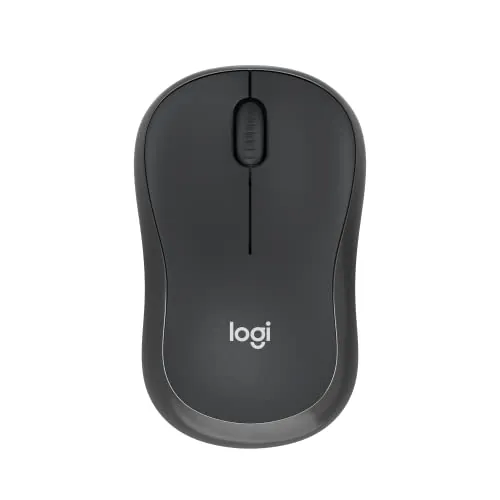
Logitech M240 Graphite vs MX Vertical Graphite: Handedness, Connection and Power
These are different desk setups, not a tested comfort comparison. Logitech describes the M240 Graphite as suitable for left- and right-handed use, with Bluetooth and a replaceable AA battery. MX Vertical Graphite is right-handed and supports Bluetooth, a Unifying receiver or a USB-C cable; Logitech also documents switching among up to three paired computers. Decide first who will use the mouse, then check the host connection you need and whether you prefer replacing an AA or recharging.
Read comparison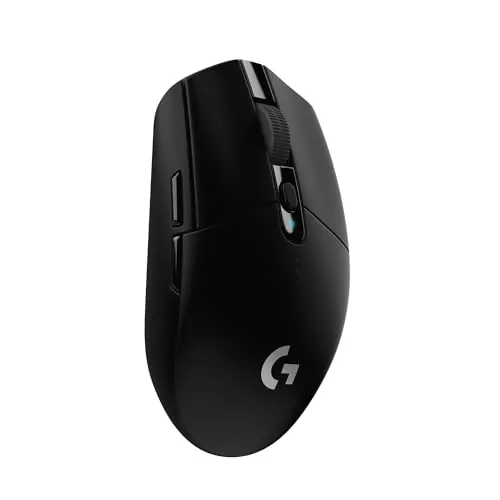
Logitech G305 vs ERGO M575S: Mouse Movement, Desk Space and Connection
The black Logitech G305 (910-005280) moves across the desk and connects through its LIGHTSPEED USB receiver. The graphite-and-blue Logitech ERGO M575S (910-007027) keeps its body in place while the thumb rolls the trackball, and supports Bluetooth Low Energy or its included Logi Bolt USB receiver. Check both the motion style and the ports available on your exact computer; M575S reduces mouse-sweep needs but still occupies desk space and needs room for your hand.
Read comparison