
Products compared
Logitech
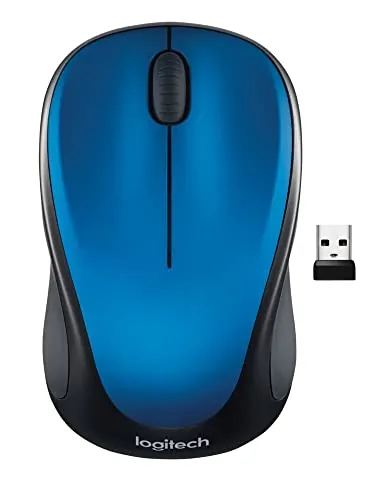
Logitech Wireless Mouse M317
Compact 2.4 GHz wireless mouse using a USB receiver; the exact U.S. product page is the Blue finish. Logitech describes rubber sides and a contoured shape. Its support page specifies one AA alkaline battery and quotes up to 12 months.
Model M317, Steel Blue, 910-002901
Amazon ASIN B00ADBY98A
Logitech
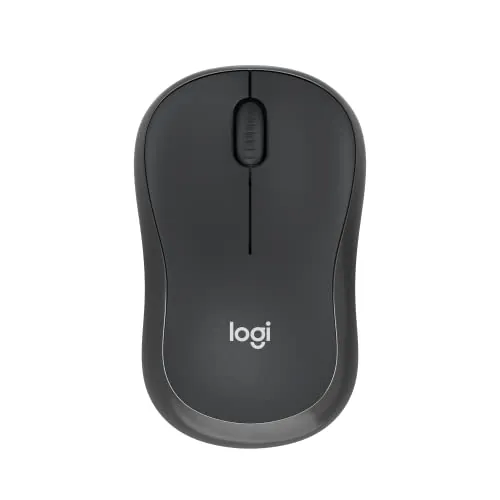
Logitech M240 Silent Bluetooth Mouse
Compact Graphite mouse with direct Bluetooth pairing. Logitech lists Bluetooth Low Energy and optional Logi Bolt support, but the consumer box lists the mouse, one pre-installed AA battery and documentation—not a receiver. SilentTouch is a maker-described click-reduction feature, not a comparative measurement against M317.
Model M240 Silent, Graphite, 910-007113
Amazon ASIN B0BXNR9DB6
Differences that matter
What matters most to you?
Choose a priority to see what it changes.
Sources for Connection and host check
Sources for Battery replacement routine
Sources for Quiet-workspace feature
Start with the computer connection
The M317 is receiver-based: Logitech’s Blue 910-002901 page tells buyers to plug its USB receiver into the computer. The M240 Silent can pair directly over Bluetooth, so that route does not use a USB port. Its U.S. page names Windows, macOS, ChromeOS, Linux and Android, while the support specification also lists iPadOS; compatibility still depends on the particular host and OS version.
Logitech lists Logi Bolt compatibility for M240, but its exact support specification marks the receiver as not included and lists only the mouse, pre-installed AA and documentation in the box. If you need a receiver-based setup, confirm separately that an optional Bolt receiver is available and appropriate for your host. Do not treat M240 as including the M317’s receiver.
Both require battery changes
Logitech support specifies one AA alkaline battery for M317 and says expected life is up to 12 months. Logitech lists one AA and an 18-month estimate for M240. These are not matched tests, and actual battery life depends on use and conditions. The useful purchase answer is that neither mouse eliminates battery replacement; choose the connection and features that suit your computer instead of assuming a proven runtime winner.
What the Silent label can—and cannot—tell you
M240’s U.S. page names SilentTouch as a click-reduction feature. That can matter if a maker-described quiet-click design is part of your buying criteria. The page’s percentage is not established here as a comparison against the M317, and no pair-specific sound measurement was found. M317’s product page does not provide a comparable click-noise result, so this guide does not claim that it is louder by a measured amount.
A practical pre-buy check
On the computer you plan to use, confirm either a usable USB port for M317’s receiver or Bluetooth LE support and permission to pair M240. If choosing M240 because the computer has no free USB port, use Bluetooth directly; buying an optional Bolt receiver would reintroduce a USB-port requirement. Then decide whether M240’s quiet-click feature is worth prioritizing and accept that both remain AA-powered.
Product details
Logitech Wireless Mouse M317
Logitech M240 Silent Bluetooth Mouse
- Connection
- Bluetooth Low Energy; Logi Bolt is supported but not included. Source
- Box contents
- Mouse, one pre-installed AA battery and user documentation; no receiver listed. Source
- Battery
- One AA battery; Logitech states 18 months of battery life. Source
- Quiet-click feature
- Logitech describes SilentTouch as reducing clicking sounds; no M317-versus-M240 measurement is established here. Source
Before you buy
Community discussions
A compact Bluetooth mouse for a tight laptop bag
Logitech M240 Silent Bluetooth Mouse
An M240 owner chose it for its compact size and Bluetooth setup, saying it fit a smaller hand and a snug laptop bag. They had previously carried a mouse with a nano USB receiver.
What to check
Compare the M240’s Bluetooth route with the M317’s included receiver and check your laptop’s available ports and carry space. This is one owner’s setup preference, not a universal fit claim.
Common questions
Does the Logitech M240 Silent consumer package include a USB receiver?
No receiver is listed in Logitech’s M240 box contents. Its support specification says Bluetooth Low Energy and Logi Bolt, with Logi Bolt not included. The U.S. consumer product page describes pairing directly over Bluetooth.M240 Silent Bluetooth Mouse — Logitech U.S.Specification - M240 — Logitech Support
Is M240 Silent proven to be 90% quieter than this M317?
No. Logitech describes SilentTouch on the M240 page, but that statement is not a measurement comparing this exact M240 with this exact M317. Treat it as a maker-described feature, not a pairwise test result.M240 Silent Bluetooth Mouse — Logitech U.S.
Do the stated battery lives prove M240 lasts six months longer?
No. Logitech lists up to 12 months for M317 and 18 months for M240 in separate product/support material. They are manufacturer estimates, not a controlled comparison of the two mice in identical use.Wireless Mouse M317 — Logitech U.S.M317/M235 mouse battery life and replacement — Logitech SupportSpecification - M240 — Logitech Support
Sources and scope
This guide compares Logitech’s U.S. product pages and official support information for the assigned models. It does not report hands-on testing or comparative results for click noise, runtime, comfort, tracking, durability or reliability. The battery durations are manufacturer estimates, not a head-to-head test. Confirm that the particular computer and workplace allow the connection method you plan to use.
Related comparisons

Logitech M240 Graphite vs MX Vertical Graphite: Handedness, Connection and Power
These are different desk setups, not a tested comfort comparison. Logitech describes the M240 Graphite as suitable for left- and right-handed use, with Bluetooth and a replaceable AA battery. MX Vertical Graphite is right-handed and supports Bluetooth, a Unifying receiver or a USB-C cable; Logitech also documents switching among up to three paired computers. Decide first who will use the mouse, then check the host connection you need and whether you prefer replacing an AA or recharging.
Read comparison
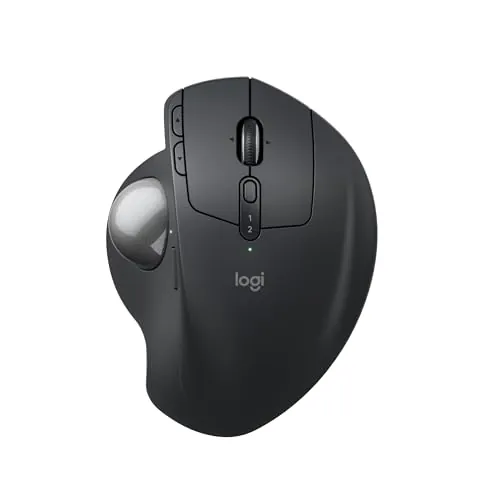
Logitech MX Master 4 vs MX Ergo S: Mouse Movement, Trackball and Switching
Both are rechargeable Logitech pointing devices, but they use different steering methods and switching controls. Compare desk motion, paired-computer count, the MX Master 4's Options+ Haptic Sense Panel, and the MX Ergo S base model's included Logi Bolt receiver before choosing.
Read comparison