
Products compared
Logitech
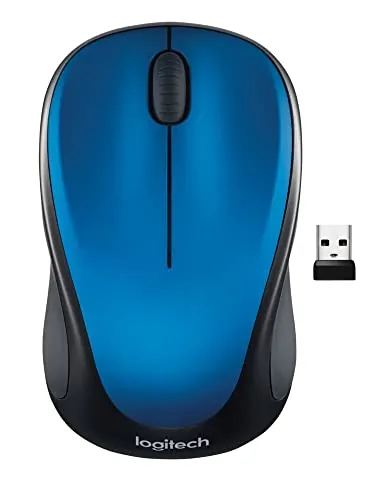
Logitech Wireless Mouse M317 (Blue)
Blue M317 variant in the selected listing. Logitech's U.S. product URL selects the blue M317 910-002901; it describes a compact, either-hand design and USB-receiver setup.
Model 910-002901
Amazon ASIN B00ADBY98A

Logitech
Logitech M720 Triathlon Multi-Device Wireless Mouse (Black)
Black M720 Triathlon in the selected listing. Logitech's U.S. page is the black M720 model-family page; its support specifications identify M/N M-R0062.
Model 910-006036
Amazon ASIN B087Z6LSHW
Differences that matter
What matters most to you?
Choose a priority to see what it changes.
Sources for Hand orientation and body format
Sources for Physical button layout
Sources for Connection path and receiver
Sources for Switching among computers or tablets
Sources for Operating-system check
Pick the body shape before the extra controls
Logitech describes the M317 as compact and designed for both right- and left-handed users. Its M720 page describes a full-size contoured shape for the right hand. If the mouse will be shared by left- and right-handed users, M317 is the direct fit described by Logitech. M720's extra buttons do not override a hand-orientation mismatch, and neither manufacturer's shape description guarantees that a particular grip will feel comfortable.
This is a practical fit check rather than a medical or comfort result: note who will use the mouse and whether a right-handed shape is acceptable before deciding whether the M720 controls are useful.
Decide whether the thumb controls will earn their space
M720 has two side buttons plus a hidden thumb button, which Logitech says are mapped for web back and forward and can be customized with Logi Options+ on macOS and Windows. RTINGS' review describes three buttons and no side buttons on the black M317 it tested. That supports a basic-controls-versus-thumb-controls distinction, not a claim that either layout makes work faster.
If you already use back/forward or repeatable shortcuts, M720 has the documented controls for that workflow. If you want a simpler layout and do not need side inputs, M317 keeps the control scheme compact. RTINGS tested a black M317, while this listing information is the blue variant; its layout observation is limited to the M317 model family.
Check the connection your computer can actually use
Logitech's U.S. M317 page describes plugging in its USB receiver and lists Windows, macOS, Linux and Works with Chromebook support. RTINGS also describes its tested black M317 as receiver-only and not Bluetooth-compatible. Logitech's M720 support sheet lists Bluetooth Low Energy and an included Unifying 2.4 GHz receiver, with separate OS support lists for the two modes.
Before choosing, check the actual host: a receiver path needs an available compatible USB port; Bluetooth needs a host that supports the documented Bluetooth mode and OS. M720's setup guide says each of its three Easy-Switch channels can use Bluetooth or Unifying. The sources do not establish equivalent multi-device switching for M317.
Product details
Logitech Wireless Mouse M317 (Blue)
Logitech M720 Triathlon Multi-Device Wireless Mouse (Black)
- Connection options
- Bluetooth Low Energy or Logitech Unifying 2.4 GHz receiver; one Unifying receiver is listed in the box Source
- Device switching
- Pair up to three devices and switch with the Easy-Switch button Source
- Hand orientation and controls
- Full-size right-handed body; two side buttons and a hidden thumb button Source
Before you buy
Community discussions
An M720 owner's hand-fit and button-reach notes
Logitech M720 Triathlon Multi-Device Wireless Mouse (Black)
One M720 owner found its larger body better suited to their large hand and palm grip than a previous generic mouse. They also found the hidden thumb button awkward to reach at first.
What to check
Compare the M317's compact, either-hand shape with the M720's right-hand body in your own grip, and check whether the M720 thumb controls are easy to reach. This is one owner's experience, not a comfort guarantee.
Common questions
Can I connect the M720 without using its receiver?
Yes. Logitech documents Bluetooth Low Energy as well as the included Unifying receiver. Check the M720 support table for the OS requirements of the connection mode you want to use.M720 Triathlon Technical Specifications, U.S. supportM720 Triathlon Mouse Setup Guide
Which one is designed for left-handed use?
Logitech describes M317 as designed for both right- and left-handed users. It describes M720 as a right-handed design, so left-handed buyers should treat that shape as a possible mismatch before focusing on extra controls.Wireless Mouse M317, Blue (910-002901)Logitech M720 Triathlon Multi-Device Wireless Mouse, Black
Does M720 switch between multiple computers?
Logitech says M720 can be paired with up to three devices and switched using Easy-Switch. Its setup guide says the channels can use Bluetooth Smart or a Unifying receiver.Logitech M720 Triathlon Multi-Device Wireless Mouse, BlackM720 Triathlon Mouse Setup Guide
Does the M317 have Bluetooth?
The Logitech U.S. M317 page describes connecting its USB receiver, and RTINGS' review of a black M317 says it uses only its receiver and is not Bluetooth-compatible. Because RTINGS tested the black colorway rather than this listing data's blue ASIN, treat its connection observation as same-model corroboration and confirm the exact package if Bluetooth is essential.Wireless Mouse M317, Blue (910-002901)Logitech M317 Review
Sources and scope
This is a feature-fit guide, not a comfort, tracking, scroll-speed, battery-life or durability test. Logitech's current U.S. M317 page identifies the blue 910-002901 model and documents USB-receiver setup, but its reviewed official material does not enumerate every connection mode. RTINGS' physical-control review tested a black M317; its three-button/no-side-button observation is applied only as same-model physical layout context and is not a test of the selected blue ASIN. Logitech's M720 U.S. support sheet applies to the M720 model family and identifies M/N M-R0062, but does not itself bridge the selected Amazon ASIN to the listing data's 910-006036 part number.
Related comparisons
Logitech M510 vs M720 Triathlon: Receiver, Bluetooth, and Scrolling
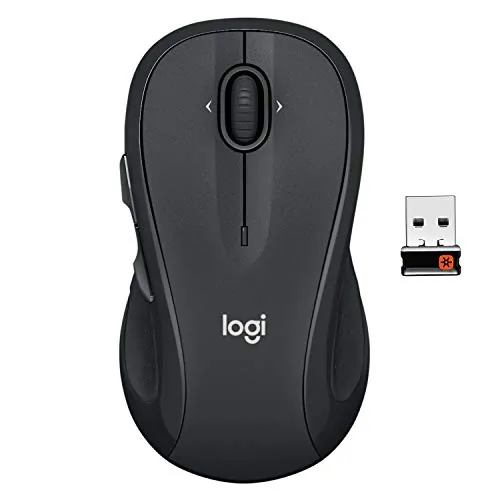
The selected U.S. retail items are M510 Comfort Plus Graphite (910-006030) and M720 Triathlon Black (910-006036). Logitech's M510 model documentation describes a Unifying USB receiver, line-by-line scrolling, and tilt scrolling. The M720 adds Bluetooth Low Energy, up to three paired-device channels with a physical Easy-Switch button, and a wheel that toggles between faster and line-by-line scrolling. Check your host OS and available ports: Logitech's current M510 receiver compatibility list names Windows 10/11, ChromeOS, and Linux, while its M720 materials also list macOS and iPadOS support. Logitech's public M510 and M720 model pages do not identify the two assigned retail part numbers, so verify the exact listing and in-box receiver before buying.
Read comparison
Logitech MX Master 4 vs M720 Triathlon: Receiver, Scroll and Setup
The Logitech MX Master 4 Graphite (910-007558) pairs a separate thumbwheel with the Actions Ring, which requires Logi Options+, and a rechargeable USB-C setup. The M720 Triathlon Black (910-006036) moves horizontally by tilting its main wheel and uses a replaceable AA battery with a Unifying receiver in the box. Both also offer Bluetooth and can pair with up to three computers. Decide by your preferred controls, software setup, host connection and power routine; this is not a comfort or performance ranking.
Read comparison