
Products compared

Logitech
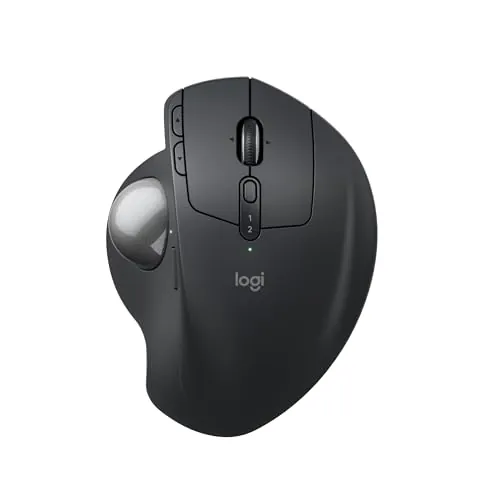
Logitech M720 Triathlon Multi-Device Wireless Mouse (Black)
A conventional optical mouse with a moving body, Bluetooth LE or Unifying wireless, three Easy-Switch channels and one replaceable AA battery.
Model M720 Triathlon; listing data part number 910-006036
Amazon ASIN B087Z6LSHW
Logitech
Logitech MX Ergo S Advanced Wireless Trackball (Graphite)
A thumb-operated trackball whose body stays in place, with Bluetooth LE or Logi Bolt wireless, two Easy-Switch channels and a rechargeable USB-C battery.
Model MX Ergo S; listing data part number 910-007259
Amazon ASIN B0D6PTR6MP
Differences that matter
What matters most to you?
Choose a priority to see what it changes.
Sources for Switching between computers or tablets
Sources for Receiver and host connection
Sources for Device size and intended spot
Choose the steering method before the feature list
The defining difference is what your hand moves. M720 is a conventional optical mouse that you move over a surface; MX Ergo S is a thumb-operated trackball that stays in place while you roll its ball. That is a genuine workflow change, not a measured claim that one is more accurate, comfortable or suitable for a health condition.
If you have not used a trackball, try the interaction before choosing it based only on USB-C charging or the stationary body. If conventional mouse movement is a must, pick the M720 or compare a different conventional rechargeable mouse instead of treating the trackball as a drop-in replacement.
Count saved devices and check the connection you will actually use
M720 documents three Easy-Switch channels; MX Ergo S documents two. Write down the computers or tablets you expect to switch between. The channel count answers whether the mouse can keep those device pairings available, but it does not guarantee Flow, file transfer or every software feature on every operating system.
Both offer Bluetooth Low Energy. Their receiver alternatives differ: M720 uses Unifying, while MX Ergo S uses Logi Bolt; the Ergo S specification lists its Bolt receiver as USB-A. Verify Bluetooth support or an available compatible USB port on each host before buying. Logitech lists Options+ on Windows and macOS; do not infer that every customization feature is available on every supported device.
Plan the power routine and confirm the exact MX Ergo package
M720 takes one replaceable AA, and Logitech lists an AA in the M720 box. MX Ergo S has a rechargeable, non-user-replaceable battery and charges through USB-C, but Logitech says its charging cable is not included. This gives you a concrete upkeep choice: keep a replacement battery available, or keep a charging cable and charging access available. The different published battery-life conditions are not a matched runtime test, so they are not compared here.
The assigned MX Ergo S is Graphite part 910-007259. Logitech’s support specifications distinguish the base MX Ergo S box (receiver, document; cable not included) from MX Ergo S Plus (detachable wedge, receiver, document; cable not included). Confirm the selected exact listing and part number; the Plus bundle is not the model compared in this guide.
Product details
Logitech M720 Triathlon Multi-Device Wireless Mouse (Black)
Logitech MX Ergo S Advanced Wireless Trackball (Graphite)
- Wireless and device switching
- Bluetooth Low Energy or Logi Bolt; the official setup guide specifies two Easy-Switch device channels. The Bolt receiver uses USB-A. Source
- Power and box
- Rechargeable 500 mAh battery, charged through USB-C; battery is not user-replaceable. The base MX Ergo S box lists a Logi Bolt receiver and says the cable is not included. Source
- Listed device dimensions
- 132.5 mm high × 99.8 mm wide × 51.4 mm deep. Source
Before you buy
Community discussions
Trying fine pointer movements with a thumb trackball
Logitech MX Ergo S Advanced Wireless Trackball (Graphite)
A longtime mouse user switched to the MX Ergo S and found large movements easy early on, while small adjustments still took practice.
What to check
Try the trackball in the space where you work and compare it with moving a conventional mouse. Use a task that needs both big moves and precise clicks.
Common questions
Does the MX Ergo S move across the desk like the M720?
No. Logitech describes the MX Ergo S as a thumb-controlled trackball, so the ball steers the pointer while the device body stays in place. M720 is a conventional optical mouse. Pick by the interaction you want; no comfort or accuracy comparison is established.M720 Triathlon Multi-Computer Wireless Mouse — U.S. Product PageMX Ergo S Wireless Trackball — U.S. Graphite Product Page, P/N 910-007259
Which one switches among more paired devices?
M720 lists three Easy-Switch channels; MX Ergo S lists two. If you need three saved hosts, that specific requirement points to M720. This is device-channel capacity, not a claim that either mouse will automatically transfer files between computers.M720 Triathlon Technical SpecificationsGetting Started — MX Ergo S
Can I use the Bolt receiver that comes with MX Ergo S for the M720?
Do not assume so. Logitech documents M720 with Bluetooth LE or Unifying and MX Ergo S with Bluetooth LE or Logi Bolt. If you want a receiver connection, check that the receiver matches the device; Bluetooth is the shared listed wireless route when the host supports it.M720 Triathlon Technical SpecificationsSpecification — MX Ergo S
What do I need to charge the MX Ergo S?
It charges through USB-C, but Logitech says its cable is not included. Plan to use a compatible USB-C charging cable you already have or obtain one separately. The internal battery is listed as not user-replaceable; M720 instead uses one replaceable AA.Specification — MX Ergo SMX Ergo S Wireless Trackball — U.S. Graphite Product Page, P/N 910-007259M720 Triathlon Technical Specifications
Sources and scope
This is a feature-fit comparison based on Logitech’s published pages and specifications, not a hands-on test. It does not rank comfort, health effects, pointer accuracy, speed, durability or battery endurance. The M720 support specification identifies the M720 family by hardware model M-R0062, while the listing data’s retail part number is 910-006036; verify the exact black Amazon listing and package before checkout. The MX Ergo S is the base Graphite SKU 910-007259, not the MX Ergo S Plus package with its detachable wedge. Logitech’s listed dimensions describe the devices, not the extra hand or desk clearance each person may want.
Related comparisons
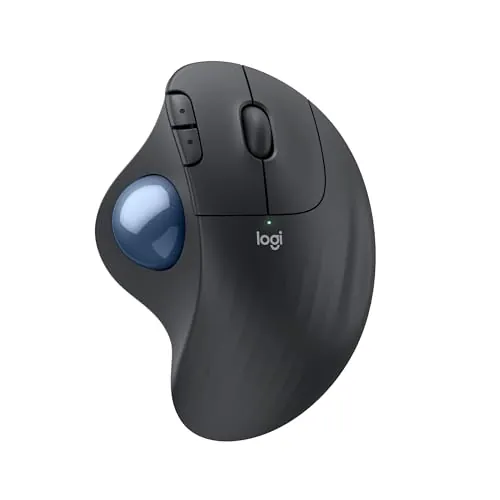
Logitech MX Ergo S vs ERGO M575S: Tilt, Thumb Controls and Power
Both are thumb-operated Logitech trackballs with Bluetooth and a Logi Bolt receiver in the manufacturer-listed box. The MX Ergo S adds a stated 20-degree tilt, a physical button for switching between speed and high-precision tracking, six customizable buttons and two-channel Easy-Switch; it recharges over USB-C, but the cable is not included. The ERGO M575S uses Logi Options+ for cursor-speed changes, offers three customizable buttons, and runs on one replaceable AA battery rated by Logitech for up to 18 months. Logitech's M575S support pages checked here do not state its saved-host count, so verify that requirement before relying on it for multi-computer switching.
Read comparison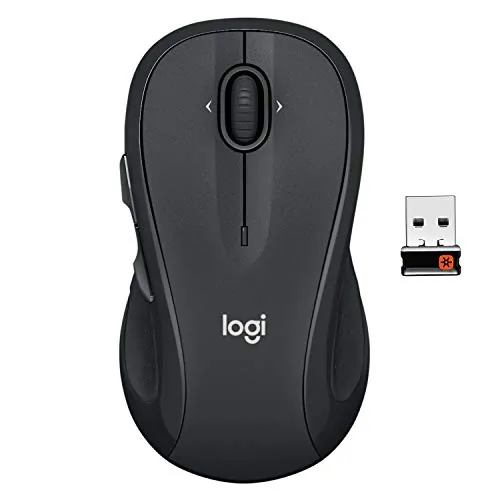
Logitech M510 vs M720 Triathlon: Receiver, Bluetooth, and Scrolling
The selected U.S. retail items are M510 Comfort Plus Graphite (910-006030) and M720 Triathlon Black (910-006036). Logitech's M510 model documentation describes a Unifying USB receiver, line-by-line scrolling, and tilt scrolling. The M720 adds Bluetooth Low Energy, up to three paired-device channels with a physical Easy-Switch button, and a wheel that toggles between faster and line-by-line scrolling. Check your host OS and available ports: Logitech's current M510 receiver compatibility list names Windows 10/11, ChromeOS, and Linux, while its M720 materials also list macOS and iPadOS support. Logitech's public M510 and M720 model pages do not identify the two assigned retail part numbers, so verify the exact listing and in-box receiver before buying.
Read comparison