
Products compared

Logitech
Logitech M720 Triathlon Multi-Device Wireless Mouse — Black
Black U.S. M720 Triathlon configuration. Logitech's support reference identifies the mouse as M-R0062; it uses Bluetooth Low Energy or Unifying 2.4 GHz and includes a Unifying receiver and one AA battery.
Model 910-006036
Amazon ASIN B087Z6LSHW
Logitech
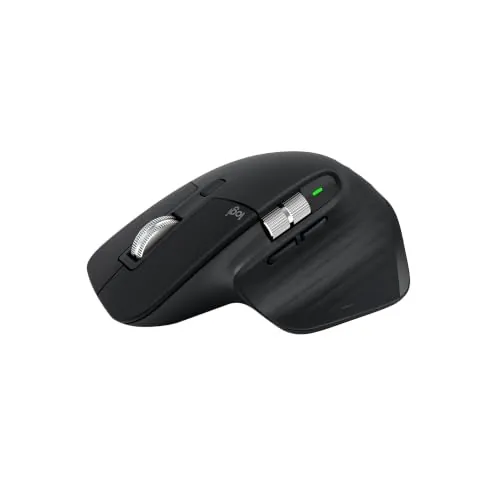
Logitech MX Master 3S Bluetooth Edition Wireless Mouse — Black
Exact black U.S. Bluetooth Edition, not the MX Master 3S Standard Edition. Bluetooth Low Energy is built in; a Logi Bolt receiver is compatible but not included. The included box listing is the mouse and user documentation; USB-C charging cable is sold separately.
Model 910-007500 / MR0096
Amazon ASIN B0G2SG3NFT
Differences that matter
What matters most to you?
Choose a priority to see what it changes.
Sources for Wheel behavior and horizontal navigation
Sources for Receiver, host port and Bluetooth plan
Sources for Battery and charging routine
Sources for Mouse-area footprint and listed weight
First choose the scroll control you want to use
M720's wheel gives you a deliberate choice: press the mode button to move between faster scrolling and line-by-line precision. Logitech also documents a tilt wheel for horizontal movement, useful if you regularly navigate a wide spreadsheet or timeline.
On the MX Master 3S Bluetooth Edition, MagSpeed can change from ratchet to free-spin automatically as you scroll faster; you can also shift modes manually. Its thumb wheel supplies a separate side-to-side input. Choose between these interactions based on how you like to move through pages and wide content, not on an unsupported claim that one scrolls faster or more comfortably.
Match the receiver route to your computer
M720 works over Bluetooth Low Energy or the Logitech Unifying 2.4 GHz receiver, and its support page lists one Unifying receiver in the box. The setup guide calls for a USB port for the receiver and says all three Easy-Switch channels can pair over Bluetooth or Unifying.
The assigned MX Master 3S Bluetooth Edition pairs through Bluetooth Low Energy. Logitech says it can also pair with a compatible Logi Bolt receiver, but does not include one. Because the documented receiver families differ, the M720's included Unifying receiver is not the receiver to buy this version for. Check which hosts have Bluetooth Low Energy and which have an available USB port before choosing a receiver workflow.
Account for battery replacements or charging
M720 uses one replaceable AA and Logitech lists one in the box. Its technical specification gives a 24-month battery rating, but that is not a controlled comparison against the Master 3S.
The Bluetooth Edition Master 3S has a rechargeable Li-Po battery and USB-C charging, with the cable not included. If you prefer rechargeable gear, make sure you have a suitable cable; if you prefer swapping a standard battery, M720's documented package includes one.
Check your desk area and exact Bluetooth Edition listing
The manufacturer lists M720 at 115 × 74 × 45 mm and the Bluetooth Edition Master 3S at 124.9 × 84.3 × 51 mm (height × width × depth). Compare the width and depth with the surface you have beside the keyboard and the distance to the desk edge; dimensions are a planning reference, not a comfort score.
The Master 3S line has more than one edition and bundle. The selected listing is Black Bluetooth Edition, part 910-007500 / support model MR0096. Its listed box has the mouse and documentation only; the Bluetooth Edition's compatible Logi Bolt receiver and USB-C charging cable are not included. Check that the exact offer says Bluetooth Edition before ordering.
Product details
Logitech M720 Triathlon Multi-Device Wireless Mouse — Black
- Scroll controls
- Button-selected dual-mode wheel for speed or line-by-line precision; the wheel also tilts for horizontal scrolling. Source
- Wireless and box contents
- Bluetooth Low Energy or Unifying wireless; Logitech lists a Unifying receiver and one AA battery in the box. The setup guide says all three Easy-Switch channels can pair through either supported route. Source
- Size and weight
- 4.53 × 2.91 × 1.78 in (H × W × D); 4.76 oz / 135 g with AA battery. Source
Logitech MX Master 3S Bluetooth Edition Wireless Mouse — Black
- Scroll controls
- Speed-adaptive MagSpeed shifts between ratchet and free-spin as scroll speed changes; a button allows manual mode switching, and a separate thumb wheel scrolls side to side. Source
- Edition and receiver
- Bluetooth Edition, model MR0096; Bluetooth Low Energy connection; Logi Bolt compatible but receiver not included. Box lists mouse and user documentation. Source
- Charging and size
- Rechargeable Li-Po battery; USB-C charging cable not included. Listed dimensions 124.9 × 84.3 × 51 mm (H × W × D), weight 141 g. Source
Before you buy
Community discussions
A buyer compares MX Master 3S and M720 shape
Logitech M720 Triathlon Multi-Device Wireless Mouse — Black
After buying an MX Master 3S, the poster was unsure about its size and shape and asked whether the 3S felt more like the MX Master 2S or M720. The archived post contains the question, not an answer.
What to check
Compare the MX Master 3S Bluetooth Edition and M720 shapes directly with your hand and desk space. Do not treat comments about the older MX Master 2S as a measured fit result for the 3S.
Common questions
Can the MX Master 3S Bluetooth Edition use the Unifying receiver included with the M720?
Logitech lists the M720's included receiver as Unifying and says the Bluetooth Edition MX Master 3S is compatible with Logi Bolt, whose receiver is not included. The sources document different receiver types; use the Master 3S with Bluetooth or a compatible Logi Bolt receiver, not the M720 box's Unifying receiver.M720 Triathlon Technical Specifications — Logitech SupportSpecification — MX Master 3S Bluetooth Edition
Does the MX Master 3S Bluetooth Edition include its charging cable?
No. Logitech lists the Bluetooth Edition box contents as the mouse and user documentation, and says its USB-C charging cable is not included. Check whether you already have a compatible cable or need to obtain one separately.Specification — MX Master 3S Bluetooth EditionGetting Started — MX Master 3S Bluetooth Edition
How do their scroll wheels differ?
M720 lets you press a button to switch between speed and line-by-line modes and has a tilt wheel for horizontal scrolling. MX Master 3S Bluetooth Edition's MagSpeed changes between ratchet and free-spin as you scroll faster, allows manual shifting, and has a separate thumb wheel for side-to-side scrolling. Logitech's materials document controls, not a matched result for speed or comfort.M720 Triathlon Multi-Computer Wireless Mouse — Black, Logitech U.S.Getting Started — MX Master 3S Bluetooth Edition
Will either mouse fit my hand or desk better?
Logitech lists M720 at 115 × 74 × 45 mm (H × W × D) and the assigned Master 3S Bluetooth Edition at 124.9 × 84.3 × 51 mm. Compare the listed width/depth with your mouse area and, if hand fit is decisive, try the shape where possible; published dimensions do not establish comfort for a specific user.M720 Triathlon Technical Specifications — Logitech SupportSpecification — MX Master 3S Bluetooth Edition
Sources and scope
This is a manufacturer-documentation comparison of the black M720 Triathlon and black MX Master 3S Bluetooth Edition, not a matched test of comfort, tracking, scroll speed, battery endurance or durability. The MX Master 3S Bluetooth Edition is the assigned 910-007500 variant; do not substitute the Standard Edition, whose box contents differ. Logitech's Bluetooth Edition spec identifies its internal model as MR0096 and says Logi Bolt compatibility does not mean a receiver is included. M720's included Unifying receiver is a different documented connection route; check the host's Bluetooth Low Energy support or available USB port and verify any receiver/adapter requirement. Listed dimensions describe the mice, not an individual's hand fit or guaranteed available mousing space.
- M720 Triathlon Multi-Computer Wireless Mouse — Black, Logitech U.S.
- M720 Triathlon Technical Specifications — Logitech Support
- M720 Triathlon Mouse Setup Guide
- MX Master 3S Bluetooth Edition — Black, Logitech U.S., part 910-007500
- Specification — MX Master 3S Bluetooth Edition
- Getting Started — MX Master 3S Bluetooth Edition
Related comparisons
Logitech M510 vs M720 Triathlon: Receiver, Bluetooth, and Scrolling
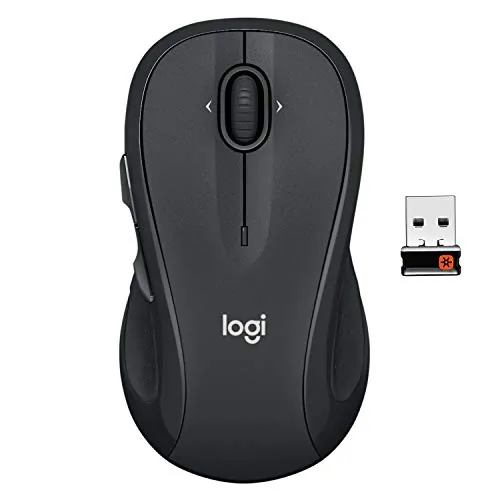
The selected U.S. retail items are M510 Comfort Plus Graphite (910-006030) and M720 Triathlon Black (910-006036). Logitech's M510 model documentation describes a Unifying USB receiver, line-by-line scrolling, and tilt scrolling. The M720 adds Bluetooth Low Energy, up to three paired-device channels with a physical Easy-Switch button, and a wheel that toggles between faster and line-by-line scrolling. Check your host OS and available ports: Logitech's current M510 receiver compatibility list names Windows 10/11, ChromeOS, and Linux, while its M720 materials also list macOS and iPadOS support. Logitech's public M510 and M720 model pages do not identify the two assigned retail part numbers, so verify the exact listing and in-box receiver before buying.
Read comparison
Logitech MX Master 4 vs MX Master 3S Bluetooth Edition: Receiver and Haptics
The U.S. Graphite MX Master 4 (910-007558) includes a USB-C receiver and adds configurable haptic feedback for supported actions. The Black MX Master 3S Bluetooth Edition (910-007500) is Bluetooth-first; Logitech says a Logi Bolt receiver is optional and not included. Both can use Logi Options+ for customization and Actions Ring workflows.
Read comparison