
Products compared

Logitech
Logitech M720 Triathlon Wireless Mouse
Black, right-handed full-size mouse; Bluetooth LE or Logitech Unifying receiver
Model M720 Triathlon (910-006036)
Amazon ASIN B087Z6LSHW
Logitech
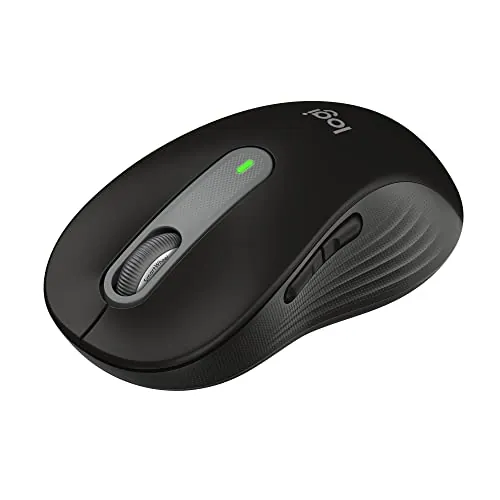
Logitech Signature M650 L Wireless Mouse
Black, large right-handed M650 size; Bluetooth LE or Logi Bolt receiver
Model Signature M650 L (910-006265; Logitech M/N MR0091 by country)
Amazon ASIN B09KX9P829
Differences that matter
Sources for Switching among computers
Sources for Receiver and setup
Sources for Scrolling and horizontal navigation
Sources for Size and hand orientation
Sources for Side-button workflow
The main decision is how many hosts share the mouse
The M720 is the better documented fit for a multi-computer desk: Logitech says it can pair with up to three devices and switch using Easy-Switch. The M650 L support specification names Bluetooth LE and Logi Bolt but lists one connection channel. That means a wireless connection choice should not be confused with multi-host switching.
If you primarily use one computer and want the large M650 size, the M650 L's setup is straightforward: choose Bluetooth or retrieve its included Bolt receiver from the mouse. If you alternate among multiple computers every day, the M720's explicit three-device workflow is the more relevant distinction.
Receiver choice matters when you already own Logitech gear
The M720 technical specification names Bluetooth LE and Unifying, and lists a Unifying receiver in its box. The M650 L specification names Bluetooth LE and Logi Bolt, with its receiver stored inside the mouse. Logitech documents these as distinct receiver families; verify your existing receiver and host ports rather than buying on the assumption that one USB receiver will serve both.
If the computer can use Bluetooth and you do not need a receiver, both models document Bluetooth LE as a connection method. Your operating system and device requirements still need to match Logitech's current compatibility information.
Try the wheel gesture that matches your everyday work
For wide spreadsheets, the M720 uses a tilting wheel for horizontal scrolling. Its separate wheel control switches between speed and precision scrolling. The M650 L's SmartWheel shifts between line-by-line and faster scrolling, while horizontal movement uses a side-button plus wheel gesture.
Both descriptions cover navigation options, not a speed or accuracy test. If horizontal navigation is central to your workflow, decide whether you prefer a wheel tilt or holding a side button while rolling.
Verify size and orientation before ordering
Logitech describes the M720 as full-size, contoured, and right-handed. M650 L is the large M650 size; Logitech's support specification gives 107.7 × 60.5 × 38.3 mm, and the product page offers an M650 L Left variant separately. Those are useful identifiers and dimensions, but they do not predict individual comfort.
Compare the listed dimensions with a mouse that already fits your desk and grip, and check the exact M650 L right-handed SKU rather than the standard M650 or the left-handed edition.
Product details
Logitech M720 Triathlon Wireless Mouse
Logitech describes the M720 as a full-sized, contoured, right-handed mouse. It can pair with up to three devices and switch through its Easy-Switch button. Its wheel switches between speed and precision modes, and the wheel tilts for horizontal scrolling.
Logitech Signature M650 L Wireless Mouse
The selected listing is the large Signature M650 L, not the standard M650 or left-handed M650 L Left. Logitech's M650L specification lists Bluetooth LE and Logi Bolt and reports one connection channel. The Bolt receiver is stored inside the mouse; the support page identifies regional M/N codes MR0091 and MR0091 C.
- Listed connection channels
- Bluetooth LE or Logi Bolt; Logitech specification lists one connection channel Source
- Included receiver
- Logi Bolt receiver stored inside the mouse Source
- Mouse dimensions
- 107.7 × 60.5 × 38.3 mm (L × W × H), excluding receiver and battery weight details Source
- Scroll controls
- SmartWheel switches from line-by-line to speed scrolling; horizontal scrolling uses a side-button plus wheel gesture Source
Before you buy
Community discussions
M720 and keyboard switching together
Logitech M720 Triathlon Wireless Mouse
A user with an M720 and K850 keyboard asked whether pressing a device key on either one could switch both together across three computers. The post is a setup question, not confirmation that the two can be synchronized.
What to check
If you want mouse and keyboard to follow the same host, confirm that workflow for the exact keyboard and software before relying on the M720’s separate channel control.
M720 owner reports unexpected device changes
Logitech M720 Triathlon Wireless Mouse
One M720 owner reported the mouse switching to a third saved device without input. They had assigned the same computer to Unifying and Bluetooth channels, but said that arrangement did not stop the reported switching; the post does not establish a cause.
What to check
If you plan to use several M720 channels, label each host and test the intended switching sequence—including any mixed receiver and Bluetooth setup—before relying on it for work.
Common questions
Can the M650 L switch among three computers like the M720?
Logitech's M720 page says it can pair with up to three devices and switch with Easy-Switch. The M650L technical specification lists Bluetooth LE and Logi Bolt but labels its connection as one channel. Do not infer multiple saved host slots from having two connection methods.Logitech M720 Triathlon product pageLogitech Support: Specification - Signature M650L
Does the M650 L include its USB receiver?
Logitech's M650L specification lists a Logi Bolt receiver inside the mouse. The getting-started guide shows removing it from the battery door and connecting it on Channel 1. Check the exact retailer listing and package before purchase.Logitech Support: Specification - Signature M650LLogitech Support: Getting Started - Signature M650
Are the M720 Unifying receiver and M650 L Logi Bolt receiver interchangeable?
Logitech identifies them as different receiver systems. These sources do not establish cross-pairing compatibility, so use the receiver family specified for the mouse rather than assuming they interchange.Logitech Support: M720 Triathlon Technical SpecificationsLogitech Support: Specification - Signature M650L
Sources and scope
This is a feature and setup comparison based on Logitech documentation. It does not establish which mouse feels more comfortable, tracks more accurately, lasts longer in real use, or performs better for a particular hand or surface.
Related comparisons
Logitech M510 vs M720 Triathlon: Receiver, Bluetooth, and Scrolling
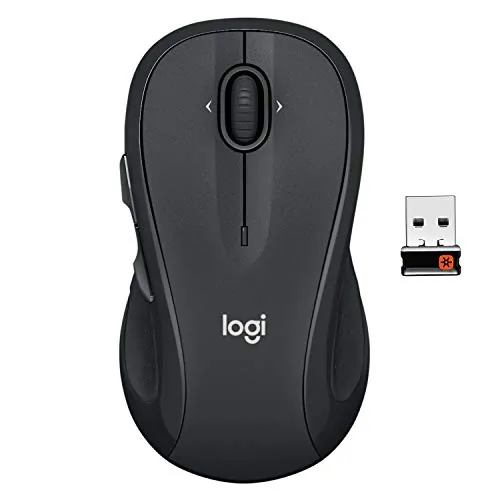
The selected U.S. retail items are M510 Comfort Plus Graphite (910-006030) and M720 Triathlon Black (910-006036). Logitech's M510 model documentation describes a Unifying USB receiver, line-by-line scrolling, and tilt scrolling. The M720 adds Bluetooth Low Energy, up to three paired-device channels with a physical Easy-Switch button, and a wheel that toggles between faster and line-by-line scrolling. Check your host OS and available ports: Logitech's current M510 receiver compatibility list names Windows 10/11, ChromeOS, and Linux, while its M720 materials also list macOS and iPadOS support. Logitech's public M510 and M720 model pages do not identify the two assigned retail part numbers, so verify the exact listing and in-box receiver before buying.
Read comparison
Logitech MX Master 4 vs M720 Triathlon: Receiver, Scroll and Setup
The Logitech MX Master 4 Graphite (910-007558) pairs a separate thumbwheel with the Actions Ring, which requires Logi Options+, and a rechargeable USB-C setup. The M720 Triathlon Black (910-006036) moves horizontally by tilting its main wheel and uses a replaceable AA battery with a Unifying receiver in the box. Both also offer Bluetooth and can pair with up to three computers. Decide by your preferred controls, software setup, host connection and power routine; this is not a comfort or performance ranking.
Read comparison