
Products compared
Logitech
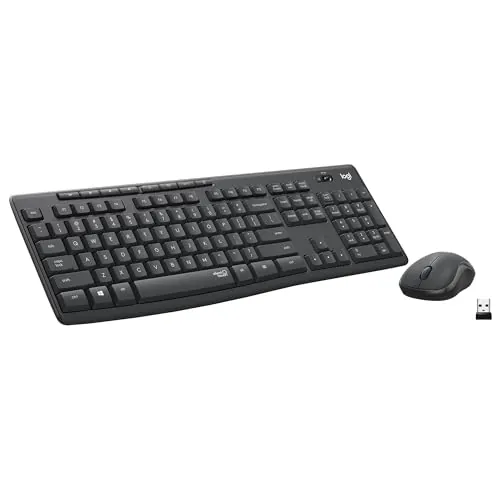
Logitech MK295 Silent Wireless Combo
Graphite U.S. combo; the keyboard and mouse share one USB-A 2.4 GHz non-Unifying receiver.
Model 920-009782
Amazon ASIN B089KV4YYX
Logitech
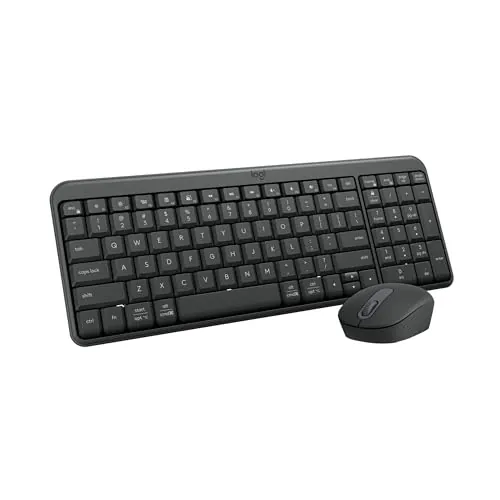
Logitech MK250 Compact Bluetooth Wireless Combo
Graphite U.S. Bluetooth combo consisting of a Logi K250 keyboard and M196 mouse; it does not use a USB dongle.
Model 920-013510
Amazon ASIN B0F36RKWDH
Differences that matter
What matters most to you?
Choose a priority to see what it changes.
Sources for Keyboard footprint and number entry
Sources for First-time setup
Sources for Operating-system shortcuts
Start with the computer, not the combo name
Check the computer you will actually use. MK295 920-009782 has a USB-A receiver for both peripherals; its official support specification calls the connection 2.4 GHz non-Unifying and lists the USB-A receiver in the box. MK250 920-013510 is Bluetooth-only in Logitech's current U.S. product description and needs no dongle.
That makes the choice concrete: reserve a usable USB-A port for MK295, or confirm Bluetooth support and use the MK250's separate keyboard-and-mouse pairing routine. An adapter or dock may change your port setup, so check the port you plan to use rather than assuming the computer's connector situation.
A number pad is not the deciding difference
Both keyboards include a number pad. Logitech describes MK295 as full-size with eight shortcuts; MK250 is the compact option that keeps its number pad and essential keys. If you enter numbers often, you can keep that capability with either set. Decide instead whether the full-size layout and extra shortcuts or the smaller keyboard footprint suits your work surface.
The MK250 setup guide also documents specific OS exceptions: Task View does not work on ChromeOS; Calculator does not work on macOS; Insert and Scroll Lock do not work on macOS and ChromeOS. If one of these functions is part of your daily routine, verify the exact key mapping before choosing compactness.
What the quiet-feature wording can and cannot tell you
Logitech presents MK295 as a SilentTouch combo. That describes the manufacturer's feature positioning; the available official sources do not test MK295 and MK250 side by side. Do not read the MK295 label as proof of a measured noise advantage over this MK250 model, and do not use comfort language from either product page as an independent comfort result.
If noise is the main reason for choosing, look for a comparison measured under similar conditions or try the exact keyboard and mouse yourself. Otherwise, the better-supported choice here is by connection method, keyboard format and the shortcuts you need.
Product details
Logitech MK295 Silent Wireless Combo
- Connection
- One USB-A receiver connects both keyboard and mouse over 2.4 GHz; the receiver is non-Unifying. Source
- Keyboard format
- Full-size keyboard with full number pad and eight shortcuts. Source
- Maker quiet-feature wording
- Logitech markets the combo with its SilentTouch technology; this is not a matched noise measurement against MK250. Source
Logitech MK250 Compact Bluetooth Wireless Combo
- Connection
- Bluetooth connection without a dongle; K250 keyboard and M196 mouse are added separately in device pairing. Source
- Keyboard format
- Compact keyboard that retains a number pad and essential keys; upper key legends are for Windows and lower legends for macOS. Source
- Shortcut compatibility
- Logitech lists Task View as unavailable on ChromeOS, Calculator unavailable on macOS, and Insert and Scroll Lock unavailable on macOS and ChromeOS. Source
Before you buy
Community discussions
Check the MK295 receiver in the mouse and packaging
Logitech MK295 Silent Wireless Combo
In a thread about an easy-to-miss receiver, a commenter who bought two MK295 combos says each mouse has a receiver storage compartment, while the receiver may be packed elsewhere in the box.
What to check
If you choose the receiver-based MK295, check the mouse compartment and the packaging flap before deciding the receiver is missing; the commenter says the dongle was not packed in the mouse compartment.
Common questions
Does the MK250 use the older Logitech USB receiver?
MK250 920-013510 is the Bluetooth combo. Logitech says it uses Bluetooth without a dongle, and its setup guide names K250 and M196 as separate devices. Verify the part number so it is not confused with a different or older MK250 package.MK250 Compact Bluetooth Wireless Combo — Logitech U.S. product pageGetting Started — MK250 — Logitech Support
Does the MK250 keep a number pad despite being compact?
Yes. Logitech describes the compact MK250 keyboard as retaining its number pad and essential keys. MK295 also has a number pad, with a full-size layout and eight additional shortcuts.MK250 Compact Bluetooth Wireless Combo — Logitech U.S. product pageMK295 Silent Wireless Combo — Logitech U.S. product page
Is MK295 proven quieter than MK250?
No side-by-side result is established here. Logitech markets MK295 with SilentTouch, but that wording is not a direct comparative test against MK250. Choose on connection and layout unless you can evaluate noise under conditions that matter to you.MK295 Silent Wireless Combo — Logitech U.S. product pageMK250 Compact Bluetooth Wireless Combo — Logitech U.S. product page
What should I know about MK250 pairing?
The Logitech guide has you add Logi K250 in Bluetooth settings (or Windows Swift Pair), type the requested numbers on K250 and press Enter; add the M196 mouse separately. Pairing with a new device requires repeating the Bluetooth setup for each component.Getting Started — MK250 — Logitech Support
Sources and scope
This guide compares Logitech MK295 part 920-009782 with the current Bluetooth MK250 part 920-013510, whose keyboard is Logi K250 and mouse is M196. It does not cover any older receiver-based MK250 package. Logitech describes SilentTouch on MK295, but these sources do not provide a controlled side-by-side noise or comfort test. The MK295 support page lists Windows and Chrome OS support at release; that list does not establish that every unlisted system is incompatible.
Related comparisons
Logitech MK470 vs MK295: Compact Number Pad or Full-Size Layout?
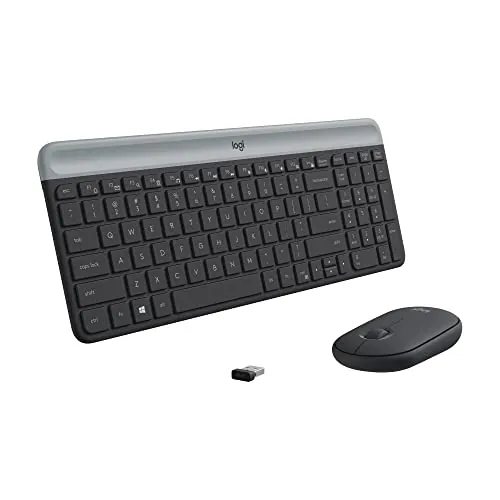
The Logitech MK470 and MK295 are both Graphite keyboard-and-mouse combos with a number pad, but the keyboard takes a different amount of desk space and uses a different key construction. MK470 pairs a compact number-pad layout and low-profile scissor keys with 12 FN shortcuts. MK295 uses a full-size layout, plunger keys and 8 convenience shortcuts plus media hotkeys. Logitech lists a 2.4 GHz non-Unifying USB-A receiver for both, so neither is a Bluetooth or Unifying-receiver choice. Both use replaceable AA/AAA batteries with the same stated keyboard and mouse life estimates; those are manufacturer figures, not a comparative battery test.
Read comparisonLogitech MK470 vs MK250: Key Profile, Bluetooth and Desk Setup
The Graphite Logitech MK470 (920-009437) and MK250 (920-013510) both keep a number pad in a compact keyboard-and-mouse set, but they connect differently. MK470 uses a 2.4 GHz non-Unifying USB-A receiver and low-profile scissor keys. MK250 uses Bluetooth LE with a Logi K250 keyboard and M196 mouse that you pair separately, and Logitech describes its keys as deep-profile. Check the computer's available connection, the key style you prefer and the separate component measurements before ordering.
Read comparison