
Products compared
Logitech
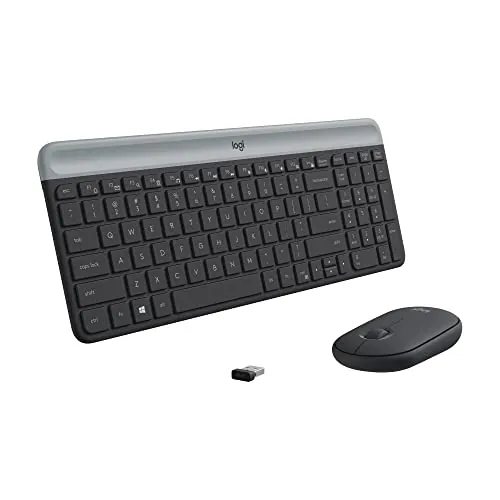
Logitech MK470 Slim Wireless Combo, Graphite
The Graphite MK470 combo is manufacturer part 920-009437. Logitech describes a compact keyboard that retains a number pad, low-profile scissor keys, 12 FN shortcuts, and a slim mouse. Its technical sheet lists one non-Unifying 2.4 GHz USB-A receiver for the combo and separate replaceable batteries for keyboard and mouse.
Model MK470 / 920-009437
Amazon ASIN B07VD4Q84X
Logitech
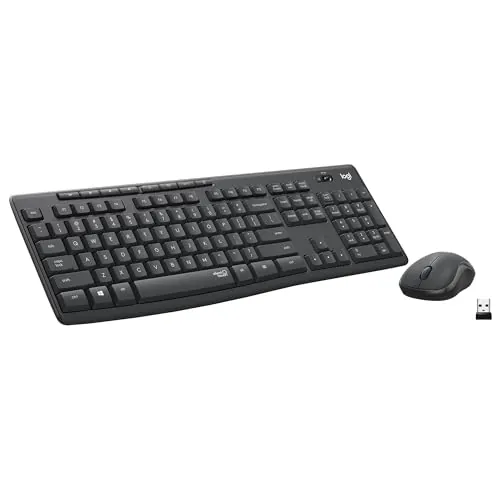
Logitech MK295 Silent Wireless Combo, Graphite
The Graphite MK295 Silent combo is manufacturer part 920-009782. Logitech describes a full-size keyboard with a number pad, eight convenience shortcuts, and a compact mouse. Its technical sheet specifies plunger keys, a 2.4 GHz non-Unifying USB-A receiver, replaceable batteries, and Windows/Chrome OS requirements at release.
Model MK295 / 920-009782
Amazon ASIN B089KV4YYX
Differences that matter
What matters most to you?
Choose a priority to see what it changes.
Sources for Keyboard arrangement and key construction
Sources for Desk fit and component dimensions
Sources for Shortcuts and everyday controls
Sources for Receiver, computer connection and operating system
Sources for Battery replacement planning
Pick the keyboard shape that matches your desk
Both combos keep a number pad. The MK470 is Logitech's compact layout with low-profile scissor keys; its product page calls out 12 FN shortcuts. The MK295 uses a full-size layout with plunger keys, 8 convenience shortcuts and media hotkeys. If you enter numbers but want the keyboard to take less of your available desk, start by measuring for the MK470. If you prefer a full-size arrangement, measure for MK295 instead.
The published component measurements are not presented in identical axis labels: Logitech's MK470 support sheet labels 373.5 mm as Height, while MK295 lists its long keyboard measurement as 441 mm Wide. Use the model's diagram or actual listing to orient dimensions, then mark the keyboard and mouse areas separately on your desk. The keyboard measurements do not include a combined keyboard-plus-mouse envelope.
Check the computer connection before choosing the combo
Logitech's technical sheets list both models with a non-Unifying 2.4 GHz receiver and USB-A connector. The product pages describe a receiver-based combo, and MK295's spec page includes a receiver in the box. Treat each purchase as needing its supplied receiver; do not plan to run either through Bluetooth or reuse a Unifying receiver unless Logitech documents support for that exact setup.
If your computer has only USB-C ports, confirm the adapter or hub you intend to use separately. The specs list Windows and Chrome OS requirements at release, not a guarantee for every current operating-system revision or shortcut-software version. Check current Logitech support for the exact computer before ordering.
Compare the controls you will actually use
MK470 lists 12 FN shortcuts on the compact layout. MK295 lists 8 convenience shortcuts and media hotkeys, and its specification page calls out Num Lock, Caps Lock and Scroll Lock controls/indicators. Count the actions you use during a normal workday rather than treating a higher shortcut count as a universal advantage.
The product pages describe reduced-noise or SilentTouch operation, but the official sources reviewed here do not contain a matched acoustic comparison between these two combos. This guide makes no relative quietness, typing-speed or comfort claim.
Plan for replaceable batteries
Logitech lists 2 AAA cells for each keyboard and 1 AA cell for each mouse. The MK470 sheet specifies replaceable, non-rechargeable batteries and gives 36 months for the keyboard and 18 months for the mouse; the MK295 sheet lists the same estimated lives. Treat these as manufacturer estimates, not measured runtime or a reason to expect one pair to outlast the other.
Before buying, decide whether keeping spare AA and AAA cells available fits your work setup. Neither technical sheet describes rechargeable batteries as included.
Four checks before you order
1. Confirm the exact Graphite part: MK470 920-009437 or MK295 Silent 920-009782. Check the regional key labels shown on the seller's exact listing.
2. Measure keyboard space and mouse space separately. MK470 is compact with a retained number pad; MK295 is the full-size layout. Compare each model's dimension diagram in the same orientation.
3. Make sure you have a usable USB-A receiver connection or a separately verified adapter/hub. Neither combo is documented here as Bluetooth or Unifying-compatible.
4. Check the current Logitech OS/support page and keep AA/AAA replacements on hand. The support sheets state OS coverage at release and their battery-life figures are estimates.
Product details
Logitech MK470 Slim Wireless Combo, Graphite
- Layout and controls
- Compact keyboard layout with a number pad, low-profile scissor keys and 12 FN shortcuts. Source
- Keyboard dimensions
- Logitech's support table lists the keyboard as 373.5 mm in its Height field, 143.9 mm in Width, and 21.3 mm in Depth. Mouse dimensions are listed separately. Source
- Wireless and operating-system listing
- 2.4 GHz non-Unifying receiver with USB-A connector. The support page lists Windows and Chrome OS requirements at release; verify current OS/software support for your exact device. Source
- Battery requirements and stated life
- Keyboard: 2 replaceable AAA cells, listed non-rechargeable battery life 36 months. Mouse: 1 replaceable AA cell, listed non-rechargeable battery life 18 months. These are manufacturer estimates, not a matched test. Source
Logitech MK295 Silent Wireless Combo, Graphite
- Layout and controls
- Full-size keyboard with full number pad, 8 convenience shortcuts and media hotkeys; the support sheet identifies plunger keys. Source
- Keyboard dimensions
- Logitech's support table lists keyboard dimensions of 22.75 mm high, 441 mm wide and 149 mm deep; mouse dimensions are listed separately. Source
- Wireless and operating-system listing
- 2.4 GHz non-Unifying receiver with USB-A connector; Logitech lists Windows and Chrome OS requirements at release. Confirm current OS and software support for your exact computer. Source
- Battery requirements and stated life
- Keyboard: 2 replaceable AAA alkaline cells, listed non-rechargeable battery life 36 months. Mouse: 1 replaceable AA cell, listed non-rechargeable battery life 18 months. These are manufacturer estimates, not a matched test. Source
Before you buy
Community discussions
Making sure the keys are where you expect
Logitech MK295 Silent Wireless Combo, Graphite
A shopper looking at MK295 part 920-009782 paid particular attention to the shape of the Enter key and the length of the left Shift.
What to check
Check the exact regional layout and measure how much desk space you need for the keyboard and number pad.
Comparing kits when you only need a keyboard
Logitech MK295 Silent Wireless Combo, Graphite
An MK295 user wanted the keyboard feel they knew from work without adding a second mouse to their home desk.
What to check
Check what comes with each receiver kit and decide where the included mouse would fit in your setup.
Common questions
Does the MK470 lose the number pad because it is compact?
No. Logitech says MK470's compact keyboard retains a number pad. The distinction is the tighter layout and scissor keys versus MK295's full-size keyboard and plunger keys.Logitech MK470 Slim Combo, Graphite, U.S. product pageLogitech MK295 Silent Wireless Combo Specifications
Can either combo connect by Bluetooth or reuse a Logitech Unifying receiver?
The technical sheets describe each as a 2.4 GHz non-Unifying receiver combo with a USB-A connector. They do not document Bluetooth or Unifying support, so do not plan on a receiver-free setup or reusing a Unifying receiver.Logitech MK470 Technical SpecificationsLogitech MK295 Silent Wireless Combo Specifications
Are the battery types or stated life estimates different?
Both spec sheets list 2 AAA batteries for the keyboard and 1 AA for the mouse, with non-rechargeable estimates of 36 months for the keyboard and 18 months for the mouse. These are manufacturer estimates, not a direct battery-life comparison.Logitech MK470 Technical SpecificationsLogitech MK295 Silent Wireless Combo Specifications
Which one should I choose if quiet typing is the main requirement?
The product pages describe quiet or SilentTouch operation, but the reviewed sources do not give a matched MK470-versus-MK295 acoustic test. This guide cannot rank them by actual noise; try both in person if that is the deciding factor.Logitech MK470 Slim Combo, Graphite, U.S. product pageLogitech MK295 Silent Combo, Graphite, U.S. product page
Sources and scope
This is a source-based setup and layout comparison, not a typing, comfort, quietness, reliability or battery-life test. Logitech describes quiet or noise-reduced operation for both products, but the sources do not provide a matched MK470-versus-MK295 sound test. The Logitech support sheets list OS support at release; check the exact current OS and available software before buying. Prices are omitted.
Related comparisons
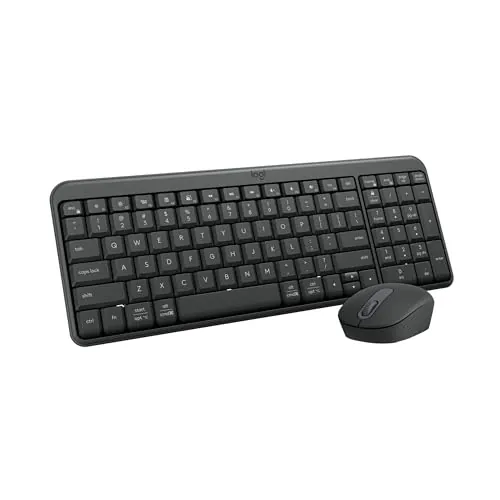
Logitech MK295 920-009782 vs MK250 920-013510: USB Receiver or Bluetooth?
Both Logitech sets include a keyboard and mouse with a number pad on the keyboard. The practical difference is how they connect and how much keyboard space you want: MK295 920-009782 shares one USB-A 2.4 GHz receiver and uses a full-size keyboard with eight shortcuts, while MK250 920-013510 uses Bluetooth without a dongle and a compact keyboard. MK250’s K250 keyboard and M196 mouse are paired separately, so check that setup and your operating-system shortcuts before buying.
Read comparisonLogitech MK470 vs MK250: Key Profile, Bluetooth and Desk Setup
The Graphite Logitech MK470 (920-009437) and MK250 (920-013510) both keep a number pad in a compact keyboard-and-mouse set, but they connect differently. MK470 uses a 2.4 GHz non-Unifying USB-A receiver and low-profile scissor keys. MK250 uses Bluetooth LE with a Logi K250 keyboard and M196 mouse that you pair separately, and Logitech describes its keys as deep-profile. Check the computer's available connection, the key style you prefer and the separate component measurements before ordering.
Read comparison