
Products compared
Logitech
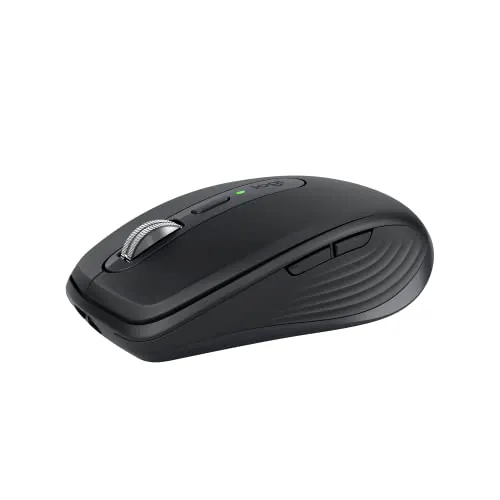
Logitech MX Anywhere 3S Compact Wireless Mouse (Graphite)
The selected listing is the US Graphite MX Anywhere 3S, part 910-006925. Logitech's exact US part page identifies Graphite and describes a compact conventional mouse. Its pairing, scroll, charging, and receiver details below are maker-stated features, not a performance test.
Model MX Anywhere 3S, 910-006925
Amazon ASIN B0BPY4ZQXG
Logitech
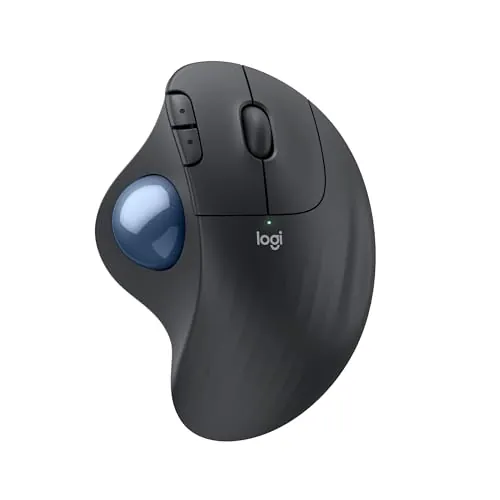
Logitech ERGO M575S Wireless Trackball (Graphite + Blue Ball)
The selected listing is the Graphite + Blue Ball ERGO M575S, part 910-007027. Logitech's exact US product page identifies that color and describes thumb-operated cursor control without moving the device. It also documents three customizable buttons. No comfort, medical, or tracking-quality conclusion is inferred.
Model ERGO M575S, 910-007027
Amazon ASIN B0BBQ3ZYNY
Differences that matter
What matters most to you?
Choose a priority to see what it changes.
Sources for Scroll and button controls
Sources for Charging versus replaceable battery
Start with the way you want to move the pointer
MX Anywhere 3S is a compact mouse you move across the work surface. ERGO M575S uses a thumb-operated ball; Logitech says the cursor can move while the trackball itself stays in place and describes that setup for small or busy spaces. If your desk is crowded, compare the M575S's listed body dimensions with the space you have, then decide whether you want a stationary ball or a mouse with a clear sweep. That is a layout check, not a personal hand-fit or comfort finding.
The controls differ too. Logitech documents the MX Anywhere 3S MagSpeed wheel's line-by-line and free-spin modes, automatic SmartShift, and a manual mode-shift button. For M575S, its exact specification lists a scroll wheel and back/forward controls, while its getting-started page labels the wide wheel and side keys. The reviewed M575S material does not document the same two-mode wheel control. Choose according to the controls you want; no source here compares scroll speed or precision.
Check connection, receiver and power before you buy
Both models support Bluetooth and Logi Bolt, but the box details differ. Logitech says the MX Anywhere 3S is Bolt-compatible and does not include the receiver; its product page lists the USB-C charging cable. The M575S specification lists the receiver and one AA battery in the box, and states that a USB-A port is required for Bolt. Logitech's setup guide also gives Bluetooth steps for M575S. Check your host's Bluetooth support or available USB-A connection before deciding which route to use.
Power is a routine choice: recharge MX Anywhere 3S over USB-C, or replace the M575S's user-replaceable AA when needed. MX Anywhere 3S's setup page documents Bluetooth pairing with up to three computers and channel switching. The reviewed M575S pages do not state its multi-computer pairing count, so ask Logitech if that is a requirement rather than assuming it matches. Manufacturer runtime estimates have different conditions and are not a comparable test.
Product details
Logitech MX Anywhere 3S Compact Wireless Mouse (Graphite)
- Pointer and scroll controls
- Compact movable mouse; Logitech documents a MagSpeed scroll wheel with a mode-shift button for line-by-line and free-spinning modes. Source
- Connection
- Bluetooth Low Energy and Logi Bolt receiver compatible; the receiver is not included. Logitech documents Bluetooth pairing with up to three computers and channel switching. Source
- Power and listed cable
- Rechargeable Li-Po battery charged through USB-C; the exact US page lists an included USB-C cable. Logitech does not list a Logi Bolt receiver as included. Source
Logitech ERGO M575S Wireless Trackball (Graphite + Blue Ball)
- Pointer and desk workflow
- Thumb-operated trackball; Logitech says the cursor can move without moving the pointing device and describes it for small or busy setups. Source
- Connection and box contents
- Supports Bluetooth and Logi Bolt. Logitech lists a Logi Bolt receiver and one AA battery in the box; the receiver requires a USB-A port, or use Bluetooth on a compatible host. Source
- Power
- Uses one user-replaceable AA battery; the maker's setup page gives up to 18 months as an estimate for either listed wireless mode, not a result comparable to MX Anywhere 3S. Source
Before you buy
Community discussions
Choosing which devices need USB instead of Bluetooth
Logitech MX Anywhere 3S Compact Wireless Mouse (Graphite)
A prospective MX Anywhere 3S buyer planned to use Bluetooth at home and needed a receiver for a computer with restricted software.
What to check
Make a connection plan for each computer. Check whether the receiver is included, which USB port it uses and where you can finish pairing.
Common questions
Which one can stay still while I move the cursor?
Logitech describes the ERGO M575S as a thumb-operated trackball: move the ball with your thumb while the device stays in place. MX Anywhere 3S is a conventional compact mouse that you move across the surface.ERGO M575S Graphite + Blue Ball, part 910-007027 — Logitech US product pageMX Anywhere 3S Graphite, part 910-006925 — Logitech US product page
Does the MX Anywhere 3S include a Logi Bolt receiver?
No. Logitech says MX Anywhere 3S is compatible with Logi Bolt, but its product page says the receiver is not included. The listed included cable is for USB-C charging.MX Anywhere 3S Graphite, part 910-006925 — Logitech US product page
Does the M575S include a receiver and battery?
Logitech's M575S specification lists a Logi Bolt receiver and one AA battery in the box. The receiver requires a USB-A port; Logitech's setup guide also documents Bluetooth pairing.Specification — ERGO M575S — Logitech SupportGetting Started — ERGO M575S — Logitech Support
Can the M575S switch among three computers like the MX Anywhere 3S?
Logitech documents up-to-three-computer Bluetooth pairing and channel switching for MX Anywhere 3S. The M575S sources reviewed here confirm Bluetooth and Bolt but do not state its multi-computer pairing count, so verify that with Logitech if it matters.Getting Started — MX Anywhere 3S — Logitech SupportSpecification — ERGO M575S — Logitech SupportGetting Started — ERGO M575S — Logitech Support
Sources and scope
Check your desk space and try the stationary thumb trackball if possible. The M575S includes a Bolt receiver and an AA. MX Anywhere 3S recharges over USB-C and its Bolt receiver is sold separately. Check the M575S pairing options if you need to move between several computers.
- MX Anywhere 3S Graphite, part 910-006925 — Logitech US product page
- Specification — MX Anywhere 3S — Logitech Support
- Getting Started — MX Anywhere 3S — Logitech Support
- ERGO M575S Graphite + Blue Ball, part 910-007027 — Logitech US product page
- Specification — ERGO M575S — Logitech Support
- Getting Started — ERGO M575S — Logitech Support
Related comparisons
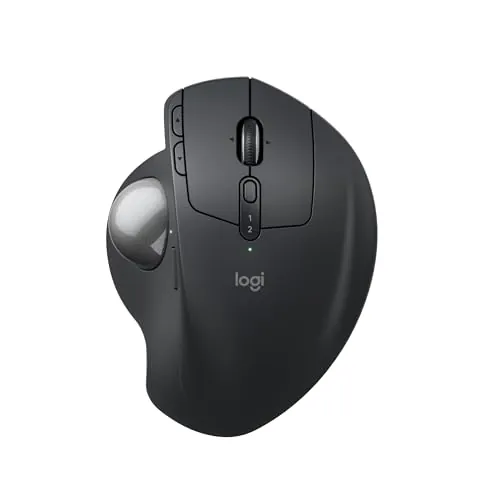
Logitech MX Ergo S vs ERGO M575S: Tilt, Thumb Controls and Power
Both are thumb-operated Logitech trackballs with Bluetooth and a Logi Bolt receiver in the manufacturer-listed box. The MX Ergo S adds a stated 20-degree tilt, a physical button for switching between speed and high-precision tracking, six customizable buttons and two-channel Easy-Switch; it recharges over USB-C, but the cable is not included. The ERGO M575S uses Logi Options+ for cursor-speed changes, offers three customizable buttons, and runs on one replaceable AA battery rated by Logitech for up to 18 months. Logitech's M575S support pages checked here do not state its saved-host count, so verify that requirement before relying on it for multi-computer switching.
Read comparison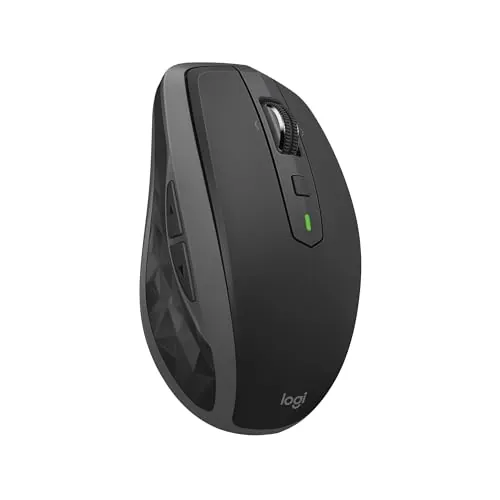
Logitech MX Anywhere 3S vs MX Anywhere 2S Bluetooth Edition: Receivers, USB-C and OS Fit
This comparison is for the assigned graphite SKUs: MX Anywhere 3S 910-006925 / ASIN B0BPY4ZQXG and MX Anywhere 2S Bluetooth Edition 910-007232 / ASIN B0CJXQVMHL. Both pair with up to three computers and support Bluetooth. The 3S can also use a Logi Bolt receiver, which Logitech says is not included; it cannot use a Unifying receiver. The 2S model family lists both Bluetooth and Unifying, but the assigned Bluetooth Edition listing says no USB receiver is included. Charging also differs: USB-C on the 3S, Micro-USB on the 2S. Decide by the receiver you own, the port and cable you want, and whether your computer can use Logitech's customization app.
Read comparison