
Products compared
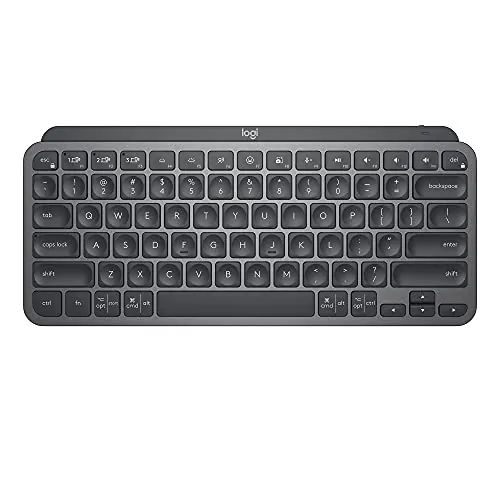
Logitech
Logitech MX Keys Mini Minimalist Wireless Illuminated Keyboard - Graphite
Exact U.S. Graphite MX Keys Mini retail part. Logitech describes this as its smaller-form keyboard and identifies a full-size version with integrated numpad as the alternative. The selected Mini package's Logi Bolt receiver contents are not confirmed by the official pages reviewed.
Model 920-010388
Amazon ASIN B098JPSVKY

Logitech
Logitech MX Keys S Wireless Keyboard - Graphite
Exact U.S. Graphite MX Keys S retail part. Its longer keyboard span accommodates the full-size layout; Logitech lists an included USB receiver and USB-C charging cable in model support documentation.
Model 920-011558
Amazon ASIN B0BKW3LB2B
Differences that matter
What matters most to you?
Choose a priority to see what it changes.
Sources for Desk width and keyboard footprint
Sources for Compact layout versus integrated number pad
Sources for Bluetooth, receiver and exact package contents
Sources for Multi-device setup, backlighting and charging
Choose by your available keyboard span
Start with the actual clear width on your desk or keyboard tray. Logitech lists the MX Keys Mini as 295.99 mm wide and 131.95 mm deep. The MX Keys S measures 430.20 mm along its long dimension and 131.63 mm across. That is about 134 mm of extra keyboard length for the S; it is a simple dimensional check, not a fit test. Leave room for the mouse and any equipment you keep beside the keyboard.
If that measurement is close, lay out a 296 mm and 430 mm span on the desk with paper or a ruler before ordering. Pick the Mini when the compact keyboard boundary is the priority. Pick the MX Keys S when the longer span fits and its full-size layout is useful.
Decide whether your work needs a dedicated numpad
The compact Mini is described by Logitech as the smaller-form option; its product page contrasts it with a full-size version that has an integrated numpad. The MX Keys S is Logitech’s full-size alternative. If spreadsheets, bookkeeping or frequent numeric entry are central to your routine, decide whether a dedicated number pad is worth the longer keyboard span. If desk space and a more compact board are more important, consider the Mini.
Logitech markets both keyboards with similarly shaped keys and backlit illumination. That information does not establish comparative typing comfort, speed, noise or key feel, so those preferences should be checked in person if they are decisive.
Match Bluetooth or Logi Bolt to the computers you use
Both models document Bluetooth Low Energy and Easy-Switch for pairing up to three computers. MX Keys Mini is also listed as Logi Bolt-compatible, but its exact 920-010388 package contents are not confirmed by the reviewed official pages. MX Keys S documentation lists a USB receiver in the box and its setup instructions call it the included Logi Bolt receiver.
Before buying, list the computers you plan to connect and check whether Bluetooth is suitable on each. If you specifically want a receiver-based connection, confirm the exact Mini bundle with the seller; do not infer that Bolt compatibility means the receiver is included. Logitech lists a USB-C charging cable in the MX Keys S box, while the Mini specification describes USB-A-to-USB-C charging.
Treat backlighting and charging as shared features
Logitech lists backlighting and rechargeable USB-C power for both models. The MX Keys S product page describes hand-proximity illumination and additional backlight controls through Logi Options+; the Mini page also describes adaptive backlighting. These shared features are not a reason by themselves to choose one over the other.
The manufacturer’s battery figures are conditional on lighting behavior and are not presented in directly comparable terms across the two cited specification pages. This guide does not rank battery life. If charge interval matters to you, check Logitech’s current exact-model instructions and consider how you expect to use the backlight.
Product details
Logitech MX Keys Mini Minimalist Wireless Illuminated Keyboard - Graphite
- Keyboard dimensions
- 295.99 mm wide × 131.95 mm deep × 20.97 mm high Source
- Wireless and device switching
- Bluetooth Low Energy; Logi Bolt-compatible. Logitech says Easy-Switch can pair up to three computers. Exact Mini retail-box receiver contents remain unconfirmed. Source
- Lighting and charging
- Backlit keys; rechargeable through USB-A-to-USB-C charging cable according to the support specification. Source
Logitech MX Keys S Wireless Keyboard - Graphite
- Keyboard dimensions
- 430.20 mm along its long dimension × 131.63 mm across × 20.5 mm high Source
- Wireless and box contents
- Bluetooth Low Energy or Logi Bolt USB receiver; Logitech lists a USB receiver and USB-C charging cable in the box. Easy-Switch pairs up to three computers. Source
- Lighting and charging
- Backlit keys and USB-C charging; battery duration varies by backlight setting and lighting conditions, so no runtime comparison is made here. Source
Before you buy
Community discussions
Choosing a full-size layout for work from home
Logitech MX Keys S Wireless Keyboard - Graphite
A buyer who had just chosen the MX Keys S after using an Apple Magic Keyboard without a number pad wanted the numpad for work from home. Desk space was not a constraint, and their Excel use varied from minimal to occasional heavier stretches.
What to check
If the extra keyboard span fits your desk, consider whether a dedicated numpad matches your own work. This post captures one buyer's changing Excel workload; it does not establish that a full-size layout suits everyone.
Common questions
Does the MX Keys Mini Graphite package include a Logi Bolt receiver?
The exact Logitech U.S. product page identifies Graphite part 920-010388, and support documentation says MX Keys Mini is Logi Bolt-compatible. The official pages reviewed do not confirm that this exact retail box includes a receiver. Confirm the package contents with the seller if you need one.MX Keys Mini Wireless Keyboard - Graphite, part 920-010388Specification - MX Keys Mini
How much extra desk length should I allow for MX Keys S?
Logitech lists the Mini at 295.99 mm wide and MX Keys S at 430.20 mm along its longer dimension, a difference of about 134 mm. Measure your own clear keyboard span and leave space for any nearby mouse or desk equipment.Specification - MX Keys MiniSpecification - MX Keys S
Can both keyboards switch between multiple computers?
Logitech’s setup instructions for both models describe pairing up to three computers with Easy-Switch. Mini’s cited setup covers Bluetooth pairing; MX Keys S can pair through Bluetooth or its included Logi Bolt receiver.Getting Started - MX Keys MiniGetting Started - MX Keys S
Do the pages establish which keyboard lasts longer or feels better to type on?
No. The manufacturer pages list model specifications and supported setup, not a controlled comparative runtime, comfort or typing test. Battery duration also depends on backlighting and use conditions.Specification - MX Keys MiniSpecification - MX Keys S
Sources and scope
This feature-fit guide uses Logitech product and support documentation, not hands-on testing. The selected Mini Graphite package’s Logi Bolt receiver inclusion is not established by the reviewed official pages; battery duration is not compared because the cited model figures use different reporting detail and backlighting affects runtime.
Related comparisons

Logitech MX Keys S vs Wave Keys: Choose by Lighting, Layout and Power
These two Logitech keyboards share Bluetooth, an included Logi Bolt receiver and Easy-Switch workflows, so connection alone does not settle the choice. MX Keys S (920-011558) has a low-profile layout, adaptive backlighting and a USB-C charging port you can use while typing. Wave Keys (920-011898) has a wave-shaped layout with an attached cushioned palm rest, uses two included AAA batteries, and its Logitech consumer FAQ says its keys are not backlit. Check your lighting, desk layout, host operating systems and power preference before choosing; neither model is a universal comfort winner.
Read comparison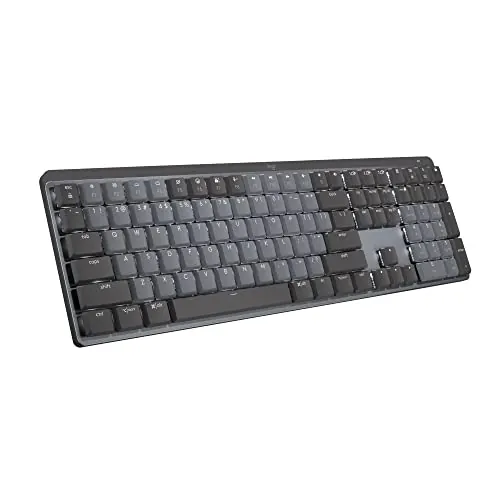
Logitech MX Keys S vs MX Mechanical: Scissor or Tactile Quiet?
The Graphite MX Keys S uses scissor keys; the assigned full-size MX Mechanical is the Tactile Quiet low-profile mechanical version. Logitech lists 1.8 mm total travel for MX Keys S and 3.2 mm for MX Mechanical. Both support lighting, Bluetooth LE or a Logi Bolt receiver, and switching among up to three devices. Choose by a typing style you already know you want; these specifications do not establish typing speed, comfort or sound superiority.
Read comparison