
Products compared
Logitech
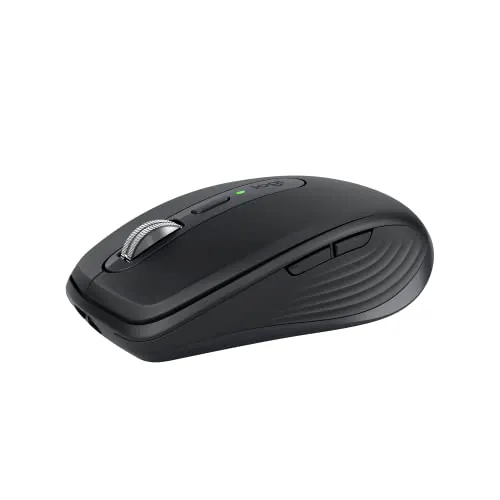
Logitech MX Anywhere 3S Wireless Bluetooth Mouse (Graphite)
U.S. Graphite variant; Bluetooth mouse compatible with Logi Bolt, receiver not included
Model 910-006925
Amazon ASIN B0BPY4ZQXG
Logitech
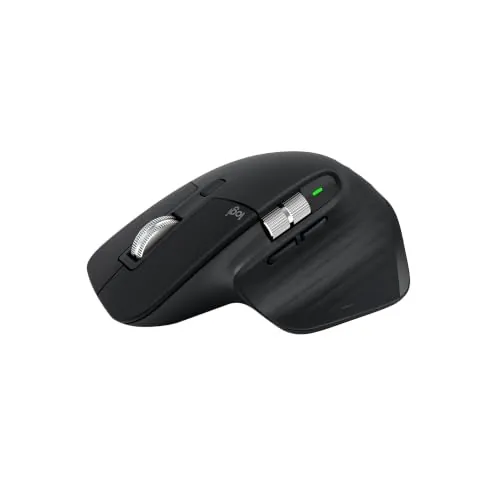
Logitech MX Master 3S Bluetooth Edition Wireless Mouse (Black)
U.S. Black Bluetooth Edition; Logi Bolt-compatible, receiver not included
Model 910-007500
Amazon ASIN B0G2SG3NFT
Differences that matter
What matters most to you?
Choose a priority to see what it changes.
Sources for Receiver and first connection
Sources for Horizontal-scroll motion
Sources for Multiple computers and OS setup
Sources for Carry weight and packing
Check the exact receiver package before choosing
The product pair here is the Graphite MX Anywhere 3S 910-006925 and Black MX Master 3S Bluetooth Edition 910-007500. Both connect over Bluetooth and are compatible with Logi Bolt, but Logitech says the receiver is not included for either exact option. The Master specification lists only the mouse and user documentation in its box; the Anywhere U.S. product listing says the included USB-C cable is for charging and identifies Bolt as a separate receiver option.
That makes the first decision practical: if the computer has Bluetooth and your organization permits it, you can pair either mouse without a dongle. If Bluetooth is disabled or a managed USB receiver is required, budget for a compatible Logi Bolt receiver and confirm that it can be used on your host. Do not use the receiver-included contents of another MX Master 3S edition to infer this Bluetooth Edition's box.
Pick the horizontal-scroll motion you will use
On MX Anywhere 3S, Logitech's guide says to hold a side button while turning the main scroll wheel. Logitech says that horizontal scrolling is on by default in Options+ and can be adjusted under Point & Scroll. A side button can be assigned to a long-press feature, but if both side buttons are assigned that way, horizontal scrolling is disabled; one regular side button remains usable when the other is assigned an advanced action.
MX Master 3S Bluetooth Edition puts horizontal motion on a separate thumb wheel. Its guide says Options+ can change the thumb wheel's speed and direction and set different actions for apps such as Excel, Word, PowerPoint, and Photoshop. This is a difference in control layout and setup options, not proof that one scrolls faster or more accurately. If you spend the day panning wide spreadsheets or timelines, choose the gesture that matches the movement you want to repeat.
Check your computers and customization software
Both setup guides document Easy-Switch pairing with up to three computers. Logitech's Anywhere 3S specification lists Bluetooth support for Windows, macOS, iPadOS, ChromeOS, Linux, and Android, with version requirements depending on the connection; it notes that sensor, wheel, and buttons work without added drivers on ChromeOS and most popular Linux distributions. The Bluetooth Edition Master specification lists Windows, macOS, iPadOS, Chrome OS, Linux, and Android, and names Options+ support at release for Windows 10/11 or later and macOS 10.15 or later.
Separate basic pointer support from configurable features: a platform can support mouse input without offering Logitech's full Options+ customization. Before choosing for a tablet, work computer, or managed OS, check the current Logitech requirements for that host and decide whether you need custom buttons, app-specific wheel actions, or only Bluetooth pointer input.
Use listed weight as a packing check, not an ergonomics score
Logitech lists the MX Anywhere 3S at 95 g with its battery and the MX Master 3S Bluetooth Edition at 141 g, a 46 g difference by subtraction. If the mouse regularly travels between home and work, compare that difference with your normal bag load and check each model against the sleeve or case you plan to use. Logitech's specifications do not determine which shape or weight will feel comfortable in your hand, and this comparison does not make a tracking-performance claim.
A quick pre-buy check is to verify the exact model code, confirm whether Bluetooth or a separately purchased receiver is the connection you can use, and rehearse the intended horizontal-scroll workflow in the apps you rely on. If the receiver or software conditions do not match your computer, another exact bundle or mouse may be a better candidate.
Product details
Logitech MX Anywhere 3S Wireless Bluetooth Mouse (Graphite)
The Graphite 910-006925 package is the compact option in this pair. Logitech lists it at 95 g with its battery and describes horizontal scrolling through a side-button-plus-main-wheel action. The official U.S. listing says a Logi Bolt receiver is not included; use Bluetooth or budget for a separately purchased compatible receiver if your setup requires one.
Logitech MX Master 3S Bluetooth Edition Wireless Mouse (Black)
This is the Bluetooth Edition, not a bundle that includes the Logi Bolt receiver. Logitech lists 141 g and describes a separate thumb wheel for side-to-side scrolling. Its setup guide also documents up to three paired computers and Options+ customization; those facts apply to the Bluetooth Edition guide, not every MX Master 3S package.
Before you buy
Community discussions
Choosing between a larger desk mouse and a compact daily setup
Logitech MX Anywhere 3S Wireless Bluetooth Mouse (Graphite)
A buyer using an MX Master 3S for spreadsheet work with a MacBook and external monitor says it feels bulky for their use and is considering the MX Anywhere 3S. The post asks whether to switch and does not report an outcome. The Master package edition is not specified.
What to check
Consider whether your work surface and hand position favor the larger Master body or a more compact mouse. Compare the exact edition and controls you plan to use before choosing.
Checking how the scroll wheel feels
Logitech MX Anywhere 3S Wireless Bluetooth Mouse (Graphite)
In a discussion about MX Anywhere 3S, a reader asked whether its wheel could feel notched like the one on an MX Master 3S.
What to check
If wheel feel matters for spreadsheets or long pages, compare the documented wheel modes and how you switch between them.
Common questions
Does either exact mouse include a Logi Bolt receiver?
No. Logitech says the Graphite MX Anywhere 3S 910-006925 is compatible with a Logi Bolt receiver but does not include one. The MX Master 3S Bluetooth Edition specification also says a receiver is not included. Both support Bluetooth, so a receiver is optional unless your host setup requires it.MX Anywhere 3S Wireless Bluetooth Mouse, Graphite (910-006925)Specification - MX Master 3S Bluetooth Edition
Which model has a separate horizontal-scroll wheel?
The MX Master 3S Bluetooth Edition has a dedicated thumb wheel. The MX Anywhere 3S uses a side-button-plus-main-wheel gesture; Logitech says horizontal scrolling is enabled by default in Options+ and configurable under Point & Scroll.Getting Started - MX Anywhere 3SGetting Started - MX Master 3S Bluetooth Edition
Can both switch between more than one computer?
Yes. Each Logitech setup guide says the mouse can be paired with up to three computers and switched using Easy-Switch. Confirm the host's Bluetooth availability or plan for a separately purchased compatible Logi Bolt receiver.Getting Started - MX Anywhere 3SGetting Started - MX Master 3S Bluetooth Edition
Does the lighter mouse necessarily feel more comfortable?
No. Logitech lists 95 g with battery for Anywhere 3S and 141 g for Master 3S Bluetooth Edition, but these specifications do not establish comfort, hand fit, or tracking performance for an individual.Specification - MX Anywhere 3SSpecification - MX Master 3S Bluetooth Edition
Sources and scope
This guide uses Logitech U.S. product and setup documentation, not hands-on or controlled testing. The weight values do not establish comfort, hand fit, tracking performance, or scrolling superiority. Operating-system and Options+ support are stated by Logitech as release-era requirements and may change; check current requirements for your computer. No price recommendation is made.
Related comparisons
Logitech MX Anywhere 3S vs MX Anywhere 2S Bluetooth Edition: Receivers, USB-C and OS Fit
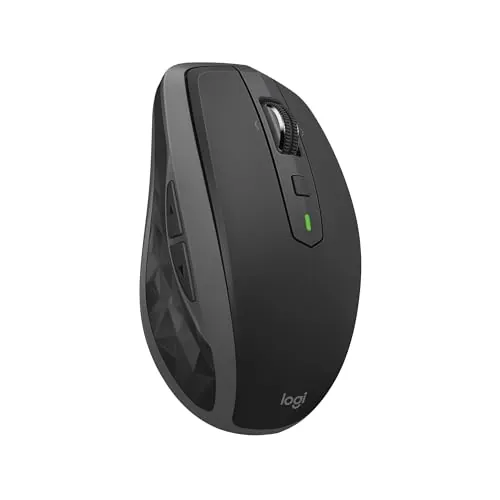
This comparison is for the assigned graphite SKUs: MX Anywhere 3S 910-006925 / ASIN B0BPY4ZQXG and MX Anywhere 2S Bluetooth Edition 910-007232 / ASIN B0CJXQVMHL. Both pair with up to three computers and support Bluetooth. The 3S can also use a Logi Bolt receiver, which Logitech says is not included; it cannot use a Unifying receiver. The 2S model family lists both Bluetooth and Unifying, but the assigned Bluetooth Edition listing says no USB receiver is included. Charging also differs: USB-C on the 3S, Micro-USB on the 2S. Decide by the receiver you own, the port and cable you want, and whether your computer can use Logitech's customization app.
Read comparison
Logitech MX Master 4 vs MX Master 3S Bluetooth Edition: Receiver and Haptics
The U.S. Graphite MX Master 4 (910-007558) includes a USB-C receiver and adds configurable haptic feedback for supported actions. The Black MX Master 3S Bluetooth Edition (910-007500) is Bluetooth-first; Logitech says a Logi Bolt receiver is optional and not included. Both can use Logi Options+ for customization and Actions Ring workflows.
Read comparison