
Products compared

Logitech
Logitech MX Master 4 Wireless Mouse, Graphite, US
Conventional wireless mouse: move the whole mouse to steer the pointer. The selected consumer model charges through USB-C, includes a wireless USB receiver, and supports Bluetooth; the charging cable is sold separately.
Model MX Master 4 (910-007558)
Amazon ASIN B0FC5SJNQX
Logitech
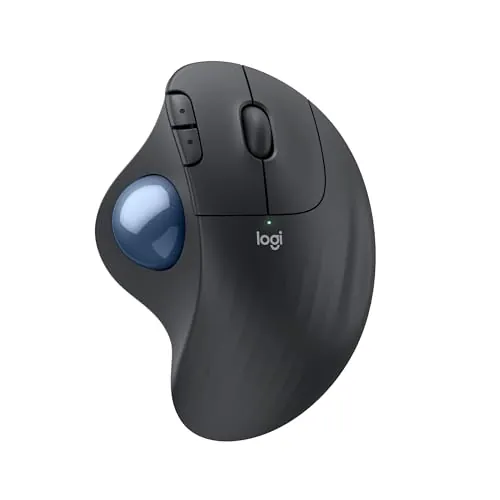
Logitech ERGO M575S Wireless Trackball Mouse, Graphite with Blue Ball, US
Thumb-operated trackball: roll the ball to move the pointer while the mouse body remains stationary. The selected US package uses one AA battery and supports Bluetooth or the Logi Bolt receiver.
Model ERGO M575S (910-007027)
Amazon ASIN B0BBQ3ZYNY
Differences that matter
What matters most to you?
Choose a priority to see what it changes.
Sources for How you steer the pointer
Sources for Host switching and connection path
Sources for What the selected kit provides
Start with the way you move the pointer
With MX Master 4, you steer by moving the whole mouse over a surface. Its setup guide shows a MagSpeed main wheel, a thumb wheel and an Easy-Switch/connect button. ERGO M575S uses a thumb-operated trackball: the mouse body stays stationary while you roll the ball to move the pointer.
That changes the motion your desk routine needs. Master 4 needs an area where the mouse can move; M575S avoids the sweep but still needs its own footprint, room for your hand and space to roll the ball. Choose the motion pattern you prefer without reading it as a health or comfort result.
Check how many devices and ports you need
Logitech documents pairing up to three computers and selecting a saved channel with Easy-Switch on Master 4. Its setup material offers the included USB receiver or direct Bluetooth pairing. Logitech describes Bluetooth and Logi Bolt receiver pairing for M575S and shows receiver storage under the battery door, but does not state a saved-device channel count.
Both include a Bluetooth path in the cited materials. If you prefer a receiver, inspect the computer's ports and the actual package before ordering. If M575S multi-host switching is a must-have, confirm its exact behavior with Logitech instead of assuming it matches Master 4's three-channel setup.
Plan the power routine and exact kit
The selected Graphite MX Master 4 is rechargeable through USB-C. Logitech's consumer product information says the cable is sold separately, so add a suitable charging cable to your setup if you do not already have one. The setup guide also identifies its included wireless USB receiver; it can pair by Bluetooth instead.
The selected Graphite + Blue Ball M575S uses one AA battery; its US package lists an AA and Logi Bolt USB receiver. Logitech's setup page has one generic 'recharge' sentence near the battery indicator, but explicitly says the device is battery powered by one AA. The page does not document a USB charging port, so use its AA specification rather than treating that sentence as proof of USB charging.
Before you buy: desk and kit check
1. Confirm the exact graphite model: MX Master 4 910-007558 or ERGO M575S Graphite + Blue Ball 910-007027.
2. Decide whether you want to move the whole mouse or steer a stationary body with a thumb ball. Measure your work area for the chosen body and movement routine; stationary operation does not guarantee a smaller overall space requirement.
3. Count computer channels. Logitech documents up to three paired computers for Master 4, while its M575S guide does not specify a saved-device count.
4. Check the host's Bluetooth or USB receiver path. The M575S package lists a Bolt receiver and AA battery. Master 4 charges through USB-C, but the charging cable is not in its box.
Product details
Logitech MX Master 4 Wireless Mouse, Graphite, US
- Pointing method
- Move the mouse body across the desk surface; includes MagSpeed wheel, thumb wheel and haptic panel Source
- Paired computers
- Up to 3; select a prepared channel with the Easy-Switch button Source
- Power
- Built-in rechargeable battery; charge from its USB-C port. Charging cable not included. Source
Logitech ERGO M575S Wireless Trackball Mouse, Graphite with Blue Ball, US
Before you buy
Community discussions
An early MX Master 4 review flags mouse lifting as a fit check
Logitech MX Master 4 Wireless Mouse, Graphite, US
After a few hours with the Master 4, one reviewer liked the extra button, adjustable haptics and thumb control, but said its weight and changed grip felt uncomfortable when lifting it to reposition. They compared it with their prior MX Master 3 and MX3S experience and were still testing.
What to check
Try the mouse in your normal workspace, including the small lifts or repositioning you actually do. This short-term report is one person's fit experience and does not predict comfort for other hands or compare it with the M575S.
A buyer asks about switching between two USB receivers
Logitech MX Master 4 Wireless Mouse, Graphite, US
A shopper using separate Windows and Mac computers asks whether an MX Master 4 can switch between two USB receivers without Bluetooth and whether the device-switch control can be remapped to a top button. The post is a question; it does not report a verified setup.
What to check
Confirm the exact package's included receiver and check M575S channel behavior with Logitech if a known multi-computer setup is essential; do not infer its channel count from this Master 4 question.
Common questions
Does the MX Master 4 include a USB-C charging cable?
No. Logitech's consumer Master 4 product information says the charging cable is not included. The setup guide identifies the mouse's USB-C charging port and says to connect it to a USB power source.MX Master 4 Wireless Mouse — Logitech US product pageGetting Started — MX Master 4
Can I use M575S without moving the mouse body?
Yes. The M575S is a thumb-operated trackball: roll the ball to move the pointer while its body stays put. You still need physical room for the trackball and your hand.Getting Started — ERGO M575S / ERGO M575SP
Does M575S charge over USB?
Logitech identifies the M575S as powered by one AA battery. Its support page also contains a generic recharge reference, but does not document USB charging. Confirm the power method with Logitech if rechargeable operation is required.ERGO M575S Wireless Trackball — Graphite + Blue Ball US product pageGetting Started — ERGO M575S / ERGO M575SP
How many computers can M575S switch between?
Logitech's M575S setup instructions describe Bluetooth and Logi Bolt receiver pairing but do not state the number of saved-device channels. Logitech documents up to three paired computers for Master 4. Verify M575S switching with Logitech if the exact channel count is essential.Getting Started — ERGO M575S / ERGO M575SPGetting Started — MX Master 4
Sources and scope
This guide compares the Logitech MX Master 4 Graphite and ERGO M575S configurations; it is not a hands-on or health assessment. It makes no claims about comfort, injury prevention, reduced strain, accuracy, learning time, productivity, battery endurance, reliability or ownership cost. Logitech's M575S support guide also mentions M575SP and includes a generic recharge sentence despite identifying an AA battery; USB charging is not documented for M575S. Confirm the exact model and power method with Logitech if charging matters.
Related comparisons
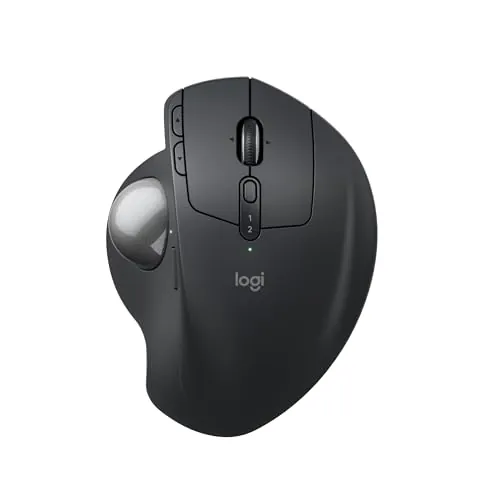
Logitech MX Ergo S vs ERGO M575S: Tilt, Thumb Controls and Power
Both are thumb-operated Logitech trackballs with Bluetooth and a Logi Bolt receiver in the manufacturer-listed box. The MX Ergo S adds a stated 20-degree tilt, a physical button for switching between speed and high-precision tracking, six customizable buttons and two-channel Easy-Switch; it recharges over USB-C, but the cable is not included. The ERGO M575S uses Logi Options+ for cursor-speed changes, offers three customizable buttons, and runs on one replaceable AA battery rated by Logitech for up to 18 months. Logitech's M575S support pages checked here do not state its saved-host count, so verify that requirement before relying on it for multi-computer switching.
Read comparison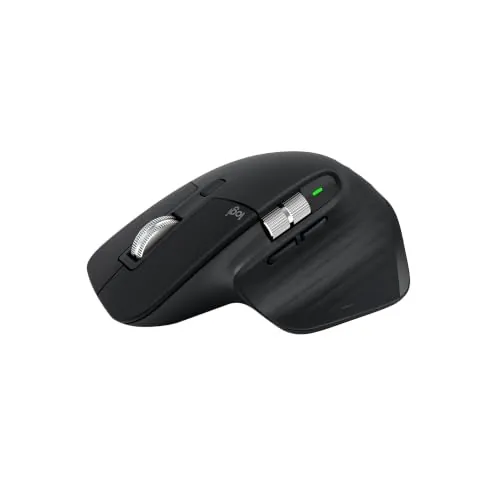
Logitech MX Master 4 vs MX Master 3S Bluetooth Edition: Receiver and Haptics
The U.S. Graphite MX Master 4 (910-007558) includes a USB-C receiver and adds configurable haptic feedback for supported actions. The Black MX Master 3S Bluetooth Edition (910-007500) is Bluetooth-first; Logitech says a Logi Bolt receiver is optional and not included. Both can use Logi Options+ for customization and Actions Ring workflows.
Read comparison