
Products compared

Logitech
Logitech MX Master 4 Wireless Mouse, Graphite
The Graphite MX Master 4 pairs over Bluetooth Low Energy or its included Logi Bolt USB receiver and charges through USB-C. Its documented controls include the MagSpeed main wheel, a separate thumb wheel, a wheel-mode button, a Haptic Sense Panel and Easy-Switch for up to three computers. Logitech describes the main wheel as shifting between line-by-line ratchet and free-spin modes; Actions Ring and customizable haptics require software setup.
Model 910-007558
Amazon ASIN B0FC5SJNQX

Logitech
Logitech MX Vertical Ergonomic Wireless Mouse, Graphite
The U.S. Graphite MX Vertical is right-handed and uses a 57-degree vertical form with a thumb rest; Logitech describes it as suited to medium-to-large hands. It pairs over Bluetooth or its Logitech Unifying USB receiver, and its USB-C cable can also connect it for corded use. Its precision wheel scrolls line by line and includes a middle click; a separate button switches cursor speed, not wheel mode. It can pair with up to three computers.
Model 910-005447
Amazon ASIN B07FNJB8TT
Differences that matter
What matters most to you?
Choose a priority to see what it changes.
Sources for Receiver, Bluetooth, and host pairing
Start with the grip you intend to use
These two Graphite models use different shapes. MX Master 4 is the non-vertical sculpted mouse; MX Vertical is designed around a right-handed, 57-degree hand position with a thumb rest. Logitech describes Vertical as suited to medium-to-large hands. That wording is only a guide: before choosing, check whether your fingers rest naturally on the buttons and whether the thumb reaches the wheel and side controls.
Logitech's published Vertical guidance does not let us predict your fit, and the cited Master 4 product material does not give a matching hand-size range. Choose by the grip and controls you can actually reach rather than by a promise about pain, comfort or medical outcomes.
Check the receiver and computer ports before you buy
Graphite MX Master 4 supports Bluetooth Low Energy or an included Logi Bolt wireless USB receiver. Logitech identifies this standard Graphite configuration as including a USB-C receiver. MX Vertical supports Bluetooth or a Logitech Unifying receiver, and its USB-C cable can also be used for wired connection.
Logi Bolt and Unifying are separate receiver families: Logitech states that devices from one family do not pair to the other family's receiver. If you rely on a dongle, confirm which protocol you already own and whether the computer has the required port. Bluetooth avoids choosing between these two receivers only when the host supports Bluetooth and its pairing policy allows it. Both mice can pair to up to three computers using their Easy-Switch controls.
Separate the scroll wheel from the pointer-speed controls
Master 4 has a MagSpeed main wheel that shifts between ratchet and free-spin modes, plus a separate thumb wheel for side-to-side navigation. A top mode button can switch the main wheel manually; software adds app-specific thumb-wheel actions and the Haptic Sense Panel's Actions Ring.
MX Vertical keeps a precision, line-by-line wheel with an integrated middle click and gives pointer speed its own top switch. That switch changes cursor speed, not scroll behavior. If you move among long pages and wide sheets, Master 4's separate wheels address two kinds of movement; if a line-by-line wheel and direct pointer-speed toggle match your work, Vertical lays those out as separate controls. This is a feature-fit choice, not a test result.
Decide whether charging can double as a wired input
Both have a USB-C path. Logitech labels the Master 4's port as its charging port; the sources cited here do not confirm that it works as wired pointer input. The Vertical setup page specifically describes using its cable to connect the powered-on mouse in corded mode.
If you only need to recharge, both models have USB-C documentation. If you require a cable fallback for pointer control, Logitech explicitly documents wired use for MX Vertical. Verify the current exact-model support information before treating MX Master 4's charging socket as a data connection.
Product details
Logitech MX Master 4 Wireless Mouse, Graphite
- Graphite MX Master 4 model
- MX Master 4 Graphite, model 910-007558 Source
- Wireless setup
- Bluetooth Low Energy or the included Logi Bolt wireless USB receiver; Easy-Switch pairs up to three computers Source
- Scroll and physical controls
- Adaptive MagSpeed main wheel can shift between ratchet and free-spin; separate thumb wheel scrolls side to side; a top mode-shift button switches wheel modes Source
- Charging and software
- USB-C charging port; the product page says customizable Haptic Sense Panel feedback and Actions Ring use Logi Options+ on Windows or macOS Source
Logitech MX Vertical Ergonomic Wireless Mouse, Graphite
- U.S. Graphite MX Vertical
- MX Vertical, part number 910-005447; Logitech's datasheet identifies this part as Graphite, AMR region Source
- Hand position and maker hand-size guidance
- Right-handed, 57-degree vertical form; Logitech describes the mouse as suited to medium-to-large hands. This is guidance, not an individual fit guarantee. Source
- Connection and charging cable
- Bluetooth, Logitech Unifying USB receiver, or USB-C cable; Logitech's setup guide documents use with the cable attached Source
- Physical controls and device switching
- Precision wheel scrolls line by line and middle-clicks; cursor-speed switch toggles pointer speed; Easy-Switch pairs up to three devices Source
Before you buy
Community discussions
An early MX Master 4 review flags mouse lifting as a fit check
Logitech MX Master 4 Wireless Mouse, Graphite
After a few hours with the Master 4, one reviewer liked the extra button, adjustable haptics and thumb control, but said its weight and changed grip felt uncomfortable when lifting it to reposition. They compared it with their prior MX Master 3 and MX3S experience and were still testing.
What to check
Try the mouse in your normal workspace, including the small lifts or repositioning you actually do. This short-term report is one person's fit experience and does not predict comfort for other hands or compare it with MX Vertical.
A monitor-hub receiver path failed in one KVM setup
Logitech MX Master 4 Wireless Mouse, Graphite
A user reports that the Master 4's USB-C receiver was not detected through a specific monitor KVM and USB hub, though it worked when plugged directly into the Mac or PC. They then got it recognized from a USB-A hub port using an adapter. The thread does not establish why the first path failed.
What to check
If you plan to leave the receiver in a monitor, hub or KVM, test that exact path and adapter before relying on it. This is one setup report, not a general receiver-compatibility result.
Common questions
Can I pair MX Master 4 with an MX Vertical Unifying receiver?
No. The exact Master 4 setup identifies Logi Bolt, while the MX Vertical datasheet identifies Unifying. Logitech explicitly says Logi Bolt and Unifying receiver families are not compatible. Use each model's supported receiver or Bluetooth where the computer supports it.Getting Started - MX Master 4 — Logitech Sync supportMX Vertical Advanced Ergonomic Mouse Datasheet — Logitech; U.S. Graphite part identifiedAre Logi Bolt devices compatible with Unifying USB receivers? — Logitech Support
Does MX Vertical's top button change scroll mode?
No. Logitech documents it as a cursor-speed switch, which changes pointer speed. Master 4 has a separate wheel-mode button for switching its main wheel between ratchet and free-spin modes.Getting Started - MX Vertical — Logitech SupportGetting Started - MX Master 4 — Logitech Sync support
Is MX Vertical sized for smaller hands?
Logitech describes it as a fit for medium-to-large hands. That is the manufacturer's guidance, not a size measurement or a guarantee that it will fit you. Try the grip and reach to its wheel and buttons if possible.MX Vertical Ergonomic Wireless Mouse — Logitech U.S. product page
Can I keep using the mouse while it charges?
Logitech's MX Vertical setup guide explicitly documents corded use over USB-C. The MX Master 4 source identifies a USB-C charging port but does not establish wired pointer use. If cable operation matters, verify the exact Master 4 instructions before purchase.Getting Started - MX Vertical — Logitech SupportGetting Started - MX Master 4 — Logitech Sync support
Sources and scope
This is a feature and setup comparison of the Graphite MX Master 4 and U.S. Graphite MX Vertical, not a hands-on test. It does not establish comfort, pain relief, ergonomics outcomes, speed, tracking quality, reliability or durability superiority. Logitech's medium-to-large hand guidance applies to MX Vertical; it is not a fit guarantee, and no matching hand-size range is asserted for MX Master 4. The Graphite MX Master 4 package and Graphite MX Vertical part are in scope; Mac-specific and business packages are not substituted.
- MX Master 4 Graphite, model 910-007558 — Logitech U.S. product page
- Getting Started - MX Master 4 — Logitech Sync support
- MX Vertical Ergonomic Wireless Mouse — Logitech U.S. product page
- Getting Started - MX Vertical — Logitech Support
- MX Vertical Advanced Ergonomic Mouse Datasheet — Logitech; U.S. Graphite part identified
- Are Logi Bolt devices compatible with Unifying USB receivers? — Logitech Support
Related comparisons
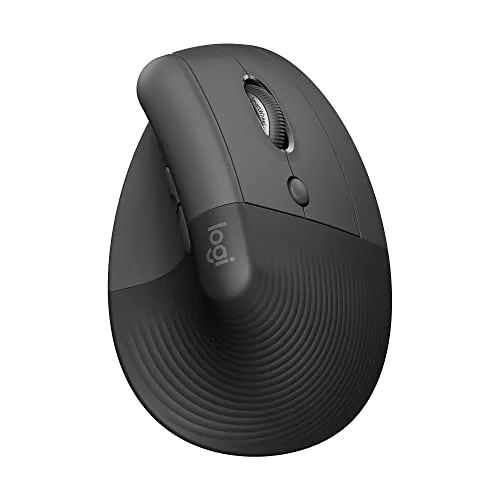
Logitech Lift vs MX Vertical: Hand Fit, Receiver and Charging
These are both right-handed Logitech vertical mice, but Logitech positions them for different hand-size ranges. Lift uses one AA battery and a Logi Bolt receiver; MX Vertical recharges over USB-C, can stay connected by cable while charging, and uses a Unifying receiver. Bluetooth is available on both.
Read comparison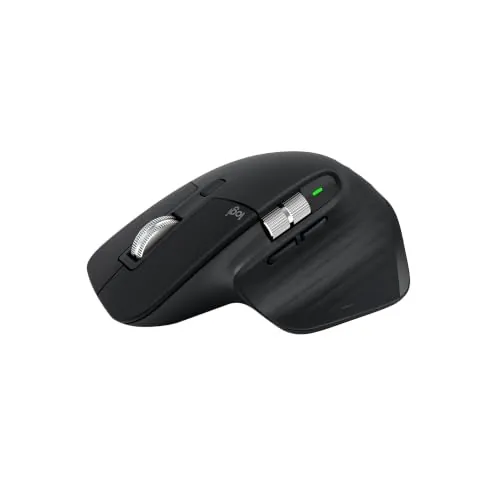
Logitech MX Master 4 vs MX Master 3S Bluetooth Edition: Receiver and Haptics
The U.S. Graphite MX Master 4 (910-007558) includes a USB-C receiver and adds configurable haptic feedback for supported actions. The Black MX Master 3S Bluetooth Edition (910-007500) is Bluetooth-first; Logitech says a Logi Bolt receiver is optional and not included. Both can use Logi Options+ for customization and Actions Ring workflows.
Read comparison