
Products compared
Logitech
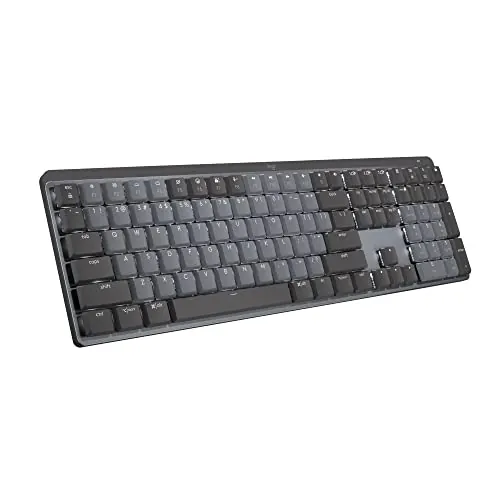
Logitech MX Mechanical Wireless Illuminated Keyboard
Full-size low-profile mechanical keyboard with Bluetooth or Logi Bolt wireless connection, Easy-Switch for up to three paired devices and rechargeable smart illumination.
Model 920-010547 — Tactile Quiet, Graphite, full-size
Amazon ASIN B09LK1P1RD
Logitech G
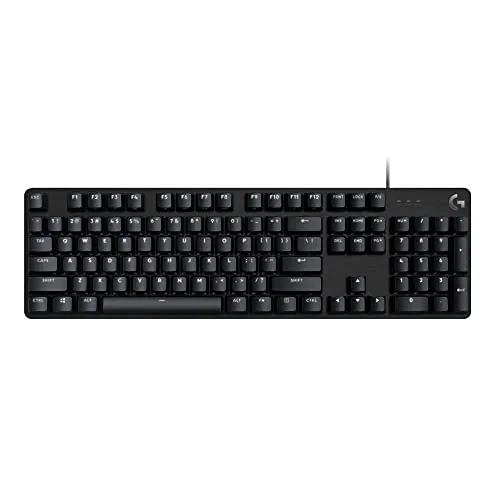
Logitech G413 SE Mechanical Gaming Keyboard
Full-size tactile mechanical keyboard with a wired desk connection, white LED lighting and five onboard lighting patterns.
Model 920-010433 — full-size, Black
Amazon ASIN B08Z6X4NK3
Differences that matter
What matters most to you?
Choose a priority to see what it changes.
Start with the connection you want at your desk
The MX Mechanical is a wireless full-size keyboard. Logitech documents Bluetooth Low Energy and the included Logi Bolt receiver, plus Easy-Switch for pairing up to three devices and changing channels from the keyboard. That workflow is useful if you routinely move between separate computers without moving the keyboard cable.
G413 SE is identified by Logitech G as a wired full-size keyboard. It suits a fixed desk where a direct cable connection is welcome. The two models are not interchangeable connection choices: the MX Mechanical USB-C lead is for charging only according to Logitech's setup guide, while G413 SE is the wired model.
Match lighting controls to how you use a keyboard
MX Mechanical's backlight turns on as hands approach and adjusts with ambient light; Logitech also lists selectable effects through keyboard shortcuts or Logi Options+. That is the documented automatic-lighting workflow, not proof that it is brighter or more visible than G413 SE.
G413 SE uses white LED lighting. Its setup guide lists five onboard patterns—static, serpent, reactive, random lights and breathing—and function-key shortcuts for brightness and pattern controls. Choose it if you want those direct controls at the keyboard; do not infer a brighter setting from the number of patterns.
Plan charging and care without assuming a maintenance winner
MX Mechanical has a rechargeable battery. Logitech's specification gives up to 15 days with backlighting and up to 10 months with it off; actual use depends on the stated lighting condition. Its setup guide says to charge over USB-C and that the cable is for charging only. G413 SE is wired, so it does not add a keyboard battery-charging routine.
The documentation reviewed does not compare cleaning effort or give a cleaning schedule for both exact models. Logitech's MX Mechanical support troubleshooting article points to a mechanical-keyboard cleaning video; use each exact model's current support instructions for cleaning rather than assuming that either keyboard needs less care.
Check layout and operating-system needs against the exact offer
Logitech calls both products full-size. MX Mechanical's page distinguishes the full-size model with an integrated numpad from the MX Mechanical Mini, and its support guide shows PC and Mac key layouts with a supported multi-OS list. The G413 SE page identifies a full-size layout and the selected U.S. part 920-010433, but the consulted G413 sources do not give a complete OS compatibility list or every regional key legend.
If you rely on a specific OS, language layout or key legend, verify it for the exact G413 SE offer before ordering. Also measure your available desk width; Logitech lists MX Mechanical at 433.85 mm wide. No directly comparable G413 SE width was established from the sources used here.
Product details
Logitech MX Mechanical Wireless Illuminated Keyboard
- Connection and switching
- Bluetooth Low Energy or included Logi Bolt receiver; Easy-Switch supports up to three paired devices Source
- Key profile and selected switch
- Full-size model with low-profile mechanical keys; selected Tactile Quiet switch option Source
- Lighting and charging
- White smart backlighting with hand-proximity and ambient-light response; rechargeable over USB-C Source
- Keyboard dimensions
- 433.85 mm wide × 131.55 mm deep × 26.10 mm high; manufacturer's spec page lists 828 g Source
Logitech G413 SE Mechanical Gaming Keyboard
- Connection
- Logitech identifies this exact G413 SE as a wired keyboard Source
- Layout and switches
- Full-size layout with tactile mechanical switches Source
- Lighting controls
- White LEDs; setup guide lists five onboard lighting patterns and FN brightness shortcuts Source
- Keycap material
- PBT keycaps listed by Logitech G Source
Before you buy
Community discussions
Trying the sound and feel of Tactile Quiet keys
Logitech MX Mechanical Wireless Illuminated Keyboard
A commenter who uses a Tactile Quiet MX Mechanical with a number pad found it more audible than their previous MX Keys and preferred its tactile feel.
What to check
If both layouts can do the job, type on the two switch styles before you decide. Include sound in your check if you work around other people.
Common questions
Can the MX Mechanical switch between several computers?
Yes. Logitech documents Easy-Switch for up to three paired devices. Its setup guide describes pairing a channel and using a short press to change channels. G413 SE is documented as wired, not as a wireless multi-device keyboard.MX Mechanical Wireless Keyboard, part 920-010547 | Logitech U.S.Getting Started — MX Mechanical | Logitech Support U.S.G413 SE Mechanical Gaming Keyboard, part 920-010433 | Logitech G U.S.
Does the MX Mechanical USB-C cable make it a wired keyboard?
Logitech's MX Mechanical setup guide says the USB-C cable is for charging only. The keyboard is specified as wireless over Bluetooth Low Energy or Logi Bolt; the cited sources do not describe USB-C keyboard data mode.Getting Started — MX Mechanical | Logitech Support U.S.Specification — MX Mechanical | Logitech Support U.S.
How do their lighting controls differ?
MX Mechanical's lighting responds to hand proximity and ambient light and offers selectable effects. G413 SE uses white LED lighting and its setup guide lists five onboard patterns plus FN brightness controls. This describes controls, not a visibility or typing-performance test.MX Mechanical Wireless Keyboard, part 920-010547 | Logitech U.S.Getting Started — MX Mechanical | Logitech Support U.S.G413 SE Mechanical Gaming Keyboard Setup Guide | Logitech G
Which is easier to maintain?
The documents do not compare cleaning effort. One routine difference is power: MX Mechanical is rechargeable and Logitech provides condition-dependent battery estimates; G413 SE is wired and does not need keyboard battery charging. For cleaning, follow the exact model's current manufacturer instructions.Specification — MX Mechanical | Logitech Support U.S.How to clean or troubleshoot keys on MX Mechanical | Logitech Support U.S.G413 SE Mechanical Gaming Keyboard, part 920-010433 | Logitech G U.S.
Sources and scope
This is a feature and setup comparison using Logitech's exact-model product and support documentation, not a typing test. The selected MX Mechanical is the full-size Tactile Quiet Graphite version, not the Mini or Clicky/Linear switch options. Logitech's inspected G413 SE sources identify it as a wired full-size tactile mechanical keyboard with white lighting, but do not provide a complete OS compatibility list or a cleaning schedule. The sources do not compare key feel, noise, latency, durability in use or typing speed.
- MX Mechanical Wireless Keyboard, part 920-010547 | Logitech U.S.
- Getting Started — MX Mechanical | Logitech Support U.S.
- Specification — MX Mechanical | Logitech Support U.S.
- G413 SE Mechanical Gaming Keyboard, part 920-010433 | Logitech G U.S.
- G413 SE Mechanical Gaming Keyboard Setup Guide | Logitech G
- Setup Guide — G413 SE | Logitech Support
- How to clean or troubleshoot keys on MX Mechanical | Logitech Support U.S.
Related comparisons

Logitech MX Keys S vs MX Mechanical: Scissor or Tactile Quiet?
The Graphite MX Keys S uses scissor keys; the assigned full-size MX Mechanical is the Tactile Quiet low-profile mechanical version. Logitech lists 1.8 mm total travel for MX Keys S and 3.2 mm for MX Mechanical. Both support lighting, Bluetooth LE or a Logi Bolt receiver, and switching among up to three devices. Choose by a typing style you already know you want; these specifications do not establish typing speed, comfort or sound superiority.
Read comparison
Logitech Wave Keys vs MX Mechanical: Layout, Receiver, and Charging
The Graphite Logitech Wave Keys (920-011898) uses a compact wave-shaped plunger layout with a cushioned palm rest and two replaceable AAA batteries. The Graphite MX Mechanical Tactile Quiet (920-010547) is a wider, full-size low-profile mechanical keyboard with a numpad, a rechargeable battery, white smart backlighting, and a USB-C charging cable. Logitech lists a Logi Bolt USB receiver and Bluetooth for both. Pick by the layout and maintenance routine you actually want; the manufacturer battery estimates use different test conditions and do not prove one lasts longer in comparable use.
Read comparison