
Products compared

Logitech
Logitech MX Vertical Ergonomic Wireless Mouse
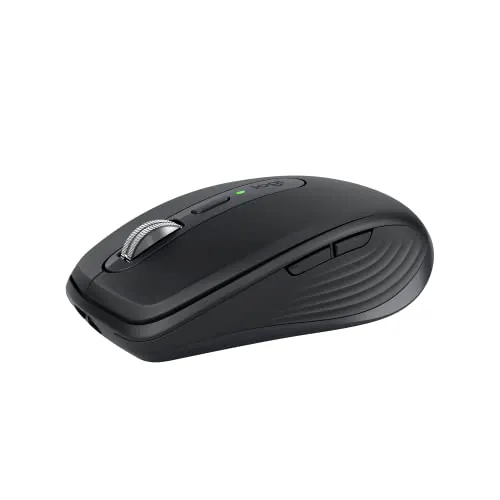
Assigned Graphite U.S. MX Vertical. Logitech identifies this exact SKU as the MX Vertical and describes its 57° vertical form. Its U.S. support page lists a Unifying USB receiver and USB-A-to-USB-C charging cable in the box.
Model 910-005447
Amazon ASIN B07FNJB8TT
Logitech
Logitech MX Anywhere 3S Compact Wireless Mouse
Assigned Graphite U.S. MX Anywhere 3S. Logitech's exact-SKU U.S. page identifies the compact model; its Bolt receiver is compatible but not included. The box includes a USB-C charging cable.
Model 910-006925
Amazon ASIN B0BPY4ZQXG
Differences that matter
What matters most to you?
Choose a priority to see what it changes.
Sources for Buttons and switching
Start with the space and the connection
These are not two sizes of the same receiver setup. MX Vertical is Logitech's taller 57° mouse and the exact U.S. support specification lists a Unifying receiver in its box. MX Anywhere 3S is a compact mouse that supports Bolt, but its U.S. product page says the receiver is not included.
Both can connect by Bluetooth, according to Logitech. If you plan to use a USB receiver instead, confirm which protocol it is and whether the host has a USB-A port or an appropriate adapter. Bolt and Unifying do not interoperate.
What changes in everyday placement
MX Vertical measures 78.5 × 79 × 120 mm (height, width, length) in Logitech’s data sheet, while MX Anywhere 3S measures 34.4 × 65 × 100.5 mm. The clearest practical check is to measure your desk clearance, drawer, travel case or pouch against those published body dimensions.
Logitech describes the Vertical's 57° angle and the Anywhere 3S as compact. Those descriptions help identify the shape; they do not prove comfort, health benefit or a personal fit.
Check the host before checkout
For MX Vertical, the listed Unifying receiver uses USB-A; Logitech also lists Bluetooth LE and wired connection through the USB-C charging cable. For MX Anywhere 3S, Bluetooth or a compatible Bolt receiver are the documented wireless paths, and the supplied USB-C cable is for charging.
If your computer or tablet lacks Bluetooth and USB-A, account for the appropriate adapter or another supported host connection. Do not treat the Vertical's included Unifying receiver as a receiver for the Anywhere 3S.
A quick pre-buy check
1. Match the offer to part 910-005447 or 910-006925. 2. Measure the storage or desk space against the official dimensions. 3. Decide whether you will use Bluetooth or a receiver. 4. If using a receiver, verify Unifying versus Bolt and whether it is in the box. 5. Check host USB ports and any adapter you need.
If the deciding question is which mouse feels better or tracks better on your surface, these published specifications cannot settle it. Try the exact shape and setup where possible; no comparative comfort or tracking test is claimed here.
Product details
Logitech MX Vertical Ergonomic Wireless Mouse
Pick the MX Vertical when its taller 57° form and included Unifying receiver match your desk, hand placement preference and host setup. If you plan to use the receiver, check for USB-A or an adapter; Bluetooth is also listed.
- Published dimensions and form
- 78.5 × 79 × 120 mm (H × W × L) in Logitech’s data sheet; Logitech describes a 57° vertical angle. Dimensions help check desk or storage space, but do not establish comfort or hand fit. Source
- Connections and included receiver
- Bluetooth Low Energy, 2.4 GHz Logitech Unifying receiver, or wired use over the USB-C charging cable. The exact U.S. support specification lists a Unifying USB receiver in the box; its USB-A plug requires a suitable host port or adapter. Source
- Controls and charging connection
- Logitech lists four customizable buttons, three Easy-Switch device indicators, cursor-speed control and a USB-C charge port. This is a connection/control inventory, not a tracking or comfort comparison. Source
Logitech MX Anywhere 3S Compact Wireless Mouse
Pick the MX Anywhere 3S when the smaller published dimensions suit the place you will use or carry it, and Bluetooth or a separately sourced Bolt receiver fits your host. Do not assume the included MX Vertical Unifying receiver can connect it.
- Published dimensions and form
- 34.4 × 65 × 100.5 mm (H × W × D). Compare those measurements with the space and pouch you actually plan to use; Logitech describes this model as compact, but does not establish individual comfort or fit. Source
- Connections and receiver status
- Bluetooth Low Energy or Logitech Bolt receiver; the U.S. product page says the Bolt receiver is not included. Logitech states Bolt devices do not work with Unifying receivers. Bluetooth lets a compatible host avoid buying a receiver. Source
- Controls and charging connection
- Logitech lists six buttons, a scroll wheel and a USB-C charge port; a USB-A-to-USB-C cable is included. Bluetooth supports up to three devices according to the exact-model specification. Source
Before you buy
Community discussions
Checking whether a receiver fits a multi-host routine
Logitech MX Anywhere 3S Compact Wireless Mouse
A prospective MX Anywhere 3S buyer asks whether a paired Bolt receiver can be moved among computers, a phone through a USB hub, or a TV without repeating setup. The post does not establish that those hosts support the receiver.
What to check
Check receiver support for each exact host and adapter in its documentation before relying on this setup. Confirm whether Bluetooth on your devices is a simpler fit.
Common questions
Can the MX Vertical's included receiver connect to the MX Anywhere 3S?
No. The Vertical's listed receiver is Logitech Unifying; the MX Anywhere 3S supports Logitech Bolt. Logitech states Bolt devices and Unifying receivers are not compatible. Both mice also support Bluetooth, subject to the host's capabilities.MX Vertical Technical Specifications — U.S. Logitech SupportMX Anywhere 3S — Logitech U.S. product page, part 910-006925Are Logi Bolt devices compatible with Unifying USB receivers? — Logitech Support
Is the Bolt receiver included with MX Anywhere 3S?
No. Logitech's U.S. MX Anywhere 3S product page says the receiver is not included. The mouse can also connect over Bluetooth to a compatible host.MX Anywhere 3S — Logitech U.S. product page, part 910-006925
Which mouse takes up less height on a desk or in a case?
Logitech lists MX Anywhere 3S at 34.4 mm high and MX Vertical at 78.5 mm high in its data sheet. Compare the published dimensions with your actual desk clearance or case; they do not determine personal comfort or fit.MX Vertical Technical Specifications — U.S. Logitech SupportSpecification: MX Anywhere 3S — Logitech U.S. SupportLogitech MX Vertical data sheet, body dimensions
Sources and scope
This guide uses Logitech U.S. information for MX Vertical 910-005447 and MX Anywhere 3S 910-006925. Logitech publishes different receiver systems: the Vertical's included receiver is Unifying; the Anywhere 3S supports Logi Bolt and the receiver is not included. Logitech says Bolt devices and Unifying receivers are not interchangeable. Bluetooth is a documented alternative on both, subject to host support. No comparative comfort, health, tracking, surface, durability or battery-life claim is made. Logitech's current MX Vertical support specification lists 125 g, while an older Logitech business datasheet lists 135 g; weight is omitted. Check the exact offer for its included-items list and finish before ordering. Logitech’s data sheet gives 78.5 mm height and 120 mm length for MX Vertical. Its support table reverses those axes. If fitting a close case or drawer, check the actual unit.
- MX Vertical Technical Specifications — U.S. Logitech Support
- MX Vertical — Logitech U.S. product page, part 910-005447
- Specification: MX Anywhere 3S — Logitech U.S. Support
- MX Anywhere 3S — Logitech U.S. product page, part 910-006925
- Are Logi Bolt devices compatible with Unifying USB receivers? — Logitech Support
- Logitech MX Vertical data sheet, body dimensions
Related comparisons
Logitech Lift vs MX Vertical: Hand Fit, Receiver and Charging
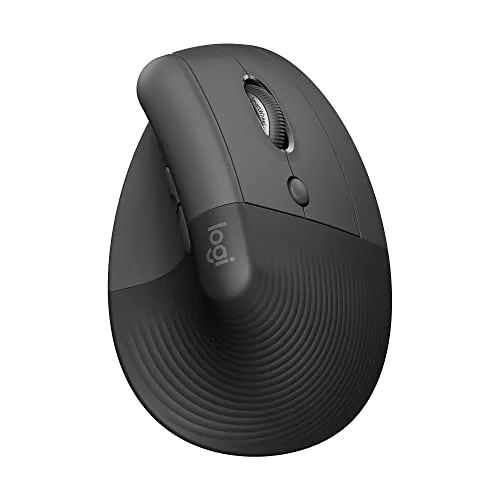
These are both right-handed Logitech vertical mice, but Logitech positions them for different hand-size ranges. Lift uses one AA battery and a Logi Bolt receiver; MX Vertical recharges over USB-C, can stay connected by cable while charging, and uses a Unifying receiver. Bluetooth is available on both.
Read comparison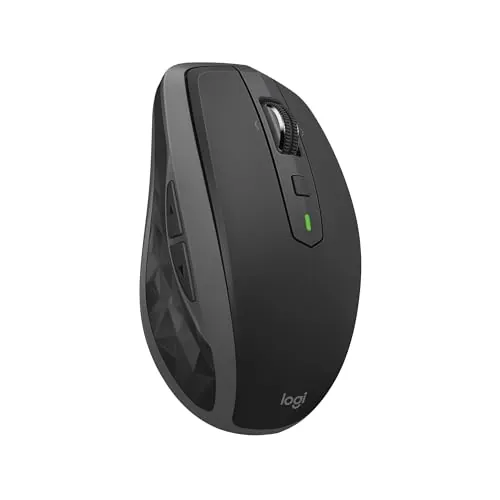
Logitech MX Anywhere 3S vs MX Anywhere 2S Bluetooth Edition: Receivers, USB-C and OS Fit
This comparison is for the assigned graphite SKUs: MX Anywhere 3S 910-006925 / ASIN B0BPY4ZQXG and MX Anywhere 2S Bluetooth Edition 910-007232 / ASIN B0CJXQVMHL. Both pair with up to three computers and support Bluetooth. The 3S can also use a Logi Bolt receiver, which Logitech says is not included; it cannot use a Unifying receiver. The 2S model family lists both Bluetooth and Unifying, but the assigned Bluetooth Edition listing says no USB receiver is included. Charging also differs: USB-C on the 3S, Micro-USB on the 2S. Decide by the receiver you own, the port and cable you want, and whether your computer can use Logitech's customization app.
Read comparison