
Products compared
Logitech
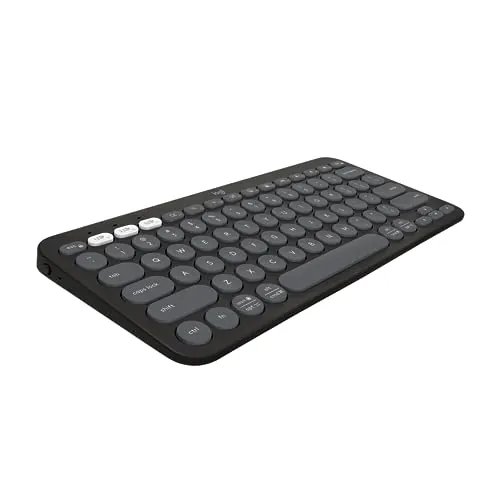
Logitech Pebble Keys 2 K380s (Tonal Graphite)
US standalone compact Bluetooth keyboard with round, low-profile keys; not the Pebble 2 Combo.
Model K380s / 920-011775
Amazon ASIN B0BT4DP7SC
Logitech
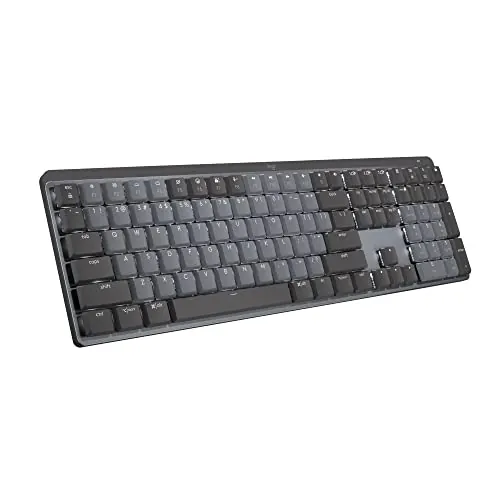
Logitech MX Mechanical (Graphite, Tactile Quiet)
US full-size Graphite model with Tactile Quiet low-profile mechanical switches; not the MX Mechanical Mini.
Model MX Mechanical / 920-010547, full-size Tactile Quiet
Amazon ASIN B09LK1P1RD
Differences that matter
What matters most to you?
Choose a priority to see what it changes.
Sources for Layout and desk or bag footprint
Sources for Device switching and receiver plan
Sources for Power routine and cable role
Sources for Key behavior and software expectations
Start with the number of keys and the space you can spare
K380s is the compact, portable member of this pair. Logitech describes its round keys as low profile and lists the body at 279.5 × 124.2 × 16.4 mm. The exact product page includes a question about a built-in numeric keypad, but the specification text we checked does not spell out the key map. If number entry is important, inspect the exact listing image rather than inferring from a general K380s description.
The full-size MX Mechanical has an integrated numpad and a listed width of 433.85 mm. That is the clearer fit for regular ten-key entry, provided the extra desk or tray width works for your setup. These are body measurements; add the space you need for hands and mouse movement yourself.
Three-device switching is common; the receiver kit is not
Both keyboards can switch among up to three paired devices. That makes the device count a shared capability rather than a reason by itself to choose one. Make a quick host list—work computer, personal computer and tablet, for example—and check whether each will use Bluetooth or Logi Bolt.
The MX specification lists a Logi Bolt receiver in the box alongside a USB-C charging cable. Logitech's standalone K380s setup page describes Bluetooth and an optional receiver bought separately; do not carry Pebble 2 Combo contents over to this standalone model. Its receiver subsection has an apparent 'M380s' text typo, so verify the exact receiver listing and pairing instructions if you need Bolt.
Choose how you want to restore power
K380s takes two AAA batteries, which Logitech's setup guide explains how to replace. It may suit a person who keeps spare cells available and does not want a keyboard charging routine.
MX Mechanical is rechargeable through USB-C. Logitech says you can continue typing during charging, while also clarifying the cable is for charging only. In practical terms, you still need Bluetooth or the receiver connected to type. This article does not compare real-world battery life.
Check the exact switch version and software you will use
This MX Mechanical listing is the full-size Graphite version with Tactile Quiet switches, not the Mini or its Clicky and Linear alternatives. Logitech documents the product family as low-profile mechanical and lists different switch options; the name Tactile Quiet is not a comparative noise test against the K380s.
K380s also has low-profile round keys and customizable function keys. If remapping keys or lighting controls matters, check the required Logi Options+ support for your operating system separately from basic Bluetooth or receiver pairing. Neither manufacturer page establishes which keyboard will feel better for a particular user.
Product details
Logitech Pebble Keys 2 K380s (Tonal Graphite)
Pick the K380s when you want a compact board to move between a desk, bag and multiple Bluetooth devices. Confirm its visible key layout suits your number-entry tasks. It uses replaceable AAA cells; if your computer needs Logi Bolt instead of Bluetooth, check the separately sold receiver and exact pairing steps before checkout.
- Listed body dimensions
- 279.5 × 124.2 × 16.4 mm, as listed in Logitech's exact-model specification table. Source
- Paired devices
- Bluetooth Low Energy and Easy-Switch for up to three paired devices. Source
- Power and receiver
- Two AAA batteries; Bluetooth is built in. Optional Logi Bolt receiver is a separate purchase for the standalone model. Source
Logitech MX Mechanical (Graphite, Tactile Quiet)
Pick the full-size MX Mechanical if you will use the integrated number pad and have room for its longer body. It includes a Bolt receiver and can also connect by Bluetooth. USB-C recharges the keyboard while you continue typing, but the cable itself does not replace the wireless data connection.
- Body dimensions
- 433.85 × 131.55 × 26.10 mm, per Logitech's specification table. Source
- Layout and switches
- Full-size keyboard with integrated numpad and low-profile mechanical keys; this model page selects Tactile Quiet. Source
- Connection and box
- Bluetooth Low Energy or included Logi Bolt receiver; the box lists a 1 m USB-C-to-A charging cable. The cable is charge-only. Source
Before you buy
Community discussions
Trying a smaller layout before giving up dedicated keys
Logitech MX Mechanical (Graphite, Tactile Quiet)
A newcomer comparing keyboards for a laptop asked about compact models. A commenter who owned the full-size and Mini MX Mechanical described preferring Logitech’s Tactile Quiet switch feel for their typing.
What to check
Set each footprint next to the mouse and laptop. Decide where you would put the number pad and how often you actually reach for it.
Common questions
Does the MX Mechanical's USB-C cable let me type without Bluetooth or a receiver?
No. Logitech labels the cable charge-only. You can continue typing while charging, but the keyboard still needs its Bluetooth or Logi Bolt wireless connection to send keystrokes.Getting Started — MX Mechanical
Do both keyboards switch between multiple computers?
Yes. Logitech documents Easy-Switch for up to three paired devices on both models. Confirm that each host can use the Bluetooth or receiver path you plan to use; the three-device count does not guarantee that all software customizations are available on every operating system.Getting Started — Pebble Keys 2 K380sMX Mechanical — Graphite, part 920-010547Getting Started — MX Mechanical
Is a Logi Bolt receiver included with the K380s?
Not with the standalone K380s described here. Logitech calls Bolt an optional receiver, while the MX Mechanical specification lists a receiver in the box. The K380s support article's optional receiver subsection contains an apparent 'M380s' typo; check the exact receiver compatibility before buying that add-on.Getting Started — Pebble Keys 2 K380sSpecification — MX Mechanical
Is the K380s a good substitute if I need a numpad?
Logitech describes K380s as compact, and its exact product page has a numeric-keypad FAQ, but the opened support specification does not state the keypad layout in text. Check the exact product photo and key map before relying on it for frequent numeric entry. MX Mechanical's full-size integrated numpad is explicitly documented.Pebble Keys 2 K380s — Tonal Graphite, US part 920-011775Specification — Pebble Keys 2 K380sMX Mechanical — Graphite, part 920-010547
Sources and scope
This guide covers the US standalone Pebble Keys 2 K380s in Tonal Graphite (920-011775) and the full-size MX Mechanical in Graphite with Tactile Quiet switches (920-010547). It does not describe the Pebble 2 Combo, original K380, MX Mechanical Mini, Clicky or Linear switch versions. Logitech calls the K380s compact and portable, while the MX page explicitly identifies the full-size model's integrated numpad. No matched typing, noise, comfort, battery-life or reliability test establishes a winner. MX Mechanical's USB-C cable is for charging only; a wireless Bluetooth or receiver connection is still required to type. K380s Bluetooth setup is documented for the exact model; its optional Bolt subsection has an apparent 'M380s' typo, so verify the exact receiver and host before buying it.
Related comparisons

Logitech MX Keys S vs MX Mechanical: Scissor or Tactile Quiet?
The Graphite MX Keys S uses scissor keys; the assigned full-size MX Mechanical is the Tactile Quiet low-profile mechanical version. Logitech lists 1.8 mm total travel for MX Keys S and 3.2 mm for MX Mechanical. Both support lighting, Bluetooth LE or a Logi Bolt receiver, and switching among up to three devices. Choose by a typing style you already know you want; these specifications do not establish typing speed, comfort or sound superiority.
Read comparison
Logitech Wave Keys vs MX Mechanical: Layout, Receiver, and Charging
The Graphite Logitech Wave Keys (920-011898) uses a compact wave-shaped plunger layout with a cushioned palm rest and two replaceable AAA batteries. The Graphite MX Mechanical Tactile Quiet (920-010547) is a wider, full-size low-profile mechanical keyboard with a numpad, a rechargeable battery, white smart backlighting, and a USB-C charging cable. Logitech lists a Logi Bolt USB receiver and Bluetooth for both. Pick by the layout and maintenance routine you actually want; the manufacturer battery estimates use different test conditions and do not prove one lasts longer in comparable use.
Read comparison