
Products compared
Logitech G
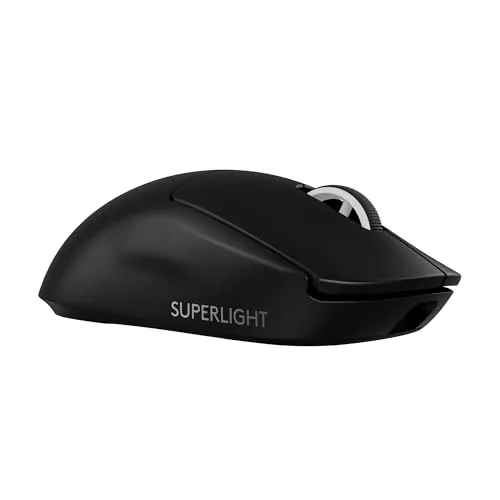
Logitech G PRO X SUPERLIGHT 2 LIGHTSPEED Wireless Gaming Mouse (Black)
Logitech's U.S. product page identifies the black PRO X SUPERLIGHT 2 and lists its 60 g weight. Logitech Support identifies mouse M/N MR0097 and receiver CU0025. Its setup guide labels left click, right click, middle click/scroll and browser forward/back; G HUB is used to configure settings such as DPI and report rate. It includes a USB-A-to-USB-C charging/data cable, USB LIGHTSPEED receiver and receiver extension adapter.
Model 910-006628
Amazon ASIN B09NBWL8J5
Logitech G
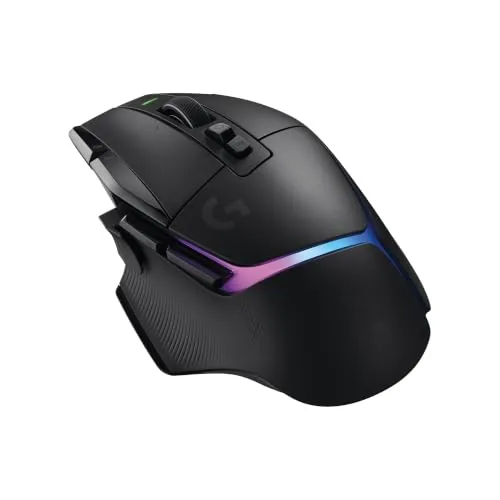
Logitech G502 X PLUS LIGHTSPEED Wireless Gaming Mouse (Black)
The Logitech U.S. product page identifies G502 X PLUS in Black and lists 13 programmable controls through G HUB. Logitech Support identifies mouse M/N MR0089 and receiver CU0021; it lists 11 buttons, a hyper-fast vertical scroll wheel with left/right tilt, and a 106 g weight. The setup guide identifies a nonprogrammable wheel-mode toggle and shows that the DPI-shift button can be reoriented or replaced by the supplied cover. Box contents include a USB-A LIGHTSPEED receiver, USB extension adapter and USB-C charging cable.
Model 910-006160
Amazon ASIN B092CB69Q4
Differences that matter
Sources for Listed carry weight and body size
Sources for Receiver, wired charging and charging-mat option
Sources for Report-rate specification caveat
Start with mass and the number of controls you will use
The black PRO X SUPERLIGHT 2 (910-006628) is listed at 60 g. Its setup guide labels left/right click, middle click/scroll and browser forward/back. The black G502 X PLUS (910-006160) is listed at 106 g; Logitech Support counts 11 buttons and 13 programmable controls, and G HUB can configure macros, DPI and game profiles. The 46 g difference is a published mass difference only, not evidence that one shape or weight will feel better in your hand.
If you keep a mouse's controls simple and want less listed mass, the Superlight 2 is the spec-based starting point. If you will assign extra inputs or use profile/DPI controls, the G502 X PLUS documents more controls. Decide which assignments you would actually use before paying for more buttons.
Compare wheel inputs and charging setup
G502 X PLUS adds left/right wheel tilt and a separate wheel-mode toggle that its setup guide marks as nonprogrammable; its support page lists hyper-fast vertical scrolling. The Superlight 2 guide labels a middle click/scroll and forward/back controls. Those differences matter if you use side tilt or a dedicated wheel control, not because the sources prove one wheel feels faster or better.
Both bundles include a USB-A LIGHTSPEED receiver and a USB-C charging cable. Superlight 2's box list includes a receiver extension adapter and an optional POWERPLAY aperture door with PTFE foot; G502 X PLUS includes a USB extension adapter and DPI-shift button cover. If desk charging matters, Logitech lists both models as compatible with the separate POWERPLAY 2 charging system, whose page says the compatible mouse is not included.
Treat report rate as a configurable spec, not a gaming result
Logitech lists up to 8,000 Hz for the PRO X SUPERLIGHT 2 and describes the G HUB setting. For G502 X PLUS, confirm the value you need with Logitech or in G HUB because its support sheet uses inconsistent units.
Logitech's current G502 X PLUS U.S. product page also advertises HERO 44K, while its support specification still labels HERO 25K and max 25,600 DPI. The guide does not use sensor/DPI values to choose between these mice; the exact current firmware/specification boundary remains a parent-review caveat.
Product details
Logitech G PRO X SUPERLIGHT 2 LIGHTSPEED Wireless Gaming Mouse (Black)
- Listed weight
- 60 g (2.12 oz); Logitech Support lists dimensions 125 × 63.5 × 40 mm. Source
- Control layout
- Setup guide labels left, right, middle/scroll, browser forward and browser back; settings including DPI and report rate are configured through G HUB. Source
- Receiver and charging
- USB-A LIGHTSPEED receiver (M/N CU0025), USB-A-to-USB-C charging/data cable and receiver extension adapter; Logitech lists max report rate of 8,000 Hz in support specifications. Source
Logitech G502 X PLUS LIGHTSPEED Wireless Gaming Mouse (Black)
- Listed weight and size
- 106 g (3.74 oz); Logitech Support lists 131.4 × 79.2 × 41.1 mm. Source
- Controls and scroll
- Logitech Support lists 11 buttons and 13 programmable controls, hyper-fast vertical scroll, and left/right tilt. Setup guide labels a separate nonprogrammable wheel-mode toggle and adjustable/replacable DPI-shift button. Source
- Receiver, charging and PowerPlay
- USB-A LIGHTSPEED receiver (M/N CU0021), USB extension adapter and USB-C charging cable are listed in the box. Logitech lists this mouse as PowerPlay-compatible. Source
Before you buy
Community discussions
Testing the wheel press separately from scrolling
Logitech G PRO X SUPERLIGHT 2 LIGHTSPEED Wireless Gaming Mouse (Black)
A PRO X SUPERLIGHT 2 owner said the wheel could still scroll when pressing it stopped registering. Reconnecting the mouse by USB-C sometimes brought the middle click back temporarily in that setup.
What to check
Try the actual middle-click action you use, such as opening a link or a game binding, along with ordinary scrolling. Decide which inputs need to be available in your normal layout.
Common questions
Which mouse is lighter, and by how much?
Logitech lists the PRO X SUPERLIGHT 2 at 60 g and the G502 X PLUS at 106 g, a 46 g difference. That is a manufacturer weight comparison, not a comfort or fatigue result.Specification: G PRO X Superlight 2 LIGHTSPEED Gaming Mouse — Logitech SupportSpecification: G502 X PLUS Wireless RGB Gaming Mouse — Logitech Support
Does the G502 X PLUS have different scroll controls?
Logitech Support lists its wheel as hyper-fast with left/right tilt, and the setup guide identifies a separate nonprogrammable wheel-mode toggle. Confirm that layout suits your scrolling routine; no scroll-speed result is claimed.Specification: G502 X PLUS Wireless RGB Gaming Mouse — Logitech SupportG502 X PLUS | G502 X LIGHTSPEED Setup Guide — Logitech
Are their receivers USB-C, and can both use POWERPLAY 2?
Both include USB-A LIGHTSPEED receivers and charge with USB-C cables. Logitech's POWERPLAY 2 page lists both PRO X SUPERLIGHT 2 and G502 X PLUS as compatible, and notes that the compatible mouse is not included with that separate charging system.Specification: G PRO X Superlight 2 LIGHTSPEED Gaming Mouse — Logitech SupportSpecification: G502 X PLUS Wireless RGB Gaming Mouse — Logitech SupportPOWERPLAY 2 Wireless Charging System — Logitech G U.S.
Can I compare their advertised polling rates directly?
Check the current settings for your mouse and receiver in G HUB. Logitech lists up to 8,000 Hz for PRO X SUPERLIGHT 2. Its G502 X PLUS support sheet gives inconsistent units, so confirm the rate with Logitech if it would change your purchase.Specification: G PRO X Superlight 2 LIGHTSPEED Gaming Mouse — Logitech SupportG PRO X SUPERLIGHT 2 LIGHTSPEED Gaming Mouse Setup Guide — LogitechSpecification: G502 X PLUS Wireless RGB Gaming Mouse — Logitech Support
Sources and scope
This guide compares manufacturer specifications and control layouts only; it does not test aiming, latency, comfort, battery runtime or gameplay outcomes. Logitech's support pages show inconsistencies in G502 X PLUS report-rate units and sensor/DPI labels versus its newer U.S. product page, so these figures are not used as a performance ranking. If maximum polling rate or sensor figure is decisive, verify the current G HUB settings and exact firmware/model support before buying.
- PRO X SUPERLIGHT 2 LIGHTSPEED Wireless Gaming Mouse — Logitech G U.S.
- Specification: G PRO X Superlight 2 LIGHTSPEED Gaming Mouse — Logitech Support
- G PRO X SUPERLIGHT 2 LIGHTSPEED Gaming Mouse Setup Guide — Logitech
- G502 X PLUS Wireless Gaming Mouse — Logitech G U.S.
- Specification: G502 X PLUS Wireless RGB Gaming Mouse — Logitech Support
- G502 X PLUS | G502 X LIGHTSPEED Setup Guide — Logitech
- POWERPLAY 2 Wireless Charging System — Logitech G U.S.
Related comparisons
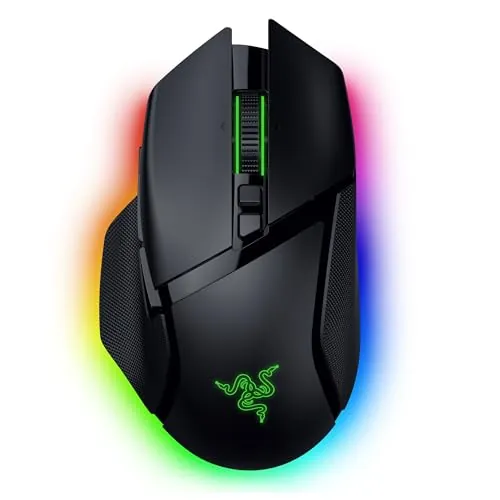
Logitech G502 X PLUS vs Razer Basilisk V3 Pro 35K: Which Fits Your Setup?
This comparison covers the black Logitech G502 X PLUS (910-006160) and black Razer Basilisk V3 Pro 35K (RZ01-05240100-R3U1). The deciding details are the host connection you need, the thumb and scroll controls you prefer, and whether you already own or plan to add a wireless-charging accessory.
Read comparison
Logitech G502 HERO vs G502 X PLUS: Wired or Rechargeable Wireless?
These black U.S. models suit different desk routines. The G502 HERO 910-005469 stays connected by its 2.1 m cable and has Logitech-documented weight adjustment. The G502 X PLUS 910-006160 uses a LIGHTSPEED USB-A receiver, recharges over USB-C, and can switch to data-over-cable use when connected directly to a PC. Its DPI-Shift button can be repositioned or replaced by a cover. Decide whether cable-free movement and the X PLUS control adjustment are worth adding a receiver and charging routine.
Read comparison