
Products compared
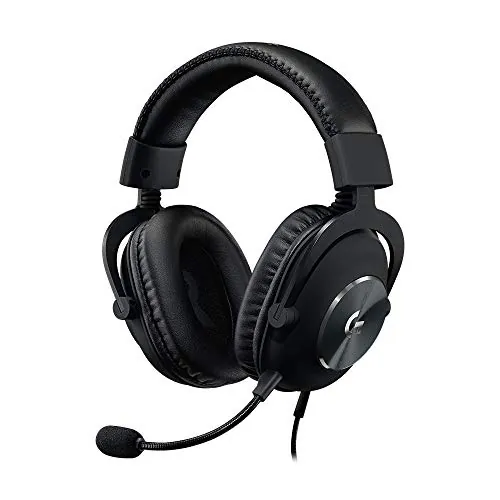
Logitech G
Logitech G PRO X Wired Gaming Headset
Black first-generation wired PRO X kit with USB DAC and detachable boom microphone; do not substitute PRO X 2 LIGHTSPEED or another PRO X revision.
Model 981-000817
Amazon ASIN B07PDFBJZD
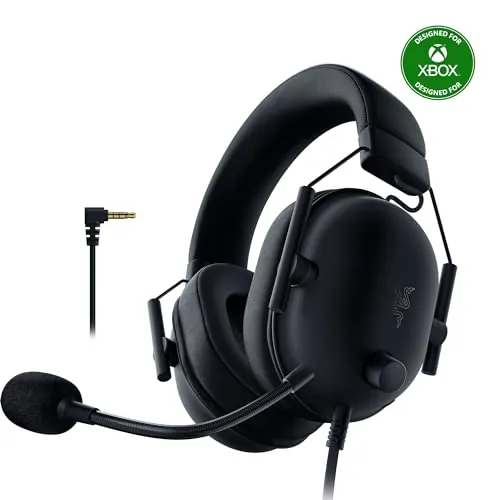
Razer
Razer BlackShark V2 X for Xbox
Black Xbox-licensed wired edition, not a similarly named PlayStation color/model listing.
Model RZ04-03240900-R3U1
Amazon ASIN B0CXGTGPZQ
Differences that matter
What matters most to you?
Choose a priority to see what it changes.
Sources for PC connection and software workflow
Sources for Console/controller connection
Sources for Volume and microphone mute controls
Sources for Cable and microphone handling
Start with the port on the device you actually use
The PRO X is not a single plug-and-play setup across every host. On PC, Logitech documents the included USB DAC for G HUB features or a PC splitter for separate headphone and mic jacks. On a console controller, the guide shows the analog cable and says the USB/DAC features are unavailable. The Razer Xbox edition uses an analog 3.5mm connection. Before buying either, check the controller, console, PC or dock where the headset will be plugged in.
Logitech’s setup guide lists Xbox One and warns that some Xbox One controllers may need a separately sold stereo headset adapter. Razer’s Xbox edition guide names Xbox Series X|S and Xbox One X/S among supported devices. These are model-specific setup notes; verify the current port and accessory needs for your own controller.
Pick the controls and microphone routine you prefer
If you play on PC and plan to use G HUB, the PRO X USB DAC is the relevant differentiator: Logitech documents EQ and Blue VO!CE filters through that PC route. If you will use an analog console connection, those features are not available on that path. Razer’s guide instead describes the Xbox headset’s analog connection and Windows Sonic support on listed Xbox and Windows systems.
For quick physical adjustments, Logitech puts mic mute and rotary volume on the PRO X PC cable, while Razer places volume and mic mute on the Xbox edition’s earcup. Logitech’s guide also shows removing its boom mic for a mobile cable setup. Razer describes its mic as bendable, but the checked exact-edition sources do not confirm detachability. Decide based on ports, controls and storage—not an untested sound or microphone-quality ranking.
Product details
Logitech G PRO X Wired Gaming Headset
- PC connection and software
- The setup guide documents the included USB DAC for PC, enabling 5-band EQ, DTS Headphone:X 2.0 and Blue VO!CE filters with Logitech G HUB. A PC splitter is the other documented PC route; the USB/DAC features are unavailable through the splitter. Source
- Console path and control location
- The guide shows analog cable connection to a controller; Logitech lists microphone mute and rotary volume on the PC cable. The Logitech Support specification sheet identifies the PRO X headset hardware family (M/N A00101). Source
Razer BlackShark V2 X for Xbox
- Connection
- The Xbox-specific master guide lists an analog 3.5mm connection and a 1.3m / 4.27ft cable. Source
- Controls and supported setup
- The Xbox guide places volume up/down and mic mute on the earcup and lists Xbox Series X|S, Xbox One X/S, PlayStation, PC/Mac, Switch and devices with 3.5mm ports in its requirements. Source
Before you buy
Community discussions
Testing analog playback and mic with a splitter
Logitech G PRO X Wired Gaming Headset
A wired G PRO X owner reported that the headset worked with the USB adapter. Over their PC’s analog splitter, they could hear playback but could not use the mic.
What to check
Plan which jack or adapter to use on each host. Confirm both playback and microphone input before relying on the connection for a game or call.
Common questions
Does the Logitech PRO X USB DAC provide its PC features on Xbox?
No. Logitech’s setup guide says its 5-band EQ, DTS Headphone:X 2.0 and Blue VO!CE filters are unavailable when the headset is connected to a console controller by analog cable.PRO X Setup Guide
Where are the volume and mic-mute controls?
Logitech lists mic mute and rotary volume on the PRO X PC cable. Razer’s Xbox guide lists volume and mic-mute controls on the earcup.PRO X Gaming Headset — Technical SpecificationsRazer BlackShark V2 X for Xbox — Master Guide
Is the BlackShark V2 X for Xbox microphone detachable?
The Razer product page describes it as bendable, but the Xbox-specific guide and product page checked here do not establish that it detaches. Verify with Razer if removability is a requirement.Razer BlackShark V2 X for PlayStation & Xbox — U.S. product pageRazer BlackShark V2 X for Xbox — Master Guide
Sources and scope
This is a documented setup and control comparison, not a sound, microphone-quality, comfort, latency or durability test. Host compatibility depends on the exact ports and console/controller setup. Logitech’s guide names Xbox One and PlayStation 4 controller setup and notes some Xbox One controllers may need a separately sold stereo headset adapter; check the current instructions for your own device.
Related comparisons
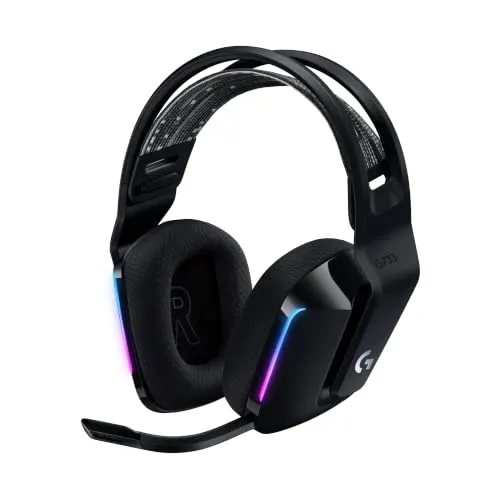
Logitech PRO X Wired vs G733: Connection, PC Features, and Fit Adjustments
The black Logitech PRO X (981-000817) connects by cable and can use its USB DAC for PC features; the black G733 (981-000863) uses a LIGHTSPEED USB receiver and has a rechargeable, non-user-replaceable battery. Compare the connection your device can use, the features that require G HUB, and the fit adjustments you prefer.
Read comparison
Logitech G PRO X vs HyperX Cloud Alpha: USB DAC or 3.5 mm Setup?
The black Logitech G PRO X wired headset (981-000817) and black-red HyperX Cloud Alpha (4P5L1AA#ABL) are both wired, detachable-mic headsets, but their setup paths differ. Logitech documents a USB DAC that enables Blue VO!CE, five-band EQ, and DTS Headphone:X 2.0 on a PC using G HUB; using the PC's analog sound-card splitter does not enable those features. HyperX documents a 3.5 mm connection, inline volume and mic-mute controls, and a detachable headset cable, mic, and PC extension cable in the box. Logitech also specifies included leatherette and velour ear-pad sets. These are setup and package choices, not sound or comfort results.
Read comparison