
Products compared
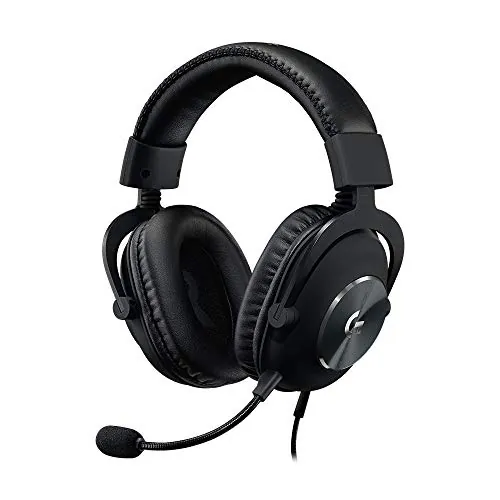
Logitech G
Logitech G PRO X Wired Gaming Headset (Black)
Original wired PRO X, black, Logitech model 981-000817; not PRO X 2 LIGHTSPEED.
Model 981-000817
Amazon ASIN B07PDFBJZD

SteelSeries
SteelSeries Arctis Nova 5 Wireless Gaming Headset (Black)
Standard black Arctis Nova 5 Wireless, SteelSeries model 61670; not Nova 5P or Nova 5X.
Model 61670
Amazon ASIN B0D2YBQQ1P
Differences that matter
What matters most to you?
Choose a priority to see what it changes.
Sources for PC connection and software path
Sources for Microphone storage and use
First choose the host path, not the marketing feature list
On a Windows PC, the wired PRO X has two documented routes. Its USB DAC with G HUB unlocks the listed 5-band EQ, DTS Headphone:X 2.0 and Blue VO!CE controls. The analog splitter connects to separate PC headphone and microphone ports, but Logitech says the named processing features are not available on that path.
The standard Nova 5 Wireless takes a different route: plug its USB-C dongle into the host, using the included adapter cable for a USB-A port, or pair over Bluetooth and switch modes with QuickSwitch. If you rely on chat/game mix balance, SteelSeries documents ChatMix through GG/Sonar on Windows 10 and above and marks it unsupported on Mac and PlayStation.
Check the console and mobile connection before assuming feature parity
Logitech currently lists PRO X Wired as compatible with PC, Xbox, PS5, Nintendo Switch and Switch 2. Its setup guide gives more specific instructions for Xbox One and PS4 controllers: connect the headset's analog cable to the controller, use stereo mode, and do not expect the USB-DAC PC features on that route. Use the compatibility list as a starting point, then check your exact controller/port and the audio path you want.
SteelSeries' standard Nova 5 guide lists PC, PS5, PS4, mobile, Nintendo Switch and Mac, and shows the 2.4 GHz USB dongle path with its adapter. Bluetooth is a separate switched mode. Neither compatibility list means every app feature is available on every platform; the ChatMix restriction is the important software check for this comparison.
Choose the microphone handling you want to repeat
The PRO X boom detaches. Its Logitech guide shows removing the boom before the illustrated mobile-cable setup. That is useful if you want the mic physically off the headset, but the diagram is not proof that a phone cable is included with the assigned retail package.
The Nova 5 boom retracts into the headset. SteelSeries' manual says to extend it fully before speaking and not use it while retracted. The practical difference is a remove-and-store step versus an extend-and-retract step; neither source measures microphone quality.
Use this three-check setup before checkout
1. Name the device for each session and check its port: PC USB plus G HUB, an analog controller cable, a USB-C wireless port, a USB-A adapter, or Bluetooth. 2. Mark the software feature you actually need, especially PRO X's DAC/G HUB requirement or Nova 5 ChatMix's Windows-only scope. 3. Decide whether you want a boom that comes off or one that retracts, and verify any mobile cable against the exact PRO X package.
If that checklist points in different directions for different devices, choose based on the session you care about most and confirm the other path before ordering. This comparison does not claim either headset sounds better or has a clearer microphone.
Product details
Logitech G PRO X Wired Gaming Headset (Black)
The wired PRO X has more than one connection route. For its documented G HUB functions, use the USB DAC on a PC; the analog splitter, console-controller and mobile paths do not provide those named features. Its boom can be detached, but check the exact package for any phone cable you need.
- PC connection paths
- The setup guide shows the included USB DAC or an analog PC splitter; 5-band EQ, DTS Headphone:X 2.0 and Blue VO!CE require the USB DAC and G HUB on PC and are unavailable on the splitter. Source
- Console path in the setup guide
- The guide shows analog controller setup for Xbox One and PlayStation 4 in stereo only; its advanced PC features are unavailable on that controller path. Source
- Boom microphone handling
- The setup guide shows the microphone plugged into the headset and removed for its mobile-cable setup. Source
SteelSeries Arctis Nova 5 Wireless Gaming Headset (Black)
The standard Nova 5 Wireless includes a USB-C dongle and USB-A adapter for its 2.4 GHz host path, plus Bluetooth QuickSwitch. Its mic retracts into the headset; SteelSeries instructs users to extend it fully before use. Platform-specific software features still have limits.
- Wireless host paths
- The exact product guide lists a USB-C wireless dongle, USB-C-to-USB-A adapter cable and a QuickSwitch control between 2.4 GHz dongle mode and Bluetooth. Source
- ChatMix platform limits
- SteelSeries lists ChatMix on Windows 10 and above through GG/Sonar; its product page says ChatMix is not supported on Mac or PlayStation. Source
- Boom microphone handling
- The guide says to extend the retractable ClearCast microphone fully for use and not use it while retracted. Source
Before you buy
Community discussions
A PC buyer asks whether Nova 5 settings depend on GG or the phone app
SteelSeries Arctis Nova 5 Wireless Gaming Headset (Black)
A buyer considering the Nova 5 for PC use asks whether SteelSeries GG or the phone companion app must remain open, and whether sidetone, EQ and mic volume can be set once. The post does not establish how those settings persist.
What to check
Decide which mic and EQ controls you need and whether you expect to configure them from PC software or a phone. Verify app and background requirements for the exact setup you plan to use; treat this post as a buyer question, not a confirmed answer about persistence.
Common questions
Does the Logitech PRO X USB DAC make Blue VO!CE work on consoles?
No. Logitech says the included USB DAC plus G HUB enables Blue VO!CE, DTS Headphone:X 2.0 and 5-band EQ on PC. Its setup guide says those features are not available through the console-controller or mobile path; its Xbox One/PS4 controller diagram is an analog stereo setup.Logitech PRO X Setup GuideLogitech G PRO X Wired Gaming Headset, model 981-000817
Can I use Arctis Nova 5 with a USB-A host?
The standard Nova 5 guide lists a USB-C wireless dongle and a USB-C-to-USB-A adapter cable in the package, and shows connecting that adapter to a computer or PlayStation. Check that you have the included adapter and the right port path for your exact device.SteelSeries Arctis Nova 5 Wireless Product Information Guide
Does the Nova 5 microphone work while retracted?
SteelSeries says to extend the retractable ClearCast microphone fully for use and not to use it while retracted. It stows inside the headset, but it is not the active speaking position described by the manual.SteelSeries Arctis Nova 5 Wireless Product Information Guide
Is the Logitech phone cable included?
The Logitech setup guide shows a separate mobile-cable setup after removing the boom microphone, but it does not establish that cable's inclusion in the assigned Amazon package. Confirm the listing contents or plan for a compatible cable before relying on that route.Logitech PRO X Setup Guide
Sources and scope
The Logitech G PRO X manual names specific PC, Xbox One, PS4-controller and mobile wiring paths; its advanced PC features depend on the included USB DAC and G HUB and are unavailable on the analog splitter, controller and mobile paths. The SteelSeries manual documents the standard Nova 5 Wireless dongle and Bluetooth workflows, its included USB-C-to-USB-A adapter, and system compatibility; the maker's current product page limits ChatMix to Windows 10 and above through GG/Sonar, and says ChatMix is unsupported on Mac and PlayStation. This guide compares setup and microphone handling, not audio quality, microphone quality, comfort, latency or measured performance. The Logitech guide shows a mobile-cable setup but does not establish that the pictured phone cable is included in the Amazon package.
Related comparisons
SteelSeries Arctis Nova 5 vs CORSAIR VOID Wireless v2
For Nintendo Switch, the Nova 5 has clearer USB-dongle guidance: SteelSeries lists the Nova 5 family for Switch and Switch 2, with a firmware/USB-audio caveat on Switch 2. CORSAIR's product page shows Switch compatibility, but its support chart does not list the VOID Wireless v2 for Switch. For PC or PlayStation, compare Bluetooth switching and mic controls: the Nova 5 changes between 2.4GHz and Bluetooth; the VOID v2 can take phone calls in RF mode but requires Bluetooth mode for Bluetooth media.
Read comparison
SteelSeries Arctis Nova 5 vs Logitech G522: Console, Audio Switching and Setup
This U.S. comparison is for the black Arctis Nova 5 model 61670 (B0D2YBQQ1P) and Logitech G522 black model 981-001491 (B0FFM5SP6M). Both offer a headset control to switch between gaming wireless and Bluetooth. SteelSeries describes QuickSwitch between the USB-C dongle and Bluetooth; Logitech explicitly says G522 cannot mix LIGHTSPEED and Bluetooth audio. G522 also supports wired USB audio, which disables LIGHTSPEED while connected. Check the console, available USB port, app settings and exact mic preference before buying.
Read comparison