
Products compared
Logitech
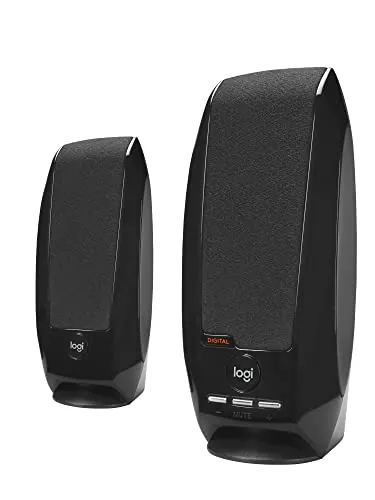
Logitech S150 USB Stereo Speakers — Black
Black U.S. Logitech S150 pair; exact model 980-000028; USB-A computer connection for audio and power.
Model 980-000028
Amazon ASIN B000ZH98LU
Logitech
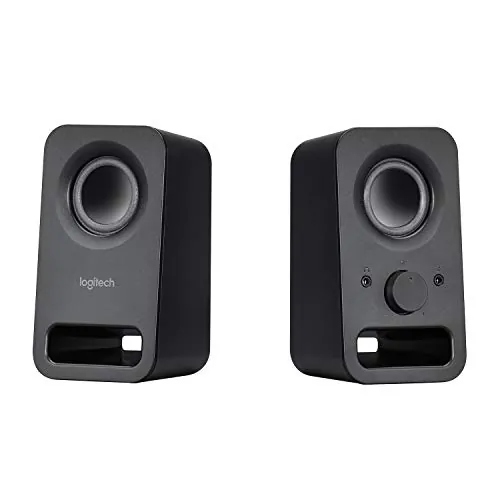
Logitech Z150 Multimedia Speakers — Black
Black U.S. Logitech Z150 pair; exact model 980-000802; AC adapter plus analog 3.5mm input path.
Model 980-000802
Amazon ASIN B00EZ9XLEY
Differences that matter
What matters most to you?
Choose a priority to see what it changes.
Sources for Everyday volume and interruption control
Sources for Private listening and front access
Sources for Two input points on Z150
Sources for What to verify at the desk before checkout
Begin with the ports and power at your actual desk
S150's simple setup is a computer USB-A connection that carries both audio and power. Logitech says unplugging that cable switches the speakers off. That makes S150 a direct candidate when the computer itself has a suitable USB-A audio connection and you want to avoid a separate speaker power adapter.
Z150 uses a separate AC adapter for power and an analog 3.5mm source. Its setup guide shows both the attached audio lead and a front auxiliary input. Before choosing it, confirm the source has an available 3.5mm audio output and that the outlet and right-speaker location work for your desk. A USB charging port on a screen or dock is not by itself proof that S150 can receive audio from that device.
Match the controls to your interruption and listening routine
S150 puts volume-up, volume-down and a dedicated mute button on the right speaker. Logitech's setup guide says pressing the center mute button silences the speakers and pressing again releases mute. If you frequently pause speaker audio during calls, that button is a distinct control from the volume keys.
Z150 places a combined power/volume knob and headphone jack on the right speaker. Logitech's setup guide also identifies a front auxiliary input there. If private listening and a single rotary speaker control are the relevant desk routines, those are documented Z150 features. The sources do not establish headphone-level behavior, automatic speaker muting when headphones are inserted, or a headphone output for S150.
Treat Z150's two analog inputs as two ports, not an unverified mixer
The Z150 quick-start guide depicts an attached 3.5mm audio lead and says another device can also connect to the front auxiliary jack. This gives buyers two physical input points, which may matter when devices have different cable placement needs.
The cited guide does not explain how simultaneous connections behave. It does not say whether the speakers mix both sources, select one automatically, or follow a priority rule. If you need a phone and computer connected at once, confirm the behavior with the exact unit or Logitech rather than assuming a switching feature from the port count.
Run a three-minute pre-buy compatibility check
Write down the device that will provide audio and check its documented output: a computer USB-A audio path for S150, or an analog 3.5mm output for Z150. Then check power separately: S150 uses its computer USB-A connection for audio and power; Z150 includes an AC adapter and needs an outlet. Confirm your monitor, hub, USB-C adapter or TV explicitly supports the desired audio path before treating it as interchangeable with a computer USB port.
Finally, decide which control should be in reach on the right speaker: S150's button mute and separate volume keys, or Z150's combined power/volume knob and headphone jack. Match the exact black U.S. item numbers 980-000028 and 980-000802 on the seller listing. This check resolves the practical choice without implying either speaker sounds better.
Product details
Logitech S150 USB Stereo Speakers — Black
- Computer connection and power
- Logitech says to connect the USB-A cable to a computer; the cable carries audio and power, and disconnecting it powers the speakers off. Source
- Right-speaker controls
- Front right speaker has volume up/down and a dedicated mute button. Source
- Analog and headphone connections
- The reviewed S150 product page and setup guide document USB computer audio; they do not establish an analog 3.5mm input or headphone output. Source
Logitech Z150 Multimedia Speakers — Black
- Power and audio connections
- Logitech's setup guide connects the included AC adapter to an outlet and the audio source to the attached 3.5mm lead or the front auxiliary input. Source
- Right-speaker controls and headphone jack
- The right speaker has a combined power/volume control knob and a front headphone jack. Source
- Documented input type
- Logitech lists analog stereo 3.5mm audio input and an AC adapter in the package contents. Source
Before you buy
Community discussions
Will a Z150 connect to this gaming monitor?
Logitech Z150 Multimedia Speakers — Black
A buyer asks whether a low-priced Swedish Z150 listing can connect to an LG 27GL83A-B monitor. The post does not identify the speaker's exact part number or confirm the monitor's audio outputs.
What to check
Before choosing between S150's USB connection and the Z150 listing, check the monitor manual for its audio output and confirm the exact regional speaker model and connection in the seller listing.
Adding basic speakers to a desktop PC
Logitech S150 USB Stereo Speakers — Black
A shopper wanted desktop speakers for times they preferred to skip headphones. A reader said they used Logitech S150 speakers on their PC.
What to check
Decide whether you want audio over USB or whether you have a spare analog output and outlet for the Z150.
Common questions
Can I power Logitech S150 from any USB port?
Logitech documents S150 connected to a computer USB-A port, with that cable carrying audio and power. A port that supplies charging power alone does not establish USB audio support. Confirm the exact host and any hub or adapter in your setup.Logitech S150 USB Stereo Speakers U.S. product page (black, model 980-000028)Logitech S150 Complete Setup Guide
Does Logitech Z150 need an outlet?
Yes. Logitech's setup guide connects the Z150 power adapter to the right speaker and then to an electrical outlet. The audio connection is separate and analog 3.5mm.Logitech Z150 Complete Setup GuideLogitech Z150 Technical Specifications
Can Z150 use two connected audio sources at once?
Logitech documents an attached 3.5mm audio lead and a front auxiliary input, but the reviewed setup and specifications do not explain mixing, automatic switching or source priority. Treat concurrent use as unverified until you confirm the exact behavior.Logitech Z150 Complete Setup GuideLogitech Z150 Technical Specifications
Which has the headphone jack?
Logitech documents a front headphone jack on Z150's right speaker. The reviewed S150 product page and setup guide do not specify headphone output; check the exact S150 item if that connection is required.Logitech S150 USB Stereo Speakers U.S. product page (black, model 980-000028)Logitech Z150 U.S. product page (black, model 980-000802)Logitech Z150 Technical Specifications
Do these specifications show which speaker sounds better?
No. This guide uses manufacturer documentation to compare connection, power and controls. It does not use a direct listening test, so it does not rank sound quality or loudness.Logitech S150 USB Stereo Speakers U.S. product page (black, model 980-000028)Logitech Z150 U.S. product page (black, model 980-000802)
Sources and scope
This guide compares documented connections and controls, not sound quality, loudness, reliability or a hands-on host compatibility test. S150 is documented as using a computer USB-A connection for audio and power. Z150 requires its AC adapter and takes analog 3.5mm audio through its attached lead or front auxiliary input. The source material does not establish simultaneous mixing, automatic switching or input priority for Z150, USB audio support from a TV/monitor/hub, or a headphone output on S150. Do not infer those behaviors from port shape or omitted product-page details.
Related comparisons
Logitech S150 vs Edifier R1280T: Connection, Cables and Remote Controls
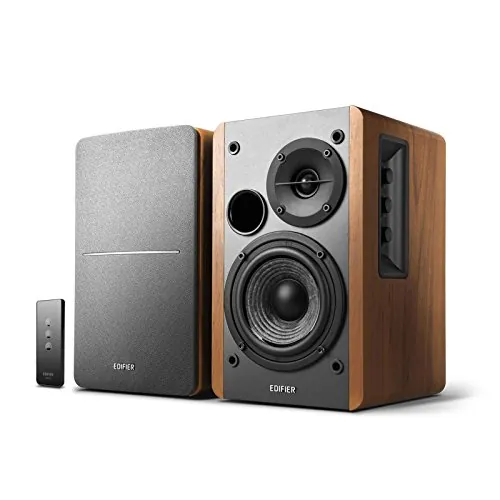
For this exact pair, Logitech S150 uses one USB-A computer connection for audio and power, with volume and mute buttons on the right speaker. Edifier R1280T uses analog RCA audio and a separate AC power connection; its manual lists included audio and speaker cables, a remote, and physical volume/bass/treble controls. The two RCA inputs can accept two connected sources, but the manual says both signals play at once. Choose by your source outputs and control reach, not an untested sound-quality claim.
Read comparison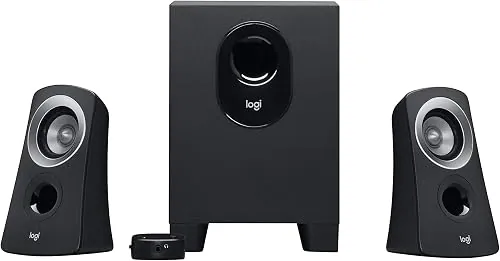
Logitech Z313 vs Z150: Which Speaker Layout Fits Your Desk?
Both models accept an analog 3.5 mm source. The Z313 uses a separate subwoofer and wired control pod; the Z150 connects at the right speaker and places its power, volume, headphone jack and auxiliary input together. Logitech's Z313 product page and setup guide describe its input cable path differently, so confirm the cable routing before arranging the subwoofer and controls.
Read comparison