
Products compared
Logitech
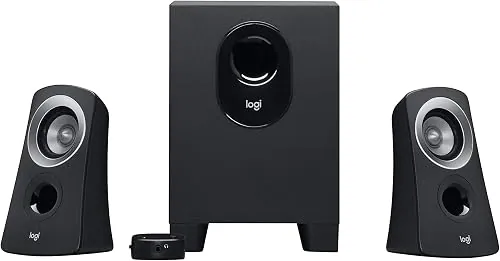
Logitech Z313 2.1 Speaker System with Subwoofer
U.S. Logitech speaker system with two satellite speakers, separate subwoofer and wired control pod. Its guide documents an analog 3.5 mm source connection and a separate electrical power cord.
Model Z313 (980-000382)
Amazon ASIN B002HWRZ2K
Logitech
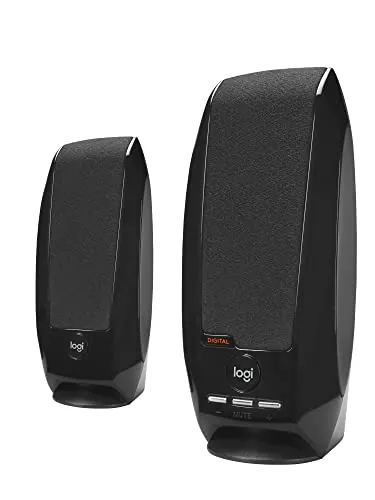
Logitech S150 USB Stereo Speakers
U.S. Logitech two-speaker USB configuration. The USB-A cable carries both audio and power from a compatible computer; the volume and mute controls are on the right speaker.
Model S150 (980-000028)
Amazon ASIN B000ZH98LU
Differences that matter
What matters most to you?
Choose a priority to see what it changes.
Sources for Source connection and power
Sources for What must fit on or around the desk
Sources for Where the everyday controls live
Sources for Cables and setup sequence
Check the audio route before comparing features
Z313 is an analog-and-outlet setup: its complete setup guide shows a 3.5 mm audio connection to the source and a separate electrical power cord. S150 uses USB-A for both audio and power from a computer. That makes the source the first filter. Look at the exact device’s output options and verify USB-audio support rather than treating any USB port as an audio input.
If the source offers both routes, move to the desk question: Z313 has two satellites, a subwoofer and a wired pod; S150 has two enclosures with its everyday volume/mute controls on the right speaker. Neither arrangement is a measured sound-quality advantage.
Draw the components and control reach on your desk
Before ordering, sketch the monitor, source device, reachable outlet and speaker positions. For Z313, add the subwoofer and leave a convenient location for the wired pod; for S150, put the right speaker where its volume and mute buttons are reachable. This is a practical placement check based on the documented component diagrams, not a claim about exact dimensions or acoustic placement.
Z313 includes a headphone jack on its pod. Logitech’s guide notes that the pod wheel does not set headphone volume, so keep the audio-source control accessible if that connection is part of your routine. The S150 sources reviewed here document volume and mute, but do not make a claim about a headphone output.
Resolve the connection-location wording before setup
The U.S. Z313 product page describes a 3.5 mm input on the back of the subwoofer, while Logitech’s complete setup guide diagrams the connector from the control pod. Because those official descriptions do not align, this comparison avoids telling you where the cable jack must be; use the included guide and the hardware in your exact box for the wiring path.
No matched listening test is included here. Choose based on documented source support, power access, number and placement of components, and control reach. Look for appropriately matched listening tests if bass, clarity or loudness is the deciding factor.
Product details
Logitech Z313 2.1 Speaker System with Subwoofer
Z313 separates analog audio, wall power and speaker placement. Plan a location for the subwoofer and a reachable position for its wired pod; the manufacturer guide says the pod’s wheel does not set headphone volume.
- Audio and power
- 3.5 mm audio connection from the source and a separate power cord to an electrical outlet. Source
- Components and controls
- Two satellite speakers, subwoofer and wired control pod; pod has power, speaker-volume wheel and headphone jack. Source
- Source connection wording
- Logitech’s U.S. page describes the input as a 3.5 mm input on the back of the subwoofer; the complete setup guide diagrams a connection from the pod. Follow the included guide for the actual cable path. Source
Logitech S150 USB Stereo Speakers
S150 simplifies the cabling when the source is a compatible computer with USB audio: the one USB-A connection supplies audio and power. Its physical controls are grouped on the right speaker.
Before you buy
Community discussions
Z313 buyer asks about PC audio recognition
Logitech Z313 2.1 Speaker System with Subwoofer
A Z313 buyer asked why the speakers were not recognized by a PC they had previously used with headphones and wondered whether dedicated drivers were needed.
What to check
Before choosing, compare your computer's available audio connection with each speaker's listed input, especially if you expect USB-style device recognition. This post captures the buyer's question; it does not establish a compatibility problem.
A Z313 buyer’s first setup with a separate subwoofer
Logitech Z313 2.1 Speaker System with Subwoofer
A new Z313 owner accustomed to a pair of desk speakers asked how to connect the extra speakers and subwoofer in their setup.
What to check
Count the separate pieces and connectors you need to route around the desk for each set.
Common questions
Will the S150 work with any USB port?
Do not assume so. Logitech describes the connection as USB audio and power from a computer. Verify that your exact source supports USB audio; the presence of a USB-A port alone is not proof.Logitech S150 USB Stereo Speakers (U.S.)Logitech S150 Complete Setup Guide
What extra space and connections does the Z313 need?
Its guide shows two satellite speakers, a separate subwoofer and a wired control pod. It uses 3.5 mm source audio and a separate electrical power cord, so check both the outlet and a place for each component.Logitech Z313 Complete Setup Guide
Does the Z313 pod wheel adjust headphone volume?
No. The setup guide says to adjust headphone volume at the audio source; the pod’s volume control does not control headphone volume.Logitech Z313 Complete Setup Guide
What if my computer has both USB audio and a 3.5 mm output?
Then choose by layout and control placement. S150 keeps the setup to two speaker enclosures and puts volume/mute on the right speaker. Z313 adds a subwoofer and a separately placeable wired pod. This comparison does not establish which sounds better.Logitech Z313 Complete Setup GuideLogitech S150 Complete Setup Guide
Sources and scope
The exact Z313 source-cable location differs between its U.S. product page and complete setup guide, so follow the included guide. S150 compatibility depends on USB-audio support on the exact source. No listening comparison, headphone-output inference for S150, sound-quality ranking or reliability claim is made.
Related comparisons
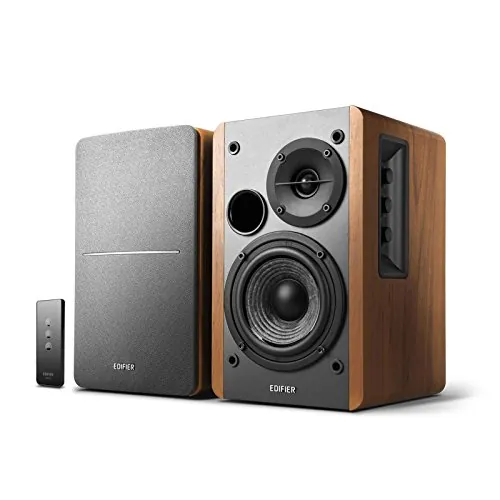
Logitech S150 vs Edifier R1280T: Connection, Cables and Remote Controls
For this exact pair, Logitech S150 uses one USB-A computer connection for audio and power, with volume and mute buttons on the right speaker. Edifier R1280T uses analog RCA audio and a separate AC power connection; its manual lists included audio and speaker cables, a remote, and physical volume/bass/treble controls. The two RCA inputs can accept two connected sources, but the manual says both signals play at once. Choose by your source outputs and control reach, not an untested sound-quality claim.
Read comparison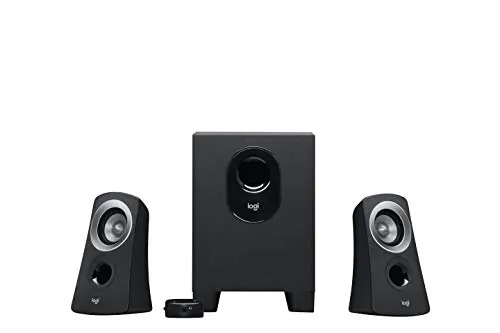
Logitech Z313 vs Z207: Subwoofer Setup or Bluetooth Switching?
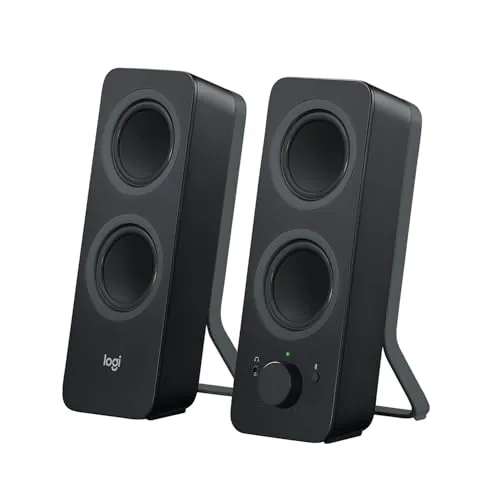
The Logitech Z313 is a 2.1 speaker system built around two satellites, a separate subwoofer and a wired control pod. The Z207 is a 2.0 stereo pair whose maker documents switching between up to two Bluetooth devices alongside a 3.5 mm input. Decide by desk layout, source switching and where you want the controls.
Read comparison