
Products compared
Logitech
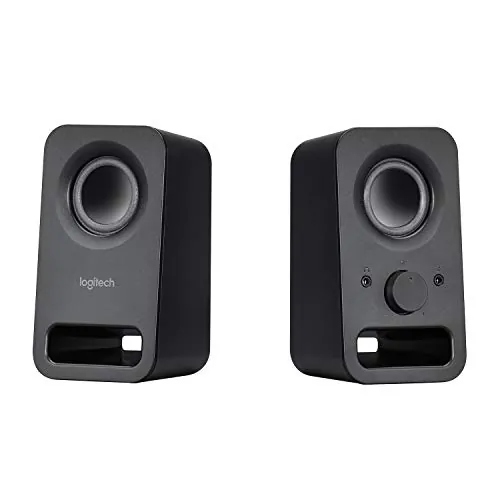
Logitech Multimedia Speakers Z150, Black
Black U.S. Z150 two-speaker set; product number 980-000802.
Model 980-000802
Amazon ASIN B00EZ9XLEY
Marshall
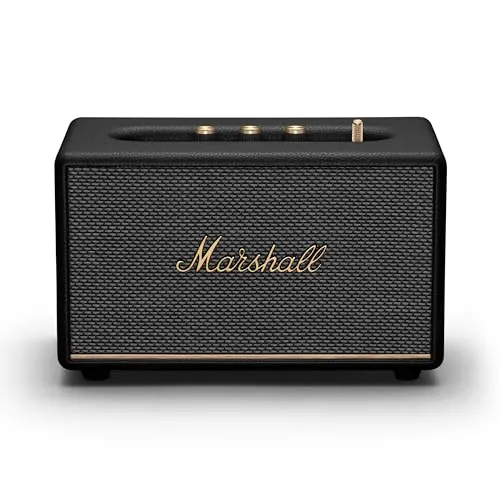
Marshall Acton III Bluetooth Home Speaker, Black
Black U.S. Acton III home speaker; Marshall product ID 1006008.
Model Acton III (1006008)
Amazon ASIN B0BC27MM5Z
Differences that matter
What matters most to you?
Choose a priority to see what it changes.
Sources for Source connection
Sources for Desk footprint, cabling, and power
Start with the source you already own
The Z150 is the straightforward analog route: Logitech lists analog stereo 3.5 mm as its audio input. Acton III accepts a 3.5 mm source too, and also documents Bluetooth 5.2; its manual says to use the source control to choose Bluetooth or AUX. If your usual playback device is a phone and you want wireless playback, Acton III is the documented fit. If your computer has only a digital or USB output, confirm how you will produce a compatible audio signal before selecting Z150.
For Acton III's wired route, plan to supply the 3.5 mm audio cable yourself: Marshall says audio leads are not included. Its manual also documents two paired Bluetooth devices, but a second connected device cannot start playback while the first is playing; pause the active device before switching playback.
Private listening is a separate buying decision
Logitech lists a headphone output and places it on the front of the right Z150 speaker, alongside its power and volume controls. That makes Z150 the clear documentation-backed choice when you want to leave the computer connected to the speaker pair and move wired headphones to the speaker itself.
Acton III's AUX label can be confusing in a comparison: Marshall's manual calls the 3.5 mm port an input and connects it to an audio source's output. The listed controls are volume, bass, treble, source, and Bluetooth media controls. The product page and manual do not list a headphone output, so plan to connect headphones at the playback device or confirm a separate route. Acton III's speaker-side tone controls are useful only if you will use them; they do not replace that headphone jack.
Measure the placement and cable route
Z150 is a linked pair, not one cabinet: Logitech lists a 1.2 m speaker-to-speaker cable. Keep the right speaker reachable if you plan to use its volume control or headphone socket. Logitech also lists a 1.8 m 3.5 mm audio lead and a 1.8 m adapter cable, so check those reaches against your source and outlet positions.
Acton III is one 260 × 170 × 150 mm cabinet, and Marshall lists a mains lead in the box without giving its length on the product page. Compare the actual usable shelf or desk area to that cabinet size, then check the outlet route. These are listed product dimensions, not a guide to ventilation or operating clearance.
Product details
Logitech Multimedia Speakers Z150, Black
- Documented audio input
- Analog stereo 3.5 mm Source
- Headphone listening
- Headphone output on the front of the right speaker; power and volume are also on that speaker Source
- Listed cable and placement details
- Two speakers linked by a 1.2 m speaker cable; listed 3.5 mm audio lead 1.8 m Source
- Power setup
- External AC adapter included; listed power cable length 1.8 m Source
Marshall Acton III Bluetooth Home Speaker, Black
- Documented audio inputs
- Bluetooth 5.2 or 3.5 mm AUX input; the source button selects Bluetooth or AUX Source
- Speaker controls
- Top-panel volume, bass, treble, source, and Bluetooth media controls Source
- Listed unit dimensions
- 260 mm W × 170 mm H × 150 mm D Source
- Power and included lead
- Wall-powered; the U.S. product page lists a mains lead in the box Source
Before you buy
Community discussions
A buyer weighs a replacement speaker's headphone connection
Logitech Multimedia Speakers Z150, Black
A U.S. buyer looking to replace Logitech S-120 lists the Z150 as an alternative but hesitates because of secondhand complaints about its headphone output. The post does not report a Z150 test or establish that concern as a result.
What to check
If you plan to use headphones from the speaker, check the exact model documentation and test with your intended headphones where possible; this buyer's post raises a question but does not answer it.
Sharing one speaker between a phone and a turntable
Marshall Acton III Bluetooth Home Speaker, Black
A studio-apartment shopper considered the Marshall Acton III for Bluetooth from a phone and an occasional wired connection to a turntable, TV or laptop.
What to check
List the output from each device you would connect. Decide whether home listening or a headphone jack at your desk matters more.
Common questions
Does the Marshall Acton III AUX jack let me plug headphones into the speaker?
No headphone output is listed in Marshall's product connectivity or manual layout. The manual identifies the 3.5 mm socket as an input for a source device. Route headphones through the phone or computer, or verify a separate listening method before buying.Marshall Acton III Black, U.S. product 1006008Marshall Acton III Full Online Manual, English
Can I use Z150 if my device has no 3.5 mm audio output?
The Z150 specification lists analog stereo 3.5 mm as its audio input. If your device exposes only another output, verify a compatible audio adapter or choose a speaker with a source connection your device supports.Logitech Multimedia Speakers Z150 Technical Specifications
Can Acton III play over Bluetooth without being plugged into power?
Marshall lists a mains lead in the box and the speaker's power input on its manual layout. Bluetooth describes the audio connection; the listed setup still uses a wall outlet.Marshall Acton III Black, U.S. product 1006008Marshall Acton III Full Online Manual, English
Sources and scope
This is a documentation-based feature and fit comparison, not a listening test. It does not rank sound quality, loudness, latency, reliability, or headphone volume behavior. Marshall's manual identifies Acton III's AUX connection as an input and does not list a headphone output; no negative claim about an undocumented feature beyond that source scope is made. Z150 is covered as Black model 980-000802 and Acton III as Black product 1006008. Check the exact listing, source-device outputs, cable path, and outlet before purchase.
Related comparisons
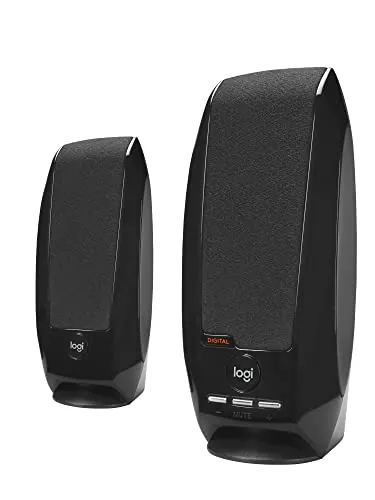
Logitech S150 vs Z150: USB Computer Audio or Analog Desk Speakers?
The black U.S. S150 (980-000028) uses one USB-A connection to a computer for both audio and power, with volume and mute buttons on the right speaker. The black Z150 (980-000802) uses an AC adapter plus analog 3.5mm audio; its right speaker has a power/volume knob, front auxiliary input and headphone jack. Choose by the ports and controls you will use. Logitech does not document how the Z150's two audio inputs behave when connected at once, nor does this comparison establish a sound-quality winner.
Read comparison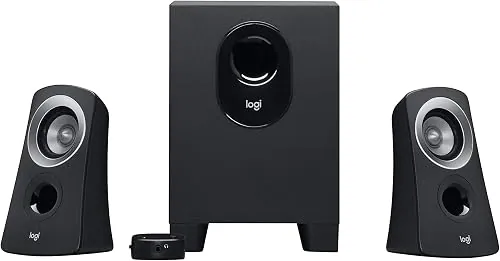
Logitech Z313 vs Z150: Which Speaker Layout Fits Your Desk?
Both models accept an analog 3.5 mm source. The Z313 uses a separate subwoofer and wired control pod; the Z150 connects at the right speaker and places its power, volume, headphone jack and auxiliary input together. Logitech's Z313 product page and setup guide describe its input cable path differently, so confirm the cable routing before arranging the subwoofer and controls.
Read comparison