
Products compared
Apple
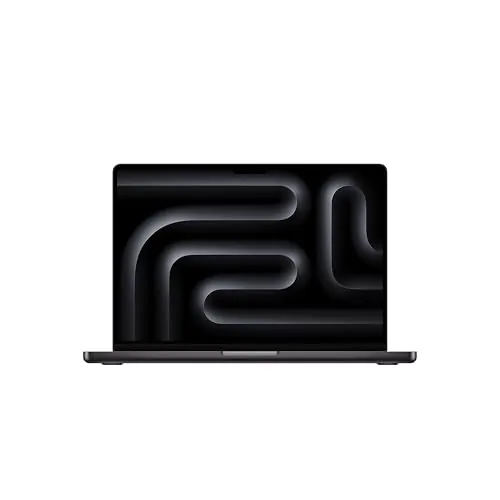
14-inch MacBook Pro with M5
U.S. Space Black configuration; 16GB unified memory and 1TB SSD; base M5 chip, not M5 Pro or M5 Max.
Model MDE14LL/A
Amazon ASIN B0FWD623D1
Apple
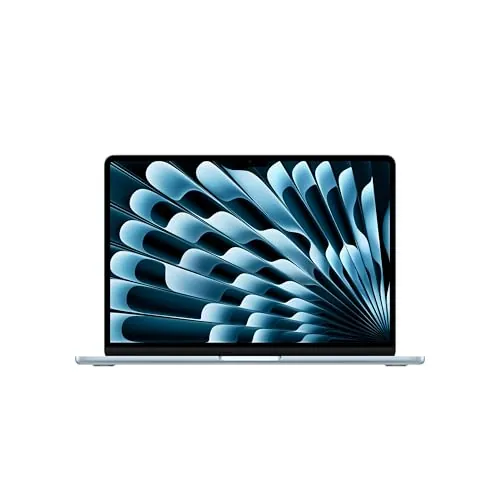
13-inch MacBook Air with M5
U.S. Sky Blue configuration; 16GB unified memory and 512GB SSD; base M5 chip.
Model MDHH4LL/A
Amazon ASIN B0GR1493ZV
Differences that matter
What matters most to you?
Choose a priority to see what it changes.
Sources for Built-in display size and features
Sources for Desk connections and card workflow
Sources for External display ceiling
Sources for Listed weight and internal storage
Start with the connections on your desk
For an SD-card import or an HDMI-only monitor/projector, the 14-inch Pro’s spec names the connections directly: an SDXC slot and HDMI alongside three Thunderbolt 4 ports. The Air lists two Thunderbolt 4 USB-C ports instead, plus MagSafe 3 and a headphone jack. That makes the Air a natural fit when your desk is already USB-C based; if not, price and pack the adapter, dock, or reader you need separately.
Charging through MagSafe is listed on both. That can keep the Air’s two USB-C ports available for desk devices during charging; the Pro offers three Thunderbolt ports and the separate HDMI and SDXC connections. Count your actual peripherals, not just ports on a spec sheet.
Two external displays do not decide this pair
Apple lists up to two external displays for both configurations, with supported two-display modes up to 6K at 60Hz or 4K at 144Hz while the built-in screen remains active. The Pro supports the two displays across Thunderbolt and HDMI; Apple also lists two displays over a single Thunderbolt port for each model. Check Apple’s full resolution and refresh-rate conditions and your dock’s output support before buying. A two-monitor desk alone is not a reason to rule out the Air.
Choose the screen and carry profile you will use
The Pro has a 14.2-inch XDR display with 3024 × 1964 resolution and ProMotion up to 120Hz; Apple specifies sustained full-screen and peak brightness figures under named conditions. The Air has a 13.6-inch Liquid Retina display at 2560 × 1664 and a listed 500-nit brightness. If XDR/HDR brightness or adaptive refresh is a concrete part of your work, the Pro’s published feature set is the relevant distinction. Otherwise, consider whether its larger screen is worth a larger body in your bag.
Apple lists the Pro at 1.55 kg and the Air at 1.23 kg; their configurations in this comparison have 1TB and 512GB of storage, respectively. The Air saves 0.32 kg, while the Pro doubles the listed internal capacity. Decide which tradeoff fits your regular route and files. These figures describe weight and configuration, not workload performance.
Verify the chip family and selected configuration
Both products in this comparison use the base M5 family. The selected Pro is MDE14LL/A, Space Black, 16GB/1TB; the selected Air is MDHH4LL/A, Sky Blue, 16GB/512GB. Apple’s part-number listing distinguishes these exact configurations, and Apple’s model-identification page separates the 14-inch M5 Pro/Max generation into other part-number families. Do not carry over M5 Pro or M5 Max port or monitor specifications to this base-M5 comparison.
No matched, controlled long-render, thermal, fan-noise, or real-use battery test for these exact product configurations was used. Apple’s battery figures are published estimates tied to specified testing conditions. If any measured advantage in those areas is decisive, find a test of the exact configurations and workload before using it to choose.
Product details
14-inch MacBook Pro with M5
- Exact configuration
- M5 with 10-core CPU and 10-core GPU; 16GB unified memory; 1TB SSD; Space Black Source
- Built-in display
- 14.2-inch Liquid Retina XDR, 3024 × 1964; ProMotion up to 120Hz Source
- Ports
- Three Thunderbolt 4 (USB-C), HDMI, SDXC, MagSafe 3, and 3.5 mm headphone jack Source
- External displays
- Up to two; Apple lists two displays up to 6K at 60Hz or 4K at 144Hz, plus the built-in display Source
- Listed weight and storage
- 1.55 kg; 1TB SSD Source
13-inch MacBook Air with M5
- Exact configuration
- M5 with 10-core CPU and 8-core GPU; 16GB unified memory; 512GB SSD; Sky Blue Source
- Built-in display
- 13.6-inch Liquid Retina, 2560 × 1664, 500 nits Source
- Ports
- Two Thunderbolt 4 (USB-C), MagSafe 3, and 3.5 mm headphone jack Source
- External displays
- Up to two; Apple lists two displays up to 6K at 60Hz or 4K at 144Hz, plus the built-in display Source
- Listed weight and storage
- 1.23 kg; 512GB SSD Source
Before you buy
Community discussions
Would the smaller screen work for your usual projects?
13-inch MacBook Air with M5
A 13-inch M5 MacBook Air owner reconsidered the screen size after seeing the two Air sizes side by side. They tried schoolwork and projects on the 13-inch and found it workable for them so far.
What to check
Try a document and the number of windows you normally have open on both screen sizes before choosing.
Common questions
Does the 13-inch Air support two external monitors?
Yes. Apple lists up to two external displays for the 13-inch M5 Air and says the built-in display can remain active. Two displays are also listed for the 14-inch base-M5 Pro. Check the resolution and refresh combination for your specific monitors.MacBook Pro (14-inch, M5) — Tech SpecsMacBook Air (13-inch, M5) — Tech Specs
What does the Pro add for an HDMI or camera-card workflow?
Its specification lists an HDMI port and an SDXC card slot. The Air specification lists two Thunderbolt 4 USB-C ports, MagSafe 3, and a headphone jack, but not built-in HDMI or SDXC; plan on the specific adapter, dock, or reader your equipment requires.MacBook Pro (14-inch, M5) — Tech SpecsMacBook Air (13-inch, M5) — Tech Specs
Is this a comparison between base M5 and M5 Pro?
No. MDE14LL/A is the 14-inch MacBook Pro with the base M5 chip; MDHH4LL/A is the 13-inch MacBook Air with M5. Apple lists the M5 Pro/Max 14-inch generation separately, with different part-number families, so its specifications do not apply here.Identify your MacBook Pro modelApple U.S. Education Institution Price List, April 1, 2026 (part-number descriptions only)
Is the Pro faster for a long render or does it last longer on battery?
This guide did not review controlled long-workload tests for these exact configurations. Apple’s battery estimates use specified test configurations and conditions; they are not a promise of your runtime. Do not choose on a sustained-performance or real-world battery winner from these model names alone.MacBook Pro (14-inch, M5) — Tech SpecsMacBook Air (13-inch, M5) — Tech Specs
Sources and scope
Apple’s specifications describe model-family limits. The exact U.S. part numbers identify the configurations compared: MDE14LL/A is the 16GB/1TB Space Black MacBook Pro, and MDHH4LL/A is the 16GB/512GB Sky Blue MacBook Air. This guide does not include controlled tests of these configurations for sustained speed, heat, fan noise or real-world battery life. Check your monitor and dock’s supported resolution, refresh rate and connection requirements before buying.
Related comparisons
MacBook Neo A18 Pro vs MacBook Air M5: Ports, Displays and Storage
These exact selections are the Indigo MacBook Neo (MHFF4LL/A, 8GB/256GB) and Sky Blue 13-inch MacBook Air M5 (MDHH4LL/A, 16GB/512GB). Apple's specifications make the desk decision concrete: Neo supports one external display up to 4K/60Hz from its USB 3 port, while Air M5 supports up to two external displays and has two Thunderbolt 4 ports plus MagSafe 3. Check your monitor's input, the cables or adapter you already own, and whether each selected memory/storage configuration fits your files and apps. The specs do not establish a performance winner for your workload.
Read comparison
MacBook Air M5 13-inch vs 15-inch: Choose by Screen and Carry Size
Both assigned U.S. configurations are 2026 MacBook Air M5 models with 16GB memory and 512GB storage, two Thunderbolt 4 ports, MagSafe 3, a headphone jack, and support for up to two external displays. The 13-inch MDHH4LL/A is 2.7 lb with an 11.97 × 8.46-inch body and an 8-core GPU; the 15-inch MDVD4LL/A is 3.3 lb with a 13.40 × 9.35-inch body and a 10-core GPU. Measure your bag and desk before choosing, and treat Apple's battery figures as stated test-condition ratings rather than a promise for your use.
Read comparison