
Products compared
NexiGo
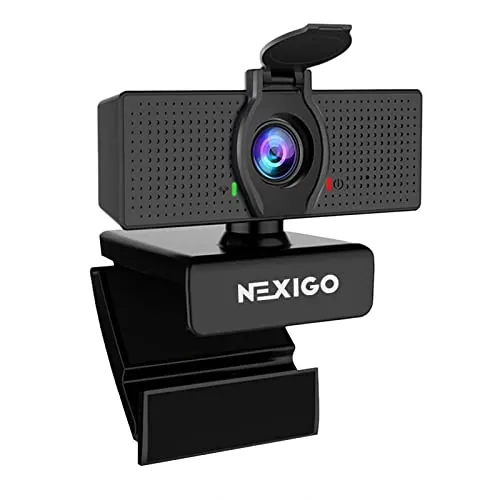
NexiGo N60 1080p Webcam
Black N60 webcam; confirm that the exact seller listing is still the N60 and includes the privacy cover.
Model N60
Amazon ASIN B088TSR6YJ
Anker
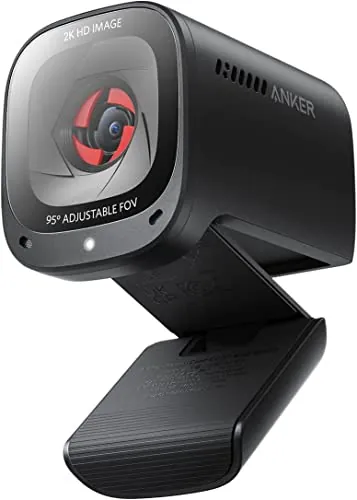
Anker PowerConf C200 2K Webcam
Black C200, manufacturer part A3369011. The cited model documentation is regional; check US seller warranty and package details on the exact listing.
Model A3369 / A3369011
Amazon ASIN B09MFMTMPD
Differences that matter
What matters most to you?
Choose a priority to see what it changes.
Sources for Focus when subject distance changes
Sources for Framing and capture settings
Sources for Privacy control and mute workflow
Sources for Host port and mounting
Start with where you sit and what the app must capture
For a caller who stays in one chair, N60's fixed-focus design and 1080p30 ceiling may cover the stated need once a preview confirms the framing and focus at the normal seat. The maker advises a suitable, consistent subject distance. Do not infer that fixed focus means no digital crop: NexiGo's pages disagree on zoom support.
C200 is the supported choice when changing subject distance makes autofocus useful, or the workflow specifically needs a webcam mode above 1080p. Its 2K30 mode does not prove a video-call app will send 2K, and no comparative image-quality test was conducted.
Check framing controls and software access before buying
C200 exposes three documented framing choices—65°, 78°, and 95°—through AnkerWork. NexiGo's N60 page says its software has 2× digital zoom, but another current N60 technical page says zoom is unavailable. If software crop is a deciding feature, verify the installed software on the exact N60 and host instead of assuming either statement applies to every setup.
The angle values should not be treated as a direct wider-versus-narrower contest: NexiGo's support text labels its 110° as diagonal, while Anker's manual does not state the same measurement axis for its preset values.
Plan the physical connection and privacy routine
C200's manual describes the supplied cable as USB-C at the webcam and USB-A at the computer, so check the host port and adapter before checkout. Its clip folds over a monitor or laptop edge and tilts; the 1/4-inch thread accepts a separate tripod. NexiGo describes the N60 as USB 2.0/3.0 compatible, with a mounting clip and 1/4-inch tripod compatibility, but the tripod is not included.
C200 has a built-in sliding cover and the manual says the camera turns off when covered. N60's separately attached cover blocks the lens; NexiGo recommends app-level mute when audio should also stop. Neither page establishes that closing the privacy cover mutes the microphone.
Product details
NexiGo N60 1080p Webcam
N60 is the simpler fit when you expect to sit at a consistent distance and 1080p30 meets the capture requirement. Its support page says the separate privacy cover blocks the lens; use the meeting app's mute control when microphone audio also needs to stop.
- Documented maximum video mode
- 1920 × 1080 at 30 fps Source
- Focus type
- Fixed focus; check the normal seated position in the webcam preview before a call. Source
- Privacy cover
- A separate cover attachment is listed as included; close it between sessions to block the lens. Source
- Host connection and mounting
- NexiGo lists USB 2.0/3.0 support, a monitor/laptop mounting clip, and 1/4-inch tripod compatibility; tripod not included. Source
Anker PowerConf C200 2K Webcam
C200 is the feature-fit choice when automatic focus, 2K30 capture, or a software-selected framing preset solves a real setup need. Anker lists Windows 7–11 and macOS 10.11+ for the camera, while its product page says AnkerWork on Mac requires macOS 10.14+; verify the software requirement for your computer before relying on the framing controls.
- Documented maximum video mode
- 2K at 30 fps; 1080p30 is also listed. Source
- Focus and framing controls
- Automatic focus; AnkerWork provides 65°, 78°, and 95° field-of-view settings. Source
- Privacy cover
- Built-in sliding cover; the manual says the camera turns off when the cover blocks it. Source
- Host connection and mount
- The included cable runs from the camera's USB-C port to a computer USB-A port. The clip tilts on a monitor/laptop; a 1/4-inch tripod thread is provided, but the tripod is not. Source
Before you buy
Community discussions
Framing a whole tabletop with a webcam
Anker PowerConf C200 2K Webcam
A buyer wanted their entire playmat in view. An Anker PowerConf C200 owner reported that their monitor clip could not point straight down, so they used a separate camera arm.
What to check
For overhead use, check the mounting angle and the width visible from your planned height before ordering. Compare that with how you would position the webcam for ordinary calls.
Common questions
Does the Anker C200's 2K specification guarantee a 2K video call?
No. The manual documents a 2K30 webcam capture mode. The calling app, selected device mode, and host workflow still determine what is used; this is not a transmission-quality result.Anker PowerConf C200 A3369 user manual
Can I use the C200's framing settings without AnkerWork?
Anker documents the 65°/78°/95° choices through AnkerWork. If those settings are important, check that the software is supported and allowed on your computer before buying.Anker PowerConf C200 A3369011 product information
Does the N60 have software zoom?
NexiGo's current N60 product page lists 2× software digital zoom, while its technical-information page says zoom in/out is unavailable. Treat this feature as unresolved and confirm the exact N60 settings before relying on crop control.NexiGo N60 1080p WebcamN60 Technical Information
Do either of these physical privacy covers mute the microphone?
The C200 manual says its shutter turns off the camera. NexiGo's N60 support guidance separately recommends using the calling app's mute control when microphone audio must stop. Use your meeting app's audio controls rather than assuming a lens cover is a mic mute.N60 supportAnker PowerConf C200 A3369 user manual
Sources and scope
This is a manufacturer-document comparison, not a picture, microphone, autofocus-speed, or reliability test. NexiGo's N60 pages conflict about digital zoom, and the published field-of-view figures are not labeled on a directly comparable basis. Anker's exact black A3369011 documentation is from its Japan storefront and multilingual manual; it establishes model features, not US warranty or the current contents of every US seller package.
Related comparisons

Elgato Facecam 4K vs Anker PowerConf C200: Capture Modes, Focus Distance and Mic Setup
Facecam 4K supports 2160p60 only over USB 3 and only in MJPG; its USB 2 modes stop at 1080p60. PowerConf C200 (A3369) tops out at 2K30 in its manual, offers autofocus and three framing angles, and includes dual microphones. Measure your camera distance and check the app’s actual input options before choosing.
Read comparison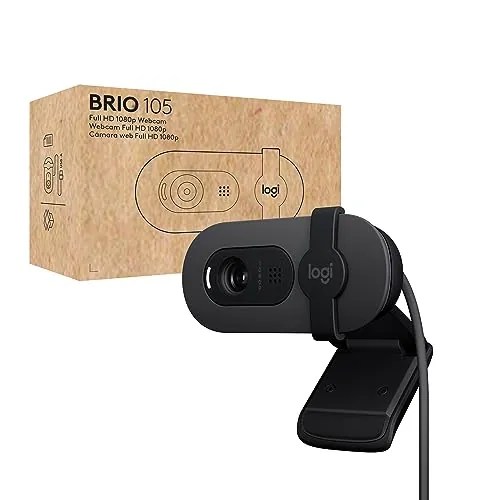
Logitech Brio 105 vs Anker PowerConf C200: Fixed View or Adjustable Framing?
The Logitech Brio 105 (North American Graphite part 960-001579) lists fixed focus, up to 1080p/30, and a 1.5 m attached USB-A cable. Anker's PowerConf C200 (A3369) adds autofocus, selectable 65°, 78° or 95° framing through AnkerWork, and a detachable USB-C camera connection; its supplied cable runs from USB-C at the camera to USB-A at the computer. Before buying, check your real seated camera distance, computer ports and permission to install configuration software. A webcam's listed maximum is not a promise that a meeting app will transmit that mode.
Read comparison